Role And Authorization

Last updated: 2023-09-28 10:43:47

Concepts

Roles

A Role is a virtual identity provided by Tencent Cloud's Cloud Access Management (CAM) that possesses a set of permissions. Roles can also be granted policies, primarily used to authorize Role Carriers with access to services, operations, and resources in Tencent Cloud. Once these permissions are attached to a role, the role can be assigned to Tencent Cloud services, allowing the services to perform operations on authorized resources on behalf of the user. The roles of Tencent Cloud Function SCF are divided into Configuration Roles and Execution Roles. You can use the Configuration Role to allow SCF to access user resources during the service configuration process. Alternatively, you can use the Execution Role to request temporary authorization for running code, facilitating code to achieve permission penetration and resource access through the role's authorization mechanism.

Policies

A Policy is a syntax rule that defines and describes one or more permissions. CAM supports two types of policies: preset policies and custom policies. Preset policies are a collection of common permissions created and managed by Tencent Cloud, such as super administrators, cloud resource administrators, etc., and these policies are read-only. Custom policies are a more detailed collection of permissions for resource management created by users. Preset policies cannot specifically describe a resource and are relatively coarse-grained, while custom policies can flexibly meet the differentiated permission management needs of users.

Permissions

Permissions describe the conditions under which certain operations are allowed or denied access to certain resources. By default, the root account is the owner of the resources and has full access to all resources under its name. A sub-account does not have access to any resources. The creator of a resource does not automatically have access to the resources they create; authorization is required from the resource owner.

Overview

When creating an SCF function, you may manipulate certain Tencent Cloud services other than SCF. Different operations may require different permissions, such as COS permissions to create and delete COS triggers, API Gateway permissions to create and delete API Gateway triggers, and COS permissions to read zipped code packages, which can be granted by configuring and selecting roles.

Configuration Roles

A configuration role is used to grant the SCF configuration the permissions to connect with other Tencent Cloud resources to access such resources within the scope of the permissions in the associated policies, including but not limited to code file access and trigger configuration. The preset policy of the configuration role supports the basic operations of function execution and covers the basic permissions required in common SCF scenarios.

Role details

The default configuration role of SCF is SCF_QcsRole, as detailed below:
Role name: SCF_QcsRole
Role entity: service-scf.qcloud.com
Role description: SCF default configuration role. This service role is used to grant the SCF configuration the permissions to connect with other resources in the cloud, including but not limited to code file access and trigger configuration. The preset policy of the configuration role can support the basic operations of function execution.
Associated policies: this role is associated with the QcloudAccessForScfRole policy, which can:
Write trigger configuration information to the bucket configuration when a COS trigger is configured.
Read the trigger configuration information from the COS bucket.
Read the code zip package from the bucket when the code is updated through COS.
Create API Gateway services and APIs and publish services when an API Gateway trigger is configured.
Perform operations such as configuring and using CLS read/write access.
Perform operations such as configuring and using CMQ read/write access.
Perform operations such as configuring and using CKafka read/write access.
Note
Users can view and modify the policies associated with the current configuration role SCF_QcsRole in the CAM Console. However, modifying the role's associated policies may cause issues such as SCF not functioning properly, so it is not recommended.

Service Authorization

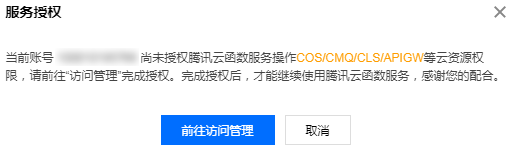
1. If you are using SCF for the first time, you will be prompted to authorize the service when you open the Serverless Console, as shown below:


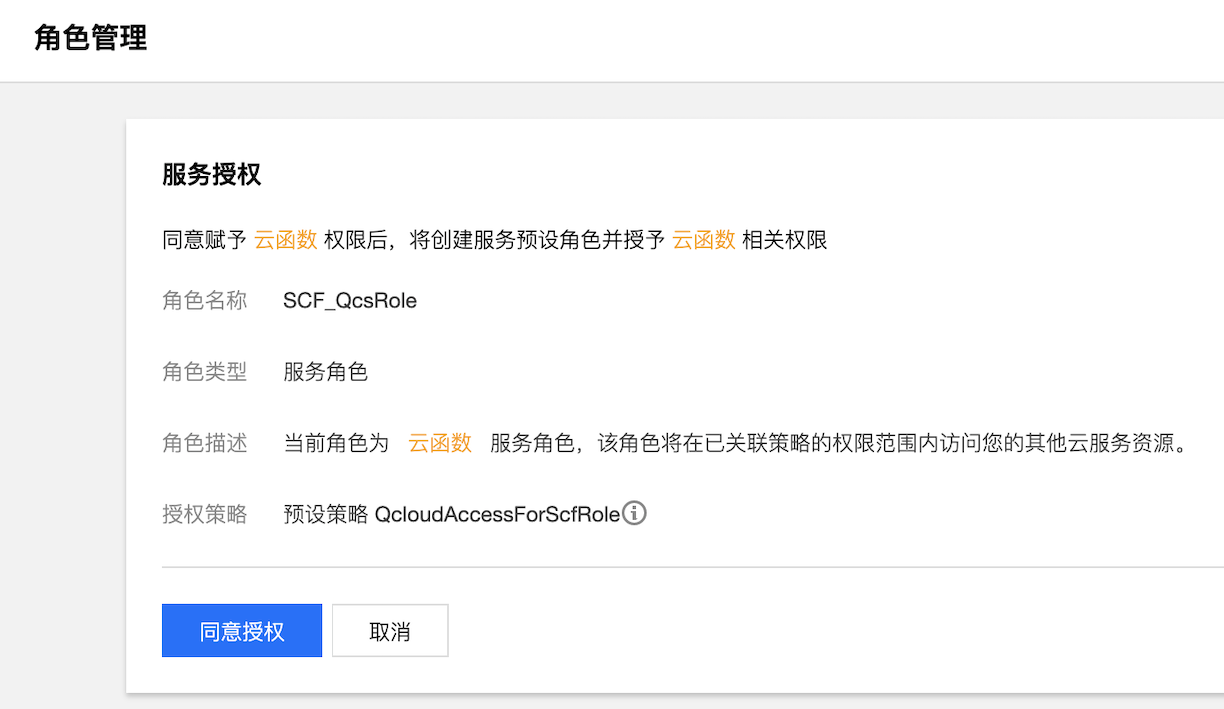
2. Select go to access management to enter the "Role Management" page, and click Grant to confirm the authorization, as shown below:


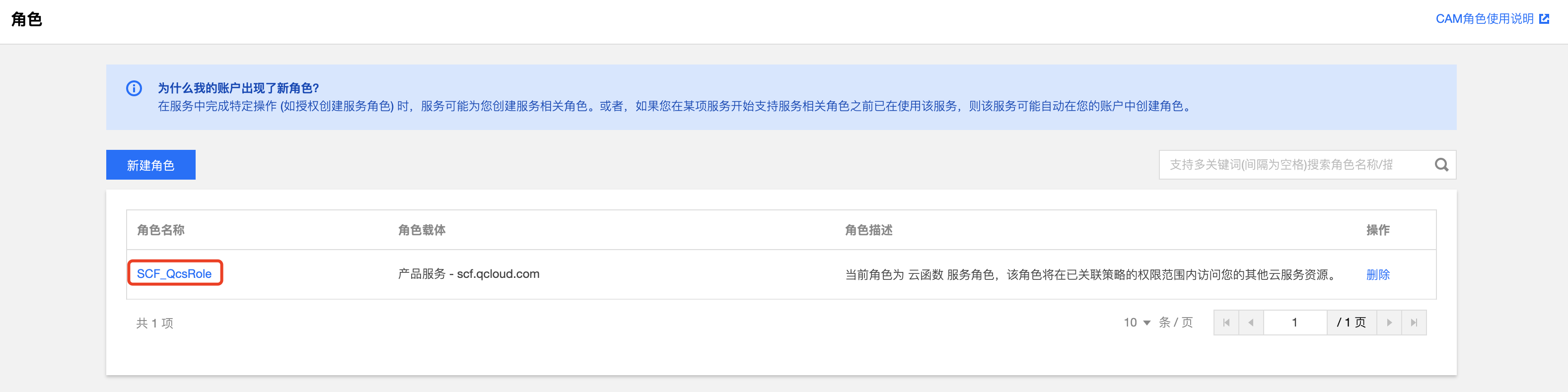
3. Upon confirmation of authorization, the role SCF_QcsRole will be automatically created for you. You can view it under Roles, as shown below:


Execution Roles

The execution role serves the user's code, with the role entity being product service-scf.qcloud.com. After users add the corresponding execution role to the function, SCF applies for temporary authorization for the user's running code within the permission scope of the associated policy of the execution role, facilitating the code to achieve permission penetration and access to other cloud resources through the role's authorization mechanism. Taking SCF_QcsRole as an example, users can also choose SCF_QcsRole as the function's execution role, which means granting the permissions corresponding to the associated policy of SCF_QcsRole to SCF, enabling SCF to obtain the right to apply for access to other cloud resources for the user's code.

Creating execution roles

1. Log in to the Serverless Console and click on Function Service in the left navigation bar.
2. On the Function Service list page, click on the name of the function for which you need to create an execution role, and you will be directed to the function configuration page.
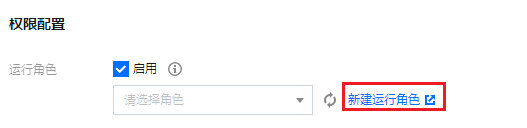
3. Select Edit at the top right corner of the function configuration page, check Enable under "Execution Role", and click on Create execution role, as shown in the figure below:


4. In the "Enter Role Entity Info" step, select Cloud Function (scf) and click Next.
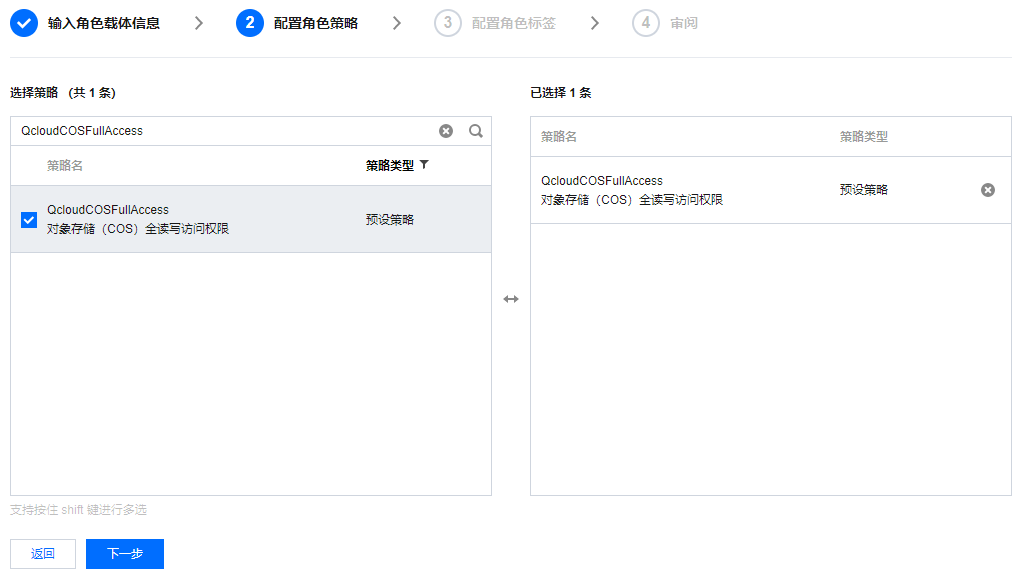
5. In the "Configure Role Policy" step, select the policy required for the function and click Next, as shown in the figure below:
Note
This document uses the selection of QcloudCOSFullAccess (full access permissions of COS) as an example. Please select the policies as needed.


6. After configuring the role tags as needed, fill in the role name in the "Review" step and click Complete. This document uses scf_cos_full_access as an example for the role name.
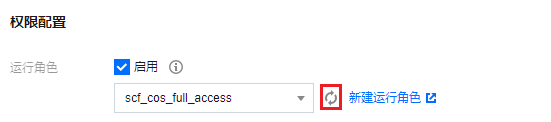
7. Return to the function configuration page and click on the

to the right of "Execution Role". You can then select the execution role you just created from the dropdown list, as shown in the figure below:


Note
When adding policies to an execution role, in addition to preset policies, you can also select custom policies to configure permissions in a more refined manner. SCF's policy syntax follows CAM's syntax structure and resource description method, which is based on the JSON format. For more information, please see SCF Policy Syntax.

Getting the temporary key information of an execution role

When a function is running, the SCF service will use the selected execution role to apply for the temporary SecretId, SecretKey, and SesstionToken.
For functions not created from an image: The relevant content will be passed into the runtime environment in the form of environment variables, as shown in the figure below:

Taking Python as an example, you can pass the above information into the function runtime environment and obtain it as an environment variable using the following code.
secret_id = os.environ.get('TENCENTCLOUD_SECRETID')
secret_key = os.environ.get('TENCENTCLOUD_SECRETKEY')
token= os.environ.get('TENCENTCLOUD_SESSIONTOKEN')
For functions created from an image: The relevant content will be passed into the context parameter in the form of HTTP headers. For more details, please refer to Image Function Parameter Description.