This document outlines how to create a layer via the Serverless console. Upon creation, a version will be automatically generated for you.
Procedure
1. Log in to the Serverless console, and select Advanced Capabilities > Layer from the left sidebar.
2. On the Layer Management page, select the region where you want to use the layer, and click Create.
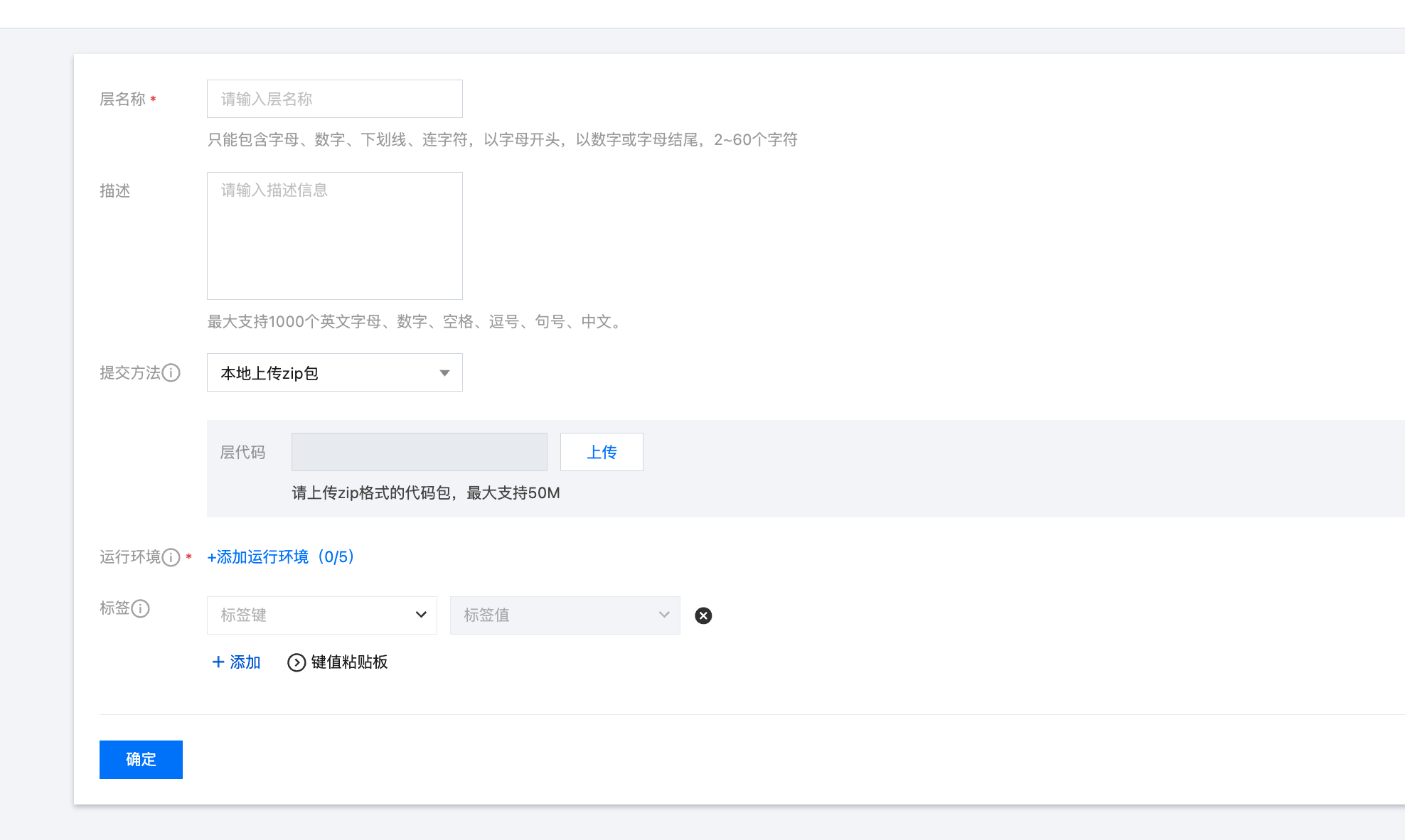
3. On the Create Layer page, configure the layer information according to your actual needs, as shown in the following figure:
Layer name: enter a custom layer name.
Description: enter descriptive information of the layer as needed.
Submission method: Local ZIP file, Local folder, and Upload a ZIP pack via COS are supported. Please select an appropriate layer file submission method based on your actual needs.
Upload Local ZIP File: Click Upload and submit a code package in zip format, with a maximum size of 50MB.
Upload Local Folder: Click Upload and select a folder, with a maximum size of 250MB. This upload method does not retain the file's executable permissions. If the folder contains executable files, please set the executable permissions locally first and then upload them via a zip package.
Upload ZIP File via COS: Select the COS bucket to use as the event source, which must be located in the same region as the function. Enter the full path of the zip code file from the root directory ("/") of the Bucket.
Runtime environment: up to 5 runtime environments compatible with this layer can be set.
4. Click OK. You can view the created layer in the layer list.