函数形态
Node.js 函数形态一般有以下两种:
示例 1:
exports.main_handler = async (event, context) => {console.log(event);console.log(context);return event};
示例 2:
exports.main_handler = (event,context,callback)=>{console.log(event);console.log(context);callback(null,"hello world");}
执行方法
在创建云函数 SCF 时,均需要指定执行方法。在使用 Node.js 开发语言时,执行方法类似
index.main_handler,此处 index 表示执行的入口文件为 index.js ,main_handler 表示执行的入口函数为 main_handler 函数。在使用本地 zip 文件上传、COS 上传等方法提交代码 zip 包时,请确认 zip 包的根目录下包含有指定的入口文件,文件内有定义指定的入口函数,文件名和函数名和执行方法处填写的能够对应,避免因为无法查找到入口文件和入口函数导致的执行失败。入参
Node.js 环境下的入参包括 event、context 和 callback,其中 callback 为可选参数。
event:使用此参数传递触发事件数据。
context:使用此参数向您的处理程序传递运行时信息。
callback(可选):
callback 是一个函数,可以在非异步处理程序中使用它来返回响应。响应对象必须与 JSON.stringify 兼容。callback 函数有 Error和响应两个参数,调用该函数时,SCF 等待函数执行完成后将响应或错误返回。返回和异常
异步处理程序
异步处理程序必须使用
async 关键字,使用 return 来返回响应,使用 throw 返回错误信息。在 SCF 中,如果您的 Node.js 函数中包含异步任务,须返回一个 promise 以确保该异步任务在当次调用执行。当您完成或拒绝该 promise 时,SCF 会返回响应或错误信息。
注意
promise 方法不支持用 callback 方法返回,请使用 return。
异步处理程序示例:
exports.main_handler = async(event,context,callback) => {const promise = new Promise((resolve,reject) => {setTimeout(function() {resolve('成功')// reject('失败')}, 2000)})return promise};
非异步处理程序
非异步处理程序,函数会一直执行,直到函数执行完成或函数超时后,SCF 将响应或错误信息返回。
注意
由于部分外部引入的库的原因,可能会导致事件循环持续不为空,从而导致函数无法返回直到超时。为了避免外部库的影响,可以通过关闭事件循环等待来自行控制函数的返回时机。通过设置
context.callbackWaitsForEmptyEventLoop 为 false,可以修改默认的回调行为,避免等待事件循环为空。
您可以在 callback 回调执行前设置 context.callbackWaitsForEmptyEventLoop = false;,使云函数后台在 callback 回调被调用后立刻冻结进程,不再等待事件循环内的事件,而在同步过程完成后立刻返回。非异步处理程序示例:
exports.main_handler = (event, context,callback) => {context.callbackWaitsForEmptyEventLoop = falsecallback(null,'success')setTimeout(() => {console.log('finish')},5000);};
异步特性支持
版本支持
函数的同步执行返回和异步事件处理分开进行的能力,版本支持情况如下:
Node.js 16.13(不支持)
Node.js 14.18(不支持)
Node.js 12.16(支持)
Node.js 10.15(支持)
Node.js 8.9(不支持、即将下线)
Node.js 6.10(不支持、即将下线)
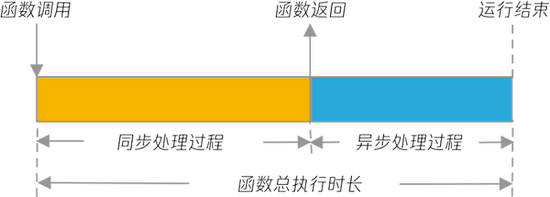
入口函数的同步执行过程完成及返回后,云函数的调用将立刻返回,并将代码的返回信息返回给函数调用方。
同步流程处理并返回后,代码中的异步逻辑可以继续执行和处理,直到异步事件执行完成后,云函数的实际执行过程才完成和退出。
注意
在这个过程中,由于云函数的日志是在整个执行过程完成后才进行收集和处理,因此在同步执行过程完成并返回时,云函数的返回信息中暂时无法提供日志、运行信息包括耗时、内存消耗等内容。具体信息可以在函数实际执行过程完成后,通过 Request Id 在日志中查询。
云函数的运行时长,将按照异步事件执行完成后进行计算。如果异步事件队列一直无法清空或执行完成,将会导致函数超时。这种情况下,调用方可能已经获得了函数的正确响应结果,但是云函数的运行状态将标注为由于超时而失败,同时运行时长按超时时间统计。
Node.js 的同步和异步运行特性、返回时间及运行时长示例如下图所示:
异步特性示例
使用如下示例代码创建函数,其中使用 setTimeout 方法设置了一个2秒后执行的函数:
'use strict';exports.main_handler = (event, context, callback) => {console.log("Hello World")console.log(event)setTimeout(timeoutfunc, 2000, 'data');callback(null, event);};function timeoutfunc(arg) {console.log(`arg => ${arg}`);}
在保存代码后,通过控制台测试或者通过云 API 的 Invoke 接口调用此函数,可以看到此函数在很短时间内即返回,响应时间小于1秒。
而查看函数的执行日志时,可以看到相关统计信息类似如下:
START RequestId: 1d71ddf8-5022-4461-84b7-e3a152403ffcEvent RequestId: 1d71ddf8-5022-4461-84b7-e3a152403ffc2020-03-18T09:16:13.440Z 1d71ddf8-5022-4461-84b7-e3a152403ffc Hello World2020-03-18T09:16:13.440Z 1d71ddf8-5022-4461-84b7-e3a152403ffc { key1: 'test value 1', key2: 'test value 2' }2020-03-18T09:16:15.443Z 1d71ddf8-5022-4461-84b7-e3a152403ffc arg => dataEND RequestId: 1d71ddf8-5022-4461-84b7-e3a152403ffcReport RequestId: 1d71ddf8-5022-4461-84b7-e3a152403ffc Duration:2005ms Memory:128MB MemUsage:13.425781MB
在日志中统计了2005ms的执行时间,同时日志中可以看到在2秒后输出了
arg => data 的内容,即相关异步操作在当前调用中执行且是在同步过程执行完成后执行的,而函数调用在异步任务执行完成后才结束。


