The content of this page has been automatically translated by AI. If you encounter any problems while reading, you can view the corresponding content in Chinese.
Short videos mainly integrate UGCKit as the core feature library. For integration, refer to UGCKit (primarily responsible for playback and shooting).
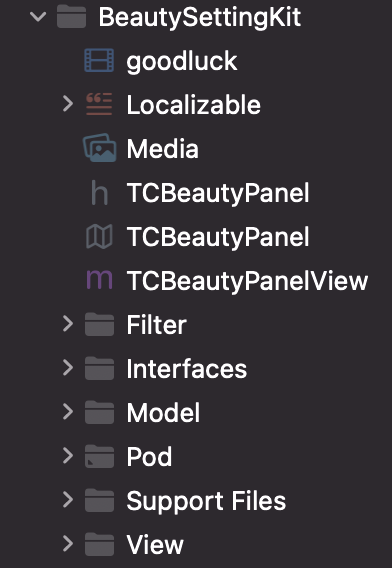
For the beauty effect feature of short videos, it is divided into basic beauty filter and Tencent Effect. The basic beauty filter is mainly implemented by integrating BeautySettingkit. For the integration method, please refer to the document of TikTok effect. All relevant code can be found under the BeautySettingKit directory. The Tencent Effect is mainly implemented by integrating xmagickit. For the implementation method, please refer to the document of Tencent Effect integration in short video SDK. All relevant code can be found under the xmagickit directory.
Module Introduction
Short videos are divided into 7 modules according to different functionalities, namely:
Account, list management, publish and profile module (under the short video directory).
Playable, recording and editing modules are the responsibility of UGCKit.
Account Module
The account module is responsible for processing user login/registration, as well as the logic of login cache.
If you already have your own account system, you can directly replace the module.
The UI logic of the account module is divided into XiaoShiPin/AppViewControllers/Account and XiaoShiPin/AppViewControllers/AccountInfo. The former involves the UI module for logging in, while the latter involves the UI module for processing materials after logging in.
The business logic of the account module can be viewed under XiaoShiPin/Model.
Main Interface and List Management
Module Overview
The main interface is primarily responsible for the switching among three primary functions: VOD list, recording, and personal information.
After entering the App, the List Interface is displayed by default. Click the record button. If you are not logged in, you will be redirected to the log-in interface; if you have already logged in, you will be redirected to the streaming interface. Click the user profile button to navigate to the Profile Page.
List management includes pulling and displaying lists.
Related Code
Model
TCLiveListModel(XiaoShiPin/AppViewControllers/mainList): Definition of the data layer of the VOD list and implementation of serialization/deserialization.
UI
TCNavigationController: Customized Navbar, mainly sets the background color of the Navbar.
TCMainViewController: tab bar control on the main interface, used for switching between switch list, recording and user profile page.
TCVideoListCell: Cell class of the VOD list, mainly shows cover, title, and nickname.
TCLiveListViewController: TableViewController of the VOD list, responsible for showing the VOD list and redirecting to the playback interface after click.
Playback Module
Module Overview
The playback module mainly includes: video preloading, playback, cache, sharing and other features.
Related Code
Under the /XiaoShiPin/AppViewControllers/VideoPlayer directory, the main processing relates to playback business logic, including UI and business logic.
Recording Module
Module Overview
The recording module mainly includes: short video multi-segment shooting, multi-segment deletion, multi-resolution shooting, adjustable-speed shoot.
Related Code
UGCKit/Source/Record In this directory, you can find all the logic related to recording.
Editing Module
Module Overview
The editing module mainly includes: video clipping, BGM, filter style, special effects, animated stickers, static stickers.
Related Code
UGCKit/Source/Edit In this directory, you can find all the logic related to editing.
Publishing Module
Module Overview
The Publishing Module mainly includes: short video release.
Related Code
XiaoShiPin/AppViewController/Publish In this directory, you can find all the logic related to publishing.
Profile Module
Module Overview
The profile module is primarily responsible for the display, storage, and modification of user profiles, and responsible for synchronizing these operations to server.
User profile mainly includes: user profile photo, Nickname, gender.
The profile module will synchronize users' latest data from the server to the App. Users can view their own related data through the profile module, including user profile photo, Nickname, gender, etc.
Users can modify their related profiles through the profile module. The profile module will synchronize these operations to server.
Other modules can also obtain and modify user profiles through the profile module.
Related Code
XiaoShiPin/AppViewController/AccountInfo In this directory, you can find all the logic related to user profiles.
ugckit
This module is mainly an advanced encapsulation of the short video SDK (including UI) for quick integration.
Introduction to each directory:
File/Directory
Description
Source/Common
Custom View module for short videos
Source/Edit
Short video editing module
Source/MediaPicker
Short video media selection module
Source/Model
Short video media model module
Source/Music
Short video music module
Source/Record
Short video recording module
Source/Report
Short video data reporting module
Source/Theme
Short video resource theme module
Source/VideoCut
Short video clipping module
xmagickit
This module is used for quick access to Tencent special effects. It is mainly an encapsulation of Tencent special effects for quick integration.
File/Directory
Description
BeautyRes
Image resources
bundle
Beauty material
Download
Download Module
View
Beauty panel and data
beautysettingkit
This module is the basic beauty filter module in short videos. If customers choose to use the basic beauty filter, they can use this module for quick integration.