操作场景
该任务为您介绍如何利用 MirrorMaker 将自建 Kafka 集群的数据迁移到 CKafka 中。
Kafka 的 MirrorMaker 工具可以实现将自建 Kafka 集群中的数据备份到 CKafka 集群中,具体原理如下:
MirrorMaker 可以使用一个 Consumer 从自建 Kafka 集群中消费消息,然后通过一个 Producer 将 这些数据发送到 CKafka 集群中,最后您将客户端的生产消费配置转到云上实例的接入网络,即可完成从自建 Kafka 集群到 CKafka 集群的数据迁移。
前提条件
已 迁移 Topic 上云。
操作步骤
1. 下载 MirrorMaker 工具 并解压到本地。
说明:
2. 配置 consumer.properties 文件。
# list of brokers used for bootstrapping knowledge about the rest of the cluster# format: host1:port1,host2:port2 ...bootstrap.servers=localhost:9092# consumer group idgroup.id=test-consumer-grouppartition.assignment.strategy=org.apache.kafka.clients.consumer.RoundRobinAssignor# What to do when there is no initial offset in Kafka or if the current# offset does not exist any more on the server: latest, earliest, none#auto.offset.reset=
参数 | 说明 |
bootstrap.servers | 自建实例的 broker 接入点列表。 |
group.id | 迁移数据时用到的消费者组 ID,请勿与自建实例已存在的消费者命名重复冲突。 |
partition.assignment.strategy | 分区分配的策略,以partition.assignment.strategy=org.apache.kafka.clients.consumer.RoundRobinAssignor 为例。 |
3. 配置 producer.properties 文件。
# list of brokers used for bootstrapping knowledge about the rest of the cluster# format: host1:port1,host2:port2 ...bootstrap.servers=localhost:9092# specify the compression codec for all data generated: none, gzip, snappy, lz4compression.type=none
参数 | 说明 |
bootstrap.servers | 云上实例的接入网络,在控制台的实例详情页面接入方式模块的网络列复制。 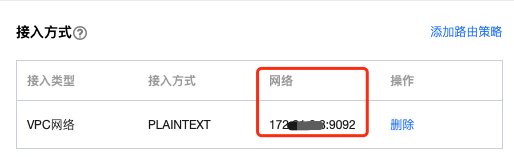 |
compression.type | 数据压缩类型,CKafka 不支持 GZip 压缩格式。 |
4. 在
.bin 目录下启动 mirrormaker 迁移工具开始迁移。sh bin/kafka-mirror-maker.sh --consumer.config config/consumer.properties --producer.config config/producer.properties --whitelist topicName
说明:
whitelist 为正则表达式,迁移匹配正则名称的 Topic。
5. 在 .bin 目录下运行
kafka-consumer-groups.sh查看自建集群消费进度。bin/kafka-consumer-groups.sh --new-consumer --describe --bootstrap-server自建集群接入点 --group test-consumer-group
说明:
group 指迁移数据时用到的消费者组 ID。

后续处理
数据迁移完成后,将客户端的生产消费配置转到云上实例的接入点。


