The content of this page has been automatically translated by AI. If you encounter any problems while reading, you can view the corresponding content in Chinese.
WAF (WAF) provides an IP blocking feature that can quickly intercept malicious IPs attacking the web, quickly respond to malicious scanning and proxy, web attack threats, etc., and enhance the efficiency of defense.
Note:
Currently, IP blocking supports domain-level differentiation. The detection duration varies for different domains, and the blocking time is calculated separately.
Background
IP Ban automatically blocks any Client IP that initiates multiple Web Attacks (triggered by the rule engine) within a short period, preventing all requests for a certain duration. Interruption logs can be viewed in the attack logs.
Completed adding protected domain, WAF protection switch for the domain is on, and the rule engine is in block mode. For operation details, please refer to Quick Start.
Directions
1. Log in to the WAF console, on the left sidebar, select Configuration Center > Basic Security > Web Security to enter the Web Security page.
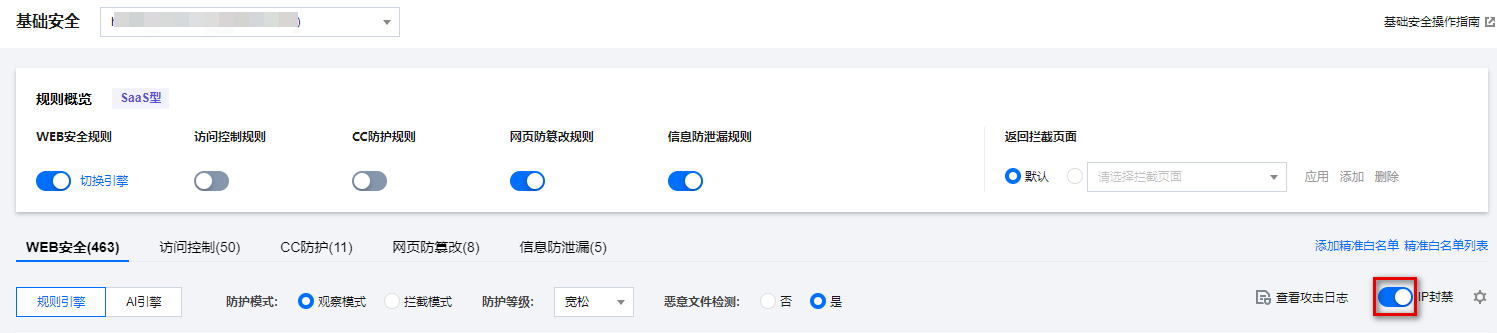
2. On the Web Security page, select the domain name to protect from the top left corner, click the IP Ban at
to enable IP Ban.
3. On the Web Security page, click on IP Ban
, modify the default parameters of IP Ban, and click Confirm to set the threshold based on business requirements.
Field Descriptions:
Number of Web Attacks: Counts the number of times the attack source IP triggers Web attacks (triggered by the rule engine, excluding AI engine, custom definition strategy, CC attacks, etc.) within the specified time.
Detection Duration: Specifies the duration for detecting the attack source IP.
Ban Duration: The duration to ban the IP request.
4. Ban Result Query.
After the IP ban attack, the attack log records the attack type field value as IP punishment, with Rule ID as 1600000001.
Search for the required CAM policy as needed, and click to complete policy association.