The content of this page has been automatically translated by AI. If you encounter any problems while reading, you can view the corresponding content in Chinese.

Viewing Monitoring Information

Last updated: 2024-10-24 15:56:39

Overview

ES provides a number of monitoring metrics for running ES clusters to monitor cluster operations such as storage, I/O, CPU, and memory utilization. Based on these metrics, you can understand the cluster operations in real time and promptly handle possible risks to ensure stable cluster operations. This document describes how to view cluster monitoring information in the ES console.

Directions

1. Log in to the ES Console, click a cluster ID/name in the cluster list to enter the cluster details page.
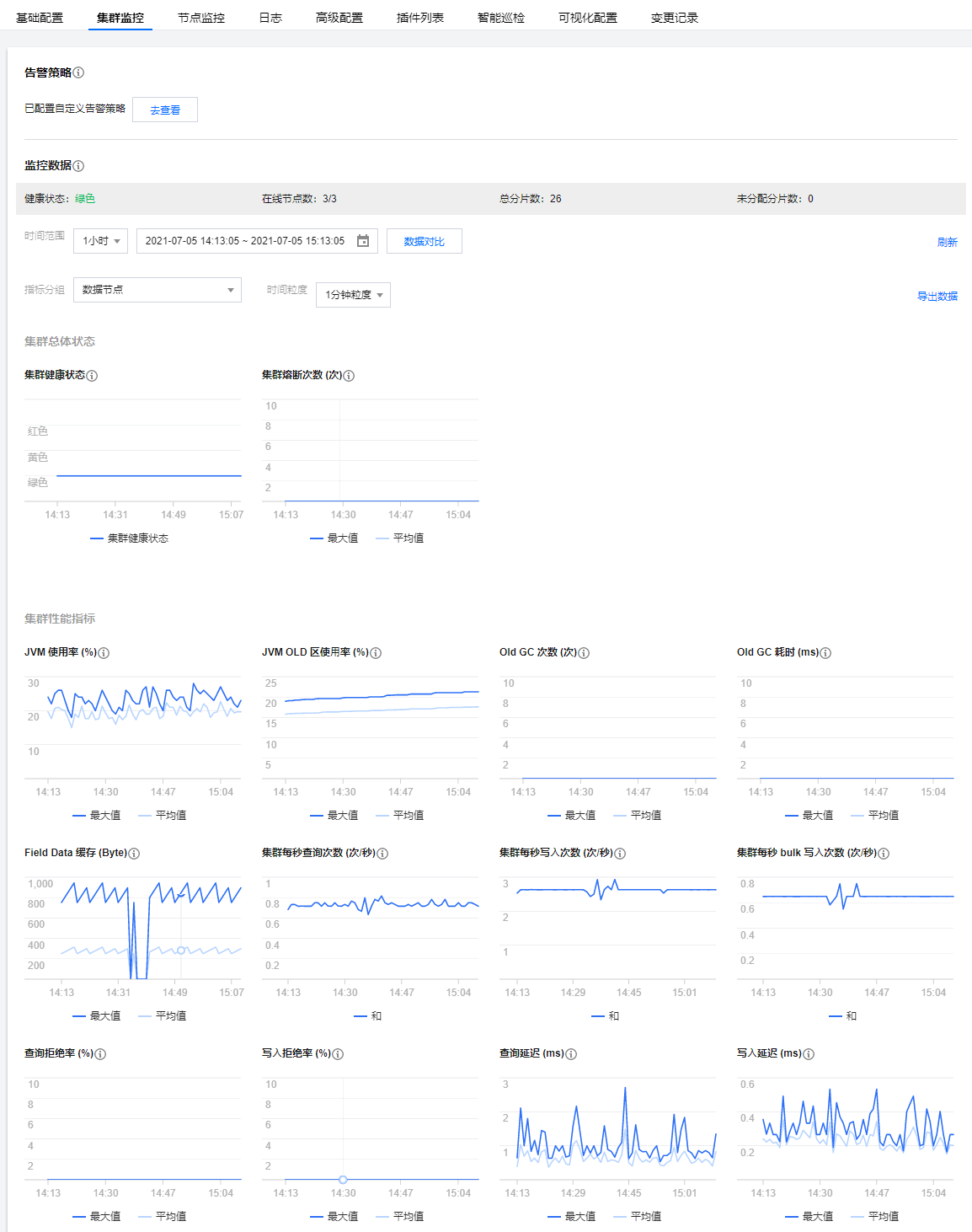
2. Select the Cluster Monitoring tab to view the overall cluster running status. Select Metric Group to view the cluster monitoring metrics of data nodes, cold data nodes, and dedicated primary nodes separately.
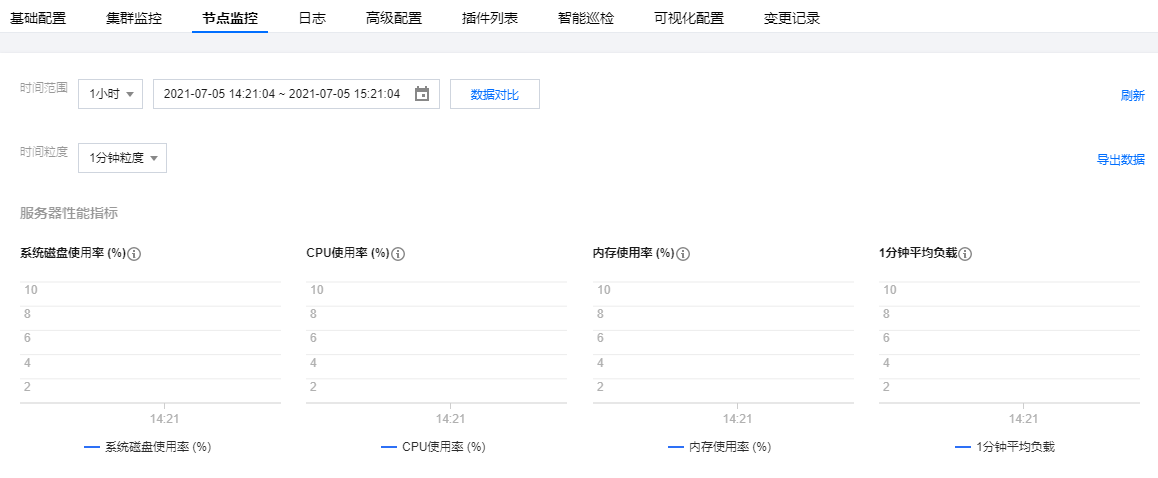
3. Select the Node Monitoring tab to view the operations and performance metrics of the nodes in the cluster.

Cluster Monitoring

On the cluster monitoring page, you can set alarm policies and view the cluster monitoring data. You can view the overall cluster status and cluster performance metrics by time range, metric group, and time granularity.
Note
You can also view the complete monitoring metrics of the ES cluster through the TCOP Console.
Search for the required CAM policy as needed, and click to complete policy association.


Node Monitoring

Node List Displays some real-time performance metrics of each node in the cluster.

Individual Node Status Provides detailed historical operation status of each node for various metrics. Supports exporting data to local storage.


Meanings and Descriptions of Certain Monitoring Metrics

An ES cluster is generally composed of multiple nodes. To reflect the overall health status of the cluster, certain monitoring metrics provide two types of values: average value and maximum value.
The average value is the average of the metric's values of all nodes in the cluster.
The maximum value is the maximum value of the metric of all nodes in the cluster.
The statistical period of each metric is 1 minute; that is, the cluster's metrics are collected once every minute. The metrics are as described below:
Monitoring Metrics
Statistical Method
Details
Cluster Health Status
ES Cluster Health Status: 0: indicates green, the cluster is normal; 1: indicates yellow, warning, some replica shards are unavailable; 2: indicates red, abnormal, some primary shards are unavailable.
green: Indicates all primary and replica shards are available, and the cluster is in its healthiest status.
yellow: Indicates all primary shards are available, but some replica shards are unavailable. In this case, search results are still complete. However, the cluster's high availability is compromised to some extent, and there is a higher risk of data loss. After the cluster's health status turns yellow, you should promptly investigate and troubleshoot the issue to prevent data loss.
red: Indicates that at least one primary shard and all its replicas are unavailable. When the cluster health status changes to red, some data has already been lost. The search can only return partial data, and the write requests allocated to a lost shard will return an exception. In this case, you should locate and troubleshoot the exceptional shard as soon as possible.
Average Disk Usage
The average of disk usage values of all nodes in the cluster in one statistical period (one minute).
If the disk utilization is too high, data cannot be written properly. Solution: Clean up useless indices promptly. Expand the cluster capacity by increasing the disk capacity of individual nodes or increasing the number of nodes.
Maximum Disk Usage
The maximum disk usage among all nodes in the cluster in one statistical period (one minute).
-
Average JVM Memory Usage
The average of the JVM memory usage values of all nodes in the cluster in one statistical period (one minute).
If this value is too high, frequent GC or even OOM will occur on cluster nodes. This happens generally because the tasks to be processed by ES exceed the load capacity of the nodes' JVMs. You need to pay attention to the tasks that are being executed by the cluster or adjust the cluster configuration.
Maximum JVM Memory Usage
The maximum JVM memory usage value of all nodes in the cluster in one statistical period (one minute).
-
Average CPU Usage
The average of CPU usage values of all nodes in the cluster in one statistical period (one minute).
When the read and write tasks processed by the nodes in the cluster exceed the load capacity of the nodes' CPUs, the value of this metric will become too high. In this case, the cluster nodes will experience a decrease in processing power or even crash. You can solve this problem in the following ways:
Observe whether this metric is consistently high or just a temporary spike. If it is a temporary spike, determine if there are any complex temporary tasks being executed.
If the metric is consistently high, analyze whether the business's read and write operations to the cluster can be optimized. Reduce read and write frequency, and reduce data volume. Thus it can alleviate the node load.
For cases where the node configuration cannot meet the business throughput, it is recommended to perform vertical scaling of the cluster nodes to improve the load capacity of a single node.
Maximum CPU Usage
The maximum CPU usage among all nodes in the cluster in one statistical period (one minute).
-
Average Cluster Load Per Minute
The average load per minute (load_1m) of all nodes in the cluster. Source of the metric: ES node status API (_nodes/stats/os/cpu/load_average/1m).
If load_1m is too high, it is recommended to lower the cluster load or upgrade the cluster node specifications.
Maximum Cluster Load Per Minute
The maximum average load in one minute (load_1m) for all nodes in the cluster.
-
Average Write Latency
Write latency (index_latency) refers to the time taken by a single index request (ms/request). The average write latency of the cluster is the average of the time taken by a single index request of all nodes in one statistical period (one minute).
Calculation rule for the single index request time of a node: two metrics are recorded once every statistical period (1 minute), i.e., total number of historical index operations on a node (_nodes/stats/indices/indexing/index_total) and total time taken by historical index operations (_nodes/stats/indices/indexing/index_time_in_millis), and the difference between two adjacent records (i.e., the absolute value in one statistical period) is taken for calculation (index time / number of index operations) to get the average single index time in one statistical period (1 minute).
Write latency is the average time it takes to write a single document. The average write latency of the cluster refers to the average of write time of all nodes in one statistical period. If the write latency is too high, you are recommended to upgrade the node specification or increase the number of nodes.
Maximum Write Latency
Write latency (index_latency) refers to the time taken by a single index request (ms/request). The maximum write latency of the cluster is the maximum value of the single index request durations among all nodes in a statistical period (one minute).
Calculation Rule for the Duration of Single Index Request of a Node: See Average Write Latency.
-
Average Query Latency
Query latency (search_latency) refers to the duration (ms/request) of a single query request. The average query latency of the cluster is the average duration of single query requests by all nodes within a statistical period (one minute).
Calculation rule for the single query request time of a node: two metrics are recorded once every statistical period (1 minute), i.e., total number of historical queries on a node (_nodes/stats/indices/search/query_total) and total time taken by historical queries (_nodes/stats/indices/search/query_time_in_millis), and the difference between two adjacent records (i.e., the absolute value in one statistical period) is taken for calculation (query time / number of queries) to get the average single query time in one statistical period (1 minute).
Query latency refers to the average time it takes to perform a single query. The average query latency of the cluster is the average query time of all nodes in a statistical period. If the query latency is too high, it is recommended to upgrade the node specifications or increase the number of nodes.
Maximum Query Latency
Query latency (search_latency) refers to the duration (ms/request) of a single query request. The maximum query latency of the cluster is the maximum value of single query request durations among all nodes within a statistical period (one minute).
Calculation Rule for the Duration of Single Query Request of a Node: See Average Query Latency.
-
Average Number of Writes Per Second
The average of the number of index requests received by all nodes in the cluster per second. Calculation rule for the number of index requests per second of a node: the total number of historical indices on a node (_nodes/stats/indices/indexing/index_total) is recorded once every statistical period (1 minute), and the difference between two adjacent records (i.e., the absolute value in one statistical period) is taken for calculation (number of indices / 60 seconds) to get the average number of index requests per second in one statistical period.
-
Average Number of Queries Per Second
The average number of query requests received per second by all nodes in the cluster. The calculation rule for the number of query requests per second per node: record the total number of historical queries for a node once every statistical period (one minute) (_nodes/stats/indices/search/query_total), take the difference between two adjacent records (i.e., the absolute value within one period) and calculate: query count / 60 seconds, getting the average number of query requests per second in the statistical period.
-
Write Rejection Rate
The ratio calculated by dividing the number of write requests rejected by the cluster by the total number of write requests in a statistical period. Calculation rule: two metrics are collected once every statistical period: the number of historical write requests rejected (version 5.6.4: _nodes/stats/thread_pool/bulk/rejected, version 6.4.3 and later: _nodes/stats/thread_pool/write/rejected) and the total number of historical write requests (version 5.6.4: _nodes/stats/thread_pool/bulk/completed, version 6.4.3 and later: _nodes/stats/thread_pool/write/completed). The difference between two adjacent records (i.e., the absolute value within one period) is taken for calculation: write request rejections / total write requests.
When the write QPS is too large or the CPU, memory, and disk usage is too high, the cluster's write rejection rate may increase. Generally, this is because that the current configuration of the cluster cannot meet the business requirements of write operations. For scenarios where the node configuration is too low, you can solve this problem by upgrading the node specifications or reducing the number of write operations. For scenarios where the disk usage is too high, you can solve this problem by scaling out the cluster's disk capacity or deleting useless data.
Query Rejection Rate
This is the ratio calculated by dividing the number of query requests rejected by the cluster by the total number of query requests in one statistical period. Calculation rule: two metrics are collected once every statistical period, i.e., the number of historical query requests rejected (_nodes/stats/thread_pool/search/rejected) and the total number of historical query requests (_nodes/stats/thread_pool/search/completed), and the difference between two adjacent records (i.e., the absolute value in one statistical period) is taken for calculation (number of rejected query requests / total number of query requests).
Excessive write QPS, high CPU, and memory usage may cause an increase in the cluster's query rejection rate. Generally, this indicates that the current cluster configuration cannot meet the needs of business read operations. If this value is too high, it is recommended to upgrade the cluster node specifications to improve the processing capacity of the cluster nodes.
Total Number of Documents in Cluster
Total number of documents in the cluster, this number may include documents from nested fields. Calculation rule: ES cluster document count API: _cluster/stats/indices/docs/count, for details, see Cluster stats API.
-
Auto Snapshot Backup Status
Backup results after the cluster enables automatic snapshot backup: 0: Automatic backup not enabled; 1: Automatic backup successful; -1: Automatic backup failed.
Automated snapshot backup will regularly back up the cluster's data to COS, allowing data recovery when needed and thus ensuring more comprehensive data security. It is recommended to enable this feature. For more information, you can refer to: Automated Snapshot Backup.
Maximum Number of Documents per Shard
The maximum number of documents per shard in the entire cluster, based on total document count.
-
Maximum Shard Storage Capacity of Cluster
The maximum storage capacity of an individual shard in the entire cluster, based on total storage size.
-
Maximum Shard Document Delete Count of Cluster
The maximum number of documents marked as deleted in an individual shard, based on total document count in all indexes of the cluster.
-
Proportion of Maximum Shard Document Delete Count of Cluster
The maximum proportion of documents marked as deleted in an individual shard compared to the total document count of that shard, based on all indexes of the cluster.
-
Number of Active Query Contexts
The average number of active query contexts across all nodes in the cluster.
-
90th Percentile of Query Task Duration
The 90th percentile latency for query tasks executed by the largest node in the cluster during each statistical period.
-
90th Percentile of Write Task Duration
The 90th percentile latency for write tasks executed by the largest node in the cluster during each statistical period.
-