The content of this page has been automatically translated by AI. If you encounter any problems while reading, you can view the corresponding content in Chinese.

YML File Configuration

Last updated: 2024-10-24 15:50:42

You can configure common parameters by modifying the YML parameter configurations of your Tencent Cloud Elasticsearch Service (ES) instance.

Steps to Use

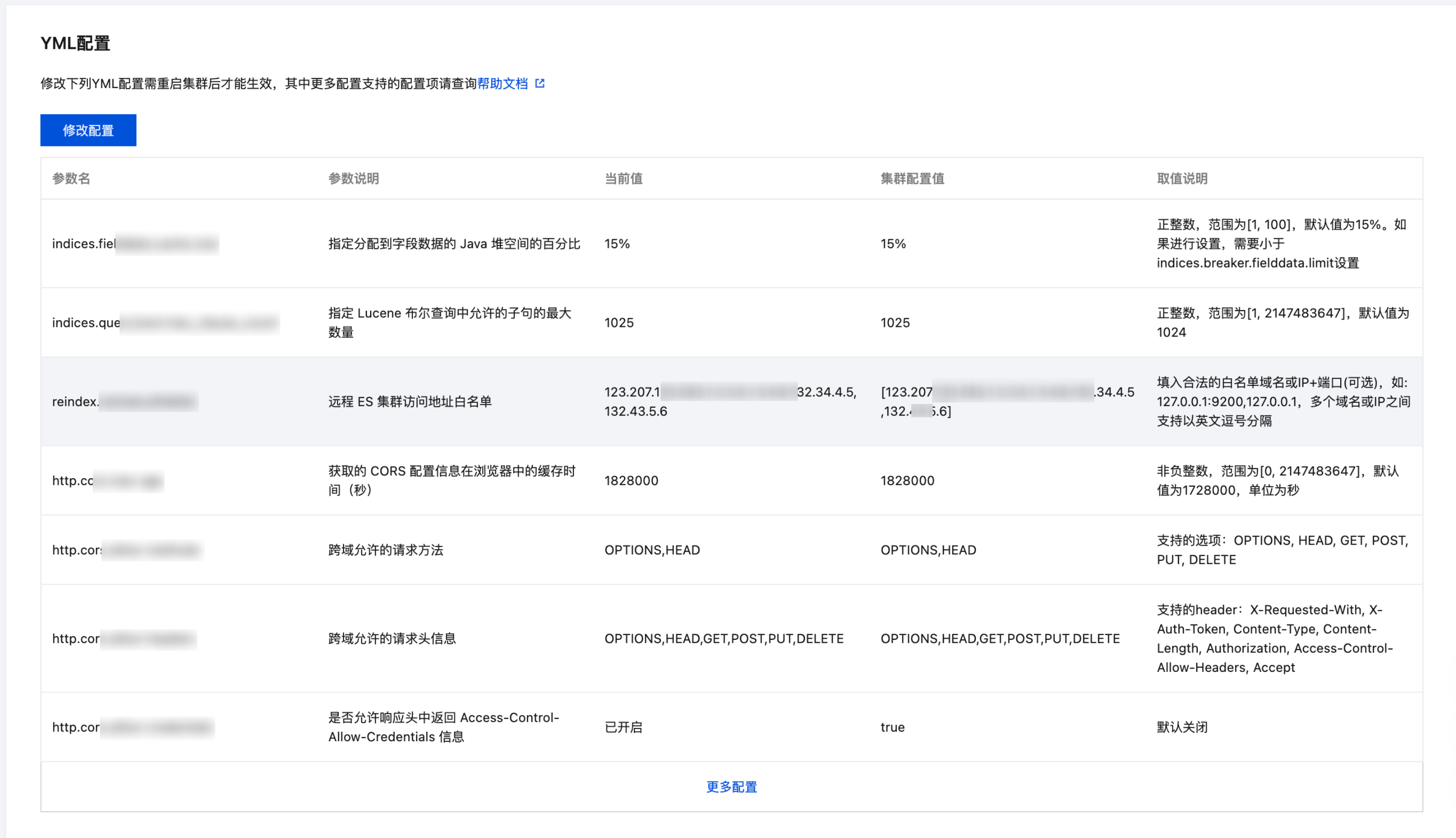
Viewing Configuration Items

Log in to the ES console, click the Cluster ID/Name of the cluster needing configuration changes to enter the cluster details page, then click Advanced Configuration to view the configuration item parameters.
The current values and cluster configuration values can be seen in the following list, because existing clusters might have undergone various non-standard operations, resulting in discrepancies between the actual configuration values and the default values, hence the console displays them
Search for the required CAM policy as needed, and click to complete policy association.


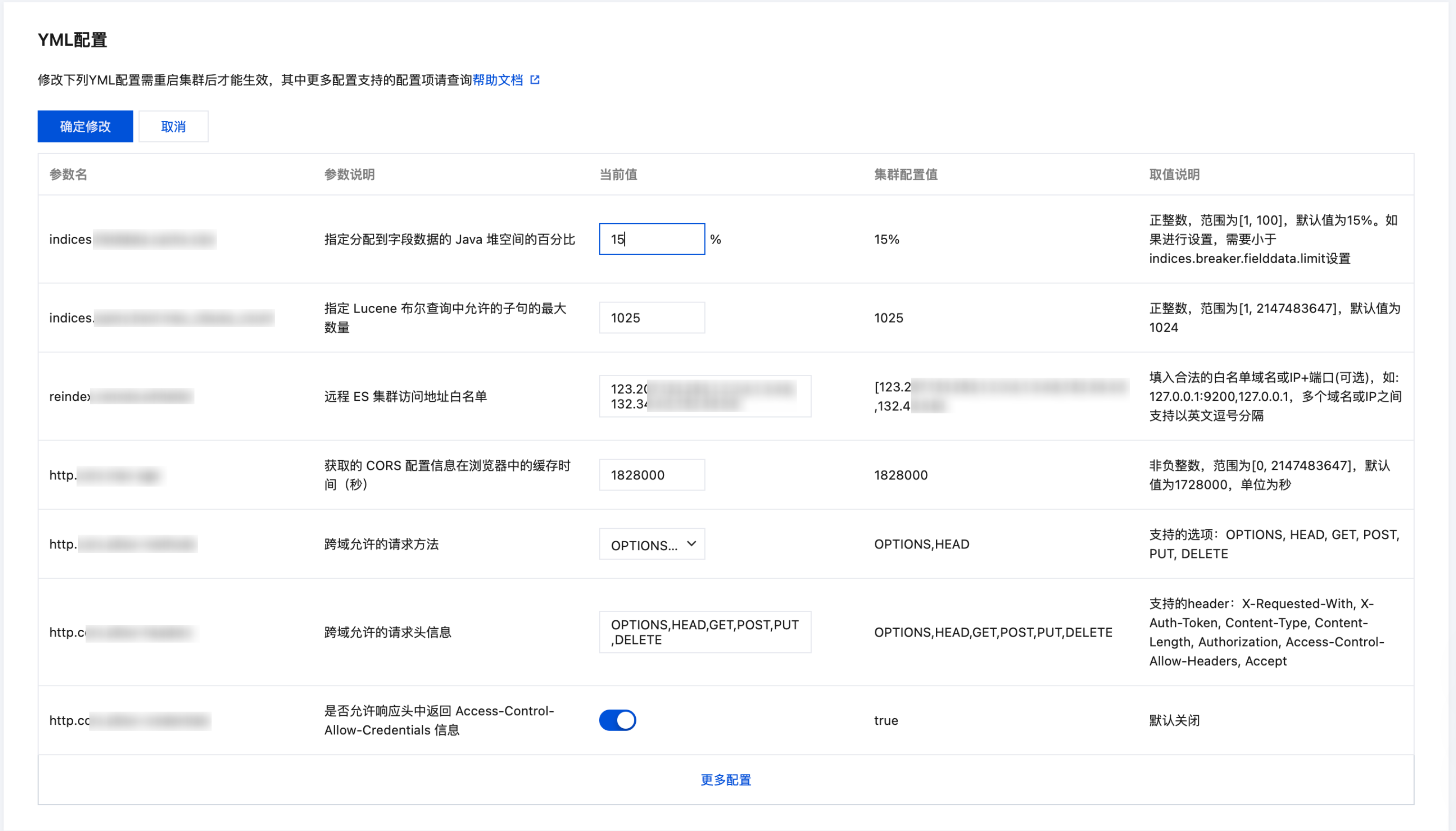
Modifying Configuration Items

Click Modify Configuration to edit the corresponding configuration item. The input restrictions for configuration items are described in the last column of the table, labeled "Value Description".

Click Confirm Changes, and the new configuration item parameters will be applied to your cluster, initiating a rolling restart. If the indexes in your cluster have replicas, the restart will not impact your business, but it is recommended to perform these operations during off-peak hours.
Note
If the cluster health status is YELLOW or RED, or there is an index in the cluster that has no replicas, you will be prompted to force restart if you try to modify the configuration items. In this case, there will be a high risk if you update the configuration, and you are recommended to repair the cluster status first by adding replicas to all indexes.
If the user understands the operational risks and still wants to proceed with the update, click OK to restart. Refer to the following diagram for details:

After confirmation, the Tencent Cloud ES instance will restart. During the restart process, you can view the progress in the cluster change records. Once the restart is successful, the YML file configuration will be completed.

Supported Parameters

Parameters
Description
Default Value
indices.fielddata.cache.size
Specifies the percentage of Java heap space allocated to the field data.
15%
indices.query.bool.max_clause_count
Specifies the maximum number of clauses allowed in a Lucene Boolean query.
1024

Configuring reindex allowlist

Parameters
Description
Default Value
reindex.remote.whitelist
Allowlist of remote ES cluster access addresses
[]

Custom Queue Sizes

Parameters
Description
Default Value
thread_pool.bulk.queue_size
Document write queue size, applicable to v5.6.4
1024
thread_pool.write.queue_size
Document write queue size, applicable to v6.4.3 and above
1024
thread_pool.search.queue_size
Document search queue size
1024

Custom CORS Access Configurations

Parameters
Description
Default Value
http.cors.enabled
Cross-origin resource sharing (CORS) configuration item, true indicates to enable cross-origin resource access, false indicates to disable it
false
http.cors.allow-origin
Domain resource configuration item, can be set to accept requests from specified domain names
""
http.cors.max-age
Cache period of the obtained CORS configuration information in the browser
1728000 (20 days)
http.cors.allow-methods
Allowed request methods for CORS
OPTIONS,HEAD,GET,POST,PUT,DELETE
http.cors.allow-headers
Request header information allowed for CORS
X-Requested-With,Content-Type,Content-Length
http.cors.allow-credentials
Whether to allow Access-Control-Allow-Credentials information in the response header
false

Configure Watcher

Parameters
Description
Default Value
xpack.watcher.enabled
true indicates to enable the X-Pack Watcher feature
true
For detailed meanings of specific configuration items, please refer to the Official documentation of Elasticsearch. If there are other configuration items that need to be set by Definition, you can provide feedback through After-sales Support.