背景
任务介绍
本次的任务为通过强化学习方式结合动态执行代码来增强模型的复杂数学推理能力。本次使用的模型为 Qwen/Qwen3-4B-Instruct-2507,参考 开源项目 在 TIONE 上实现模型的强化学习训练。
使用产品及模块
TI-ONE 开发机
TI-ONE 的开发机内置了开箱即用的强化学习环境,您只需要在创建开发机的时候选择内置通用镜像 verl0.6.1-vllm0.11.0-torch2.8-py312-cuda12.8-gpu 即可进行强化学习相关代码开发和调试。
Agent 沙箱服务
Agent 沙箱服务(Agent Sandbox,AGS)是腾讯云面向 AI 智能体推出的新一代沙箱执行环境,具备安全隔离、高性能、可扩展的特性。它支持浏览器、代码以及自定义等多种沙箱形态,让智能体能够在受控环境中真实运行,并安全地与数字世界交互。本案例中使用的是代码沙箱类型。
前置准备
开通腾讯云 Agent 沙箱服务
1. 登录 Agent 沙箱服务 控制台,开通产品权限。
2. 在沙箱工具页面,单击新建沙箱工具,按照页面指引创建代码解释器类型的沙箱工具,工具名称命名为
code-interpreter-v1。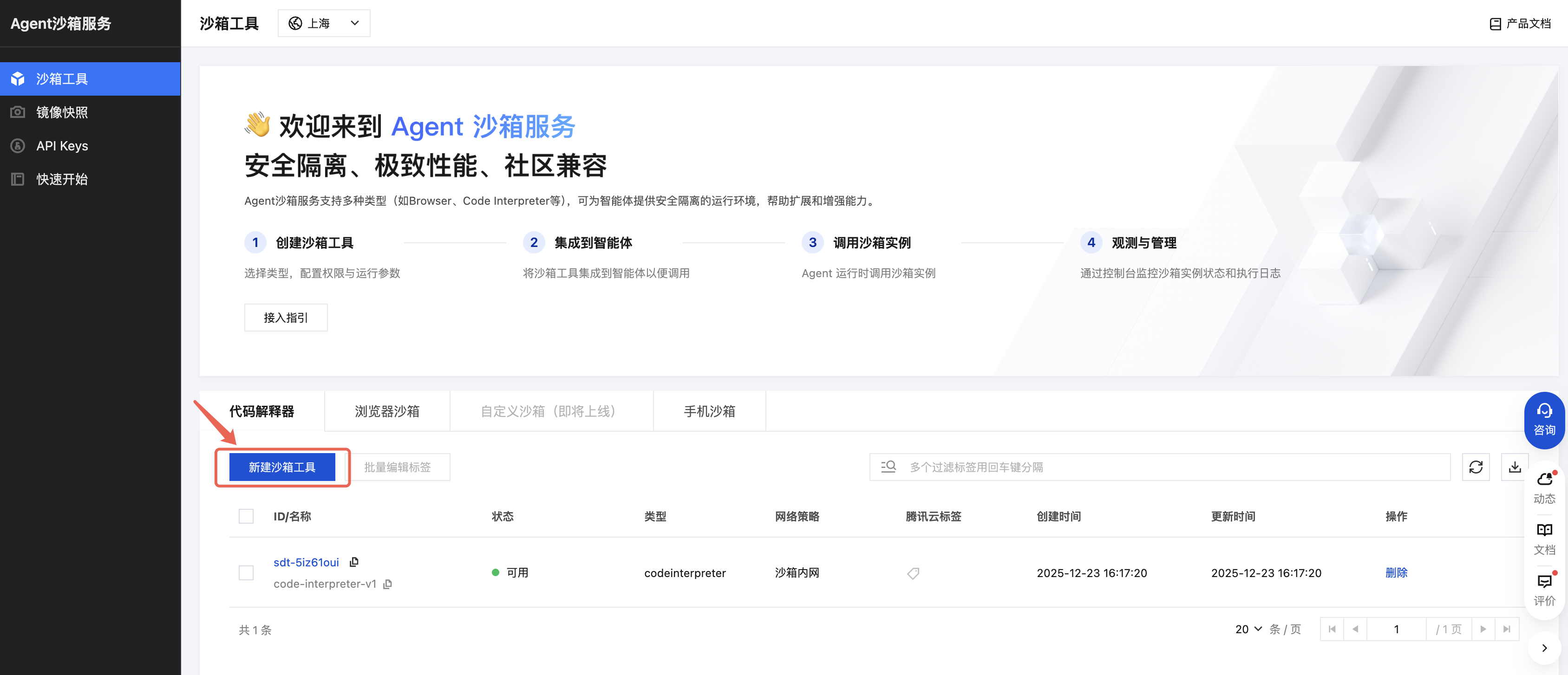
3. 在 API Keys页面,单击新建,新建一个 API Key。请妥善保管此 API Key,后续需要在配置文件中使用。

准备 TI-ONE 开发机环境
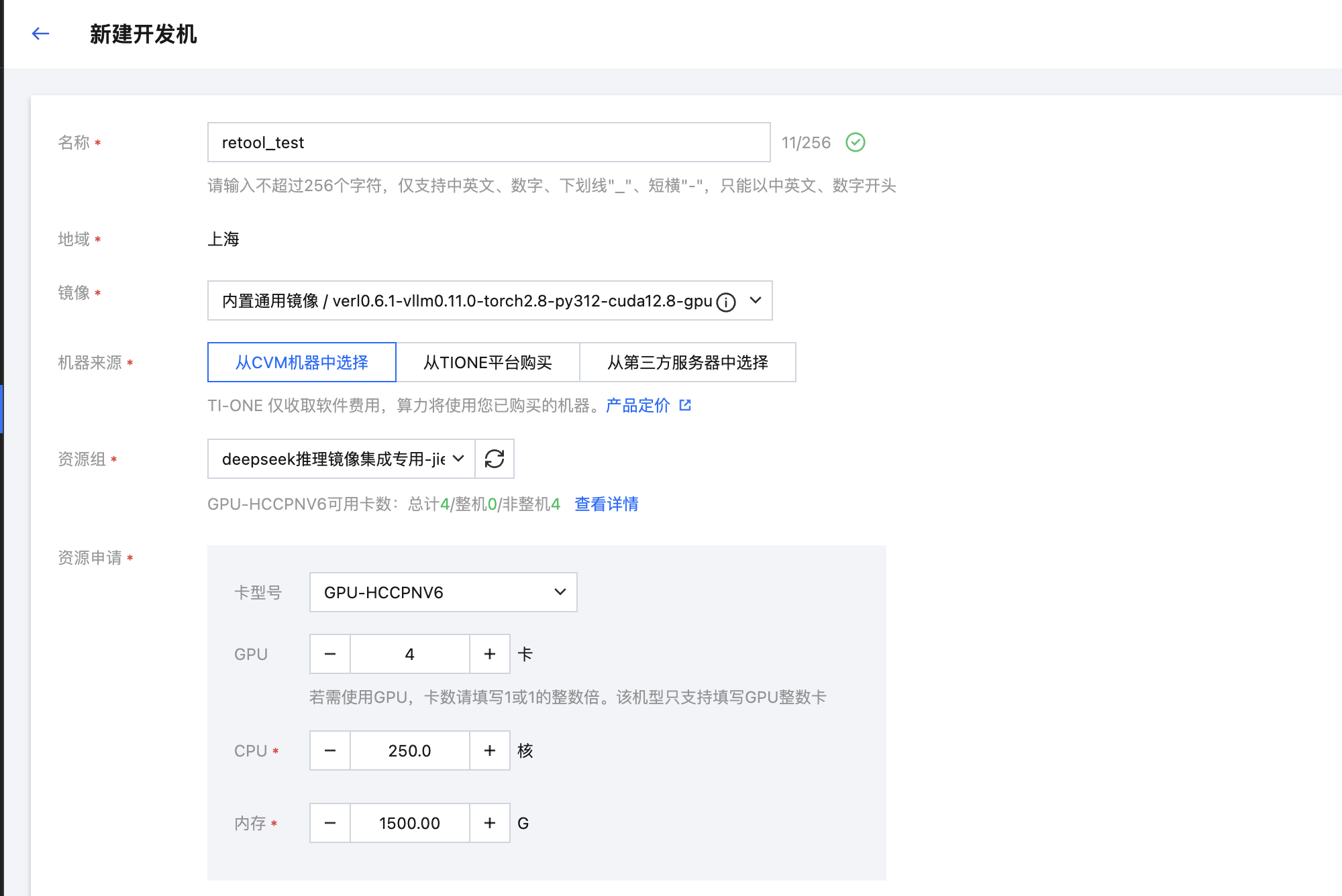
镜像:内置通用镜像 / verl0.6.1-vllm0.11.0-torch2.8-py312-cuda12.8-gpu
资源申请:4 卡 HCCPNV6(如果需要在开发机训练,需要包含GPU资源,如果仅是传输文件及修改代码,可以仅使用 CPU 资源)
存储路径设置:CFS,源路径选择一个自己的工作目录,容器挂载路径使用默认值
物料准备
模型
准备训练需要使用的预训练模型权重,可以自行从 Hugging Face / ModelScope 等平台下载,或是上传到 COS 等对象存储上后下载到开发机中。
这里我们使用 Qwen/Qwen3-4B-Instruct-2507 模型,模型下载到了开发机的
/home/tione/notebook/models/Qwen/Qwen3-4B-Instruct-2507 目录中。数据集
从 Hugging Face 下载数据集
RL 训练数据集:BytedTsinghua-SIA/DAPO-Math-17k
RL 评测数据集:Maxwell-Jia/AIME_2024
# 按需设置代理export HF_ENDPOINT=https://hf-mirror.comhf download --repo-type dataset BytedTsinghua-SIA/DAPO-Math-17k --local-dir /home/tione/notebook/data/BytedTsinghua-SIA/DAPO-Math-17khf download --repo-type dataset Maxwell-Jia/AIME_2024 --local-dir /home/tione/notebook/data/Maxwell-Jia/AIME_2024
如果不能直连 Hugging Face,将下载好的数据集上传到开发机路径中。
预处理 RL 训练数据集
运行如下脚本,对 RL 训练数据集进行预处理。
python3 examples/data_preprocess/dapo_multiturn_w_tool.py --local_dataset_path /home/tione/notebook/data/DAPO-Math-17k --local_save_dir /home/tione/notebook/data/BytedTsinghua-SIA/DAPO-Math-17k_processed
代码
将示例代码(代码基于开源 verl v0.6.1 版本少量修改)下载到开发机的
/home/tione/notebook/verl 目录中。wget "https://llm-cfs-sync-1308945662.cos.ap-shanghai.myqcloud.com/public/code/verl-v0.6.1_ags_demo.zip?q-sign-algorithm=sha1&q-ak=AKID9CDB4qX8byFOQK8pQuGUaYO6f6PbfcZP&q-sign-time=1768465730;1800001730&q-key-time=1768465730;1800001730&q-header-list=&q-url-param-list=&q-signature=5348597d80390f498e7f22756309167afdb7927b" -O /home/tione/notebook/verl-v0.6.1_ags_demo.zipunzip /home/tione/notebook/verl-v0.6.1_ags_demo.zip
修改
verl/recipe/retool 目录下的 e2b_code_tool_config.yaml 文件,将 e2b_api_key 替换为上述在 Agent 沙箱服务产品创建的 API Key。tools:- class_name: "verl.tools.e2b_code_tool.E2BCodeTool"config:e2b_domain: "ap-shanghai.tencentags.com"e2b_api_key: "ark_XXXXXX" # 替换为自己的 API Keye2b_template: "code-interpreter-v1"sandbox_timeout: 300default_timeout: 30default_language: "python"type: nativetool_schema:type: "function"function:name: "code_interpreter"desc:ription: "A tool for executing code."parameters:type: "object"properties:code:type: "string"description: "The code to execute."required: ["code"]
代码沙箱的调用实现在
verl/verl/tools/e2b_code_tool.py 文件中,可以根据需要修改代码沙箱的调用逻辑和日志级别。编辑训练启动命令 verl/recipe/retool/run_qwen3-4b-instruct_dapo_e2b_code_tool.sh,按需修改训练超参和路径:
set -x# ================= gpus ============================NNODES=1GPUS_PER_NODE=4# ================= data/model/tool =================DATA_ROOT=/home/tione/notebook/datadapo_math_17k=$DATA_ROOT/BytedTsinghua-SIA/DAPO-Math-17k_processedaime_2024=$DATA_ROOT/Maxwell-Jia/AIME_2024model_path=/home/tione/notebook/models/Qwen3-4B-Instruct-2507train_files="['$dapo_math_17k']"test_files="['$aime_2024']"# tooltool_config_path=recipe/retool/e2b_code_tool_config.yaml# wandbproject_name=e2b_code_retoolexperiment_name=qwen3-4b_dapodefault_local_dir=/home/tione/notebook/checkpoint/$experiment_name# ================= algorithm =================adv_estimator=grpouse_kl_in_reward=Falsekl_coef=0.0use_kl_loss=Falsekl_loss_coef=0.0clip_ratio_low=0.2clip_ratio_high=0.28max_turns=8max_prompt_length=2048max_response_length=16384actor_lr=1e-6train_batch_size=128ppo_mini_batch_size=32n_resp_per_prompt=8n_resp_per_prompt_val=30# ================= perfomance =================infer_tp=1 # vllmtrain_sp=4 # trainoffload=Trueactor_max_token_len_per_gpu=$(( (max_prompt_length + max_response_length) * 1 ))log_prob_max_token_len_per_gpu=$(( actor_max_token_len_per_gpu * 4 ))export PYTHONUNBUFFERED=1python3 -m verl.trainer.main_ppo \\algorithm.adv_estimator=$adv_estimator \\algorithm.use_kl_in_reward=$use_kl_in_reward \\algorithm.kl_ctrl.kl_coef=$kl_coef \\data.train_files="$train_files" \\data.val_files="$test_files" \\data.return_raw_chat=True \\data.train_batch_size=$train_batch_size \\data.max_prompt_length=$max_prompt_length \\data.max_response_length=$max_response_length \\data.filter_overlong_prompts=True \\data.truncation='error' \\data.custom_cls.path=recipe/retool/retool.py \\data.custom_cls.name=CustomRLHFDataset \\custom_reward_function.path=recipe/retool/retool.py \\custom_reward_function.name=compute_score \\actor_rollout_ref.model.path=$model_path \\actor_rollout_ref.model.use_remove_padding=True \\actor_rollout_ref.model.enable_gradient_checkpointing=True \\actor_rollout_ref.actor.use_kl_loss=$use_kl_loss \\actor_rollout_ref.actor.kl_loss_coef=$kl_loss_coef \\actor_rollout_ref.actor.clip_ratio_low=$clip_ratio_low \\actor_rollout_ref.actor.clip_ratio_high=$clip_ratio_high \\actor_rollout_ref.actor.clip_ratio_c=10.0 \\actor_rollout_ref.actor.optim.lr=$actor_lr \\actor_rollout_ref.actor.use_dynamic_bsz=True \\actor_rollout_ref.actor.ppo_mini_batch_size=$ppo_mini_batch_size \\actor_rollout_ref.actor.ppo_max_token_len_per_gpu=$actor_max_token_len_per_gpu \\actor_rollout_ref.actor.ulysses_sequence_parallel_size=$train_sp \\actor_rollout_ref.actor.fsdp_config.param_offload=$offload \\actor_rollout_ref.actor.fsdp_config.optimizer_offload=$offload \\actor_rollout_ref.ref.log_prob_max_token_len_per_gpu=$log_prob_max_token_len_per_gpu \\actor_rollout_ref.rollout.name=vllm \\actor_rollout_ref.rollout.mode=async \\actor_rollout_ref.rollout.tensor_model_parallel_size=$infer_tp \\actor_rollout_ref.rollout.multi_turn.enable=True \\actor_rollout_ref.rollout.multi_turn.max_user_turns=$max_turns \\actor_rollout_ref.rollout.multi_turn.max_assistant_turns=$max_turns \\actor_rollout_ref.rollout.multi_turn.tool_config_path=$tool_config_path \\actor_rollout_ref.rollout.multi_turn.format=hermes \\actor_rollout_ref.rollout.gpu_memory_utilization=0.9 \\actor_rollout_ref.rollout.n=$n_resp_per_prompt \\actor_rollout_ref.rollout.val_kwargs.top_p=0.6 \\actor_rollout_ref.rollout.val_kwargs.temperature=1.0 \\actor_rollout_ref.rollout.val_kwargs.n=$n_resp_per_prompt_val \\trainer.logger=['console','tensorboard'] \\trainer.project_name=$project_name \\trainer.experiment_name=$experiment_name \\trainer.n_gpus_per_node=$GPUS_PER_NODE \\trainer.val_before_train=True \\trainer.log_val_generations=100 \\trainer.nnodes=$NNODES \\trainer.save_freq=30 \\trainer.default_local_dir=$default_local_dir \\trainer.test_freq=5 \\trainer.total_epochs=1 $@
使用开发机进行 RL 训练
1. 在开发机列表中,单击操作列的打开,进入开发机实例内部。
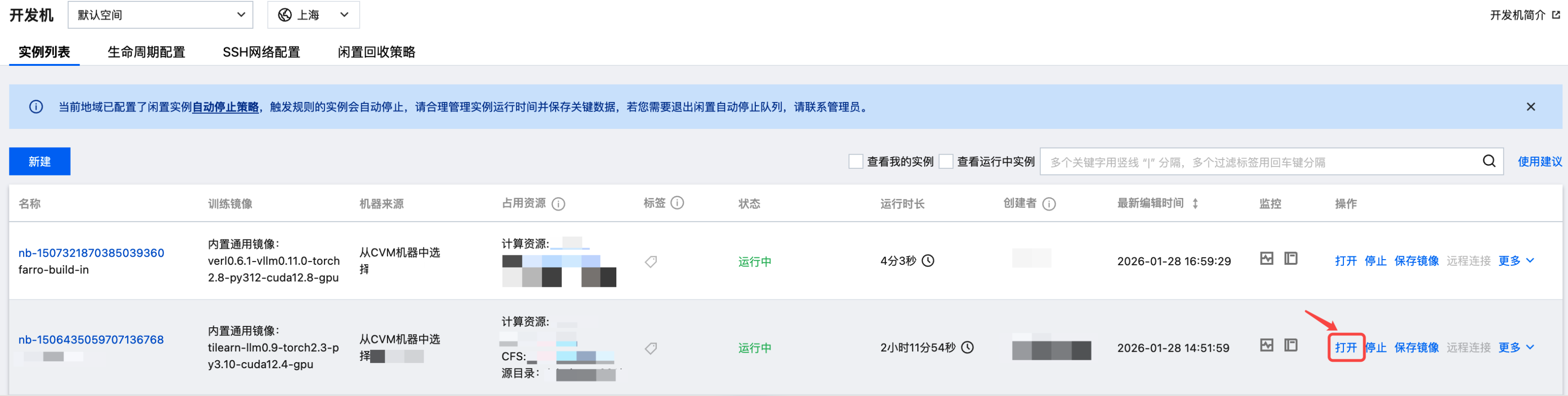
2. 选择 VS Code,进入开发页面。
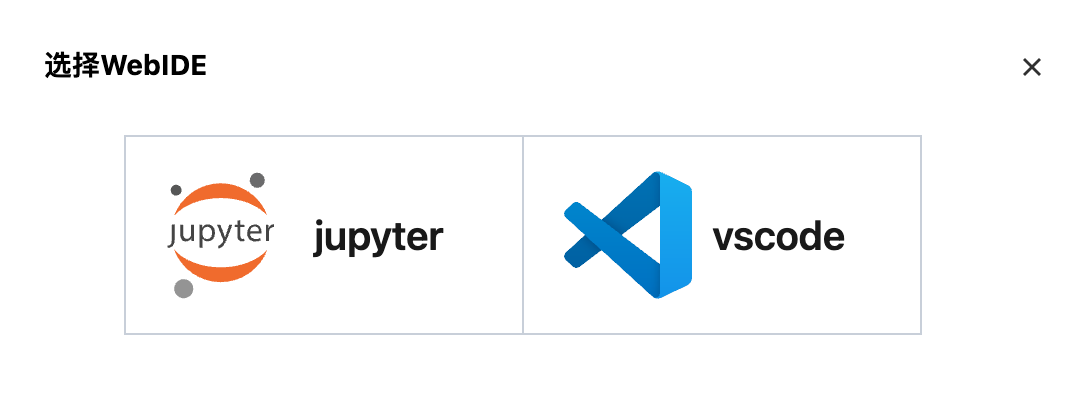
3. 在开发机终端中执行以下命令开始训练:
pip install e2b_code_interpretercd /home/tione/notebook/verl# 强制使用 cuda12.8export LD_LIBRARY_PATH=/usr/local/cuda/compat:$LD_LIBRARY_PATHbash recipe/retool/run_qwen3-4b-instruct_dapo_e2b_code_tool.sh
使用任务式建模提交 RL 训练任务
进入任务式建模,单击新建任务,任务配置参数和界面如下图所示:
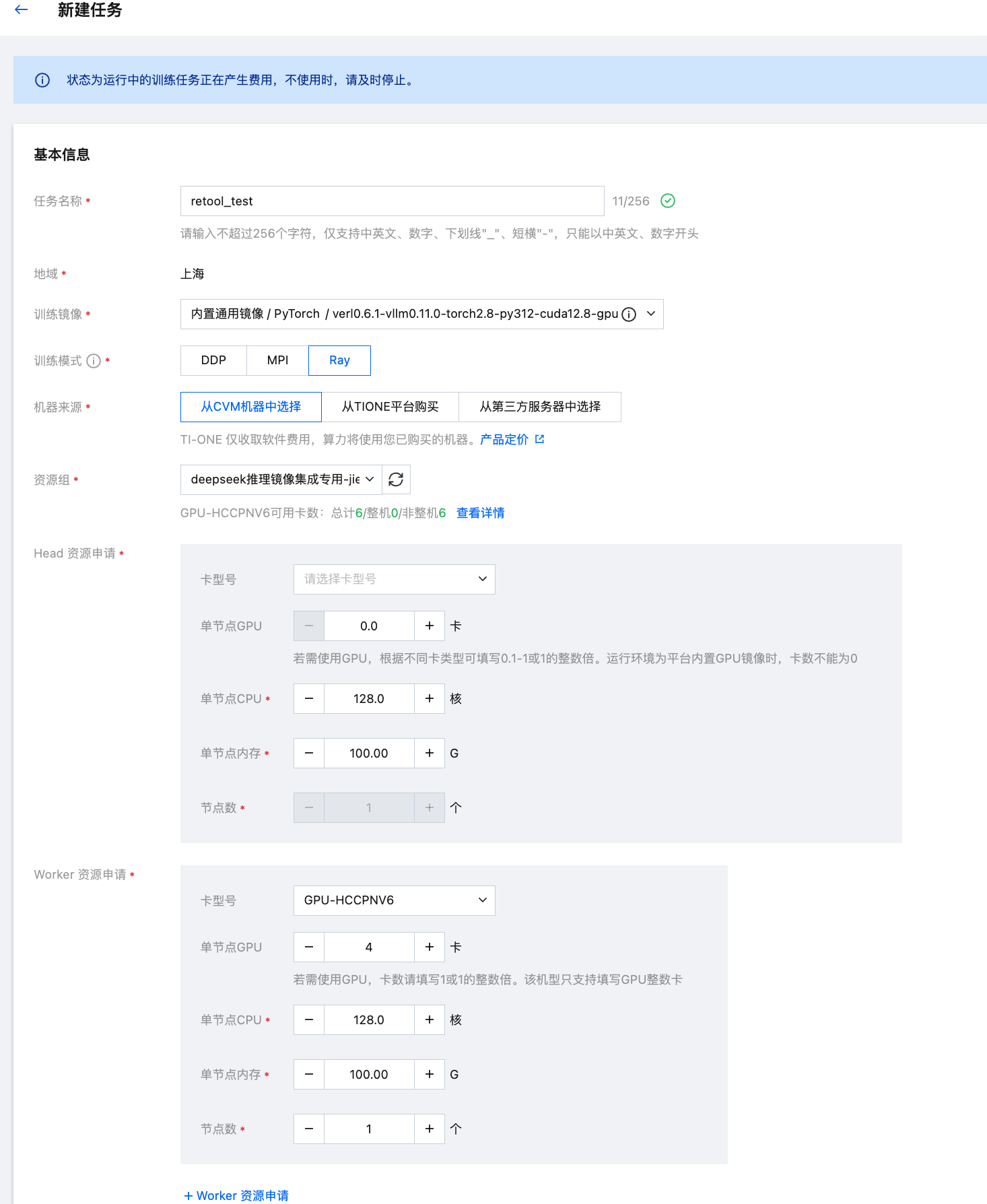
训练镜像:内置通用镜像 / verl0.6.1-vllm0.11.0-torch2.8-py312-cuda12.8-gpu
训练模式:Ray
资源申请
Head 算力规格:128C1000G
Head 节点数量:1 个
Worker 算力规格:128C1000G GPU-HCCPNV6*4
Worker 节点数量:1 个
存储路径设置:同开发机
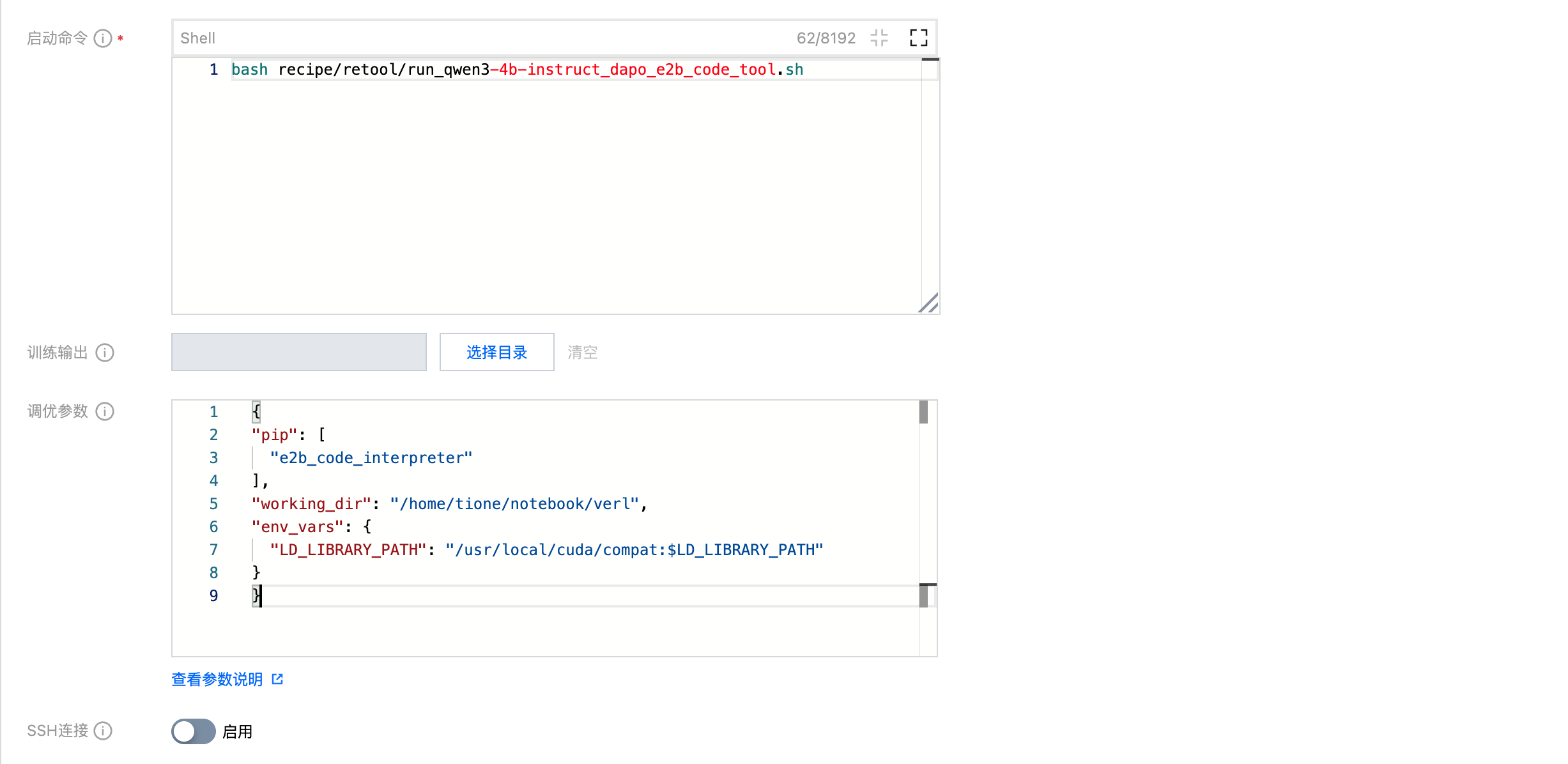
启动命令:
bash recipe/retool/run_qwen3-4b-instruct_dapo_e2b_code_tool.sh
框架高级参数 RuntimeEnv 配置:
{"pip": ["e2b_code_interpreter"],"working_dir": "/home/tione/notebook/verl","env_vars": {"LD_LIBRARY_PATH": "/usr/local/cuda/compat:$LD_LIBRARY_PATH"}}
若希望提交多机多卡训练任务,Head 和 Worker 节点可以都申请8卡GPU,并对应修改训练启动命令中的 NNODES 及 GPUS_PER_NODE 参数。
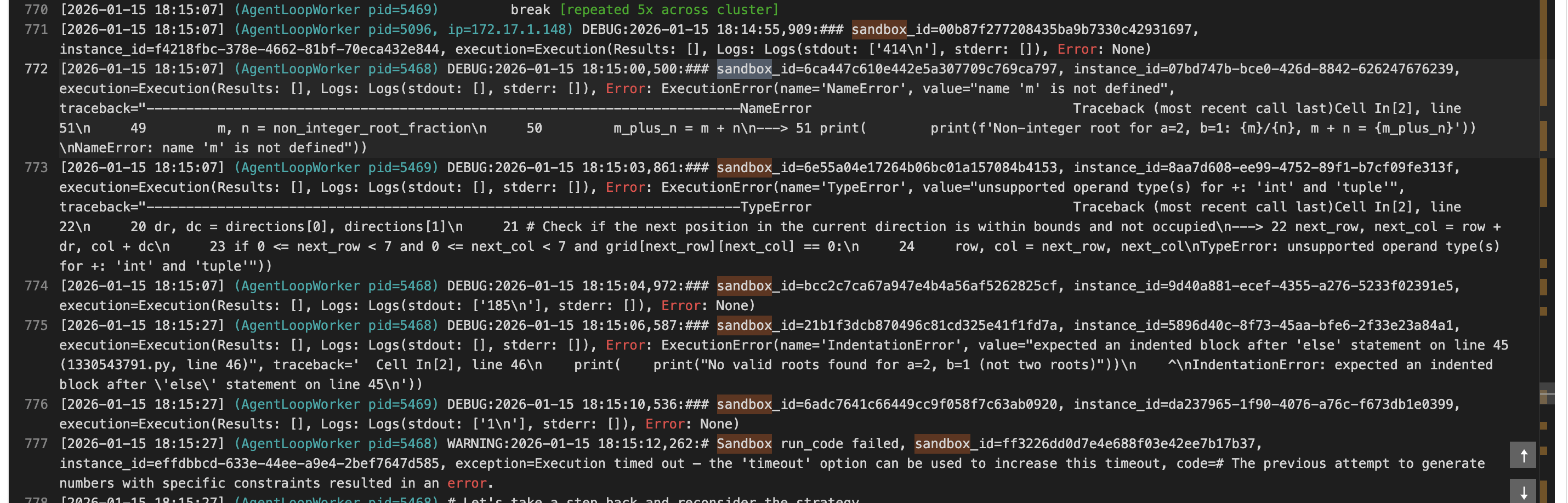
等到任务进入运行中时,可以看到模型生成的代码会在创建的 Sandbox 内执行,如下所示:
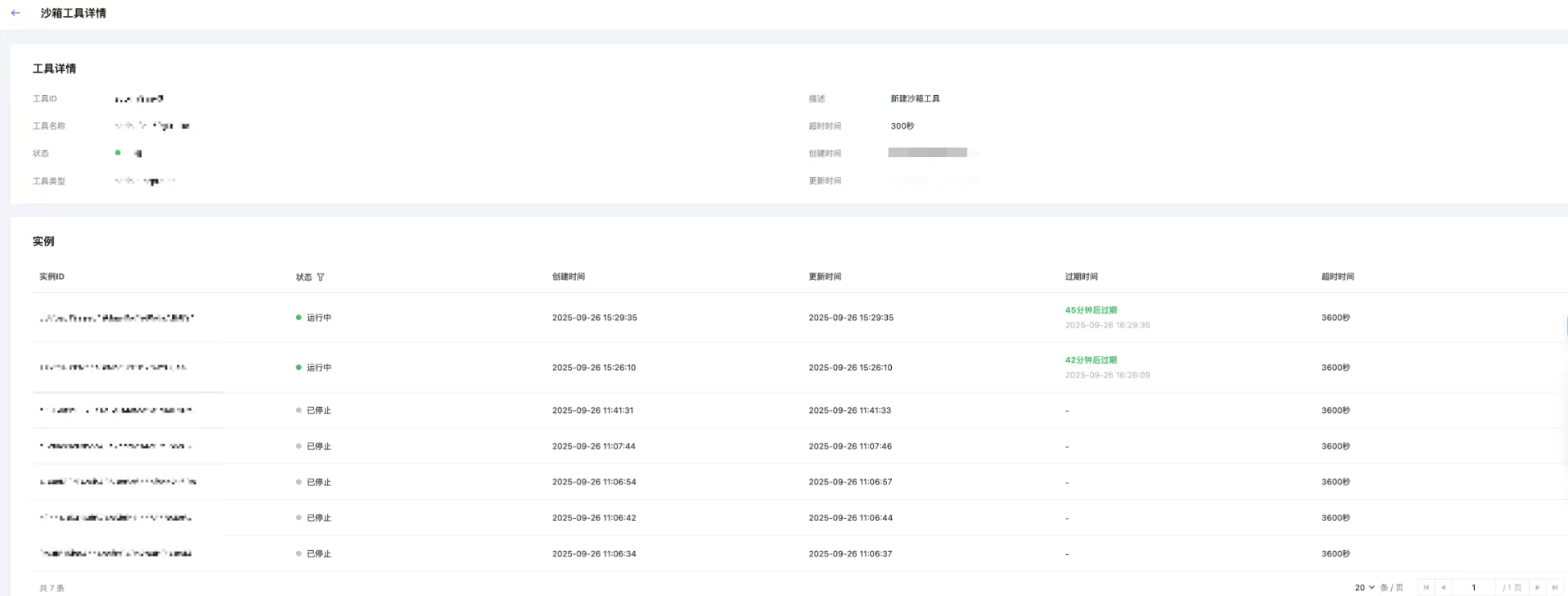
同时可以在 AGS 控制台看到生成的沙箱实例,如下图所示:
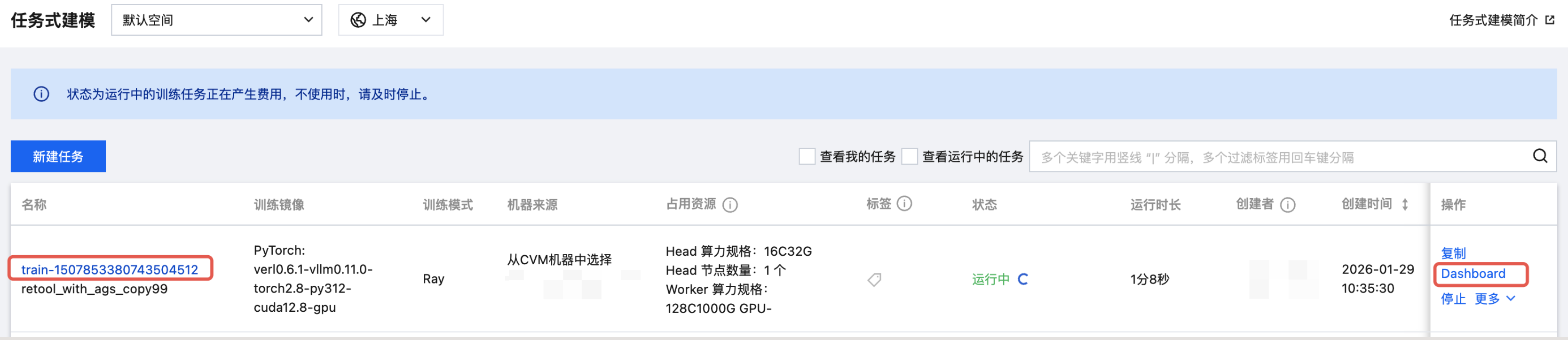
任务运行中时,可以单击列表页的 Dashboard 一键打开 Ray 强化学习任务的监控面板观察任务的运行资源和指标,如下图所示:
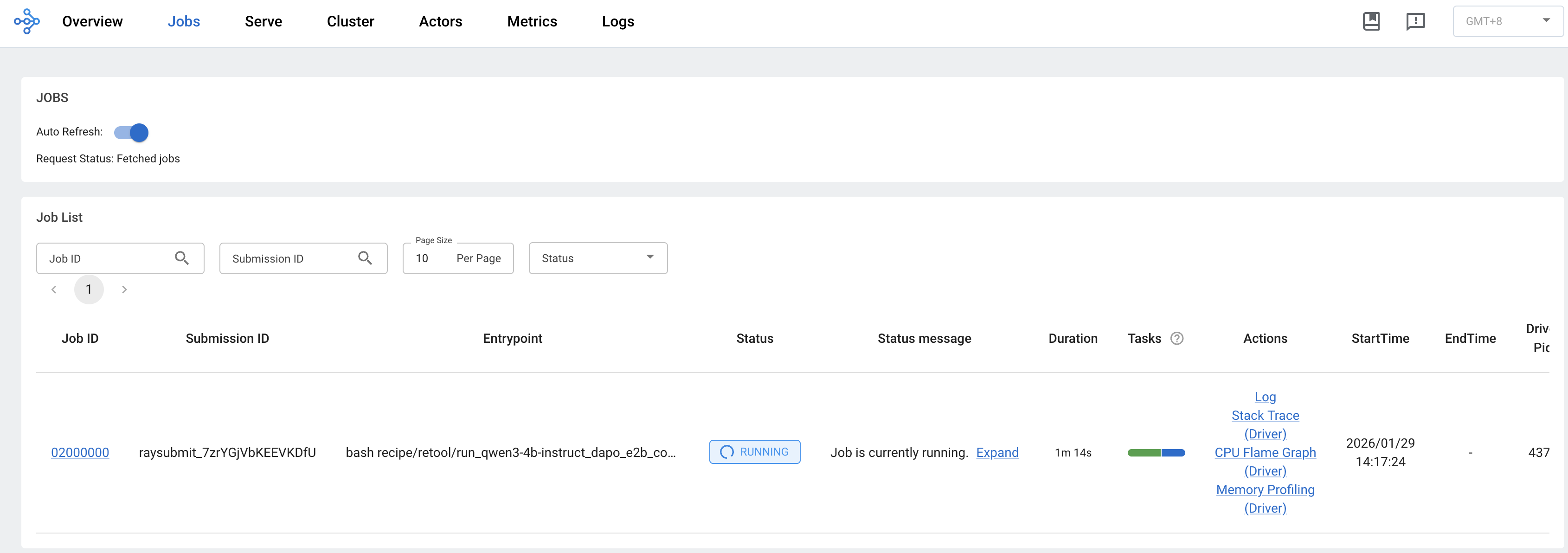
Dashboard 的 Jobs 页面:
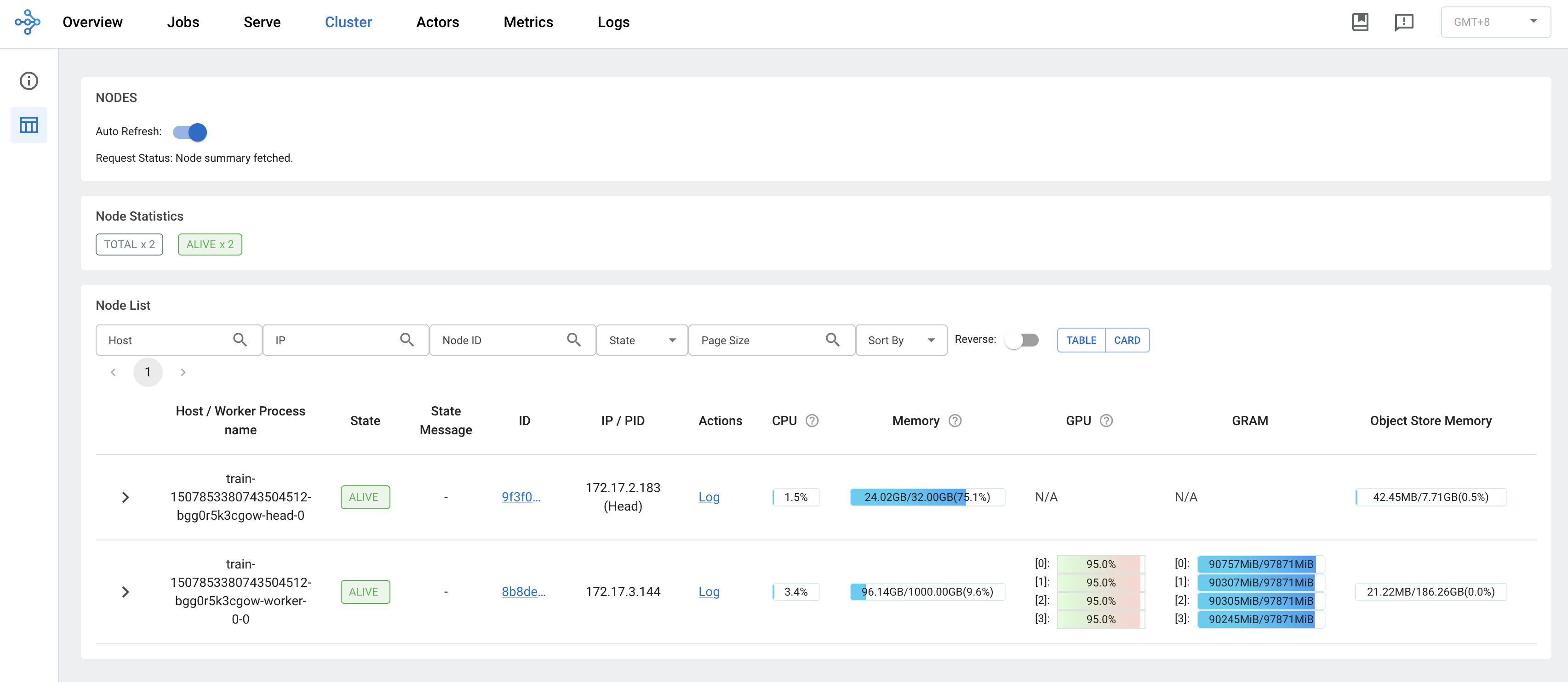
Dashboard 的 Cluster 页面: