开发准备
1. 注册腾讯云账号,单击进入 文字识别控制台,即可开通相应服务。
2. 在 账号中心 获取 API 密钥。
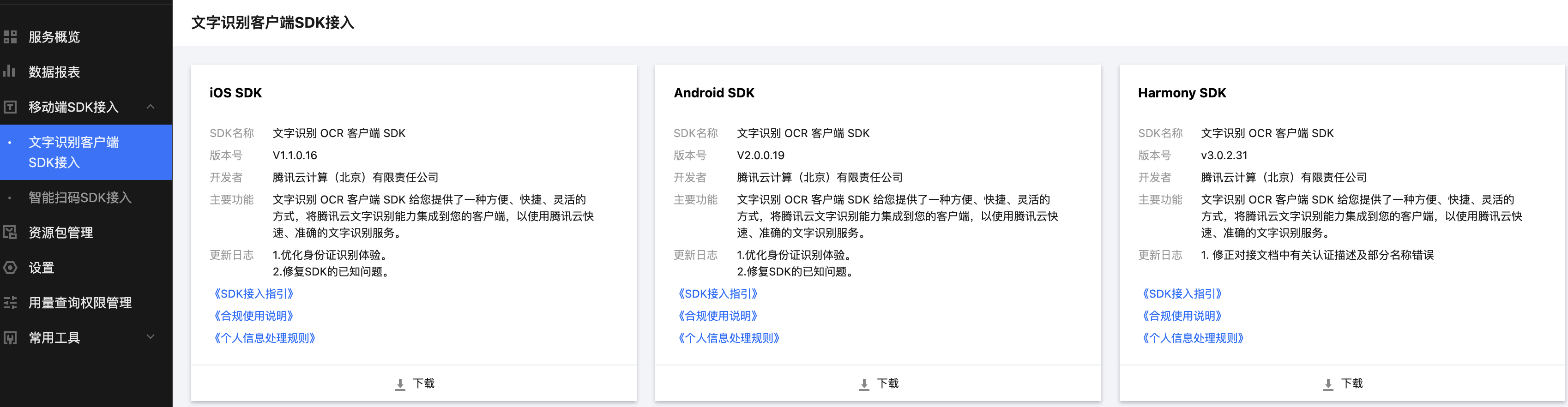
3. 前往文字识别客户端 SDK 接入页面 下载对应 SDK。
iOS 端 OCR SDK 接入流程
iOS 端 OCR SDK 介绍
SDK 中包含了以下 framework 库以及资源文件:
OcrSDKKit.framework - OCR 对外接口、页面设置及网络请求库
YTImageRefiner.framework - 图片解析
tiny_opencv2.framework - opencv 库
tnn.framework - 底层深度学习库
OcrSDK.bundle - 资源文件
Photos.framework - 相册资源库
环境依赖
当前 iOS OCR 识别 SDK 版本适用于 iOS 11.0 及以上的版本
开发工具使用 Xcode 11 或以上版本集成开发
接入步骤
1. 将 OCR Framework、系统 Framework 库以及 bundle 文件都添加至项目中。
├── OcrSDKKit.framework├── YTImageRefiner.framework├── tiny_opencv2.framework└── tnn.framework//系统库├── Accelerate.framework├── Photos.framework├── PhotosUI.framework└── CoreML.framework
//资源文件└── OcrSDK.bundle
2. 添加编译选项
将调用 SDK的ViewController 设置为 Objective-C++Source 或者更改后缀为.mm(sdk 内部使用了 Objective-C++ 语法)
Other Linker Flags添加为 -ObjC
3. 权限设置
OCR SDK 需要手机网络、 摄像头、访问相册的使用权限,请添加对应的权限声明。
<key>Privacy - Camera Usage Description</key><string>OCR识别需要开启您的摄像头权限,用于识别</string><key>Privacy - Photo Library Usage Description</key><string>OCR识别需要您开启相册权限,浏览您的照片</string><key>Prevent limited photos access alert</key><Boolean>YES</Boolean>
SDK 接口说明
SDK 初始化
客户初始化 OCR SDK
#import <OcrSDKKit/OcrSDKKit.h>#import <OcrSDKKit/OcrSDKConfig.h>static NSString* const SECRET_ID = @""; // SECRET_ID 信息static NSString* const SECRET_KEY = @""; // SECRET_KEY 信息/*!* OCR 配置类:* ocrModeType: 检测类型 OCR_DETECT_MANUAL 手动拍摄; OCR_DETECT_AUTO_MANUAL 自动识别卡片*/OcrSDKConfig *ocrSDKConfig = [[OcrSDKConfig alloc] init];ocrSDKConfig.ocrModeType = _ocrModel;/// SDKKIt 加载 OCR 配置信息/// @param secretId Secret id/// @param secretKey Secret key/// @param ocrConfig ocr 配置类[[OcrSDKKit sharedInstance] loadSDKConfigWithSecretId:nil withSecretKey:nil withConfig:ocrSdkConfig];
进入 OCR 主页面
/*!* OCR UI 配置类:*/CustomConfigUI *customConfigUI = [[CustomConfigUI alloc] init];customConfigUI.remindConfirmColor = [UIColor blueColor];/// 启动 SDK 模块,运行带有 UI 界面的功能识别模块/// @param OcrType 识别模式/// @param customConfigUI UI 配置对象/// @param onProcessSucceed 成功回调 block/// @param onProcessFailed 失败回调 block[[OcrSDKKit sharedInstance] startProcessOcr:IDCardOCR_BACK withSDKUIConfig:customConfigUI withProcessSucceedBlock:^(id _Nonnull resultInfo, UIImage *resultImage, id _Nonnull reserved) {///resultInfo 识别成功信息(json)///resultImage 识别成功后截取的图片} withProcessFailedBlock:^(NSError * _Nonnull error, id _Nullable reserved) {///error 错误信息///reserved 一般会回传 requestid,定位错误}];
更新临时密钥
OCR SDK 支持使用临时密钥接口,使用临时密钥的好处主要有以下两点,第一将固定密钥与终端分离可以增加安全性;第二因为兑换临时密钥是您完全可控的行为,因此您可以根据自定义规则来控制最终用户的接口访问权限。因此建议您使用临时密钥的方式,具体可以参考文档 (临时密钥文档与流程链接)
/// @param tmpSecretId 临时 SecretId/// @param tmpSecretKey 临时密钥信息/// @param token 临时兑换 token[[OcrSDKKit sharedInstance] updateFederationToken:tmpSecretId withTempSecretKey:tmpSecretKey withToken:token];
SDK 资源释放
/// 清理 SDK 资源[OcrSDKKit clearInstance];
目前 OCR SDK 支持七种类型的识别模式如下表所示。
OcrType 类型 | 代表含义 |
OcrType.IDCardOCR_FRONT | 身份证人像面识别模式 |
OcrType.IDCardOCR_BACK | 身份证国徽面识别模式 |
OcrType.BankCardOCR | 银行卡正面识别模式 |
OcrType.BusinessCardOCR | 名片卡正面识别模式 |
OcrType.MLIdCardOCR | 马来西亚身份证识别模式 |
OcrType.LicensePlateOCR | 汽车车牌识别模式 |
OcrType.VinOCR | 汽车 VIN 码识别模式 |
OcrType.VehicleLicenseOCR_FRONT | 行驶证主页识别模式 |
OcrType.VehicleLicenseOCR_BACK | 行驶证副页识别模式 |
OcrType.DriverLicenseOCR_FRONT | 驾驶证主页识别模式 |
OcrType.DriverLicenseOCR_BACK | 驾驶证副页识别模式 |
OcrType.VinOCR2 | 汽车VIN码识别模式(高精度版) |
OcrType.HKIDCardoCR_03 | 中国香港身份证03版本识别模式 |
OcrType.IDCardOCR_HK18 | 中国香港身份证18版本识别模式 |
OcrType.PermitOCR | 港澳台通行证识别模式 |
OcrType.MLIDPassportocR | 国际护照识别模式 |
OcrType.HmtResidentPermitOCR | 港澳台居住证 |
常见错误
1. 当提示 requsetConfigDict is nil,检查下是不是在进入 SDK 时,执行了 [OcrSDKKit cleanInstance] 把密钥和配置设置清除了。
2. SDK 页面依托于 UIWindow,所以需要在 AppDelegate.h 中添加 @property (nonatomic, strong) UIWindow * window;。
3. 当出现进入 SDK 黑屏,控制台打印日志 Application tried to push a nil view controller on target....,需要在 build setting -> Other Linker Flags 里设置添加 -ObjC。
4. Building for iOS Simulator, but the linked and embedded framework 'OcrSDKKit .framework' was built for iOS + iOS Simulator.
解决方法是:Buil Settings --> Build Options --> Validate Workspace 改为 Yes


