Apache Airflow 是一款开源的工作流管理系统,集成了编排、调度、监控以及图形化展示等功能。在数据仓库场景,Airflow 则可以应用于 ETL 任务的管理。本文主要介绍如何在云端服务器上搭建 Airflow。
Airflow 默认安装
1. 购买 云服务器。
注意
本文以 CentOS 8.0 为例。

2. 安装依赖软件
安装 Airflow 前,需安装如下依赖。
yum install redhat-rpm-config -yyum install mysql-devel -yyum install python3-devel -ydnf update gcc annobin -y
3. 创建 Home 目录
mkdir -p /usr/local/services/airflowexport AIRFLOW_HOME=/usr/local/services/airflow
AIRFLOW_HOME 变量可以配置到
/etc/profile 文件中。4. 安装 Airflow
pip install apache-airflow[mysql]
5. 初始化 DB
airflow initdb
6. 配置安全组
Airflow 的 webui 默认启动在8080端口,如果想要通过外网访问,需要打开安全组的8080。

7. 启动 webui
使用如下命令:
airflow webserver -D
如果通过
url http://{ip}:8080/admin/可以正常访问页面,则代表配置成功。处理时区
Airflow 使用 UTC 时间,与北京时间差8个小时,因此需要进行处理,由于 Airflow 写死部分代码,因此除了修改配置文件外,也需要修改源码,步骤如下:
1. 修改
AIRFLOW_HOME下的airflow.cfgdefault_timezone = utc 修改为 default_timezone = Asia/Shanghaidefault_ui_timezone = UTC 修改为 default_ui_timezone = Asia/Shanghai
2. 修改文件
/usr/local/lib/python3.6/site-packages/airflow/utils/timezone.py
在语句 utc = pendulum.timezone('UTC') 下新增如下语句:from airflow.configuration import conftry:tz = conf.get("core", "default_timezone")if tz == "system":utc = pendulum.local_timezone()else:utc = pendulum.timezone(tz)except Exception:pass
修改函数
utcnow():d = dt.datetime.utcnow() 修改为 d = dt.datetime.now()
3. 修改文件
/usr/local/lib/python3.6/site-packages/airflow/utils/sqlalchemy.py
在语句 utc = pendulum.timezone('UTC')下添加如下内容:from airflow.configuration import conftry:tz = conf.get("core", "default_timezone")if tz == "system":utc = pendulum.local_timezone()else:utc = pendulum.timezone(tz)except Exception:pass
注释语句:
cursor.execute("SET time_zone = '+00:00'")
4. 修改文件
/usr/local/lib/python3.6/site-packages/airflow/www/templates/admin/master.htmlvar UTCseconds = (x.getTime() + x.getTimezoneOffset()*60*1000);修改为var UTCseconds = x.getTime();
"timeFormat":"H:i:s %UTC%",修改为"timeFormat":"H:i:s",
5. 重启 webserver
cat {AIRFLOW_HOME}/airflow-webserver.pidkill {pid}airflow webserver -D
使用云数据库 MySQL 存储数据
Airflow 默认使用嵌入式的 Sqlite 存储数据,如果要上生产环境,必须满足高可用的要求,这里以云数据库 MySQL 为例,步骤如下:
1. 购买 云数据库 MySQL
注意
必须是高可用版或者金融版,基础版由于不支持 explicit_defaults_for_timestamp 参数,因此无法作为 Airflow 的存储。
2. 修改参数
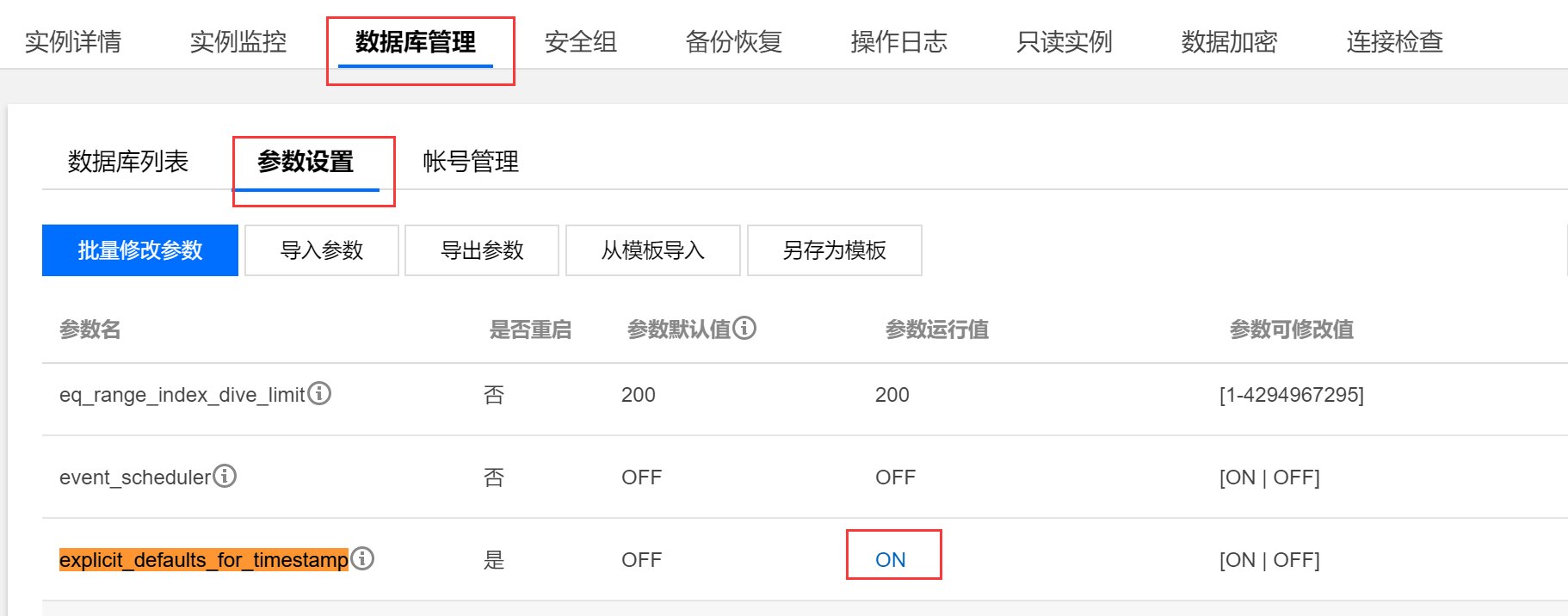
在控制台修改参数 explicit_defaults_for_timestamp 为 ON,修改后如下:
3. 创建 DB 及用户
登录 MySQL,运行如下语句,其中用户名及密码可根据用户情况进行修改。
create database airflow;create user 'airflowuser'@'%' identified by 'pwd123';grant all on airflow.* to 'airflowuser'@'%';flush privileges;
4. 修改
{AIRFLOW_HOME}/airflow.cfg 中的配置sql_alchemy_conn = sqlite:////usr/local/services/airflow/airflow.db修改为sql_alchemy_conn = mysql://airflowuser:pwd123@{ip}/airflow
5. 重新初始化数据库
airflow initdb
如果想保留之前的运行数据,可运行如下命令:
airflow resetdb


