MyBatis详解


文章目录
- 一、MyBatis概述
- 二、MyBatis事务管理机制
- 三、CRUD
- 四、Mapper文件namespace属性
- 五、动态SQL
- 六、MyBatis核心配置
- 七、分页查询插件PageHelper
- 八、高级映射
- 九、MyBatis缓存机制
- 十、MyBatis注解式开发
- 十一、其他
一、MyBatis概述
1.1、什么是框架
- 框架英文
Framework - Java常用框架:
- SSM三大框架:Spring + SpringMVC + MyBatis
- SpringBoot
- SpringBoot
- …
- 框架其实就是对通用代码的封装。提前写好了一对接口和类,我们可以在项目中直接引入这些接口和类(引入框架),基于框架开发可以大大提高开发效率。
- 框架一般都以jar包形式存在。(jar包中有class文件以及各种配置文件等)
1.2、三层架构
- MyBatis就是持久层DAO框架,负责数据的CRUD。
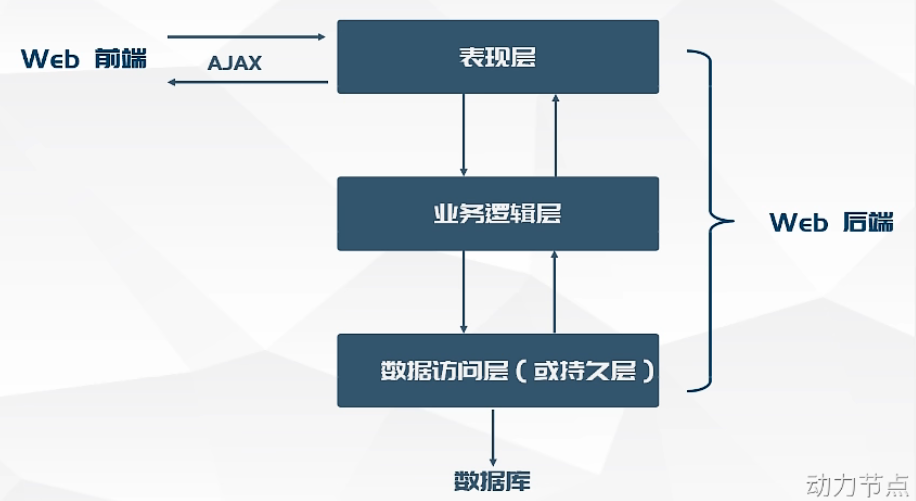
三层架构详解见:MVC模式与三层架构的关系
1.3、JDBC的不足
- SQL语句在Java程序中写死了,改SQL的话就要改Java代码,不够灵活。违背了开闭原则OCP。
- JDBC操作繁琐。能不能自动化?
- 开闭原则:在面向对象编程领域中,开闭原则规定"软件中的对象(类,模块,函数等等)应该对于扩展是开放的,但是对于修改是封闭的",这意味着一个实体是允许在不改变它的源代码的前提下变更它的行为。 该特性在产品化的环境中是特别有价值的,在这种环境中,改变源代码需要代码审查,单元测试以及诸如此类的用以确保产品使用质量的过程。
1.4、MyBatis概述
- MyBatis本质上就是对JDBC的封装,通过MyBatis完成CRUD。
- MyBatis在三层架构中属于持久层,也就是持久层框架。
- MyBatis是一个基于Java的持久层框架。
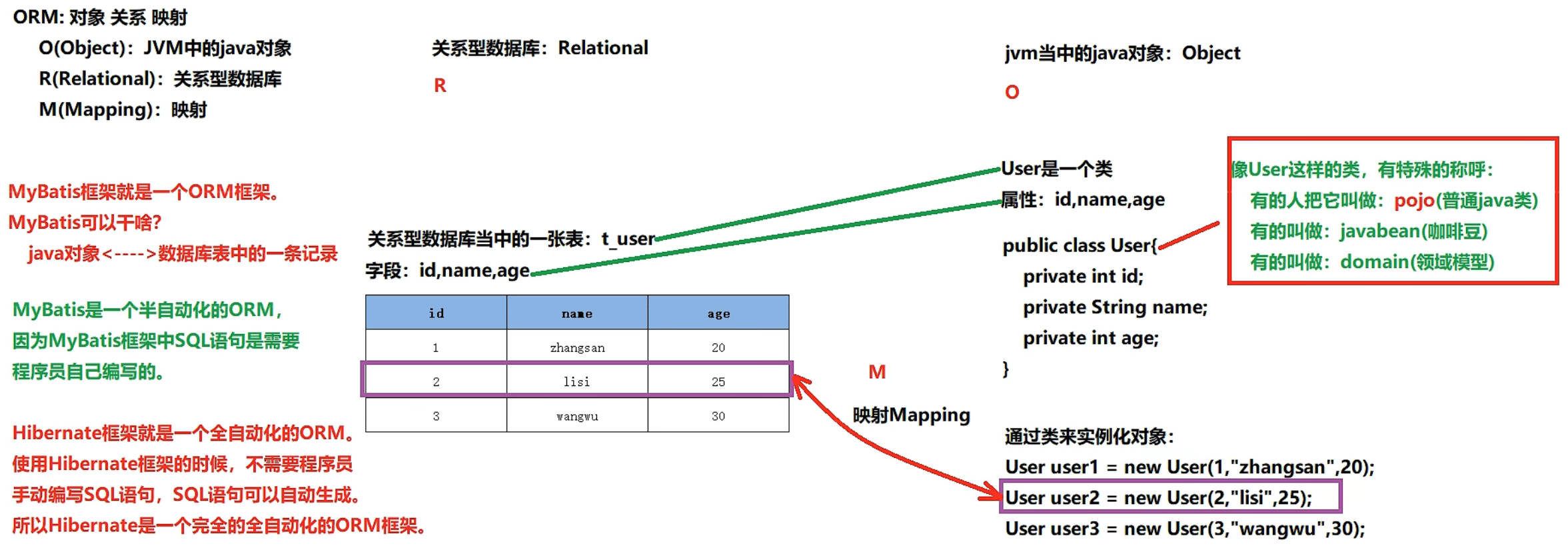
- ORM(Object Relational Mapping):对象关系映射
- 一个类对应一张表
- 一个对象对应一条记录
- 一个属性对应一个字段
1.5、MyBatis优点
- 支持定制化SQL(可以做SQL优化)、存储过程、基本映射以及高级映射。
- 避免了几乎素有的JDBC代码手动设置参数以及获取结果。
- 支持XML开发、也支持注解式开发。(为保证sql语句的灵活,mybatis大部分使用XML开发)
- 将接口和Java的POJOs(普通Java对象)映射成数据库中的记录。
- 体积小:两个jar包,两个XML配置文件。
- 完全做到sql解耦合。
- 提供基本映射标签和高级映射标签。
- 提供XML标签,支持动态SQL的编写。
二、MyBatis事务管理机制
在mybatis-config.xml文件中,可以通过以下配置进行MyBatis事务管理:<transactionManager type="JDBC/MANAGED" />
- type属性的值不区分大小写。
- 若没有配置
<transactionManager type="JDBC/MANAGED />则未开启事务。
MyBatis提供了两种事务管理机制:
- JDBC事务管理器:MyBatis框架自己管理事务,底层执行的是JDBC事务管理代码。
- MANAGED事务管理器:MyBatis自己不再管理框架,交给其他容器管理。如:Spring。
事务版MyBatis代码
// 这个版本仅用于理解,实际使用见下一个版本
    public static void main(String[] args){
    	// 因为sqlSession用于控制事务,声明在try中的话有作用域限制。
        SqlSession sqlSession = null ;
        try{
            // 1.获取SqlSessionFactoryBuilder对象
            SqlSessionFactoryBuilder sqlSessionFactoryBuilder = new SqlSessionFactoryBuilder();

            // 2.获取SqlsessionFactory对象
            InputStream s =  Resources.getResourceAsStream("mybatis-config.xml");
            SqlSessionFactory sqlSessionFactory = sqlSessionFactoryBuilder.build(s);

            // 3.获取SqlSession对象,开启事务openSession
            sqlSession = sqlSessionFactory.openSession();

            // 4.执行sql,处理业务
            int count = sqlSession.insert("insertTt");
            System.out.println("插入几条记录:"+count);

            // 5.关闭事务
            sqlSession.commit();
        } catch (Exception e){
            // 出现异常时回滚事务
            if (sqlSession != null){
                sqlSession.rollback();
            }
            e.printStackTrace();
        } finally {
            if (sqlSession != null){
                // 回滚事务后,关闭会话(释放资源)
                sqlSession.close();
            }
        }
    }
三、CRUD
MyBatis获取参数值的两种方式:${},#{}
- {}:本质是字符串拼接,存在sql注入问题。使用格式:'{xxx}',注意有单引号。
#{}:本质是占位符,能用#{}就不要用${}。底层使用的JDBC的"?"占位符。
MyBatis工具类
因为一个数据库对应一个SqlSessionFactory对象,因而只创建一个SqlSessionFactory对象即可,不用每次都在方法中创建一个SqlSessionFactory对象。所以将其封装为工具类使用,不用每次都创建。
// SqlSessionUtil工具类
public class SqlSessionUtil {
    // 工具类的构造方法一般都是私有化的
    // 工具类中所有的方法都是静态的,直接使用类名调用,不需要new对象
    // 为了防止new对象,构造方法私有化
    private SqlSessionUtil(){}

    private static SqlSessionFactory sqlSessionFactory;

    // 类在加载时执行,且只执行一次
    // SqlSessionUtil工具类在进行第一次加载的时候,解析mybatis-config.xml文件。创建SqlSessionFactory对象。

    static {
        try{
            sqlSessionFactory = new SqlSessionFactoryBuilder().build(Resources.getResourceAsStream("mybatis-config.xml"));
        } catch (IOException e) {
            throw new RuntimeException(e);
        }
    }

    // 获取会话对象
    public static SqlSession openSession(){
        return sqlSessionFactory.openSession();
    }

}


// 在DAO中调用工具类
SqlSession sqlSession = SqlSessionUtil.openSession();
int count = sqlSession.insert("insertTt");
System.out.println(count);
sqlSession.commit();
sqlSession.close();
3.1、Create增
3.1.1、用Map集合入参
开发中,我们插入数据时,不能在Java中把值写死,而是从前端获取,那么应该怎么做呢:
- 在mapper的sql语句中,值用
#{index}占位,index是Map的key。 - 在DAO中调用insert方法时,传入sql的id和一个对象即可。
- 开发中Map的key为字段名。
示例:
	// Mapper
// null表示没有值,数据库也会是null
// 这里的index必须和Map中的key对应,否则数据库值为null。因为index匹配不到相应的值,相当于没有插入值。
<insert id="insertXxx">
	insert into 表(字段1,字段2,字段3,字段4) values(null,#{k1},#{k2},#{k3});
</insert> // DAO
// 使用Map集合对前端传来的数据进行封装。
Map<String,Object> map = new HashMap();
map.put("k1","value1");
map.put("k2","value2");
map.put("k3","value3");
// 开发中Map的key为字段名。
// insert方法可以如两个参:sql的id,一个对象
// 对象是封装的数据,sql语句会从这个对象读取数据
int count = sqlSession.insert("insertXxx",map);
System.out.println(count);
sqlSession.commit();
sqlSession.close();3.1.2、用Bean普通对象入参
步骤:
- 新建一个实体类,属性的数据类型建议使用包装类型,可以防止null值问题。
- 在DAO中传值创建实体类的实体对象
- 这里的是使用类的属性占位,
- 但匹配值的时候不是用属性去匹配的,而是调用属性对应的get方法获取值。
- 比如carNum,会调用getCarNum()方法获取值。
- 若获取不到值,则会报错,而不是使用null值。
示例:
// Car实体类
public class Car {
	// 数据类型用包装类型,防止null值。
	private Long id;
	private String carNum;
	private Double brand;
	...省略setter、getter、构造方法
}

// Mapper
<insert id="insertXxx">
	insert into 表(字段1,字段2,字段3,字段4) values(null,#{carNum},#{brand});
</insert>

// DAO
public void xxx(){
	Car car = new Car(null,'1001','奥迪')
}
int count = sqlSession.insert("insertXxx",car)
...
sqlSession.commit();
sqlSession.close();
3.1.3、多个参数入参
前面讲的方法都是传递一个参数,那么传递多个参数怎么传递呢?
如果传递多个参数mybatis怎么做的呢?
- mybatis框架会自动创建一个Map集合,并且创建自增的key,将参数按顺序作为value
- map.put(“arg0”,name)
- map.put(“arg1”,sex)
- …
- 或
- map.put(“param1”,name)
- map.put(“param2”,sex)
- …
- 注意arg和param起始索引不一样。
<select id="" resultType="">
	select * from 表 where xxx=#{arg0} and xxx=#{arg1}
	或
	select # from 表 where xxx=#{param1} and xxx=#{param2}
</select>// 传递name,sex两个参数
List<XXX> 方法名(String name, Character sex);3.1.4、多参用@param注解入参
对于多个参数入参,前面那种方式可读性太差,可以使用注解入参。
使用@param注解命名参数:
- 此时MyBatis会将这些参数放在一个map集合中,以两种方式进行存储:
- 以@param注解的值为key,以参数为value。
- 以param1,param2…为key,以参数为值。
- @params(“值”) 参数。
- 注解:@param(value=“值”),value属性可省@param(“值”)
- 一般参数少于5个时使用该方法,简单的语句用注解,复杂的语句用XML。
// Mapper
<!-- id和注解方法名一致 -->
<select id="getUsers" resultType="映射类型">
  select id, car_num
  from 表
  where id = #{id} and car_num = #{num} //值直接使用注解的值即可
</select>// DAO
public List<Car> getUsers(@Param("num") String carNum, @Param("brand") Double brand);3.2、Retrieve查
3.2.1、普通查询
// Mapper
<!-- 根据id查询一个,resultType指定将结果集封装成什么类型的对象(映射类型) -->
<!-- 全限定类名:就是类名全称,带包路径的用点隔开,例如: java.lang.String。
即全限定名 = 包名+类型 -->
<!-- 映射类型要更具返回值类型来指定,可以使用类型别名(见官网,如java.lang.Integer别名为int或integer)-->
<select id="selectById" resultType="全限定类名">
	select * from 表 where id=#{id}

	<!-- 当存在复合词时,通常数据库使用“-”链接,Java使用“小驼峰”,
	因而需要用as给结果集取别名,否则mybatis在结果集中匹配不到相应字段的值,导致返回值为null。 -->
	select id,car_name as carName,brand from 表 where id=#{id}
</select>

<!-- 查询所有,resultType指定将结果集封装成什么类型的对象 -->
<select id="selectAll" resultType="全限定类名">
	select * from 表
	select id,car_name as carName,brand from 表
</select>

<!-- 但是上面这种用别名的范式不够灵活,若有多条这样的语句,每次都要取别名,太麻烦 -->
<!-- 用sql片段 -->
<sql id="brand_column">
	id,car_name as carName,brand
</sql>
<select id="selectAll" resultType="全限定类名">
	select <include refid="brand_column" /> from 表
</select>

<!-- 上面这种方式也不够灵活,因为有的字段可能不需要,就要定义多个sql片段 -->
<!-- 使用resultMap,resultMap会自动根据查询的字段完成映射 -->
<!-- id:resultMap唯一标识;type:映射的类型,支持别名(将结果集封装成什么类型的对象)-->
<resultMap id="brandResultMap" type="全限定类名">
	<!-- 给id取别名 -->
	<id cloumn="表中的字段" property="实体类的属性" />

	<!-- 给一般字段取别名 -->
	<result column="表中的字段" property="实体类的属性" />
</resultMap>

将select中resultType换成resultMap
<select id="selectAll" resultMap ="resultMap的id">
	select * from 表
	select car_name from 表 // 不用再指定别名
</select>// Car实体类
public class Car {
// 数据类型用包装类型,防止null值。
private Long id;
private String carNum;
private Double brand;
...省略setter、getter、构造方法
}
/****************************************************************/
// DAO
// 查询一个
Object car = sqlSession.selectOne("selectById",id);
System.out.println(car);
sqlSession.close();
/****************************************************************/
// 查询所有
List<Object> cars = sqlSession.selectList("selectAll");
// 遍历
cars.forEach(cars->System.out.println(car));
sqlSession.close();驼峰命名自动映射
- 对于结果集中数据库字段("-"连接)和Java属性(驼峰)命名规则不一样,导致无法映射值,mybatis还提供了一种方式来自动映射。
- 使用这种方式的前提是:属性名遵循Java的命名规范,数据库表的列名遵循SQL的复合词命名规范。
- Java命名规范:采用小驼峰
- SQL命名规范:全部小写,复合词用“-”连接
- 字段名称必须保持一样,比如:carName–>>car_name单词。如果有拼写错误则无法映射。
在mybatis-config,xml文件中开启驼峰映射:
<!--放在properties后边-->
<settings>
	<setting name="mapUnderscoreToCamelCase" value="true" />
</settings>
开启后,在mapper的sql标签的resultType中就可以直接写类名,mybatis会自动映射
<selece id="" resultType="类名"></select>3.2.2、模糊查询
- select * from 表 where xxx like '%{xxx}%',使用{}拼接字符串
select * from 表 where xxx like concat('%',#{xxx},'%'),使用MySQL的concat()函数拼接字符串select * from 表 where xxx like "%"#{xxx}"%",使用#{}拼接字符串
3.3、Update改
根据id修改:值的传递可以根据增得方法使用Map或Bean来封装。
<update id="updateById">
	update 表 set
		car_num=#{carNum},
		brand=#{brand}
	where
		id=#{id}
</update>// Car实体类
public class Car {
// 数据类型用包装类型,防止null值。
private Long id;
private String carNum;
private Double brand;
...省略setter、getter、构造方法
}
// DAO
Car car = new car(4L,"1001","50")
int count = salSession.update("updateById",car)
...
sqlSession.commit();
sqlSession.close();3.4、Delete删
// Mapper
// 删除一个
<!-- 如若只有一个占位符,占位符里的值可以随便写,但最好见名知意 -->
<delete id="delById">delete from 表 where id = #{id}</delete>

// 批量删除1
<delete id="deleteParamsByIds">
	<!--
		collection表示参数的类型,可以选择array list;
		open在语句开始位置添加内容,close在语句结束位置添加内容;
		item当前元素,如果是array就表示array[i],如果是list就表示当前下标对象;
		separator分隔符,一般选用半角,(逗号)
	 -->
	delete from ts_sys_params where id in
	<foreach collection="array" open="(" close=")" item="item" separator="," >
   	 #{item}
	</foreach>
</delete>

// 批量删除2
int deleteMore(@param("ids")String ids)
<delete id="deleteMore" >
<!-- 不能用#{},因为他会给每一个值添加单引号,如:'1','2','3' -->
delete from 表 where id in(${ids})
</delete>// DAO
int count = sqlSession.delete("delById",id)
...
sqlSession.commit();
sqlSession.close();3.5、动态设置表名
在SQL优化中,我们会将数据拆分为多个表,查询的时候可以指定不同表名来查询,可以通过“${}”动态设置表的值。
List<Car> getAlluser(@param("tableName") Striing tableName);<select id="getAlluser" resultType="映射类型">
select * from ${tableName}
</select>3.6、insert时获取自增主键的主键
有时候,我们在插入记录的时候需要获取插入记录的自增主键id的值,因为JDBC支持该功能,所以MyBatis也支持。
<!--
useGeneratedKeys:设置当前sql使用了自增主键,会返回主键值;
keyProperty:返回的主键映射到结果集的哪个属性上
 -->
<insert id="sqlId" useGeneratedKeys="true" keyProperty="id">
	insert into ....
</insert>
3.7、getMapper方法
开发中我们定义一个DAO接口,其实现类需要我们自己去写,太过麻烦。mybatis提供了SqlSession.getMapper方法为我们动态生成DAO接口的实现类,我们只需要写一个dao接口和抽象方法即可。
mybatis采用了代理模式,在内存中生成dao接口的代理类,然后创建代理类的实例对象。
使用getMapper的前提是:SqlMapper.xml文件中的namespace必须是dao接口的全限定名称,id必须是dao接口的方法名。
使用方法:
SqlSession sqlSession = SqlSessionUtil.openSession();
StudentMapper mapper = sqlSession.getMapper(StudentMapper(是接口).class);
四、Mapper文件namespace属性
在mapper.xml文件的mapper标签有一个namespace属性,用来指定命名空间。防止sqlId重复。
- 若存在多个<mapper namespace=“xxx”>标签,mapper标签中又有同名的sqlId,
- 此时在DAO中就要通过:
namespace.id来指定sql语句,比如List<Object>> cars = sqlSession.selectList("namespace.id") - 否则mybatis不指定该执行哪个mapper的sql。
- 实际上
namespace.id也是指定sqlId的完整写法。
五、动态SQL
5.1、if标签
if标签可以用于动态拼接sql语句。
<select id="" resultType="">
	select * from 表 where

	<!--
		当test返回true,当前标签的sql语句才会被拼接,
		test中写拼接当前sql的条件判断语句,
		mybatis的动态sql不能使用“&&”,只能使用and。
	 -->
	<if test="条件语句">sql语句</if>
	<if test="条件语句">sql语句</if>
</select>
5.2、where标签
where标签的作用:让where子句更加动态智能。
- 所有条件都为空时,where标签保证不会生成where子句(若<where>中的<if>全为false,则没有where从句)。
- 自动去除某些sql子句前面多余的and或or,针对if中的sql语句。
<select id="" resultType="">
select * from 表
	<where>
		<if test="条件语句">sql语句</if>
		<if test="条件语句">sql语句</if>
	</where>
</select>
5.3、trim标签
- prefix:在trim标签中的语句最前面添加内容
- suffix:在trim标签中的语句最末尾添加内容
- prefixOverrides:删除前缀,删除每条子句前面的内容
- suffixOverrides:删除后缀,删除每条子句末尾的内容
<select id="" resultType="">
select * from 表
	<!--
		prefix="where":在第一个if子句前面加上where;
		suffixOverrides="and|or":删除每个if子句末尾的and或or;
	 -->
	<trim prefix="where" suffixOverrides="and|or">
		<if test="条件语句">sql语句</if>
		<if test="条件语句">sql语句</if>
	</trim>
</select>
5.4、set标签
- 主要在update语句中使用,用来生成SET关键字,同时去掉最后多余的“,”。
- 比如我们只提交不为空的字段;或不更新值为空的字段。
<update id="">
	update 表
		<set>
			<if test="carNum != null and carNum != ''">car_num=#{carNum},</if>
			<if test="brand !=null and brand != ''">brand=#{brand},</if>
		</set>
	where id = #{id}
</update>
5.5、choose标签
- <choose>、<when>、<otherwise>这三个标签常常一起使用。
- 相当于if-else if-else一样
<choose>
	<!-- 执行test条件成立的那个sql子句,若都为false则执行otherwise子句 -->
	<when test="条件">sql子句</when>
	<when test="条件">sql子句</when>
	<when test="条件">sql子句</when>
	<otherwise>sql子句</otherwise>
</choose>
5.6、foreach批量删除
- sql批量删除:
delete from 表 where id in(1,2,3);delete from where id=1 or id=2 or id=3;
- foreach标签批量删除:
collection:指定数组或集合,指只能是array或arg0或注解item:每次遍历的当前项名称separator:每一项之间的分隔符open:循环语句开始的内容close:循环语句结束的内容
// 法1
<delete id="sqlId">
	<!-- delete from 表 where id in(1,2,3) -->
	delete from 表 where id in
	<!-- collection表示参数的类型,可以选择array list;
	open在语句开始位置添加内容,close在语句结束位置添加内容;
	item当前元素,如果是array就表示array[i],如果是list就表示当前下标对象;
	separator分隔符,一般选用半角,(逗号)
 -->
 	<!-- 这里in后面的“()”在foreach中指定了 -->
	<foreach collection="array" open="(" close=")" item="item" separator="," >
   	 #{item}
	</foreach>
</delete>

// 法2
<delete id="sqlId">
	delete from 表 where
	<foreach collection="array" iteam="iteam" separator="or">
		id=#{iteam}
	</foreach>
</delete>
5.7、foreach批量插入
sql批量插入:
insert into 表 values(xxx,xxx,xxx),(xxx,xxx,xxx),(xxx,xxx,xxx)foreach批量插入:
<insert id="sqlId">
	insert into 表 values
	<foreach collection="数组|集合" iteam="iteam" separator=",">
		(#{iteam.xxx},#{iteam.xxx},#{iteam.xxx},#{iteam.xxx})
	</foreach>
</insert>
5.8、sql标签与include标签
- <sql>标签用来声明sql片段
- <include>标签用来将sql片段包含到sql语句中
- 作用:实现代码复用,易于维护
// sql片段
<sql id="sqlId">
	id,
	car_num as carNum,
	...
</sql>

<select id="sqlId" resultType="映射类型">
	<!-- 使用sql片段 -->
	select <include refid="sql片段id" />
	from 表 where ...
</select>
六、MyBatis核心配置
<?xml version="1.0" encoding="UTF-8" ?>

<!--
    这里的configuration就是根标签
    .dtd规定了标签的排序、嵌套关系,对标签的排序和嵌套指定了一套规则
-->
<!DOCTYPE configuration
        PUBLIC "-//mybatis.org//DTD Config 3.0//EN"
        "https://mybatis.org/dtd/mybatis-3-config.dtd">
<configuration>
     <!--default表示默认使用的环境-->
    <environments default="development">
        <!--id指定使用的环境-->
        <environment id="development">
            <transactionManager type="JDBC"/>
            <dataSource type="POOLED">
                <property name="driver" value="com.mysql.cj.jdbc.Driver"/>
                <property name="url" value="jdbc:mysql://localhost:3306/mybatisdemo"/>
                <property name="username" value="root"/>
                <property name="password" value="2525"/>
            </dataSource>
        </environment>
    </environments>
    <mappers>
        <!--从类路径中加载资源-->
        <mapper resource="CarMapper.xml"/>
    </mappers>
</configuration>
6.1、MyBatis配置之environments开发环境
- environments:配置开发环境,一个环境连接一个数据库,对应一个SqlSessionFactory对象
- environment:配置具体提开发环境,不同的开发环境会读取不同的environment 中的配置
<!--default表示默认使用的环境-->
<environments default="development">
	<!--id指定使用的环境-->
	<!--在SqlSessionFactoryBuilder.build(ResourceAsStream("mybatis-config.xml"),环境id)可以指定环境id,若不指定则使用默认环境-->
	<environment id="development">其他配置</environment>
</environments>
6.2、MyBatis配置之transactionManager事务管理
在mybatis-config.xml文件中,可以通过以下配置进行MyBatis事务管理:<transactionManager type="JDBC/MANAGED" />
- type属性的值不区分大小写。
- 若没有配置
<transactionManager type="JDBC/MANAGED />则未开启事务。
MyBatis提供了两种事务管理机制:
- JDBC事务管理器:MyBatis框架自己管理事务,底层执行的是JDBC事务管理代码。
- MANAGED事务管理器:MyBatis自己不再管理框架,交给其他容器管理。如:Spring。
<transactionManager type="JDBC"/>6.3、MyBatis配置之dataSource数据源
- dataSource称为数据源,为程序提供Connection对象,也就是一个数据库连接池,比如:druid。
- 数据源实际上是一套JDK规定的规范:java.sql.DataSource。我们也可以自定义源组件,实现java.sql.DataSource接口即可。
- 数据库连接池配置得好也能提高系统性能。
<!--
type:指定数据源的类型,即用什么方式类获取Connection对象。有三个值,分别是:
UNPOOLED:不使用数据库连接池技术,每次请求都会创建一个新的Connectiom对象。
POOLED:使用mybatis自己实现的数据库连接池。
JNDI:集成其他第三方数据库连接池。JNIT也是一套规范,是Java命名目录接口,Tomcat、Jetty、WebLogic、WebSphere这些服务器(容器)都实现了这个规范。
集成方式:https://blog.csdn.net/qq_45872039/article/details/128623005?spm=1001.2014.3001.5501
-->
<dataSource type="">
	type的值不同,dataSource 内部的配置也不同,具体见官网
</dataSource>
6.4、properties标签/文件
- mybatis提供了更加灵活的配置properties,方便维护。
- 连接数据库的信息可以单独写到一个资源文件中,文件格式:
xxx.properties。
6.4.1、properties标签
在properties中配置的property,在其他地方可以通过这里的name来获取值,格式:${name},但也是在property标签使用。
<properties>
	 <property name="jdbc.driver" value="com.mysql.cj.jdbc.Driver"/>
     <property name="jdbc.url" value="jdbc:mysql://localhost:3306/mybatisdemo"/>
</properties>

<dataSource type="">
	<property name="driver" value="${jdbc.driver}"/>
	<property name="url" value="${jdbc.url}"/>
</dataSource>
6.4.2、properties文件
- 连接数据库的信息可以单独写到一个资源文件中,这样更方便我们去维护。
- 文件格式:
xxx.properties。
xxx.properties文件示例:
jdbc.driver=com.mysql.cj.jdbc.Driver
jdbc.url=jdbc:mysql://localhost:3306/mybatisdemo
在mybatis-config.xml文件中导入
// 导入文件
<properties resource="xxx.properties文件路径" />

// 然后就可以通过${jdbc.driver}读取配置文件
<property name="driver" value="${jdbc.driver}"/>
七、分页查询插件PageHelper
在开发中,我们要获取分页的数据其实很简单,就直接写相应的sql语句就能拿到想要的数据。但是获取分页相关的数据就比较难。
分页相关的数据:


这些信息可以返给前端用于配置分页导航栏:什么时候显示上一页,导航栏显示哪些页码等信息

7.1、MySQL分页原理
MySQL分页查询语法:
SELECT 字段 FROM 表名 LIMIT 偏移量,条目数量;SELECT 字段 FROM 表名 LIMIT 条目数量 OFFSEF 偏移量;(MySQL新特性8.0)- 偏移量:起始索引。
- 偏移量计算公式:
(pageNum-1) * pageSize
7.1、分页插件PageHelper
第一步:在pom.xml中引入PageHelper依赖,在maven坐标仓库查找。 第二步:在mybatis-config.xml文件中配置插件
<plugin interceptor="com.github.pagehelper.PageInterceptor"></plugin>第三步:在Mapper中写sql,但是分页部分的sql语句不用写,pagehelper插件会自动给我们加上。
<select id="" resultType="">
	select * from 表 // limit LIMIT 偏移量,条目数量;这部分不用写
</select>
第四步:
// 获取分页数据
PageHelper.stratPage(pageNum,pageSize);
List<Car> cars = mapper.selectAll();//cars 中包含了所有分页数据

// 获取分页数据,和额外的分页信息,acrPageInfo 包含了所有信息
PageInfo<Car> acrPageInfo = new PageInfo<>(cars,导航页码数)//导航页码数:前端导航卡片直接显示的页码数量
八、高级映射
前面讲解的都是一对一的映射关系,也就是一个类(一张表)对应一个实体(对象),但实际环境中是存在一对多、多对一、多对多的关系的。
存在多张表时,怎么区分主表和从表呢?
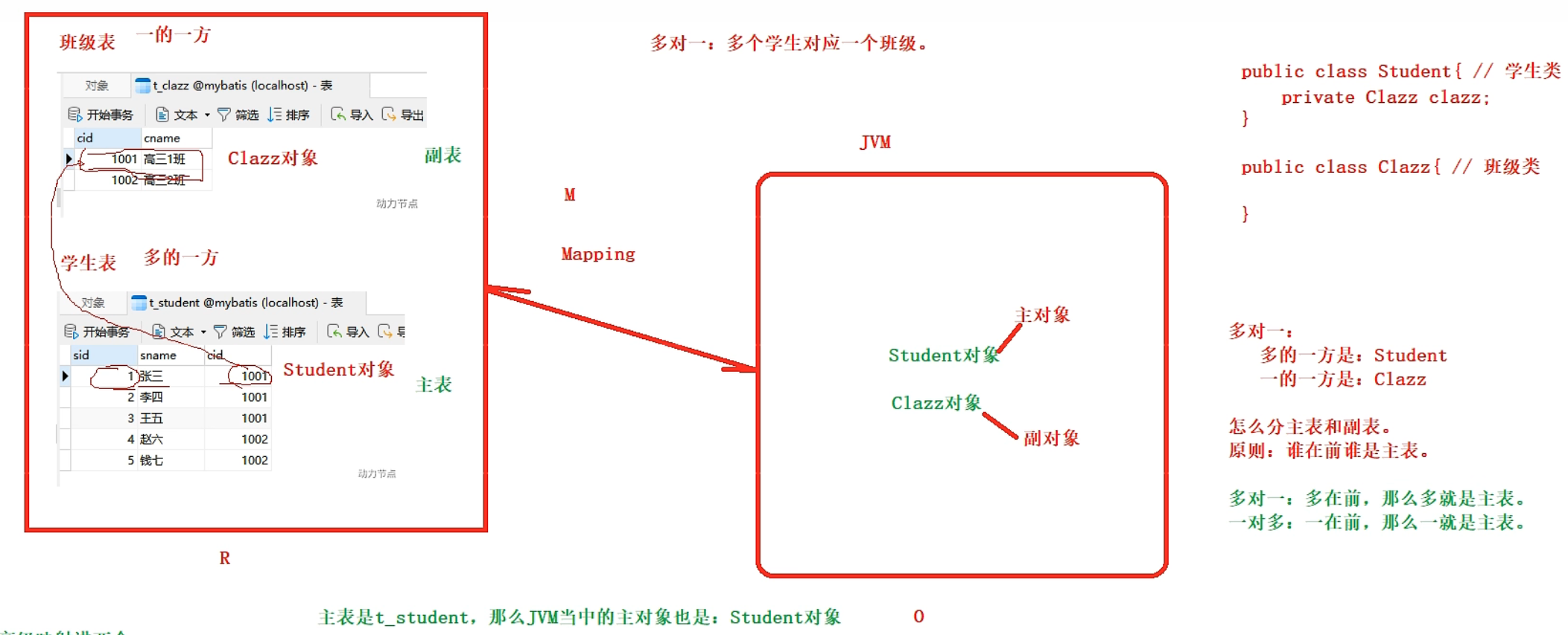
- 遵循一个原则:谁在前谁就是主表,主表是谁,映射到JVM的主对象就是谁。
- 多对一:多是主表
- 一对多 :一是主表
8.1、高级映射之多对一
8.1.1、多对一实现原理
多对一需要查询两张表,其中多的一方是主表。
多表连接需要外键来实现。如下图,当我们根据sid在学生表中查询,可以拿到学生的cid进而可以在班级表中根据cid查询。
具体的类需要这样来设计,如下图,因为Student表是主表,一张表对应的是Java的一个类,所以可以在Student这个类中可以将Clazz这个类作为其成员属性。
8.1.2、实现多对一
方式1:级联属性映射(一条SQL语句)
// 学生类
public class Student{
	private Clazz clazz;
}

// 班级类
public class Clazz{}

public interface StudentMapper{
	Student selectById(Integer id);
}<mapper namespace="com.mapper.StudentMapper">
<resultMap id="studentResultMap" type="Student">
<!--column是结果集的字段,property是Java的属性,resultMap将column的值映射到property上-->
<id property="sid" column="sid" />
<result property="sname" column="sname" />
<result property="clazz.cid" column="cid" />
<result property="clazz.cname" column="cname" />
</resultMap>
</mapper>
<select id="selectById" resultMap="studentResultMap">
select
s.sid,s.sname,c.cid,c.cname //查询两表中的数据
from
t_stu s left join t_clazz c on s.cid=c.cid //s.cid=c.cid是多表查询连接条件
where
s.sid=#{sid}
</select>SqlSession sqlSession = SqlSessionUtil.openSession();
StudentMapper mapper = sqlSession.getMapper(StudentMapper.class);
Student student = mapper.selectById(具体id);
// student结果集中有所有查询的数据方式2:关联标签(一条SQL语句)
// 学生类
public class Student{
	private Clazz clazz;
}
// 班级类
public class Clazz{}
/************************************************************************/

public interface StudentMapper{
	Student selectById(Integer id);
}<mapper namespace="com.mapper.StudentMapper">
<resultMap id="studentResultMapAssociation" type="Student">
<!--column是结果集的字段,property是Java的属性,resultMap将column的值映射到property上-->
<id property="sid" column="sid" />
<result property="sname" column="sname" />
<!--
association翻译为关联,即一个Student对象关联一个Clazz对象
property:提供被映射的属性名
javaType:指定映射的Java类型
-->
<association property="clazz" javaType="Clazz">// Student中有clazz属性。
<id property="cid" column="cid" />
<result property="cname" column="cname" />
</association>
</resultMap>
</mapper>
<select id="selectById" resultMap="studentResultMap">
select
s.sid,s.sname,c.cid,c.cname //查询两表中的数据
from
t_stu s left join t_clazz c on s.cid=c.cid //s.cid=c.cid是多表查询连接条件
where
s.sid=#{sid}
</select>SqlSession sqlSession = SqlSessionUtil.openSession();
StudentMapper mapper = sqlSession.getMapper(StudentMapper.class);
Student student = mapper.selectById(具体id);
// student结果集中有所有查询的数据方式3:分步查询,两条SQL语句(可复用,支持懒加载)
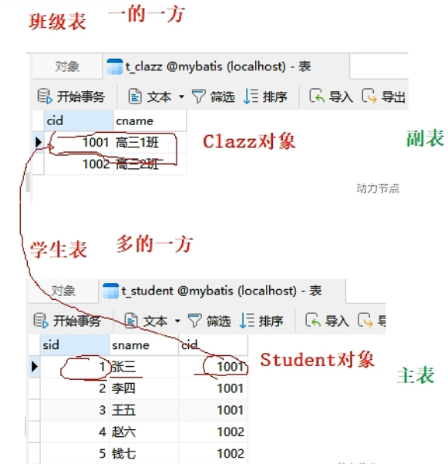
- 分布查询思路,比如下图,我们查询学生的信息:
- 第一步:根据学生表的cid(先查主表)
- 第二步:根据cid查询班级表(再查从表)
- 分步查询的优点是:
- sql可复用:因为将一条sql语句分为了两条sql语句
- 支持懒加载/延迟加载机制:有的时候再执行,比如我们只需要查主表中的某个字段的时候,就不会执行从表的查询操作,提高了性能。
- 懒加载默认是关闭的,需要手动开启。
第一步:查主表
<mapper namespace="com.mapper.StudentMapper">
	<resultMap id="studentResultMapStep" type="Student">
		<!--column是结果集的字段,property是Java的属性,resultMap将column的值映射到property上-->
		<id property="sid" column="sid" />
		<result property="sname" column="sname" />
		<!--
			association翻译为关联,即一个Student对象关联一个Clazz对象:
				property:提供被映射的属性名;
				select:指定第二条sql语句,namespace.sqlId;
				column="cid"就是第二条语句需要的cid,从这里传过去
		-->

		<association
			property="clazz"
			select="com.mapper.ClazzMapper.selectByIdStep2"
			column="cid"
		>// Student中有clazz属性。
			<id property="sid" column="sid" />
			<result property="cname" column="cid" />
		</association>
	</resultMap>
</mapper>

<select id="selectByIdStep1" resultMap="studentResultMapStep">
	select sid,sname,cid from t_stu where sid=#{sid}
</select>
第二步:查从表
<mapper namespace="com.mapper.ClazzMapper">
	<select id="selectByIdStep2" resultType="Clazz">
		select cid,cname from t_clazz where cid = #{cid} // cid从第一步的association的column传过来
	</select>
</mapper>
开启懒加载
懒加载好处:有的时候再执行,比如我们只需要查主表中的某个字段的时候,就不会执行从表的查询操作,提高了性能。
- 全局开启:在
mtbatis-config.xml文件中配置
<settings>
	<setting name="lazyLoadingEnabled" value="true" />
</settings>- 关闭懒加载:全局开启后,有些语句我们可能不需要使用懒加载,可以局部关闭。
<association fetchType="eager"> - 局部开启:只在该association标签关联的表有效
<association fetchType="lazy">,通常不会用这种方式开启,大多情况下我们都是需要懒加载机制来提升性能的。
8.2、高级映射之一对多
8.2.1、一对多实现原理
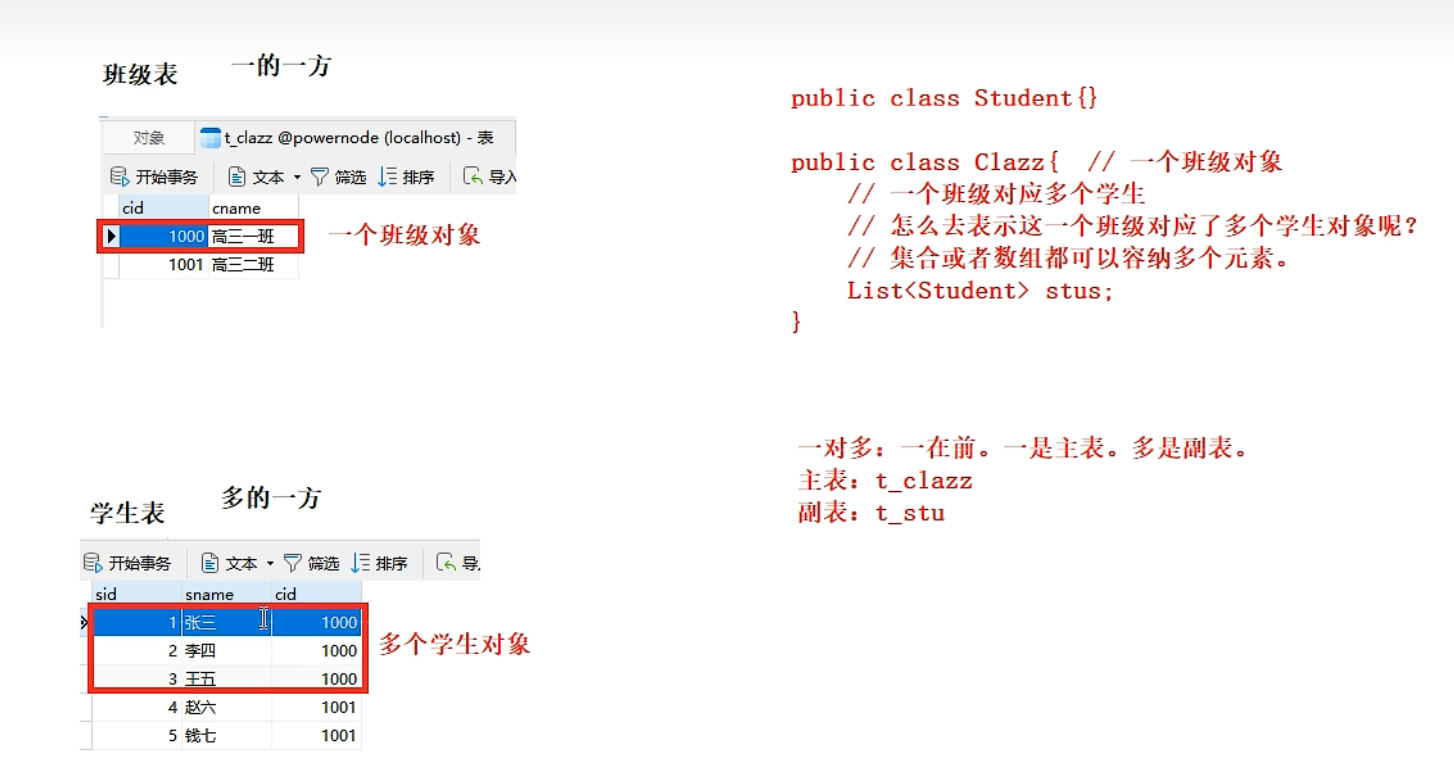
一对多中,一的一方是主表,如下图t_clazz是主表。
Java程序需要这样设计,设计两个类一个Student对于学生表,一个Clazz对应班级表。将从表对应的类作为主表的属性,类型为List<从表对应的类>类型的集合。因为这个属性有多个值,所以需要List集合来存储。
8.2.2、实现一对多
// 对应主表
public class Clazz{
	prviate List<Student> stus;
}
/********************************************************************************/

// 对应从表
public class Student{}
方式1:collection
<mapper namespace="com.mapper.StudentMapper">
	<resultMap id="clazzesultMap" type="Clazz">
		<!--column是结果集的字段,property是Java的属性,resultMap将column的值映射到property上-->
		<id property="cid" column="cid" />
		<result property="cname" column="cname" />

		<!--
			collection翻译为集合
				property:提供被映射的集合
				ofType:指定集合中当前元素的类型
		-->
		<collection property="stus" ofType="Student">
			<id property="sid" column="sid" />
			<result property="sname" column="sname" />
		</collection >
	</resultMap>
</mapper>

<select id="selectByCollection" resultMap="clazzResultMap">
	select
		s.sid,s.sname,c.cid,c.cname //查询两表中的数据
	from
		t_clazz c left join t_stu s on c.cid=#{cid} //s.cid=c.cid是多表查询连接条件
	where
		s.sid=#{sid}
</select>
方式2:分步查询
- 和多对一分步查询思路一样:
- 第一步:在在主表中查出cid
- 第二步:根据cid查从表的记录
- 同样支持懒加载
// 第一步
<mapper namespace="com.mapper.ClazzMapper">
	<ResultMap id="clazzResultStep" type="Clazz">
		<id property="cid" column="cid" />
		<result property="cname" column="cname" />

		<!-- select的值是第二条sql语句id,namespace.sqlId-->
		<collection
			property="stus"
			select="com.mapper.StudentMapper.selectByStep2"
			column="cid" />
	</ResultMap>

	<select id="selectByStep1" resultType="clazzResultStep">
		select cid,cname from t_clazz where cid =#{cid}
	</select>
</mapper>

// 第二步
<mapper namespace="com.mapper.StudentMapper">
	<select id="selectByStep2" resultType="Student">
		select * from t_stu where cid=#{cid}
	</select>
</mapper>
8.3、多对多实现思路
将多对多拆分为一对多。
九、MyBatis缓存机制
- 缓存:cache
- 缓存的作用:通过减少IO,来提高程序执行的效率。
- MyBatis的
缓存原理:将DQL语句的查询结果集放到缓存(内存)中,当下一次执行这条select语句的时候,直接从缓存中取数据,步再查数据库。- 一方面减少了IO;
- 一方面不再频繁的执行繁琐的查找算法,大大提高了效率。
- 当执行更新操作时,会清空对应的缓存。
- 缓存只针对DQL(select)语句有效。
- MyBatis的缓存包括:
- 一级缓存:将结果集放到SqlSession中(当前会话有效)。
- 二级缓存:将结果集放到SqlSessionFactory中(整个数据库有效)。
9.1、一级缓存
- 一级缓存:将结果集放到SqlSession中(当前会话有效)。
- 一级缓存默认就是开启的,不需要任何配置。
- 原理:只要使用同一个SqlSession对象执行同一条DQL语句,就会走缓存。
- 一级缓存失效:
- 在第一次DQL和第二次DQL之间你做了一下任意一件事都会导致一级缓存被清空:
- 执行了sqlSession.clearCache()方法。这是手动
清空一级缓存。 - 执行了任何语句的INSERT、DELETE、UPDATE操作,不管和当前DQL语句涉及的字段有没有关系,都会
清空一级缓存。
- 执行了sqlSession.clearCache()方法。这是手动
- 在第一次DQL和第二次DQL之间你做了一下任意一件事都会导致一级缓存被清空:
9.2、二级缓存
- 二级缓存:将结果集放到SqlSessionFactory中(数据库有效)。
- 二级缓存也是默认开启的,但是需要手动使用:
- <setting name=“cacheEnabled” value=“true”>默认全局开启了二级缓存,不需要我们取配置。
- 手动使用二级缓存:在需要使用二级缓存的SqlMapper.xml文件中添加一个标签即可:
<acahe /> - 使用二级缓存的实体类对象必须是
可序列化的,也就是必须实现java.Serializable接口 - SqlSession对象
关闭(close)或提交(commit)后,一级缓存中的数据才会被写到二级缓存中,此时二级缓存才可用。也就是说先从一级缓存获取数据,再从二级缓存获取数据。
- 二级缓存
失效的情况:- 只要两次DQL之间执行了任何更新操作,二级缓存就会被
清空(一级缓存也会被清空)
- 只要两次DQL之间执行了任何更新操作,二级缓存就会被
- 二级缓存相关配置:
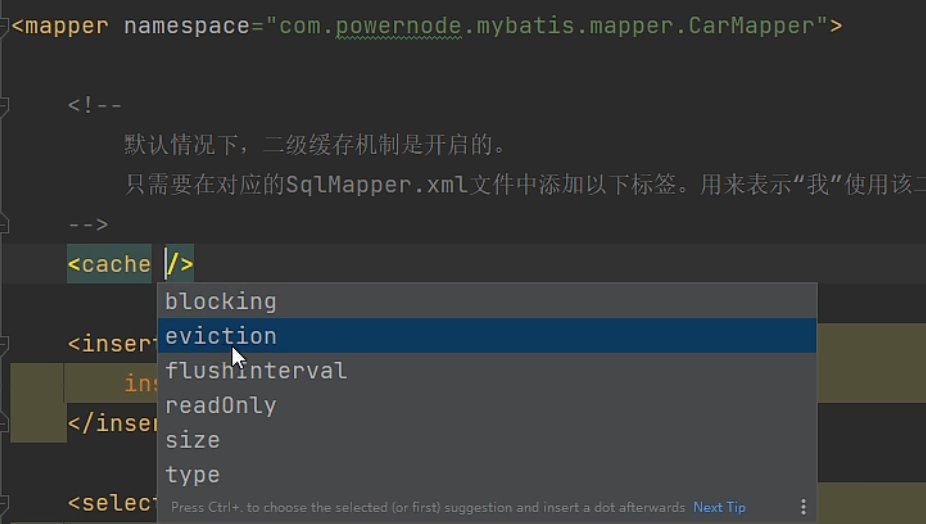
- eviction:指定从缓存中移除某个对象的淘汰算法。默认采用LRU策略。
- LRU:Least Recently Used。最近最少使用。优先淘汰在间隔时间内使用频率最低的对象。(还有一种LFU算法)
- FIFO:First In First Out。一种先进先出的数据缓存器。先进入的二级缓存最先被淘汰。
- SOFT:软引用。淘汰软引用指向的对象。具体算法和JVM的垃圾回收算法有关。
- WEAK: 弱引用。淘汰弱引用指向的对象。具体算法和JVM的垃圾回收算法有关。
- flushInterval:二级缓存刷新时间间隔,单位毫秒。若没有配置,则代表步刷新,只要内存足够大就会一直向二级缓存放数据,出现执行了更新操作。
- readOnly:
- true:多条相同的DQL语句执行后返回的是同一个对象。性能好。但是存在多线程并发的安全问题。
- false:多条相同的DQL执行后返回对象的副本。调用了clone方法,性能一般,但是安全。
- size:设置缓存内存大小,存储Java对象数量。默认1024。
9.3、集成第三方缓存组件
- 除了使用MyBatis自带的缓存以外,我们还可以使用第三方的缓存组件。
- 注意:第三方缓存组件只能代替二级缓存,一级缓存依然存在。
- 第三方缓存组件有:EhCache(Java写的)、Memcache(C语言写的)等等,使用方式不做介绍。
十、MyBatis注解式开发
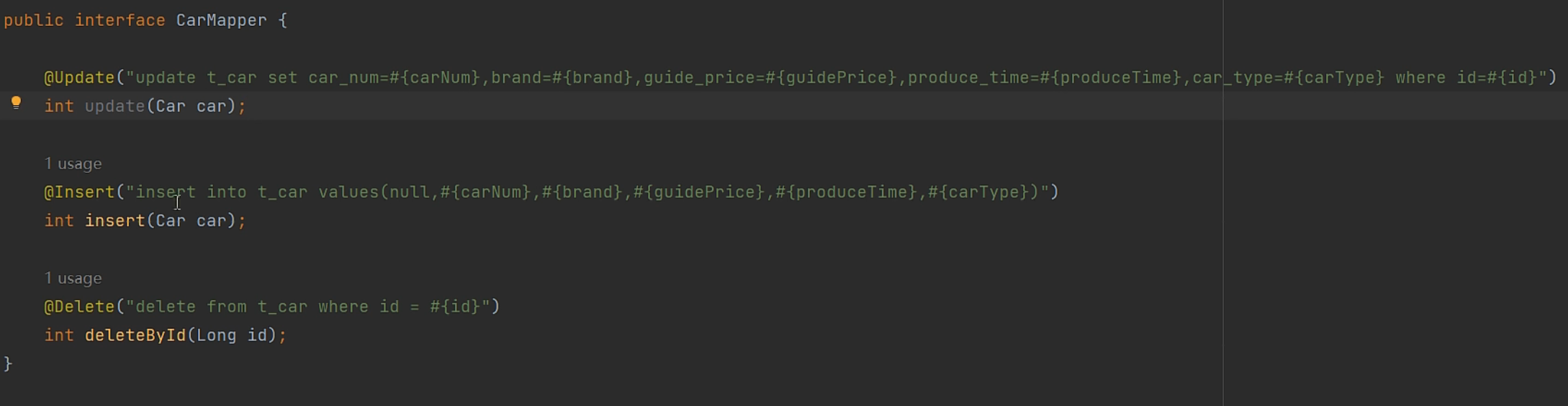
- 注解式开发可以减少Sql映射文件的配置,使代码变得更加简洁。
- 但是使用注解式开发,sql语句的维护成本也会更高。对于复杂的sql语句还会显得十分混乱。
- 所以最好还是用xml来映射sql语句,尽量不用注解开发。
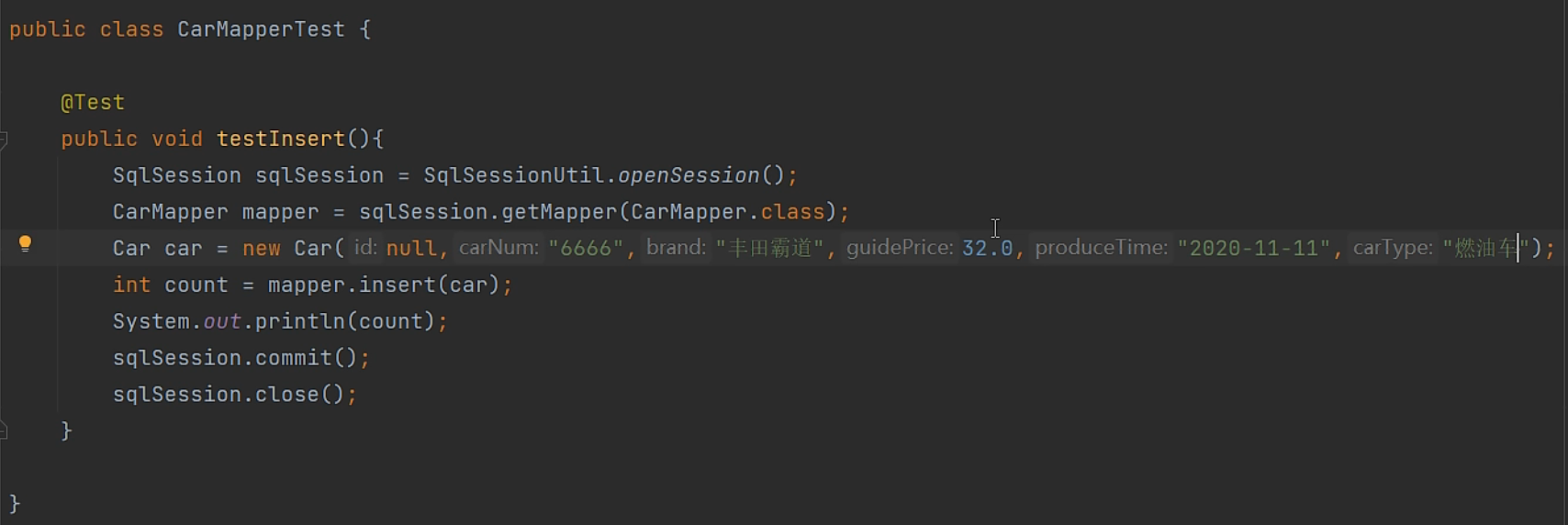
10.1、@insert

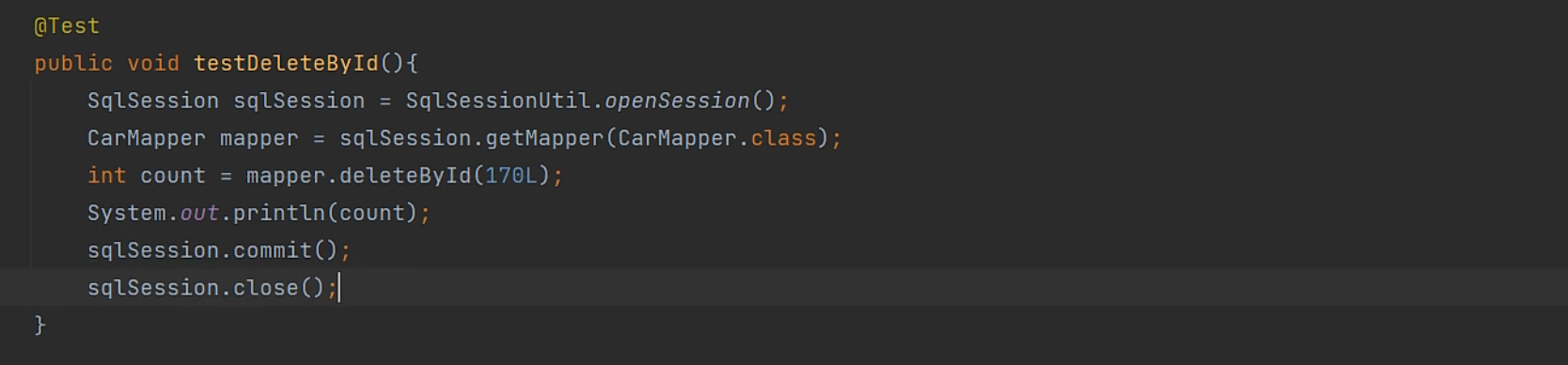
10.2、@delete

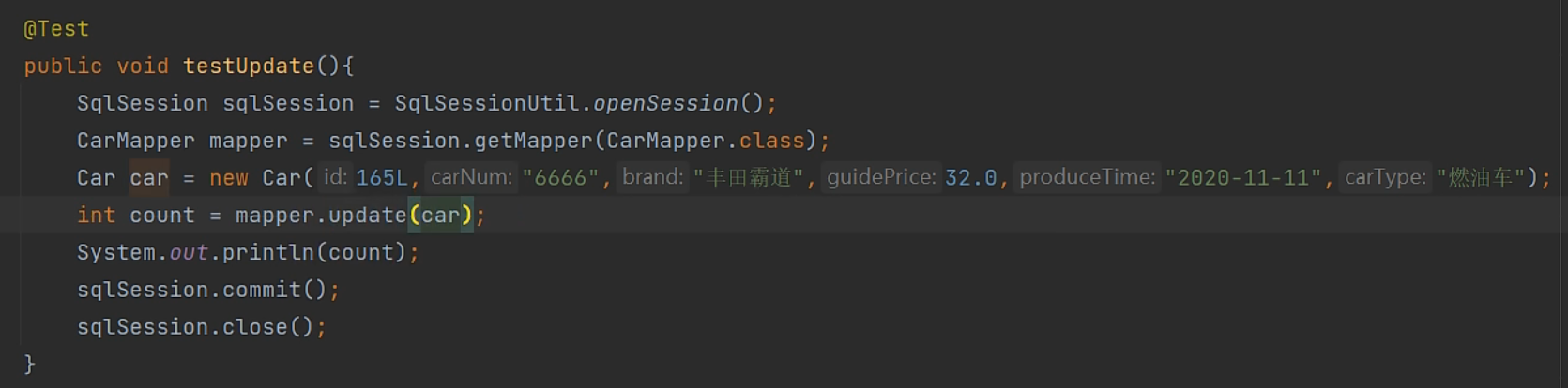
10.3、@update
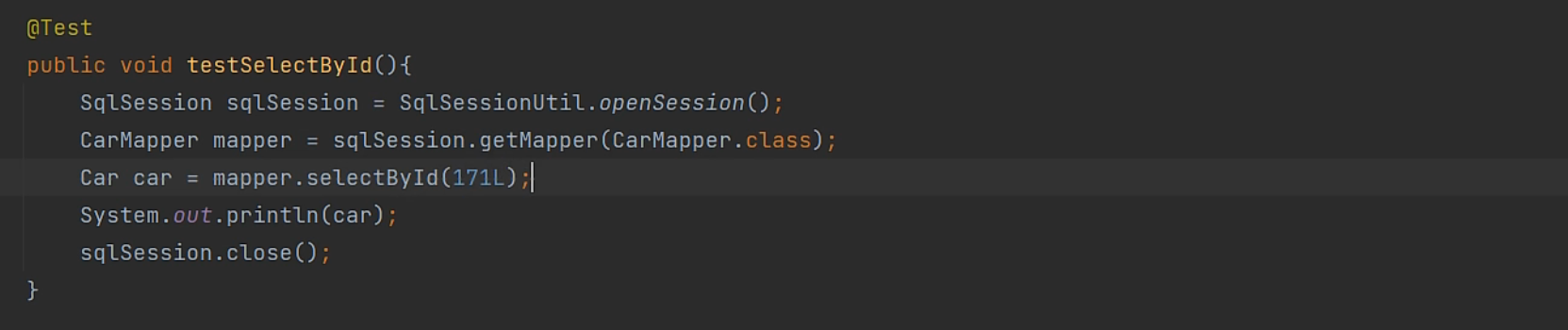
10.4、@select

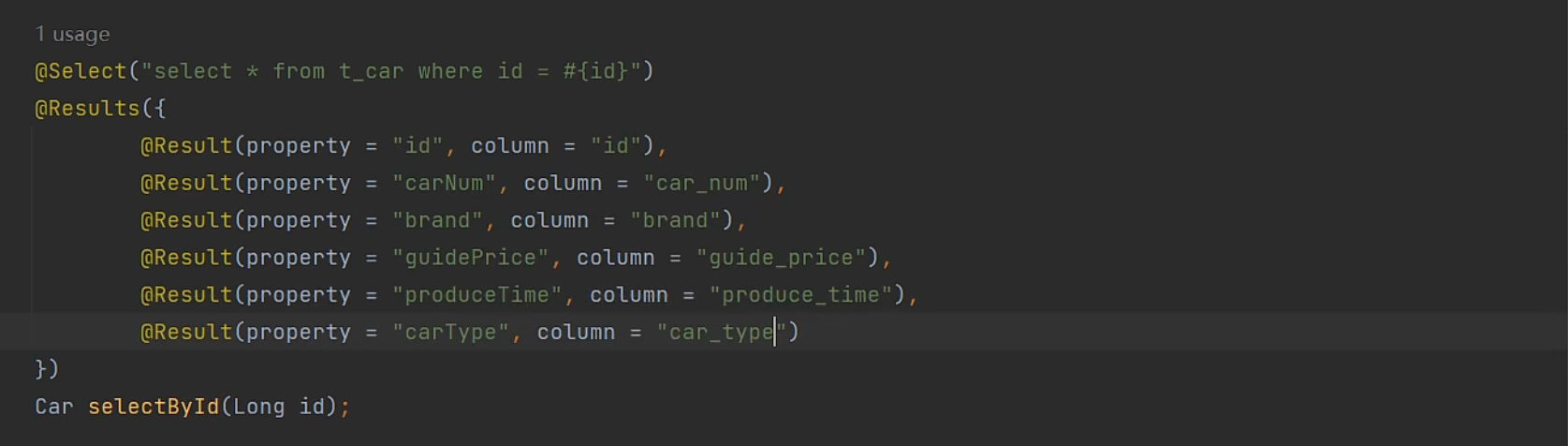
@results
- @results可以映射结果集,处理结果集中复合词格式不一样的问题,将column的值映射到property的值,

十一、其他
11.1、在MyBatis中引入junit单元测试
直接在MyBatis项目pom.xml文件中引入junit依赖即可。
在主程序中写程序代码,在test中new实例对象调用方法,传参,看实际值和期望值是否一致。
<dependency>
	<groupId>junit</groupId>
	<artifactId>junit</artifactId>
	<version>4.13.2</version>
	<scope>test</scope>
</dependency>
11.2、集成日志框架Logback
默认情况下MyBatis项目运行日志是没有开启的。
MyBatis常见的日志组件:
SLF4J:lockback实现了SLF4J规范。
LOG4J
LOG4J2
STDOUT_LOGGING:标准日志,MyBatis已经实现了这种日志,不需要引入jar包,但是日志信息不完整。开启方法:
- 在MyBatis项目pom.xml中配置:
<settings>
	<setting name="logImpl" value="STDOUT_LOGGING" />
</settings>
集成logback日志框架:
- logback实现了SLF4J标准。
- 集成方式:
- 第一步:
- 到maven坐标仓库中找到logback
- 在MyBatis项目pom.xml文件中引入依赖即可
- loback日志框架
- 第二步:引入logback所必须的xml配置文件,用于配置输出哪些日志,以及输出格式。
- 这个配置文件名必须为:logback.xml或logback-test.xml。
- 这个配置文件必须放到类的根目录下。即resources目录下。
- 第一步:
logback.xml配置:
<?xml version="1.0" encoding="UTF-8"?>
<configuration>
	<appender name="CONSOLE" class="ch.qos.logback.core.ConsoleAppender">
	<target>System.out</target>
		<encoder>
		<!-- 日志输出格式:%d表示日期时间,%-5level:日志级别  ,%c取类 %thread表示线程名(在哪个方法执行),
			%msg:日志消息,%n是换行符 ,不会用就去百度一下logback的日志格式-->
					<pattern>%d{yyyy-MM-dd HH:mm:ss.SSS}[%-5level] %c [%thread] :%msg%n</pattern>
			</encoder>
	</appender>

	<!-- 滚动记录文件,先将日志记录到指定文件,当符合某个条件时,将日志记录到其他文件 -->
	<appender name="FILE"
		class="ch.qos.logback.core.rolling.RollingFileAppender">
		<encoder>
						<pattern>%d{yyyy-MM-dd HH:mm:ss.SSS} [%thread] %-5level %logger{36}-%msg%n</pattern>
							<charset>utf-8</charset>
			</encoder>
		<!-- 日志输出路径 -->
		<file>D:/zhu/logback/data1.log</file>
		<!-- 指定日志文件拆分和压缩规则 -->
		<rollingPolicy class="ch.qos.logback.core.rolling.SizeAndTimeBasedRollingPolicy">
			<!-- 通过指定压缩文件的名称,来确定分割文件方式 -->
			<fileNamePattern>D:/zhu/logback/data2-%d{yyyy-MMdd}.log%i.gz	</fileNamePattern>
			<!-- 文件拆分大小 -->
				<maxFileSize>1MB</maxFileSize>
		</rollingPolicy>
	</appender>


	<!-- level:用来设计打印级别,大小写无关:TRACE,DEBUG,INFO,WARN,ERROR,ALL和OFF,默认debug
	<root>可以包含零个或多个<appender-ref>元素,标识这个输出位置将会被本日志级别控制。
 -->
	<root level="ALL">
	<!-- 注意:如果这里不配置关联打印位置,该位置将不会记录日志 -->
		<appender-ref ref="CONSOLE" />
		<appender-ref ref="FILE" />
	</root>
</configuration>
11.3、MyBatis逆向工程
- 所谓的逆向工程就是:根据数据库表逆向生成Java的pojo类、sqlMapper.xml文件、Mapper接口等。
- 要完成这个工作,需要借助第三方逆向工程插件,具体使用不做介绍。
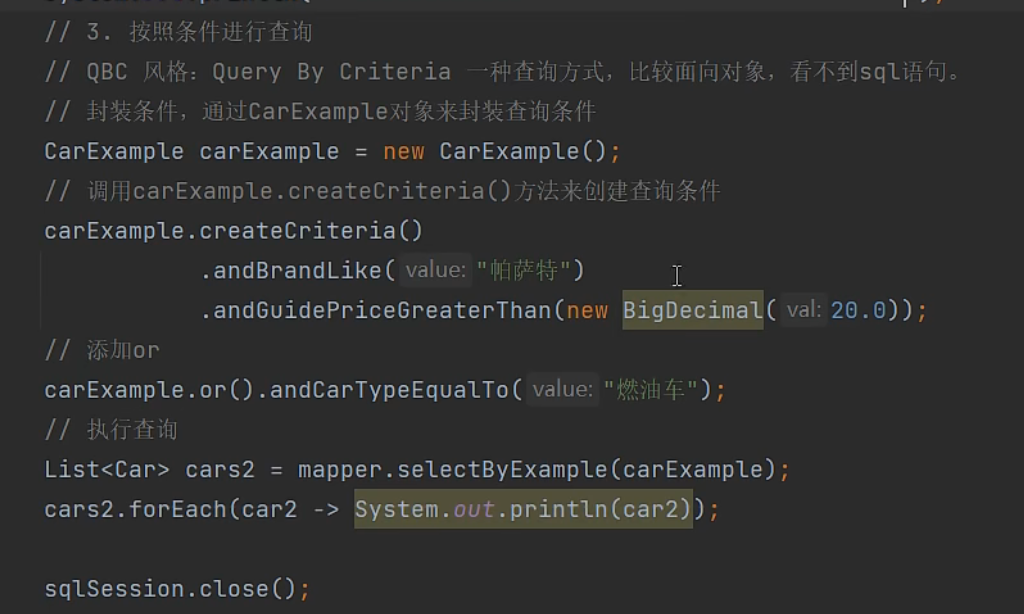
11.4、逆向工程之QBC查询风格
- QBC(Query By Criteria):根据条件查询,是一种面向对象的查询风格,看不到sql语句。
本文参与 腾讯云自媒体同步曝光计划,分享自作者个人站点/博客。
原始发表:2023-01-15,如有侵权请联系 cloudcommunity@tencent.com 删除
评论
登录后参与评论
推荐阅读
目录
腾讯云开发者

Copyright © 2013 - 2026 Tencent Cloud. All Rights Reserved. 腾讯云 版权所有
深圳市腾讯计算机系统有限公司 ICP备案/许可证号:粤B2-20090059  粤公网安备44030502008569号
腾讯云计算(北京)有限责任公司 京ICP证150476号 | 京ICP备11018762号