【Android 逆向】frida 框架安装 ( 设置 Python 3.7 版本 | 安装 frida 12.7.5 版本 | 安装 frida-tools 5.1.0 版本 )

【Android 逆向】frida 框架安装 ( 设置 Python 3.7 版本 | 安装 frida 12.7.5 版本 | 安装 frida-tools 5.1.0 版本 )

韩曙亮
发布于 2023-03-29 19:13:55
发布于 2023-03-29 19:13:55
文章目录
前言
frida 与 Python 之前存在版本匹配 , 如果设置的 frida 版本与 Python 版本不兼容 , 经常出现库不匹配的情况 , 报各种错误 , 这里推荐按照本博客中的版本进行匹配 ;
如果出现版本不匹配的情况 , 需要卸载相关模块 , 重新进行安装配置 ;
一、设置 Python
版本
首先要安装 Python 工具 , 参考 【开发环境】Windows 中安装 Python 各个版本 ( 下载 Python 各版本 SDK | 安装 Python ) 博客进行安装 , 这里设置
版本进行后续操作 ;
设置 Python
版本 : Windows 中安装了多个 Python 版本 , 在环境变量中 , 将哪个版本的路径放置在最顶端 , 那么当前调用 python 或 pip 命令时 , 就使用的哪个版本的 Python ;
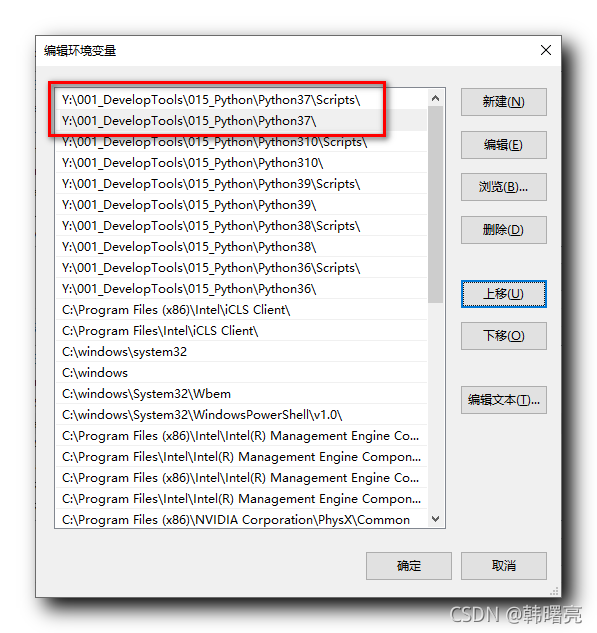
设置完 Python
环境变量后 , 使用 python -V 命令 , 查看当前的 Python 版本 ;
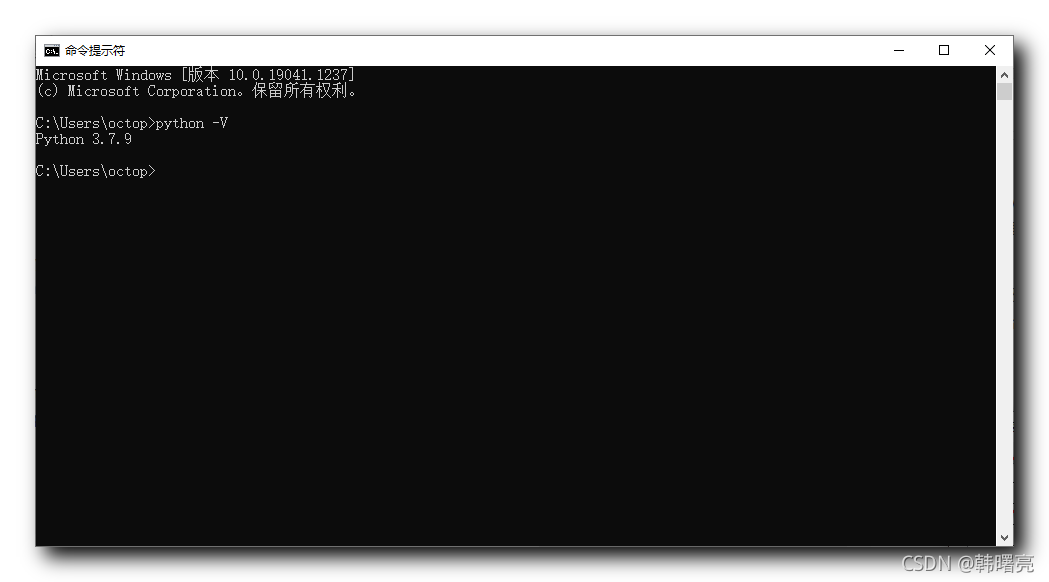
二、安装 frida
版本
安装 frida
版本 , 该版本对应的 frida-tools 版本是
版本 ;
安装 frida
版本命令 :
pip install frida==12.7.5安装过程命令行输出 :
C:\Users\octop>pip install frida==12.7.5
Collecting frida==12.7.5
  Downloading frida-12.7.5.tar.gz (6.9 kB)
Using legacy setup.py install for frida, since package 'wheel' is not installed.
Installing collected packages: frida
    Running setup.py install for frida ... done
Successfully installed frida-12.7.5
WARNING: You are using pip version 20.1.1; however, version 21.2.4 is available.
You should consider upgrading via the 'd:\001_develop\022_python\python37_64\python.exe -m pip install --upgrade pip' command.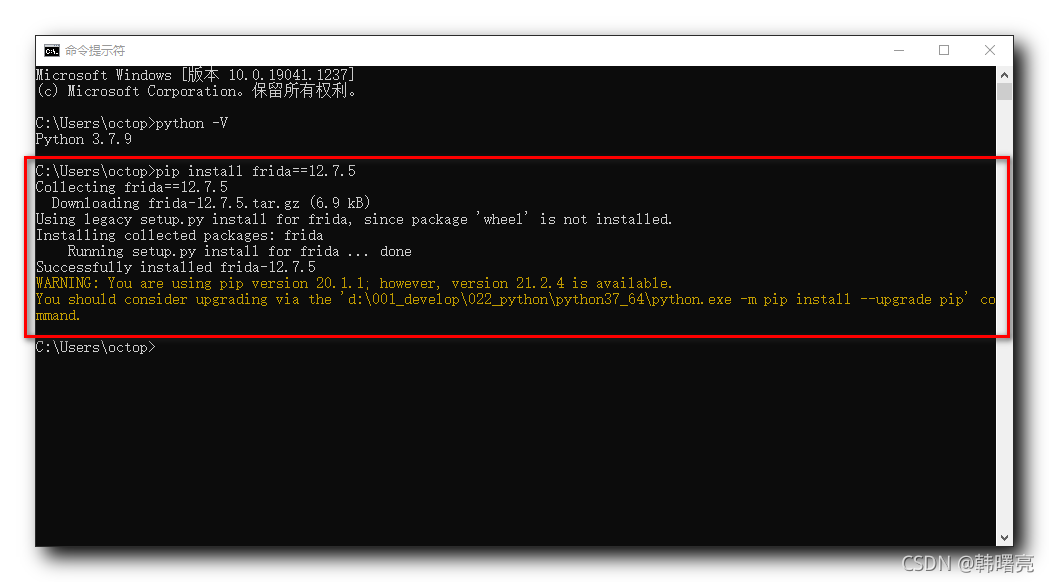
三、安装 frida-tools
版本
安装 frida-tools
版本 , 该版本对应的 frida 版本是
版本 ;
安装 frida-tools
版本命令 :
pip install frida-tools==5.1.0安装过程命令行输出 :
C:\Users\octop>pip install frida-tools==5.1.0
Collecting frida-tools==5.1.0
  Downloading frida-tools-5.1.0.tar.gz (26 kB)
Collecting colorama<1.0.0,>=0.2.7
  Downloading colorama-0.4.4-py2.py3-none-any.whl (16 kB)
Requirement already satisfied: frida<13.0.0,>=12.7.3 in d:\001_develop\022_python\python37_64\lib\site-packages (from frida-tools==5.1.0) (12.7.5)
Collecting prompt-toolkit<3.0.0,>=2.0.0
  Downloading prompt_toolkit-2.0.10-py3-none-any.whl (340 kB)
     |████████████████████████████████| 340 kB 656 kB/s
Collecting pygments<3.0.0,>=2.0.2
  Downloading Pygments-2.10.0-py3-none-any.whl (1.0 MB)
     |████████████████████████████████| 1.0 MB 344 kB/s
Collecting wcwidth
  Downloading wcwidth-0.2.5-py2.py3-none-any.whl (30 kB)
Collecting six>=1.9.0
  Downloading six-1.16.0-py2.py3-none-any.whl (11 kB)
Using legacy setup.py install for frida-tools, since package 'wheel' is not installed.
Installing collected packages: colorama, wcwidth, six, prompt-toolkit, pygments, frida-tools
    Running setup.py install for frida-tools ... done
Successfully installed colorama-0.4.4 frida-tools-5.1.0 prompt-toolkit-2.0.10 pygments-2.10.0 six-1.16.0 wcwidth-0.2.5
WARNING: You are using pip version 20.1.1; however, version 21.2.4 is available.
You should consider upgrading via the 'd:\001_develop\022_python\python37_64\python.exe -m pip install --upgrade pip' command.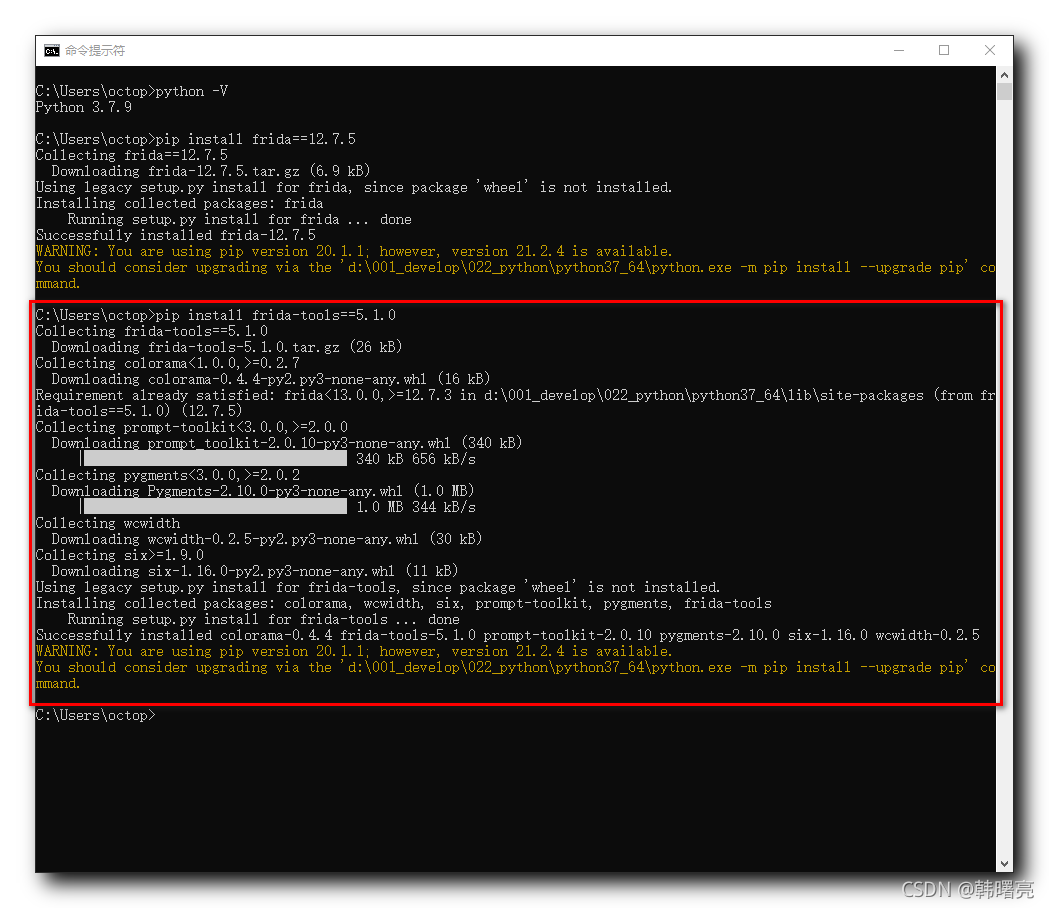
四、安装 PyCharm
参考 【开发环境】Windows 安装 PyCharm 开发环境 ( 下载 PyCharm | 安装 PyCharm | 在 PyCharm 中创建 Python 工程 ) 博客 , 安装 社区版 PyCharm 即可 ;
本文参与 腾讯云自媒体同步曝光计划,分享自作者个人站点/博客。
原始发表:2021-10-09,如有侵权请联系 cloudcommunity@tencent.com 删除
评论
登录后参与评论
推荐阅读
目录
腾讯云开发者

Copyright © 2013 - 2026 Tencent Cloud. All Rights Reserved. 腾讯云 版权所有
深圳市腾讯计算机系统有限公司 ICP备案/许可证号:粤B2-20090059  粤公网安备44030502008569号
腾讯云计算(北京)有限责任公司 京ICP证150476号 | 京ICP备11018762号