【软件测试】自动化常用函数


元素的定位
web ⾃动化测试的操作核⼼是能够找到⻚⾯对应的元素,然后才能对元素进⾏具体的操作。常⻅的元素定位⽅式⾮常多,如 id,classname,tagname,xpath,cssSelector 常⽤的主要由 cssSelector 和 xpath
cssSelector
选择器的功能:选中页面中指定的标签元素
选择器的种类分为基础选择器和复合选择器,常见的元素定位方式可以通过 id 选择器和子类选择器来进行定位
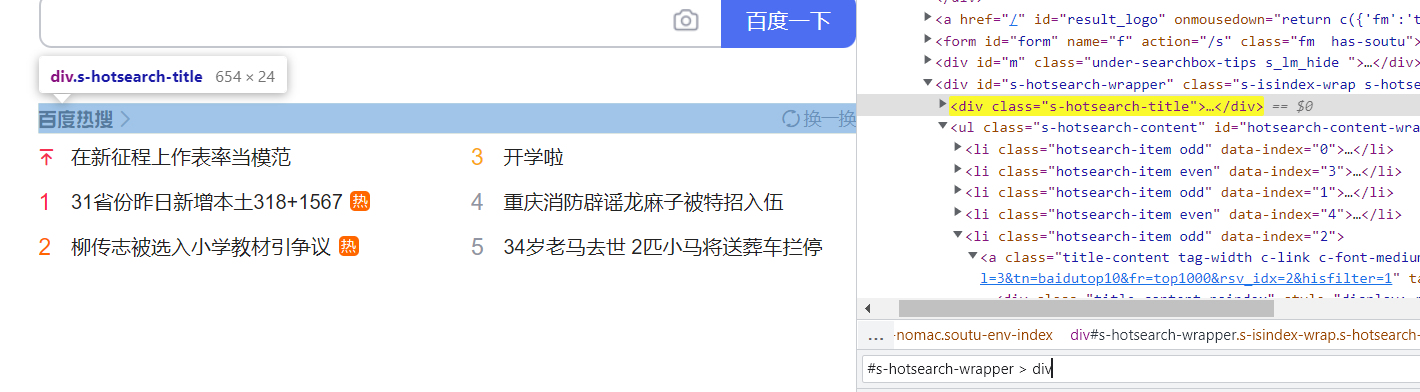
image.png
xpath
XML 路径语⾔,不仅可以在 XML ⽂件中查找信息,还可以在 HTML 中选取节点。
xpath 使⽤路径表达式来选择 xml ⽂档中的节点
xpath 语法中:
- 获取 HTML 页面中所有的节点:
//* - 获取 HTML 页面指定的节点:
//[指定节点]//ul:获取 HTML 页面所有的ul节点//input:获取 HTML 页面所有的input节点
- 获取一个节点中的直接子节点:
///span/input
- 获取一个节点的父节点:
..//input/..:获取input节点的父节点
- 实现节点属性的匹配:
[@...]//[@id='kw]:匹配HTML页面中的id属性为kw的节点
- 使用指定索引的方式获取对应的节点内容
- 注意:
xpath的索引是从1开始的 - 百度首页通过:
//div/ul/li[3],定位到第三个百度热搜标签
- 注意:
更便捷的⽣成 selector/xpath 的⽅式:右键选择复制"Copy selector/xpath"
注意:登录状态下和非登录状态下,自动化打开的页面不一定相同。做自动化测试一定要注意页面状态的一致性
查找元素
findElement,在页面查找元素,返回值WebElement查找页面元素
driver.findElement(By.cssSelector("#s-hotsearch-wrapper > div > a.hot-title > div > i:nth-child(1)")).click();
driver.findElement((By.xpath("//*[@id=\"s-hotsearch-wrapper\"]/div/a[1]/div/i[1]"))).click();- 这两个查找,都是找到百度热搜
findElements,在页面查找元素,返回值为List<WebElement>
List<WebElement> elements = driver.findElements(By.cssSelector("#hotsearch-content-wrapper > li > a > span.title-content-title"));
for(WebElement str : elements){
    System.out.println(str.getText());
}- 打印热搜标题
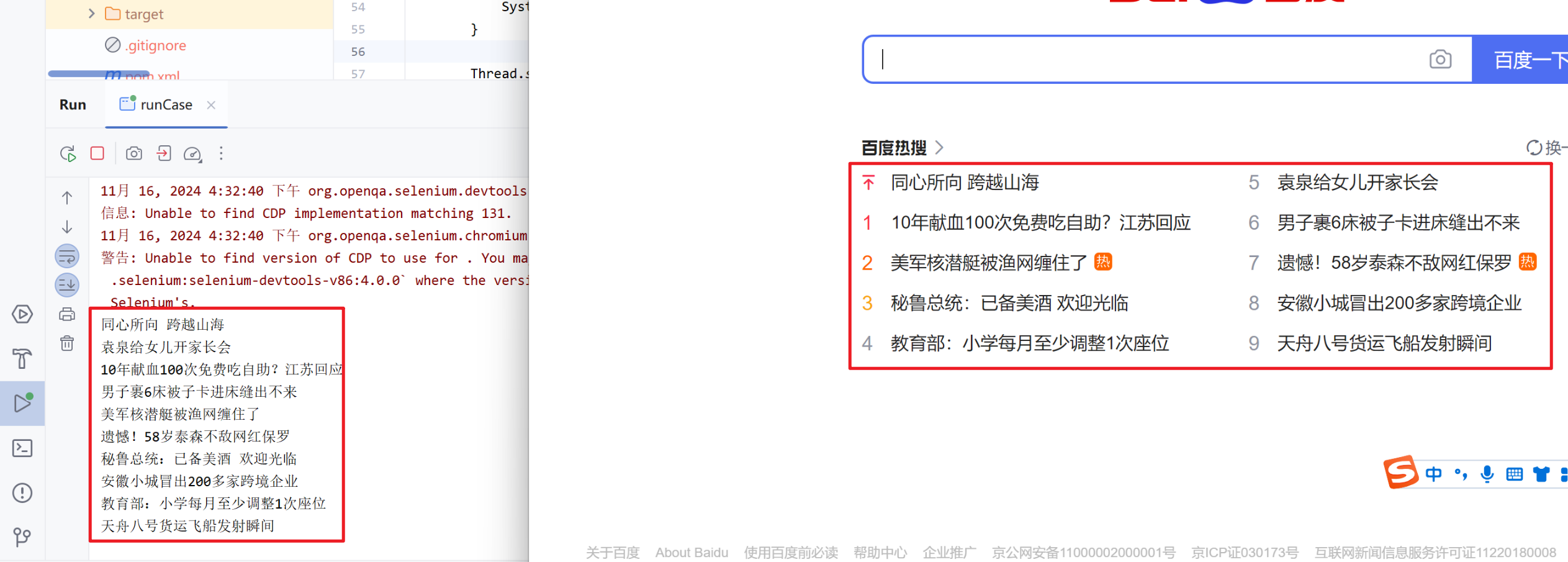
image.png
操作测试对象
点击/提交对象——click()
//找到百度一下并点击
driver.finElement(By.cssSelector("#su")).click();
页面中,除了按钮可以点之外,其他绝大多数元素也能点击
- 页面隐藏的元素不能进行操作,不然会报错
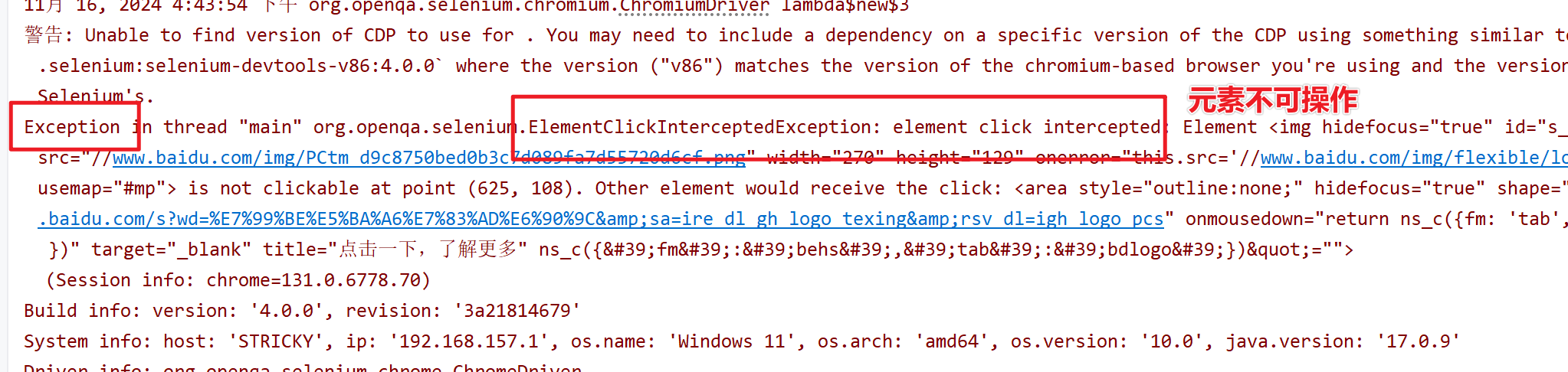
image.png
模拟按键输入——sendKeys(“”)
这个方法可以在任意能输入文本的地方进行输入
driver.findElement(By.cssSelector("#kw")).sendKeys("今天天气");
Thread.sleep(3000);
driver.quit();
![[屏幕录制 2024-11-16 165917.mp4]]
清除文本内容——clear()
输入文本后,又想换一个新的关键词,这里就需要用到 clear()
若想在一个场景下更换多个关键词,需要将前一个关键词清楚掉;若不清除,每次 sendKeys 将完成拼接的操作
driver.findElement(By.cssSelector("#kw")).sendKeys("我爱游戏");
driver.findElement(By.cssSelector("#kw")).clear();
driver.findElement(By.cssSelector("#kw")).sendKeys("我爱学习");
获取文本信息——getText()
WebElement bdtext =  driver.findElement(By.cssSelector("#hotsearch-content-wrapper > li:nth-child(3) > a > span.title-content-title"));
System.out.println(bdtext.getText());
问题:是否可以通过
getText()获取到“百度⼀下按钮”上的⽂字“百度⼀下”呢?
//获取百度一下按钮上的文本
String text = driver.findElement(By.cssSelector("#su")).getText();
System.out.println("百度一下上的文字为:"+text);- 最终得到的结果是:
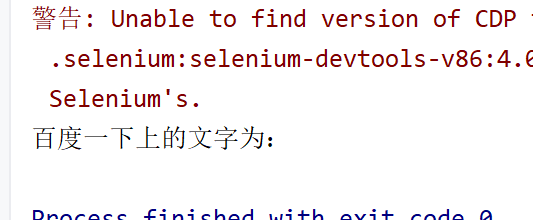
image.png
- 打印的 text 是空的,因为“百度一下”是 input 标签里面的属性值,需要用 getAttribute(String) 将其拿出来,不能通过拿文本的方式将其拿出来
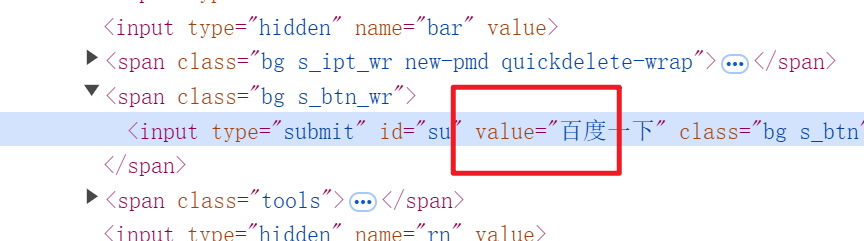
image.png
//获取百度一下按钮上的文本
String text = driver.findElement(By.cssSelector("#su")).getAttribute("value");
System.out.println("百度一下上的文字为:"+text);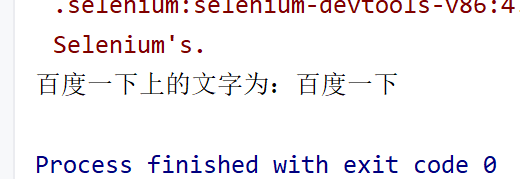
image.png|360
获取页面标题和 URL
String title = driver.getTitle();
String url = driver.getCurrentUrl();
System.out.println(title);
System.out.println(url);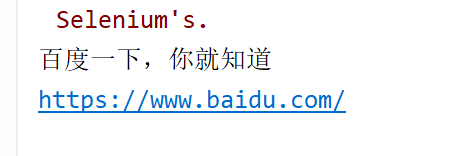
image.png|327
窗口
设置窗口大小
//设置窗口大小
//窗口最小化
driver.manage().window().minimize();
Thread.sleep(2000);
//窗口最大化
driver.manage().window().maximize();
Thread.sleep(2000);
//窗口全屏
driver.manage().window().fullscreen();
Thread.sleep(2000);
//自定义尺寸
driver.manage().window().setSize(new Dimension(800,400));
Thread.sleep(2000);
切换窗口
当创建一个驱动之后,驱动对象就会指向打开的那个页面的句柄
- 每一个标签页都有一个自己的句柄信息
- 如果想让
driver指向别的标签页,就需要使其指向改变
- 获取所有标签页的句柄信息
- 当新建的窗口句柄信息与最初的标签页句柄信息不一样的话,就进行 driver 指向改变
- 从而达到切换窗口的效果
- 获取当前页面句柄:
driver.getWindowHandle() - 获取所有页面句柄:
driver.getWindowHandles()
driver.findElement(By.cssSelector("#s-hotsearch-wrapper > div > a.hot-title > div")).click();
String curHandle = driver.getWindowHandle();
Set<String> allHandles = driver.getWindowHandles();
for(String handle : allHandles){
    if(handle != curHandle){
        //切换 driver 的句柄指向
        driver.switchTo().window(handle);
    }
}- 根据
driver获取所有页面的句柄,但指向只有一个
注意:执行了
driver.close()之前需要切换到未被关闭的窗口
- 自动化一般不会存在要打开好多个标签页,跳转到任意标签页的操作
- 可以直接使用
driver.get(URL)进行跳转
关闭窗口
//关闭当前标签页
driver.close();

//关闭浏览器,释放driver对象
driver.quit();- 若 driver 指向标签页 1,那么即使你关闭了标签页 1,没有改变 driver 指向,就无法关闭标签页 2,除非将 driver 的指向改变
close() 用到的场景比较少,只会在以下场景下去使用
- 测试打开的新的标签页之后还要继续返回到前一个标签页中进行测试
等待
假如写自动化代码出现了 NoSuchElement 错误
- 第一步:在报错的代码前添加
Thread.sleep(秒),设置的时间长一点 - 第二步:执行自动化,在自动化打开的页面里打开前端开发者工具,手动检查元素是否真的不一样
- 自动化打开的页面确实不存在该元素
- 手动打开的页面和自动化打开的页面不一样(很有可能是登录和未登录状态下的页面不一样)
- 元素为动态元素(解决办法:先定位动态元素的前一级标签,再增加要定位的元素标签)
- 自动化打开的页面确实存在该元素
- 代码执行的速度比页面渲染的速度要快。页面还没渲染出来,程序就已经开始找了,导致元素没有找到(解决办法:添加等待)
- 自动化打开的页面确实不存在该元素
强制等待
以阻塞线程的方式,达到等待的效果
Thread.sleep(秒);- 优点:写法简单,好理解,直接阻塞程序
- 缺点:极大的增加了自动化的执行时间
100 条测试用例,每个用例添加强制等待平均时间 3 s
- 总:
1000 * 3 = 3000s = 50min - 理想的情况下:
2 - 3min
隐式等待
隐式等待是一种智能等待,他可以规定在查找元素时,在指定时间内不断查找元素。如果找到则代码继续执行,知道超时没找到元素才会报错。
你的女朋友转校了,让你等她三年。但第二年的时候,她回来了
- 你坚持要等完三年再和她在一起(强制等待)
- 她回来后,你就和她在一起了(隐式等待)
implicitlyWait()参数:Duration类中提供的毫秒、秒、分钟等方法
//隐式等待3秒
driver.manage().timeouts().implicitlyWait(Duration.ofSeconds(3));

//隐式等待3000毫秒
driver.manage().timeouts().implicitlyWait(Duration.ofMillis(3000));- 在
3s内找到元素,继续执行 - 在
3s内没有找到元素,报错NoSuchElement - 以轮询的方式来查找这个元素,一直在询问找到没有
- 优点:智能等待,作用全局
隐式等待作⽤域是整个脚本的所有元素。即只要 driver 对象没有被释放掉(driver.quit()),隐式等待就⼀直⽣效。
显式等待
显式等待也是一种智能等待,在指定超时时间范围内只要满足操作的条件就会继续执行后续代码
new WebDriverWait(driver, Duration.ofSeconds(3).until($express))$press:涉及到selenium.support.ui.ExpectedCondition包下的ExprxtedCondition类- 返回值:
boolean
WebDriverWait wait = new WebDriverWait(driver,Duration.ofSeconds(3));
wait.until(ExpectedConditions.elementToBeClickable(By.cssSelector("#su")));
//先保证元素存在且可以点击后
driver.findElement(By.cssSelector("#su")).click();- 优点:显式等待是智能等待,可以自定义显式等待的条件,操作灵活
- 缺点:写法复杂
ExpectedConditions 预定义的一些示例:
elementToBeClickable(By location):用于检查元素的期望是可见的并已启用,以便可以单击它textToBe(By locator, String str):检查元素(精确匹配)presenceOfElementLocated(By locator):检查页面的 DOM 上是否存在元素urlToBe(java.lang.String url):检查当前页面的 URL 是一个特定的 URL
浏览器导航
- 打开网站
//更长的方法
driver.navigate().to("https://www.bytedance.com");

//简单的方法
driver.get("https://www.bytedance.com");- 浏览器的前进、后退、刷新
//后退
driver.navigate().back();
//前进
driver.navigate().forward();
//刷新
driver.navigate().refresh();
本文参与 腾讯云自媒体同步曝光计划,分享自作者个人站点/博客。
原始发表:2024-11-17,如有侵权请联系 cloudcommunity@tencent.com 删除
评论
登录后参与评论
推荐阅读
目录
腾讯云开发者

Copyright © 2013 - 2026 Tencent Cloud. All Rights Reserved. 腾讯云 版权所有
深圳市腾讯计算机系统有限公司 ICP备案/许可证号:粤B2-20090059  粤公网安备44030502008569号
腾讯云计算(北京)有限责任公司 京ICP证150476号 | 京ICP备11018762号