Linux如何设置ssh密钥(免密码)登录

Linux如何设置ssh密钥(免密码)登录

用户5921339
发布于 2025-05-20 17:06:06
发布于 2025-05-20 17:06:06
来自公众号:IT人家
前言
我们在使用ssh客户端远程连接Linux服务器时,为了考虑安全方面的因素,通常使用密钥的方式来登录。密钥分为公钥和私钥,这两把密钥可以互为加解密。公钥是公开的,私钥是由个人自己持有,并且必须妥善保管和注意保密。
Linux设置密钥登录的步骤
一、生成密钥(公钥与私钥)
执行ssh-keygen命令,生成id_rsa和id_rsa.pub两个文件,id_rsa是私钥(重要,需安全保管),id_rsa.pub是公钥,密钥生成过程中可根据提示对密钥设置密码,也可留空直接回车。
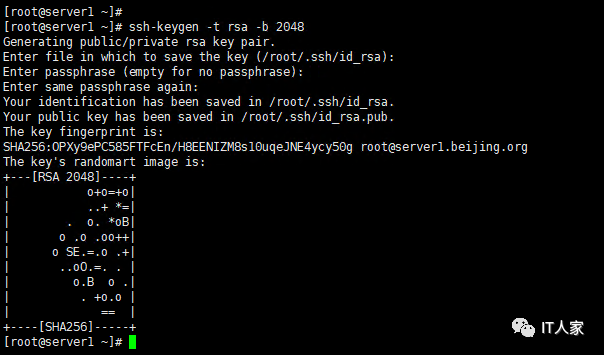
解释:
- -t 选项指定要使用的加密算法,“rsa”表示使用RSA算法;
- -b 选项指定密钥的长度;
- -C 选项是可选的,用于添加注释。
二、创建authorized_keys文件并设置权限
1.查看密钥认证文件authorized_keys是否存在,若不存在则创建并授权,命令如下:
[root@server1 ~]# touch ~/.ssh/authorized_keys
[root@server1 ~]# chmod 600 ~/.ssh/authorized_keys
2.将公钥内容追加到authorized_keys文件中
[root@server1 ~]# cd ~/.ssh
[root@server1 .ssh]# cat id_rsa.pub >> authorized_keys
三、设置sshd配置文件允许使用密钥登录
- 修改sshd_config文件,启用以下参数:
RSAAuthentication yes
PubkeyAuthentication yes
PermitRootLogin yes
AuthorizedKeysFile .ssh/authorized_keys
- 修改完配置文件,重启sshd服务
[root@server1 ~]# systemctl restart sshd四、使用私钥登录验证
- 在Linux主机上登录验证
[root@server1 .ssh]# ssh root@localhost -i id_rsa
Last login: Wed Sep 13 17:13:28 2023 from 192.168.15.1
- 在Win下使用ssh客户端导入私钥登录验证
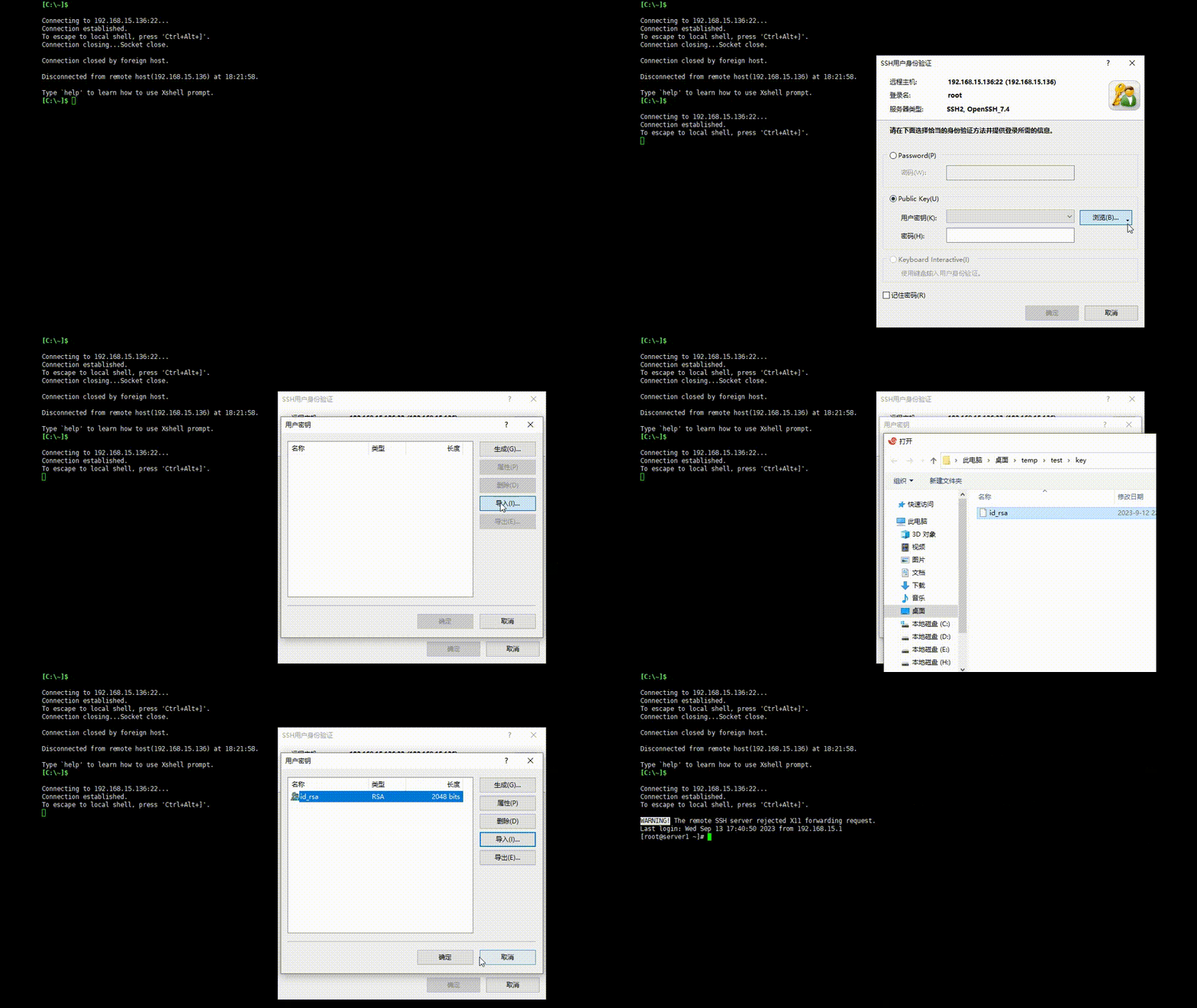
五、禁用密码登录
- 修改sshd_config文件,启用以下参数:
PasswordAuthentication no- 重启sshd服务
[root@server1 ~]# systemctl restart sshd至此,Linux已经设置为密钥登录,相对于使用密码认证登录的方式更为安全,前提是私钥要安全保管。今天的分享就到这里了,你学会了吗?
本文参与 腾讯云自媒体同步曝光计划,分享自微信公众号。
原始发表:2023-09-13,如有侵权请联系 cloudcommunity@tencent.com 删除
目录
腾讯云开发者

Copyright © 2013 - 2026 Tencent Cloud. All Rights Reserved. 腾讯云 版权所有
深圳市腾讯计算机系统有限公司 ICP备案/许可证号:粤B2-20090059  粤公网安备44030502008569号
腾讯云计算(北京)有限责任公司 京ICP证150476号 | 京ICP备11018762号