Agent使用的浏览器自动化工具BrowserUseTool开发实现
原创
Agent使用的浏览器自动化工具BrowserUseTool开发实现
原创
礼兴
发布于 2025-09-27 17:02:51
发布于 2025-09-27 17:02:51
一、依赖
<!-- Selenium WebDriver -->
<dependency>
    <groupId>org.seleniumhq.selenium</groupId>
    <artifactId>selenium-java</artifactId>
    <version>4.25.0</version>
</dependency>

<!-- Chrome Driver -->
<dependency>
    <groupId>org.seleniumhq.selenium</groupId>
    <artifactId>selenium-chrome-driver</artifactId>
    <version>4.25.0</version>
</dependency>

<!-- WebDriver Manager (自动管理驱动) -->
<dependency>
    <groupId>io.github.bonigarcia</groupId>
    <artifactId>webdrivermanager</artifactId>
    <version>5.7.0</version>
</dependency>
二、代码实现
import com.google.adk.tools.BaseTool;
import com.google.adk.tools.Annotations.Schema;
import lombok.extern.slf4j.Slf4j;
import org.openqa.selenium.By;
import org.openqa.selenium.Keys;
import org.openqa.selenium.OutputType;
import org.openqa.selenium.TakesScreenshot;
import org.openqa.selenium.WebDriver;
import org.openqa.selenium.WebElement;
import org.openqa.selenium.chrome.ChromeDriver;
import org.openqa.selenium.chrome.ChromeOptions;
import org.openqa.selenium.support.ui.WebDriverWait;
import org.openqa.selenium.support.ui.ExpectedConditions;
import org.jetbrains.annotations.NotNull;

import java.time.Duration;
import java.util.List;
import java.util.Map;

@Slf4j
public class BrowserUseTool extends BaseTool {
    private static WebDriver driver;
    private static WebDriverWait wait;

    protected BrowserUseTool(@NotNull String name, @NotNull String description) {
        super(name, description);
        log.info("BrowserUseTool name {}, description {}", name, description);
    }

    protected BrowserUseTool(@NotNull String name, @NotNull String description, boolean isLongRunning) {
        super(name, description, isLongRunning);
        log.info("BrowserUseTool name {}, description {}, isLongRunning {}", name, description, isLongRunning);
    }

    /**
     * 浏览器操作工具 - 支持打开Chrome浏览器并进行Google搜索
     */
    public static Map<String, Object> browserAction(
            @Schema(name = "action", description = "操作类型: open_browser, google_search, navigate, click, input_text, get_text, screenshot, close_browser")
            String action,
            @Schema(name = "query", description = "搜索关键词 (用于 google_search)")
            String query,
            @Schema(name = "url", description = "网址 (用于 navigate)")
            String url,
            @Schema(name = "text", description = "输入文本 (用于 input_text)")
            String text,
            @Schema(name = "selector", description = "CSS选择器 (用于 click, input_text)")
            String selector) {

        System.out.printf("%n-- Tool Call: browserAction(action='%s') --%n", action);
        log.info("BrowserUseTool Tool Call: browserAction(action='{}') --%n", action);

        try {
            switch (action.toLowerCase()) {
                case "open_browser":
                    return openBrowser();

                case "google_search":
                    return googleSearch(query);

                case "navigate":
                    return navigate(url);

                case "click":
                    return clickElement(selector);

                case "input_text":
                    return inputText(selector, text);

                case "get_text":
                    return getPageText();

                case "screenshot":
                    return takeScreenshot();

                case "close_browser":
                    return closeBrowser();

                default:
                    return Map.of("error", "不支持的操作: " + action);
            }
        } catch (Exception e) {
            System.err.printf("-- Tool Error: %s --%n", e.getMessage());
            return Map.of("error", "浏览器操作失败: " + e.getMessage());
        }
    }

    /**
     * 打开Chrome浏览器
     */
    public static Map<String, Object> openBrowser() {
        if (driver != null) {
            return Map.of("status", "success", "message", "浏览器已经打开");
        }

        try {
            ChromeOptions options = new ChromeOptions();
            options.addArguments("--remote-allow-origins=*");
            options.addArguments("--disable-blink-features=AutomationControlled");
            options.addArguments("--user-agent=Mozilla/5.0 (Windows NT 10.0; Win64; x64) AppleWebKit/537.36");
            // 可选:无头模式
            // options.addArguments("--headless");

            driver = new ChromeDriver(options);
            wait = new WebDriverWait(driver, Duration.ofSeconds(10));
            driver.manage().window().maximize();

            System.out.println("-- Chrome浏览器已成功打开 --");
            log.info("-- Chrome浏览器已成功打开 --");
            return Map.of("status", "success", "message", "Chrome浏览器已成功打开");
        } catch (Exception e) {
            return Map.of("status", "error", "message", "打开浏览器失败: " + e.getMessage());
        }
    }

    /**
     * Google搜索功能
     */
    public static Map<String, Object> googleSearch(@Schema(name = "query", description = "搜索关键词") String query) {
        if (driver == null) {
            openBrowser();
        }

        if (query == null || query.trim().isEmpty()) {
            return Map.of("status", "error", "message", "搜索关键词不能为空");
        }

        try {
            // 导航到Google
            driver.get("https://www.google.com");
            System.out.println("-- 已导航到Google首页 --");

            // 等待搜索框加载
            WebElement searchBox = wait.until(
                    ExpectedConditions.elementToBeClickable(By.name("q"))
            );

            // 输入搜索关键词
            searchBox.clear();
            searchBox.sendKeys(query);
            searchBox.sendKeys(Keys.ENTER);

            // 等待搜索结果加载
            wait.until(ExpectedConditions.presenceOfElementLocated(By.id("search")));

            System.out.printf("-- Google搜索完成: '%s' --", query);
            log.info("-- Google搜索完成: '{}}' --", query);

            // 获取搜索结果摘要
            List<WebElement> results = driver.findElements(By.cssSelector("h3"));
            int resultCount = Math.min(results.size(), 5);
            Map<String, Object> stringMap = Map.of(
                    "status", "success",
                    "message", String.format("Google搜索完成,找到约 %d 个结果", resultCount),
                    "query", query,
                    "url", driver.getCurrentUrl(),
                    "result_count", resultCount
            );
            log.info("-- Google搜索结果: '{}}' --", stringMap);
            return stringMap;
        } catch (Exception e) {
            return Map.of("status", "error", "message", "Google搜索失败: " + e.getMessage());
        }
    }

    /**
     * 导航到指定URL
     */
    public static Map<String, Object> navigate(String url) {
        if (driver == null) {
            openBrowser();
        }

        if (url == null || url.trim().isEmpty()) {
            return Map.of("status", "error", "message", "URL不能为空");
        }

        try {
            driver.get(url);
            String currentUrl = driver.getCurrentUrl();
            String title = driver.getTitle();

            System.out.printf("-- 已导航到: %s --", currentUrl);

            return Map.of(
                    "status", "success",
                    "message", "导航成功",
                    "url", currentUrl,
                    "title", title
            );
        } catch (Exception e) {
            return Map.of("status", "error", "message", "导航失败: " + e.getMessage());
        }
    }

    /**
     * 点击元素
     */
    public static Map<String, Object> clickElement(String selector) {
        if (driver == null) {
            return Map.of("status", "error", "message", "浏览器未打开");
        }

        if (selector == null || selector.trim().isEmpty()) {
            return Map.of("status", "error", "message", "选择器不能为空");
        }

        try {
            WebElement element = wait.until(
                    ExpectedConditions.elementToBeClickable(By.cssSelector(selector))
            );
            element.click();

            System.out.printf("-- 已点击元素: %s --", selector);

            return Map.of(
                    "status", "success",
                    "message", "元素点击成功",
                    "selector", selector
            );
        } catch (Exception e) {
            return Map.of("status", "error", "message", "点击元素失败: " + e.getMessage());
        }
    }

    /**
     * 输入文本
     */
    public static Map<String, Object> inputText(String selector, String text) {
        if (driver == null) {
            return Map.of("status", "error", "message", "浏览器未打开");
        }

        if (selector == null || text == null) {
            return Map.of("status", "error", "message", "选择器和文本不能为空");
        }

        try {
            WebElement element = wait.until(
                    ExpectedConditions.elementToBeClickable(By.cssSelector(selector))
            );
            element.clear();
            element.sendKeys(text);

            System.out.printf("-- 已输入文本到元素: %s --", selector);

            return Map.of(
                    "status", "success",
                    "message", "文本输入成功",
                    "selector", selector,
                    "text", text
            );
        } catch (Exception e) {
            return Map.of("status", "error", "message", "输入文本失败: " + e.getMessage());
        }
    }

    /**
     * 获取页面文本
     */
    public static Map<String, Object> getPageText() {
        if (driver == null) {
            return Map.of("status", "error", "message", "浏览器未打开");
        }

        try {
            String pageText = driver.findElement(By.tagName("body")).getText();
            String title = driver.getTitle();
            String url = driver.getCurrentUrl();

            // 限制文本长度
            String truncatedText = pageText.length() > 2000 ?
                    pageText.substring(0, 2000) + "..." : pageText;

            Map<String, Object> status = Map.of(
                    "status", "success",
                    "title", title,
                    "url", url,
                    "text", truncatedText,
                    "full_length", pageText.length()
            );
            System.out.print("-- GetPageText Google搜索结果: ");
            System.out.println(status);
            log.info("-- GetPageText Google搜索结果: '{}}' --", status);
            return status;
        } catch (Exception e) {
            return Map.of("status", "error", "message", "获取页面文本失败: " + e.getMessage());
        }
    }

    /**
     * 截图
     */
    public static Map<String, Object> takeScreenshot() {
        if (driver == null) {
            return Map.of("status", "error", "message", "浏览器未打开");
        }

        try {
            TakesScreenshot screenshot = (TakesScreenshot) driver;
            String base64Screenshot = screenshot.getScreenshotAs(OutputType.BASE64);

            return Map.of(
                    "status", "success",
                    "message", "截图成功",
                    "screenshot_base64", base64Screenshot,
                    "screenshot_length", base64Screenshot.length()
            );
        } catch (Exception e) {
            return Map.of("status", "error", "message", "截图失败: " + e.getMessage());
        }
    }

    /**
     * 关闭浏览器
     */
    public static Map<String, Object> closeBrowser() {
        if (driver == null) {
            return Map.of("status", "success", "message", "浏览器已经关闭");
        }

        try {
            driver.quit();
            driver = null;
            wait = null;

            System.out.println("-- 浏览器已关闭 --");
            log.info("-- 浏览器已关闭 --");
            return Map.of("status", "success", "message", "浏览器已成功关闭");
        } catch (Exception e) {
            return Map.of("status", "error", "message", "关闭浏览器失败: " + e.getMessage());
        }
    }
}
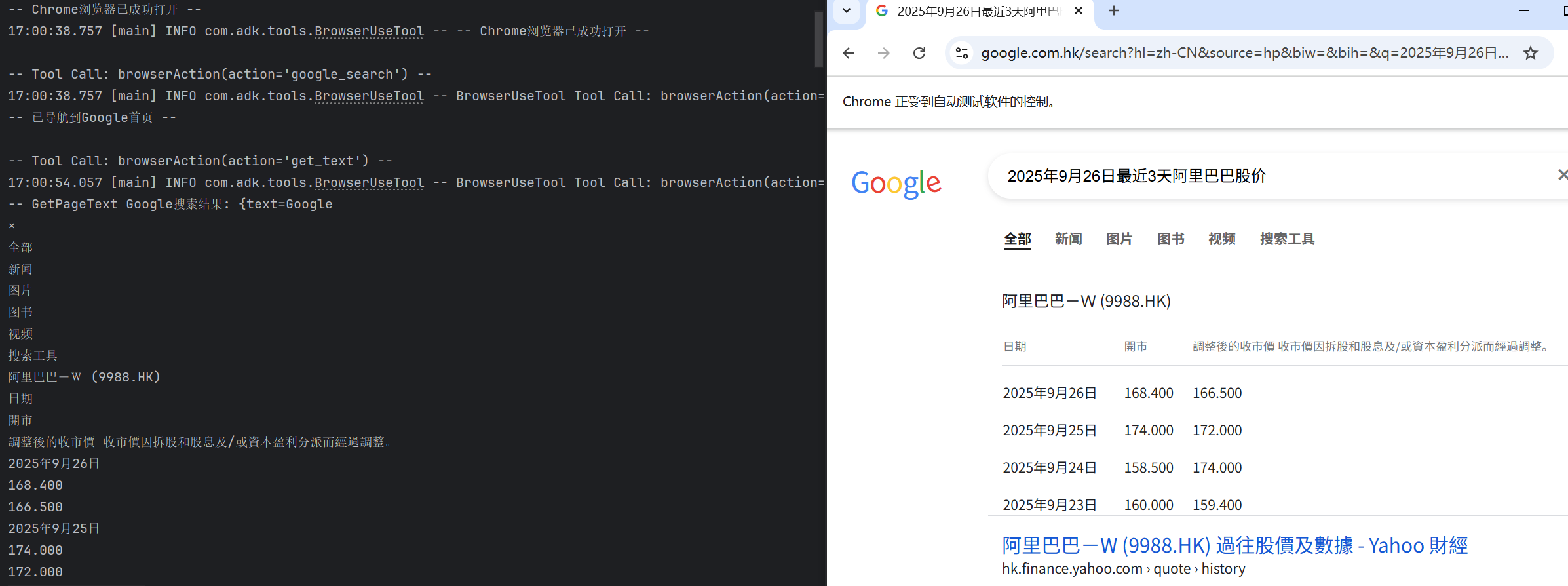
三、测试与效果
    public static void main(String[] args) {
        browserAction("open_browser", null, null, null, null);
        browserAction("google_search", "2025年9月26日最近3天阿里巴巴股价", null, null, null);
        browserAction("get_text", null, null, null, null);

        openBrowser();
        googleSearch("2025年9月26日最近3天阿里巴巴股价");
        getPageText();
    }
效果展示
原创声明:本文系作者授权腾讯云开发者社区发表,未经许可,不得转载。
如有侵权,请联系 cloudcommunity@tencent.com 删除。
目录
腾讯云开发者

Copyright © 2013 - 2026 Tencent Cloud. All Rights Reserved. 腾讯云 版权所有
深圳市腾讯计算机系统有限公司 ICP备案/许可证号:粤B2-20090059  粤公网安备44030502008569号
腾讯云计算(北京)有限责任公司 京ICP证150476号 | 京ICP备11018762号