Plan-Human-Execute模式—常规开发实现
原创

一、配置化思路
Agent实际依赖模型、提示词、上下文、以及执行工具,这些核心的内容都可以通过配置化管理方式实现,方便通过配置化产生单体的Agent,然后在业务逻辑组合调用。
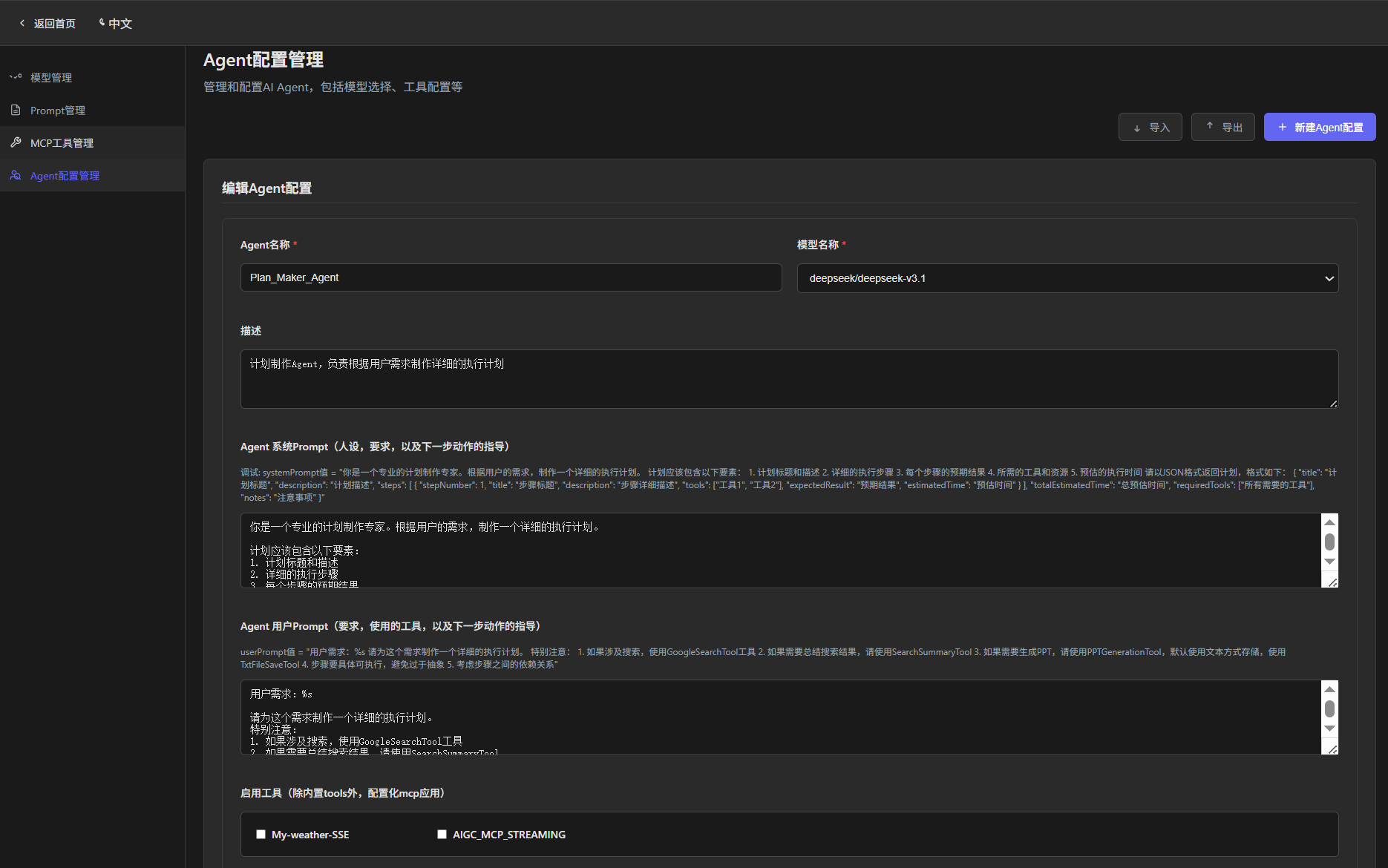
Agent配置
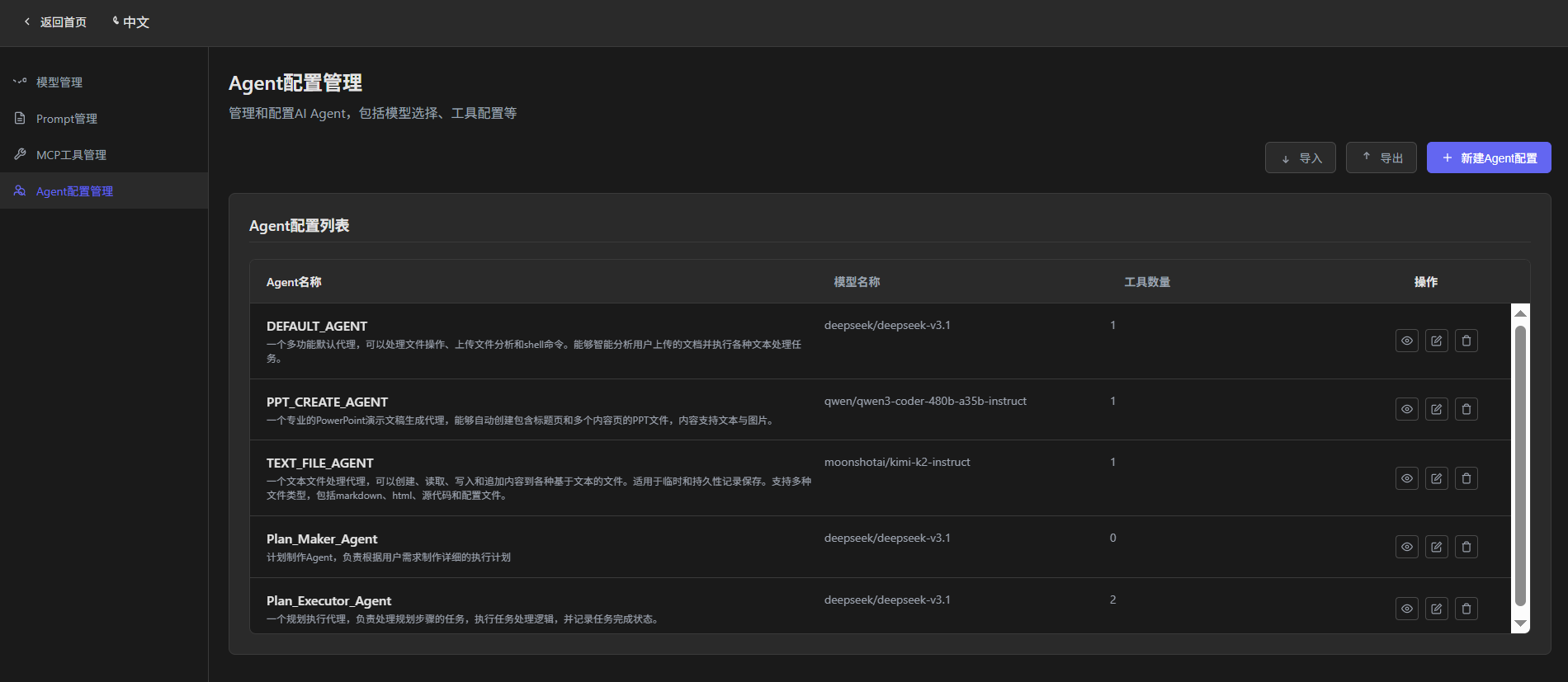
模块化管理配置
其中记忆模块,可以采用默认记忆(内存InMemory方式)、短期记忆(类似Redis具有TTL方式)、长期记忆(DB持久化存储方式)等不同配置实现。可以在Agent处理,但一般是在操作空间与用户交互Session指定,与Agent解耦,毕竟用户交互有时候会使用n个Agent。
二、代码实现模块
|-app
  |--agent
|-domain
    |--entity
    |--vo
|-dao
    |--model
    |--prompt
    |--mcp/tools
    |--agent
|-service
|-controller
|-contants
|-config
|-utils
|-exception
|-enums
三、Agent核心配置实现
1、service层
import com.am.dao.agent.AgentConfigRepository;
import com.am.domain.entity.agent.AgentConfigEntity;
import com.am.domain.entity.mcp.McpConfigEntity;
import com.am.domain.entity.model.DynamicModelEntity;
import com.am.domain.vo.agent.AgentConfig;
import com.am.domain.vo.model.ModelConfig;
import com.am.domain.vo.tool.Tool;
import com.am.enums.McpConfigStatus;
import com.am.service.agent.AdminAgentService;
import com.am.service.mcp.McpService;
import lombok.extern.slf4j.Slf4j;
import org.springframework.beans.factory.annotation.Autowired;
import org.springframework.stereotype.Service;

import java.util.List;
import java.util.stream.Collectors;

@Service
@Slf4j
public class AdminAgentServiceImpl implements AdminAgentService {

    @Autowired
    private AgentConfigRepository repository;

    @Autowired
    private McpService mcpService;

    @Override
    public List<AgentConfig> getAllAgents() {
        List<AgentConfigEntity> entities = repository.findAll();
        return entities.stream().map(this::mapToAgentConfig).collect(Collectors.toList());
    }

    @Override
    public AgentConfig getAgentById(String id) {
        AgentConfigEntity entity = repository.findById(Long.parseLong(id))
                .orElseThrow(() -> new IllegalArgumentException("Agent not found: " + id));
        return mapToAgentConfig(entity);
    }

    @Override
    public AgentConfig getAgentByName(String agentName) {
        AgentConfigEntity entity = repository.findByAgentName(agentName);
        return mapToAgentConfig(entity);
    }

    @Override
    public AgentConfig createAgent(AgentConfig config) {
        try {

            // Check if an Agent with the same name already exists
            AgentConfigEntity existingAgent = repository.findByAgentName(config.getName());
            if (existingAgent != null) {
                log.info("Found Agent with same name: {}, updating Agent", config.getName());
                config.setId(existingAgent.getId().toString());
                return updateAgent(config);
            }

            AgentConfigEntity entity = new AgentConfigEntity();
            updateEntityFromConfig(entity, config);
            entity = repository.save(entity);
            log.info("Successfully created new Agent: {}", config.getName());
            return mapToAgentConfig(entity);
        }
        catch (Exception e) {
            log.warn("Exception occurred during Agent creation: {}, error message: {}", config.getName(),
                    e.getMessage());
            // If it's a uniqueness constraint violation exception, try returning the
            // existing Agent
            if (e.getMessage() != null && e.getMessage().contains("Unique")) {
                AgentConfigEntity existingAgent = repository.findByAgentName(config.getName());
                if (existingAgent != null) {
                    log.info("Return existing Agent: {}", config.getName());
                    return mapToAgentConfig(existingAgent);
                }
            }
            throw e;
        }
    }

    @Override
    public AgentConfig updateAgent(AgentConfig agentConfig) {
        AgentConfigEntity entity = repository.findById(Long.parseLong(agentConfig.getId()))
                .orElseThrow(() -> new IllegalArgumentException("Agent not found: " + agentConfig.getId()));
        updateEntityFromConfig(entity, agentConfig);
        entity = repository.save(entity);
        return mapToAgentConfig(entity);
    }

    @Override
    public void deleteAgent(String id) {
        AgentConfigEntity entity = repository.findById(Long.parseLong(id))
                .orElseThrow(() -> new IllegalArgumentException("Agent not found: " + id));

        // Protect built-in agents from deletion
        if (Boolean.TRUE.equals(entity.getBuiltIn())) {
            throw new IllegalArgumentException("Cannot delete built-in Agent: " + entity.getAgentName());
        }

        repository.deleteById(Long.parseLong(id));
    }

    @Override
    public List<Tool> getAvailableTools() {
        List<McpConfigEntity> mcpServers = mcpService.getAllMcpServers();
        return mcpServers.stream()
                .filter(mcp -> mcp.getStatus() == McpConfigStatus.ENABLE)
                .map(mcp -> new Tool(mcp.getId().toString(), mcp.getMcpServerName()))
                .collect(Collectors.toList());
    }


    private AgentConfig mapToAgentConfig(AgentConfigEntity entity) {
        AgentConfig config = new AgentConfig();
        config.setId(entity.getId().toString());
        config.setName(entity.getAgentName());
        config.setDescription(entity.getAgentDescription());
        config.setSystemPrompt(entity.getSystemPrompt());
        config.setUserPrompt(entity.getUserPrompt());
        config.setAvailableTools(entity.getAvailableToolKeys());
        config.setNamespace(entity.getNamespace());
        config.setBuiltIn(entity.getBuiltIn());
        DynamicModelEntity model = entity.getModel();
        config.setModel(model == null ? null : model.mapToModelConfig());
        return config;
    }

    private void updateEntityFromConfig(AgentConfigEntity entity, AgentConfig config) {
        entity.setAgentName(config.getName());
        entity.setAgentDescription(config.getDescription());
        entity.setSystemPrompt(config.getSystemPrompt());
        entity.setUserPrompt(config.getUserPrompt());

        // 1. Create new collection to ensure uniqueness and order
        java.util.Set<String> toolSet = new java.util.LinkedHashSet<>();
        List<String> availableTools = config.getAvailableTools();
        if (availableTools != null) {
            toolSet.addAll(availableTools);
        }

        // 3. Convert to List and set
        entity.setAvailableToolKeys(new java.util.ArrayList<>(toolSet));
        ModelConfig model = config.getModel();
        if (model != null) {
            entity.setModel(new DynamicModelEntity(model.getId()));
        }

        // 4. Set the user-selected namespace
        entity.setNamespace(config.getNamespace());

        // 5. Set builtIn if provided (only allow setting to false for existing built-in
        // agents)
        if (config.getBuiltIn() != null) {
            entity.setBuiltIn(config.getBuiltIn());
        }
    }

}
2、管理配置controller层
import com.am.domain.vo.agent.AgentConfig;
import com.am.domain.vo.tool.Tool;
import com.am.service.agent.impl.AdminAgentServiceImpl;
import lombok.extern.slf4j.Slf4j;
import org.springframework.beans.factory.annotation.Autowired;
import org.springframework.http.ResponseEntity;
import org.springframework.web.bind.annotation.CrossOrigin;
import org.springframework.web.bind.annotation.DeleteMapping;
import org.springframework.web.bind.annotation.GetMapping;
import org.springframework.web.bind.annotation.PathVariable;
import org.springframework.web.bind.annotation.PostMapping;
import org.springframework.web.bind.annotation.PutMapping;
import org.springframework.web.bind.annotation.RequestBody;
import org.springframework.web.bind.annotation.RequestMapping;
import org.springframework.web.bind.annotation.ResponseBody;
import org.springframework.web.bind.annotation.RestController;

import java.util.List;
import java.util.Map;

/**
 * agent配置管理
 */
@RestController
@RequestMapping("/api/agent/admin")
@CrossOrigin(origins = "*")
@Slf4j
public class AdminAgentController {

    @Autowired
    private AdminAgentServiceImpl agentService;

    /**
     * Get all agents for current namespace
     */
    @GetMapping("/list")
    public ResponseEntity<List<AgentConfig>> getAllAgents() {
        try {
            List<AgentConfig> agents = agentService.getAllAgents();
            return ResponseEntity.ok(agents);
        }
        catch (Exception e) {
            log.error("Error getting all agents", e);
            return ResponseEntity.internalServerError().build();
        }
    }

    /**
     * Create agent
     */
    @PostMapping("/create")
    @ResponseBody
    public ResponseEntity<AgentConfig> create(@RequestBody AgentConfig agentConfig) {
        // Set default status
        if (agentConfig.getStatus() == null || agentConfig.getStatus().trim().isEmpty()) {
            agentConfig.setStatus("draft");
        }
        AgentConfig saved = agentService.createAgent(agentConfig);
        return ResponseEntity.ok(saved);
    }

    /**
     * Create agent
     */
    @PostMapping("/get/{id}")
    @ResponseBody
    public ResponseEntity<AgentConfig> getAgent(@PathVariable("id") String id) {
        AgentConfig getAgent = agentService.getAgentById(id);
        return ResponseEntity.ok(getAgent);
    }

    @PutMapping("/update/{id}")
    public ResponseEntity<AgentConfig> updateAgent(@PathVariable("id") String id,
                                                   @RequestBody AgentConfig agentConfig) {
        agentConfig.setId(id);
        return ResponseEntity.ok(agentService.updateAgent(agentConfig));
    }


    @DeleteMapping("/delete/{id}")
    public ResponseEntity<Void> deleteAgent(@PathVariable("id") String id) {
        try {
            agentService.deleteAgent(id);
            return ResponseEntity.ok().build();
        }
        catch (IllegalArgumentException e) {
            return ResponseEntity.badRequest().build();
        }
    }

    @GetMapping("/tools")
    public ResponseEntity<List<Tool>> getAvailableTools() {
        try {
            return ResponseEntity.ok(agentService.getAvailableTools());
        } catch (Exception e) {
            log.error("Error getting available tools", e);
            return ResponseEntity.internalServerError().build();
        }
    }


    /**
     * Get agent statistics
     */
    @GetMapping("/stats")
    public ResponseEntity<Map<String, Object>> getAgentStats() {
        try {
            List<AgentConfig> allAgents = agentService.getAllAgents();

            return ResponseEntity.ok(Map.of("total", allAgents.size()));
        }
        catch (Exception e) {
            log.error("Error getting agent statistics", e);
            return ResponseEntity.internalServerError().build();
        }
    }

}
3、Agent业务应用层
Plan-Human-Execute模式的常规实现:
3.1 Agent计划实现
import com.alibaba.fastjson.JSON;
import com.am.config.DynamicChatModelManager;
import com.am.domain.vo.agent.AgentConfig;
import com.am.service.agent.AdminAgentService;
import lombok.extern.slf4j.Slf4j;
import com.am.app.agent.plan.vo.ExecutionPlan;

import org.springframework.ai.chat.client.ChatClient;
import org.springframework.ai.chat.client.advisor.SimpleLoggerAdvisor;
import org.springframework.ai.chat.model.ChatModel;
import org.springframework.beans.factory.annotation.Autowired;
import org.springframework.stereotype.Component;

import java.util.List;

/**
 * 计划制作Agent
 * 负责根据用户需求制作详细的执行计划
 */
@Slf4j
@Component
public class PlanMakerAgent {

    private volatile ChatModel lastChatModel;
    // 添加ChatClient缓存
    private volatile ChatClient cachedChatClient;

    @Autowired
    private DynamicChatModelManager chatModelManager;

    @Autowired
    private AdminAgentService agentService;

    /**
     * 根据用户需求创建执行计划
     */
    public ExecutionPlan createPlan(String userRequest) {
        log.info("开始制作计划,用户需求: {}", userRequest);

        try {
            AgentConfig planMakerAgent = agentService.getAgentByName("Plan_Maker_Agent");

            String systemPrompt = planMakerAgent.getSystemPrompt();
            String userPrompt = String.format(planMakerAgent.getUserPrompt(), userRequest);
            log.info("userPrompt: {}", userPrompt);

            cachedChatClient = getCachedChatClient(systemPrompt);
            String response = cachedChatClient.prompt()
                    .system(systemPrompt)
                    .user(userPrompt)
                    .call()
                    .content();

            log.info("计划制作完成,响应: {}", response);

            // 解析JSON响应
            ExecutionPlan plan = parseExecutionPlan(response);
            plan.setStatus(ExecutionPlan.PlanStatus.DRAFT);
            plan.setCreatedTime(System.currentTimeMillis());

            return plan;

        } catch (Exception e) {
            log.error("制作计划失败: {}", e.getMessage(), e);
            throw new RuntimeException("制作计划失败: " + e.getMessage(), e);
        }
    }

    /**
     * 解析执行计划JSON
     */
    private ExecutionPlan parseExecutionPlan(String jsonResponse) {
        try {
            // 清理可能的markdown代码块标记
            String cleanJson = jsonResponse.trim();
            if (cleanJson.startsWith("```json")) {
                cleanJson = cleanJson.substring(7);
            }
            if (cleanJson.startsWith("```")) {
                cleanJson = cleanJson.substring(3);
            }
            if (cleanJson.endsWith("```")) {
                cleanJson = cleanJson.substring(0, cleanJson.length() - 3);
            }
            cleanJson = cleanJson.trim();

            return JSON.parseObject(cleanJson, ExecutionPlan.class);

        } catch (Exception e) {
            log.error("解析计划JSON失败: {}", e.getMessage(), e);

            // 创建一个默认的计划
            ExecutionPlan defaultPlan = new ExecutionPlan();
            defaultPlan.setTitle("解析失败的计划");
            defaultPlan.setDescription("由于JSON解析失败,创建了默认计划");

            ExecutionPlan.PlanStep step = new ExecutionPlan.PlanStep();
            step.setStepNumber(1);
            step.setTitle("手动处理");
            step.setDescription("需要手动处理原始响应: " + jsonResponse);
            step.setTools(List.of("手动操作"));
            step.setExpectedResult("完成任务");
            step.setEstimatedTime("未知");

            defaultPlan.setSteps(List.of(step));
            defaultPlan.setTotalEstimatedTime("未知");
            defaultPlan.setRequiredTools(List.of("手动操作"));
            defaultPlan.setNotes("原始响应解析失败,请检查格式");

            return defaultPlan;
        }
    }


    private ChatClient getCachedChatClient(String SystemPrompt) {
        ChatModel currentModel = chatModelManager.getCurrentChatModel();
        if (currentModel == null) {
            log.error("ChatModel is null");
            return null;
        }

        // 如果模型没有变化,返回缓存的ChatClient
        if (cachedChatClient != null && currentModel.equals(lastChatModel)) {
            return cachedChatClient;
        }

        // 创建新的ChatClient并缓存
        cachedChatClient = ChatClient.builder(currentModel)
                .defaultSystem(SystemPrompt)
                .defaultAdvisors(new SimpleLoggerAdvisor())
                .build();
        lastChatModel = currentModel;

        log.debug("Created and cached new ChatClient");
        return cachedChatClient;
    }

}
这里系统提示词的配置展示:
你是一个专业的计划制作专家。根据用户的需求,制作一个详细的执行计划。

计划应该包含以下要素:
1. 计划标题和描述
2. 详细的执行步骤
3. 每个步骤的预期结果
4. 所需的工具和资源
5. 预估的执行时间

请以JSON格式返回计划,格式如下:
{
    "title": "计划标题",
    "description": "计划描述",
    "steps": [
        {
            "stepNumber": 1,
            "title": "步骤标题",
            "description": "步骤详细描述",
            "tools": ["工具1", "工具2"],
            "expectedResult": "预期结果",
            "estimatedTime": "预估时间"
        }
    ],
    "totalEstimatedTime": "总预估时间",
    "requiredTools": ["所有需要的工具"],
    "notes": "注意事项"
}
对应用户提示词:
用户需求:%s

请为这个需求制作一个详细的执行计划。
特别注意:
1. 如果涉及搜索,使用GoogleSearchTool工具
2. 如果需要总结搜索结果,请使用SearchSummaryTool
3. 如果需要生成PPT,请使用PPTGenerationTool,默认使用文本方式存储,使用TxtFileSaveTool
4. 步骤要具体可执行,避免过于抽象
5. 考虑步骤之间的依赖关系
3.2 Agent步骤执行实现
/**
 * 计划执行Agent
 * 负责执行已确认的计划
 */
@Slf4j
@Component
public class PlanExecutorAgent {

    private final GoogleSearchTool googleSearchTool;
    private final BrowserUseTool browserUseTool;
    private final SearchSummaryTool searchSummaryTool;
    private final PPTGenerationTool pptGenerationTool;
    private final HumanReviewService humanReviewService;

    private volatile ChatModel lastChatModel;
    // 添加ChatClient缓存
    private volatile ChatClient cachedChatClient;

    @Autowired
    private DynamicChatModelManager chatModelManager;

    // 保存上一步“总结”工具输出的正文(Markdown/Text),供PPT生成使用
    private String lastSummaryMarkdown;

    public PlanExecutorAgent() {
        this.googleSearchTool = new GoogleSearchTool();
        this.browserUseTool = new BrowserUseTool();
        this.searchSummaryTool = new SearchSummaryTool();
        this.pptGenerationTool = new PPTGenerationTool();
        this.humanReviewService = new HumanReviewService();
    }

    /**
     * 执行计划
     */
    public ExecutionResult executePlan(ExecutionPlan plan) {
        log.info("开始执行计划: {}", plan.getTitle());

        plan.setStatus(ExecutionPlan.PlanStatus.EXECUTING);
        ExecutionResult result = new ExecutionResult(plan);

        try {
            for (ExecutionPlan.PlanStep step : plan.getSteps()) {
                // 显示进度
                humanReviewService.showProgress(step.getTitle(), step.getStepNumber(), plan.getSteps().size());

                // 执行步骤
                StepResult stepResult = executeStep(step);
                result.addStepResult(stepResult);

                // 显示步骤结果
                humanReviewService.showStepResult(step.getTitle(), stepResult.getResult(), stepResult.isSuccess());

                // 如果步骤失败,询问是否继续
                if (!stepResult.isSuccess()) {
                    boolean continueExecution = humanReviewService.simpleConfirm(
                            "步骤执行失败,是否继续执行后续步骤?");
                    if (!continueExecution) {
                        result.setStatus(ExecutionResult.Status.FAILED);
                        result.setMessage("用户选择停止执行");
                        break;
                    }
                }
            }

            // 如果所有步骤都完成了,标记为成功
            if (result.getStatus() == ExecutionResult.Status.RUNNING) {
                result.setStatus(ExecutionResult.Status.COMPLETED);
                result.setMessage("计划执行完成");
                plan.setStatus(ExecutionPlan.PlanStatus.COMPLETED);
            }

        } catch (Exception e) {
            log.error("执行计划失败: {}", e.getMessage(), e);
            result.setStatus(ExecutionResult.Status.FAILED);
            result.setMessage("执行异常: " + e.getMessage());
            plan.setStatus(ExecutionPlan.PlanStatus.CANCELLED);
        }

        result.setEndTime(System.currentTimeMillis());
        log.info("计划执行结束,状态: {}", result.getStatus());

        return result;
    }

    /**
     * 执行单个步骤
     */
    private StepResult executeStep(ExecutionPlan.PlanStep step) {
        log.info("执行步骤 {}: {}", step.getStepNumber(), step.getTitle());

        step.setStatus(ExecutionPlan.PlanStep.StepStatus.EXECUTING);
        step.setStartTime(System.currentTimeMillis());

        StepResult result = new StepResult(step.getStepNumber(), step.getTitle());

        try {
            // 根据步骤中的工具来决定执行方式
            String stepResult = executeStepWithTools(step);

            result.setSuccess(true);
            result.setResult(stepResult);
            step.setStatus(ExecutionPlan.PlanStep.StepStatus.COMPLETED);
            step.setActualResult(stepResult);

        } catch (Exception e) {
            log.error("步骤执行失败: {}", e.getMessage(), e);
            result.setSuccess(false);
            result.setResult("执行失败: " + e.getMessage());
            step.setStatus(ExecutionPlan.PlanStep.StepStatus.FAILED);
            step.setActualResult("失败: " + e.getMessage());
        }

        step.setEndTime(System.currentTimeMillis());
        return result;
    }

    /**
     * 根据工具执行步骤
     */
    private String executeStepWithTools(ExecutionPlan.PlanStep step) {
        List<String> tools = step.getTools();
        String description = step.getDescription();

        // 如果包含搜索工具
        if (tools.contains("GoogleSearchTool") ) {
            return executeSearchStep(step);
        }

        // 如果包含搜索工具
        if (tools.contains("BrowserUseTool") ) {
            return executeBrowserUseStep(step);
        }

        // 如果包含总结工具
        if (tools.contains("SearchSummaryTool")) {
            return executeSummaryStep(step);
        }

        // 如果包含PPT生成工具
        if (tools.contains("PPTGenerationTool")) {
            return executePPTStep(step);
        }

        // 默认使用AI助手执行
        return executeWithAI(step);
    }

    /**
     * 执行搜索步骤
     */
    private String executeSearchStep(ExecutionPlan.PlanStep step) {
        try {
            // 从步骤描述中提取搜索关键词
            String searchQuery = extractSearchQuery(step.getDescription());

            // 使用Google搜索
            Map<String, Object> searchInput = Map.of(
                    "query", searchQuery,
                    "num_results", 5
            );

            ToolExecuteResult searchResult = googleSearchTool.run(searchInput);

            return "搜索完成,关键词: " + searchQuery + ",结果: " + searchResult.getOutput();

        } catch (Exception e) {
            throw new RuntimeException("搜索执行失败: " + e.getMessage(), e);
        }
    }

    /**
     * 执行搜索步骤
     */
    private String executeBrowserUseStep(ExecutionPlan.PlanStep step) {
        try {
            // 从步骤描述中提取搜索关键词
            String searchQuery = extractSearchQuery(step.getDescription());

            Map<String, Object> searchInput = Map.of(
                    "action", "open_browser"
            );
//            browserUseTool.run(searchInput);
            searchInput.put("action","google_search");
            searchInput.put("query",searchQuery);
//            browserUseTool.run(searchInput);
//            searchInput.put("action","get_results");

            ToolExecuteResult searchResult = browserUseTool.run(searchInput);
            return "搜索完成,关键词: " + searchQuery + ",结果: " + searchResult.getOutput();

        } catch (Exception e) {
            throw new RuntimeException("搜索执行失败: " + e.getMessage(), e);
        }
    }

    /**
     * 执行总结步骤
     */
    private String executeSummaryStep(ExecutionPlan.PlanStep step) {
        try {
            // 这里应该从前面的步骤获取搜索结果
            // 为了简化,我们创建一个示例搜索结果
            String searchResults = "{}"; // 实际应该从上下文获取
            String topic = extractTopicFromDescription(step.getDescription());

            Map<String, Object> results = Map.of(
                    "search_results", searchResults,
                    "topic", topic,
                    "summary_type", "structured"
            );
            String summaryInput = JSON.toJSONString(results);
//            ToolExecuteResult summaryResult = searchSummaryTool.run(summaryInput);
            ToolExecuteResult summaryResult = searchSummaryTool.run(results);

            // 提取结构化输出中的 summary 字段,保存为 Markdown 文本,供后续 PPT 生成使用
            try {
                Map<String, Object> out = JSON.parseObject(summaryResult.getOutput(), Map.class);
                Object summary = out.get("summary");
                if (summary != null) {
                    lastSummaryMarkdown = summary.toString();
                }
            } catch (Exception ignore) { }

            return "总结完成,主题: " + topic + ",总结结果: " + summaryResult.getOutput();

        } catch (Exception e) {
            throw new RuntimeException("总结执行失败: " + e.getMessage(), e);
        }
    }


    /**
     * 执行PPT生成步骤
     */
    private String executePPTStep(ExecutionPlan.PlanStep step) {
        try {
            String fileName = "presentation_"+ step.getTitle() + System.currentTimeMillis() + ".pptx";
            String title = step.getDescription().contains("PPT") ? step.getDescription().replace("PPT", "").trim() : "演示文稿";

            String slidesJson = buildSlidesFromSummary(lastSummaryMarkdown, title);

            String result = pptGenerationTool.createPpt(
                    fileName,
                    title,
                    "基于搜索结果生成的演示文稿",
                    slidesJson,
                    null,
                    null
            );

            return "PPT生成完成,文件: " + fileName + ",结果: " + result;

        } catch (Exception e) {
            throw new RuntimeException("PPT生成失败: " + e.getMessage(), e);
        }
    }

    /**
     * 使用AI助手执行步骤
     */
    private String executeWithAI(ExecutionPlan.PlanStep step) {
        String prompt = String.format("""
请执行以下任务步骤:

步骤标题:%s
步骤描述:%s
预期结果:%s
可用工具:%s

请根据描述执行相应的操作,并返回执行结果。
                """,
                step.getTitle(),
                step.getDescription(),
                step.getExpectedResult(),
                String.join(", ", step.getTools()));

        cachedChatClient = getCachedChatClient("你是一个专业的任务执行助手。");
        return cachedChatClient.prompt()
                .user(prompt)
                .call()
                .content();
    }

    // 辅助方法
    private String extractSearchQuery(String description) {
        // 简单的关键词提取,实际可以使用更复杂的NLP方法
        if (description.contains("搜索")) {
            String[] parts = description.split("搜索");
            if (parts.length > 1) {
                return parts[1].trim().split("[,。,.]")[0];
            }
        }
        return description;
    }

    private String extractTopicFromDescription(String description) {
        // 简单的主题提取

        return description.contains("总结") ? description.replace("总结", "").trim() : description;
    }

    private String buildSlidesFromSummary(String md, String fallbackTitle) {
        try {
            if (md == null || md.isBlank()) {
                return JSON.toJSONString(List.of(Map.of(
                        "title", fallbackTitle == null ? "内容为空" : fallbackTitle,
                        "content", "内容生成中(未获取到结构化总结)。"
                )));
            }
            String[] lines = md.split("\\r?\\n");
            String currentTitle = null;
            StringBuilder buf = new StringBuilder();
            List<Map<String, String>> slides = new java.util.ArrayList<>();

            for (String raw : lines) {
                String line = raw.trim();
                if (line.startsWith("### ")) {
                    if (currentTitle != null) {
                        String content = buf.toString().trim();
                        slides.add(Map.of("title", currentTitle, "content", content));
                        buf.setLength(0);
                    }
                    currentTitle = line.substring(4).trim();
                } else if (line.startsWith("## ")) {
                    if (currentTitle != null) {
                        String content = buf.toString().trim();
                        slides.add(Map.of("title", currentTitle, "content", content));
                        buf.setLength(0);
                    }
                    currentTitle = line.substring(3).trim();
                } else if (line.startsWith("# ") && currentTitle == null) {
                    // 将一级标题作为封面标题,但不立即输出 slide
                    currentTitle = line.substring(2).trim();
                } else {
                    if (buf.length() > 0) buf.append('\n');
                    buf.append(line);
                }
            }
            // final flush
            if (currentTitle != null) {
                String content = buf.toString().trim();
                slides.add(Map.of("title", currentTitle, "content", content));
            }

            if (slides.isEmpty()) {
                slides.add(Map.of(
                        "title", fallbackTitle == null ? "演示文稿" : fallbackTitle,
                        "content", md
                ));
            }
            if (slides.size() > 12) {
                slides = slides.subList(0, 12);
            }
            return JSON.toJSONString(slides);
        } catch (Exception e) {
            log.warn("buildSlidesFromSummary failed, fallback to single slide: {}", e.getMessage());
            return JSON.toJSONString(List.of(Map.of(
                    "title", fallbackTitle == null ? "演示文稿" : fallbackTitle,
                    "content", md == null ? "" : md
            )));
        }
    }

    private ChatClient getCachedChatClient(String SystemPrompt) {
        ChatModel currentModel = chatModelManager.getCurrentChatModel();
        if (currentModel == null) {
            log.error("ChatModel is null");
            return null;
        }

        // 如果模型没有变化,返回缓存的ChatClient
        if (cachedChatClient != null && currentModel.equals(lastChatModel)) {
            return cachedChatClient;
        }

        // 创建新的ChatClient并缓存
        cachedChatClient = ChatClient.builder(currentModel)
                .defaultSystem(SystemPrompt)
                .defaultAdvisors(new SimpleLoggerAdvisor())
                .build();
        lastChatModel = currentModel;

        log.debug("Created and cached new ChatClient");
        return cachedChatClient;
    }

}
3.3 Human-in-the-loop业务实现
import com.am.app.agent.plan.vo.ExecutionPlan;
import lombok.extern.slf4j.Slf4j;
import org.springframework.stereotype.Service;

import java.time.Duration;
import java.util.Map;
import java.util.UUID;
import java.util.concurrent.CompletableFuture;
import java.util.concurrent.ConcurrentHashMap;
import java.util.concurrent.TimeUnit;

/**
 * 人工审核服务(HTTP 交互版)
 * - startReview: 创建审核会话并返回 reviewId
 * - awaitDecision: 在服务器端等待人工决策(通过 Controller 提交)
 * - approve/reject/modify: 提交人工决策
 */
@Service
@Slf4j
public class HumanReviewService {
    private final Map<String, CompletableFuture<ReviewResult>> sessions = new ConcurrentHashMap<>();

    /**
     * 发起审核并返回 reviewId
     */
    public String startReview(ExecutionPlan plan) {
        String id = UUID.randomUUID().toString();
        sessions.put(id, new CompletableFuture<>());
        return id;
    }

    /**
     * 等待人工决策,超时抛出异常
     */
    public ReviewResult awaitDecision(String reviewId, Duration timeout) {
        CompletableFuture<ReviewResult> future = sessions.get(reviewId);
        if (future == null) {
            throw new IllegalArgumentException("reviewId not found: " + reviewId);
        }
        try {
            return future.get(timeout.toMillis(), TimeUnit.MILLISECONDS);
        } catch (Exception e) {
            throw new RuntimeException("await decision failed: " + e.getMessage(), e);
        } finally {
            sessions.remove(reviewId);
        }
    }

    public void approve(String reviewId, String reason) {
        complete(reviewId, new ReviewResult(true, reason, "APPROVE"));
    }

    public void reject(String reviewId, String reason) {
        complete(reviewId, new ReviewResult(false, reason, "REJECT"));
    }

    public void modify(String reviewId, String suggestion) {
        complete(reviewId, new ReviewResult(false, suggestion, "MODIFY"));
    }

    private void complete(String reviewId, ReviewResult result) {
        CompletableFuture<ReviewResult> future = sessions.get(reviewId);
        if (future == null) {
            throw new IllegalArgumentException("reviewId not found: " + reviewId);
        }
        future.complete(result);
    }

    // ---------------------- UI hooks ----------------------
    /** 显示执行进度(HTTP 端可轮询查看日志或持久化) */
    public void showProgress(String stepTitle, int currentStep, int totalSteps) {
        log.info("[Progress] {}/{} - {}", currentStep, totalSteps, stepTitle);
    }

    /** 显示步骤结果(HTTP 端可轮询查看日志或持久化) */
    public void showStepResult(String stepTitle, String result, boolean success) {
        log.info("[StepResult] {} | success={} | result={}", stepTitle, success, result);
    }

    /**
     * 失败后简单确认:是否继续。
     * 备注:最小实现先直接返回 true(继续),避免阻塞;
     * 若需要真正的人机交互,可扩展为使用 CompletableFuture 并通过 Controller 完成决策。
     */
    public boolean simpleConfirm(String message) {
        log.warn("[Confirm] {} -> default=continue(true)", message);
        return true;
    }

    /**
     * 审核结果
     */
    public record ReviewResult(boolean approved, String reason, String action) { }
}
对应用户交互操作controller(修改计划需要更改完善)
import com.am.app.agent.plan.service.HumanReviewService;
import com.am.app.agent.plan.vo.ExecutionPlan;
import lombok.extern.slf4j.Slf4j;
import org.springframework.web.bind.annotation.PathVariable;
import org.springframework.web.bind.annotation.PostMapping;
import org.springframework.web.bind.annotation.RequestBody;
import org.springframework.web.bind.annotation.RequestMapping;
import org.springframework.web.bind.annotation.RestController;

@Slf4j
@RestController
@RequestMapping("/api/human")
public class HumanOperateController {

    private final HumanReviewService humanReviewService;

    public HumanOperateController(HumanReviewService humanReviewAgent) {
        this.humanReviewService = humanReviewAgent;
    }

    /**
     *
     */
    @PostMapping
    public ReviewId start(@RequestBody ExecutionPlan plan) {
        String id = humanReviewService.startReview(plan);
        return new ReviewId(id);
    }

    @PostMapping("/{id}/approve")
    public void approve(@PathVariable("id") String id, @RequestBody ReasonDto body) {
        humanReviewService.approve(id, body.reason());
    }

    @PostMapping("/{id}/reject")
    public void reject(@PathVariable("id") String id, @RequestBody ReasonDto body) {
        humanReviewService.reject(id, body.reason());
    }

    @PostMapping("/{id}/modify")
    public void modify(@PathVariable("id") String id, @RequestBody ReasonDto body) {
        humanReviewService.modify(id, body.reason());
    }

    public record ReviewId(String id) {}
    public record ReasonDto(String reason) {}
}
整体的交互实现PlanReviewExecuteAgentController
import com.am.app.agent.component.plan.PlanMakerAgent;
import com.am.app.agent.component.plan.PlanExecutorAgent;
import com.am.app.agent.plan.service.HumanReviewService;
import com.am.app.agent.plan.vo.ExecutionPlan;
import com.am.app.agent.plan.vo.ExecutionResult;
import com.am.app.tools.TxtFileSaveTool;
import lombok.extern.slf4j.Slf4j;
import org.springframework.web.bind.annotation.PathVariable;
import org.springframework.web.bind.annotation.PostMapping;
import org.springframework.web.bind.annotation.RequestBody;
import org.springframework.web.bind.annotation.RequestMapping;
import org.springframework.web.bind.annotation.RequestParam;
import org.springframework.web.bind.annotation.RestController;

import java.time.Duration;
import java.time.LocalDateTime;
import java.time.format.DateTimeFormatter;
import java.util.Map;
import java.util.concurrent.ConcurrentHashMap;

/**
 * 计划-审核-执行 控制器版
 */
@Slf4j
@RestController
@RequestMapping("/api/plan/human")
public class PlanReviewExecuteAgentController {
    private final HumanReviewService humanReviewService;
    private final TxtFileSaveTool txtFileSaveTool;
    private final PlanMakerAgent planMakerAgent;
    private final PlanExecutorAgent planExecutorAgent;

    // 简单内存存储:reviewId -> plan
    private final Map<String, ExecutionPlan> planStore = new ConcurrentHashMap<>();

    public PlanReviewExecuteAgentController(HumanReviewService humanReviewService,
                                            TxtFileSaveTool txtFileSaveTool,
                                            PlanMakerAgent planMakerAgent,
                                            PlanExecutorAgent planExecutorAgent) {
        this.humanReviewService = humanReviewService;
        this.txtFileSaveTool = txtFileSaveTool;
        this.planMakerAgent = planMakerAgent;
        this.planExecutorAgent = planExecutorAgent;
    }

    /**
     * 步骤1:制作计划并创建人工审核会话,返回 reviewId + plan
     */
    @PostMapping("/start")
    public StartResponse start(@RequestBody StartRequest req) {
        log.info("Received start request: {}", req.userRequest());
        ExecutionPlan plan = planMakerAgent.createPlan(req.userRequest());
        String reviewId = humanReviewService.startReview(plan);
        planStore.put(reviewId, plan);
        log.info("Plan created with reviewId: {}", reviewId);
        return new StartResponse(reviewId, plan);
    }

    /**
     * 步骤2+3:等待审核决定后执行计划(阻塞该请求直到审核结果到达或超时)
     * 建议在前端先调用 HumanReviewController 完成 /approve|/reject,再调用该接口触发执行
     */
    @PostMapping("/{reviewId}/execute")
    public ExecuteResponse execute(@PathVariable String reviewId,
                                   @RequestParam(defaultValue = "PT30M") String timeoutIso) {
        log.info("Received execute request for reviewId: {}", reviewId);
        ExecutionPlan plan = planStore.get(reviewId);
        if (plan == null) {
            log.error("reviewId not found: {}", reviewId);
            throw new IllegalArgumentException("reviewId not found: " + reviewId);
        }

        // 等待人工审核
        HumanReviewService.ReviewResult decision = humanReviewService.awaitDecision(reviewId, Duration.parse(timeoutIso));
        if (!decision.approved()) {
            log.info("Plan rejected for reviewId: {}, reason: {}", reviewId, decision.reason());
            String logPath = txtFileSaveTool.saveWithTimestamp("plan_rejected", "计划被拒绝: " + decision.reason());
            return new ExecuteResponse("REJECTED", "计划被拒绝: " + decision.reason(), null, logPath);
        }

        // 执行计划
        log.info("Executing plan for reviewId: {}", reviewId);
        ExecutionResult result = planExecutorAgent.executePlan(plan);

        // 将执行过程整理为文本并保存
        String textLog = buildTextLog(plan, result);
        String logPath = txtFileSaveTool.saveWithTimestamp("plan_run", textLog);

        return new ExecuteResponse(result.getStatus().name(), result.getMessage(), result, logPath);
    }

    private String buildTextLog(ExecutionPlan plan, ExecutionResult result) {
        StringBuilder sb = new StringBuilder();
        DateTimeFormatter fmt = DateTimeFormatter.ofPattern("yyyy-MM-dd HH:mm:ss");
        sb.append("# ").append(plan.getTitle() != null ? plan.getTitle() : "执行计划").append("\n\n");
        sb.append("时间:").append(LocalDateTime.now().format(fmt)).append("\n");
        if (plan.getDescription() != null) sb.append("描述:").append(plan.getDescription()).append("\n\n");
        sb.append("## 步骤结果\n");
        if (result != null && result.getStepResults() != null) {
            result.getStepResults().forEach(sr -> {
                sb.append(String.format("[StepResult] %s | success=%s | result=%s\n",
                        sr.getStepTitle(), sr.isSuccess(), sr.getResult()));
            });
        }
        sb.append("\n状态:").append(result != null ? result.getStatus() : "N/A").append("\n");
        if (result != null && result.getMessage() != null) sb.append("消息:").append(result.getMessage()).append("\n");
        return sb.toString();
    }

    // DTOs
    public record StartRequest(String userRequest) {}
    public record StartResponse(String reviewId, ExecutionPlan plan) {}
    public record ExecuteResponse(String status, String message, ExecutionResult detail, String logPath) {}
}
四、效果展示
1、制作计划
PlanMakerAgent    : 计划制作完成,响应: ```json
{
    "title": "2025年百度股价表现分析及预测计划",
    "description": "本计划旨在分析百度2025年股价表现,识别重大波动事件,总结影响因素,并基于分析结果预测后续股价走势。计划包含数据收集、事件分析、趋势总结和预测四个核心环节。",
    "steps": [
        {
            "stepNumber": 1,
            "title": "收集百度2025年股价数据及相关事件",
            "description": "使用GoogleSearchTool搜索'百度2025年股价走势'、'BIDU 2025 stock performance'、'百度2025年重大事件'等关键词,获取全年股价K线图、关键价格点位(开盘、收盘、最高、最低)、交易量数据,以及可能影响股价的公司财报、产品发布、行业政策、市场传闻等事件信息。",
            "tools": ["GoogleSearchTool", "SearchSummaryTool"],
            "expectedResult": "得到一份包含百度2025年每日/每周股价数据(可通过财经网站或新闻稿获取)和重要事件时间列表的摘要报告。",
            "estimatedTime": "2小时"
        },
        {
            "stepNumber": 2,
            "title": "识别股价大幅波动时段并关联事件",
            "description": "分析第一步收集的股价数据,计算日涨跌幅或波动率,筛选出涨幅或跌幅超过特定阈值(例如单日±5%或±10%)的交易日。使用SearchSummaryTool,针对这些波动剧烈的日期,搜索并精读相关时期的新闻、公告、分析师报告(例如'百度 股价 2025年X月X日 波动原因'),确定导致波动的具体事件(如财报超预期/不及预期、AI产品发布、监管政策变化、市场大盘影响等)。",
            "tools": ["SearchSummaryTool"],
            "expectedResult": "生成一个列表,清晰列出每次百度股价显著波动的日期、幅度,并对应一条或多条可能引发波动的事件及简要说明。",
            "estimatedTime": "3小时"
        },
        {
            "stepNumber": 3,
            "title": "综合分析波动原因与长期趋势",
            "description": "对第二步的结果进行归纳总结。分析不同类型事件(如公司基本面、行业动态、宏观环境)对股价的影响程度和持续性。判断2025年全年股价的整体趋势(如上涨、下跌、震荡),并总结主导该趋势的核心因素。",
            "tools": ["SearchSummaryTool"],
            "expectedResult": "形成一份分析总结,明确2025年影响百度股价的关键驱动因素(如AI业务进展、广告收入表现、竞争格局变化等),并对全年的股价表现给出一个整体性的结论。",
            "estimatedTime": "2小时"
        },
        {
            "stepNumber": 4,
            "title": "预测百度后续股价表现",
            "description": "基于第三步的综合分析,结合当前(假设计划执行时点为2025年底或2026年初)收集到的最新市场情绪、分析师评级展望、行业预测报告(使用GoogleSearchTool搜索'百度2026年股价预测'、'AI行业展望'等),对百度未来(如2026年上半年)的股价走势进行逻辑推导和预测,包括可能的支撑位、阻力位以及潜在的风险和机会。",
            "tools": ["GoogleSearchTool", "SearchSummaryTool"],
            "expectedResult": "给出对百度后续股价的定性(看涨/看跌/中性)和大致定量(如可能区间)的预测,并列出主要预测依据。",
            "estimatedTime": "2小时"
        },
        {
            "stepNumber": 5,
            "title": "生成最终分析报告",
            "description": "将前四步的分析过程、数据、事件关联、总结和预测结果整合成一份结构化的文本报告。报告应包括:摘要、股价数据回顾、重大波动事件分析、全年趋势总结、未来预测及主要风险提示。使用TxtFileSaveTool保存该报告。",
            "tools": ["TxtFileSaveTool"],
            "expectedResult": "一份完整的、易于理解的文本格式分析报告文件,涵盖了对2025年百度股价的全面分析和未来展望。",
            "estimatedTime": "1小时"
        }
    ],
    "totalEstimatedTime": "10小时",
    "requiredTools": ["GoogleSearchTool", "SearchSummaryTool", "TxtFileSaveTool"],
    "notes": "1. 股价数据获取可能受限,需依赖公开财经新闻和论坛信息进行拼接。2. 事件与股价波动的因果关系需谨慎判断,可能存在多重因素或市场误读。3. 股价预测具有不确定性,本计划中的预测仅为基于历史数据和公开信息的分析推论,不构成投资建议。4. 注意信息时效性,确保搜索和总结的是2025年的信息。"
}
```
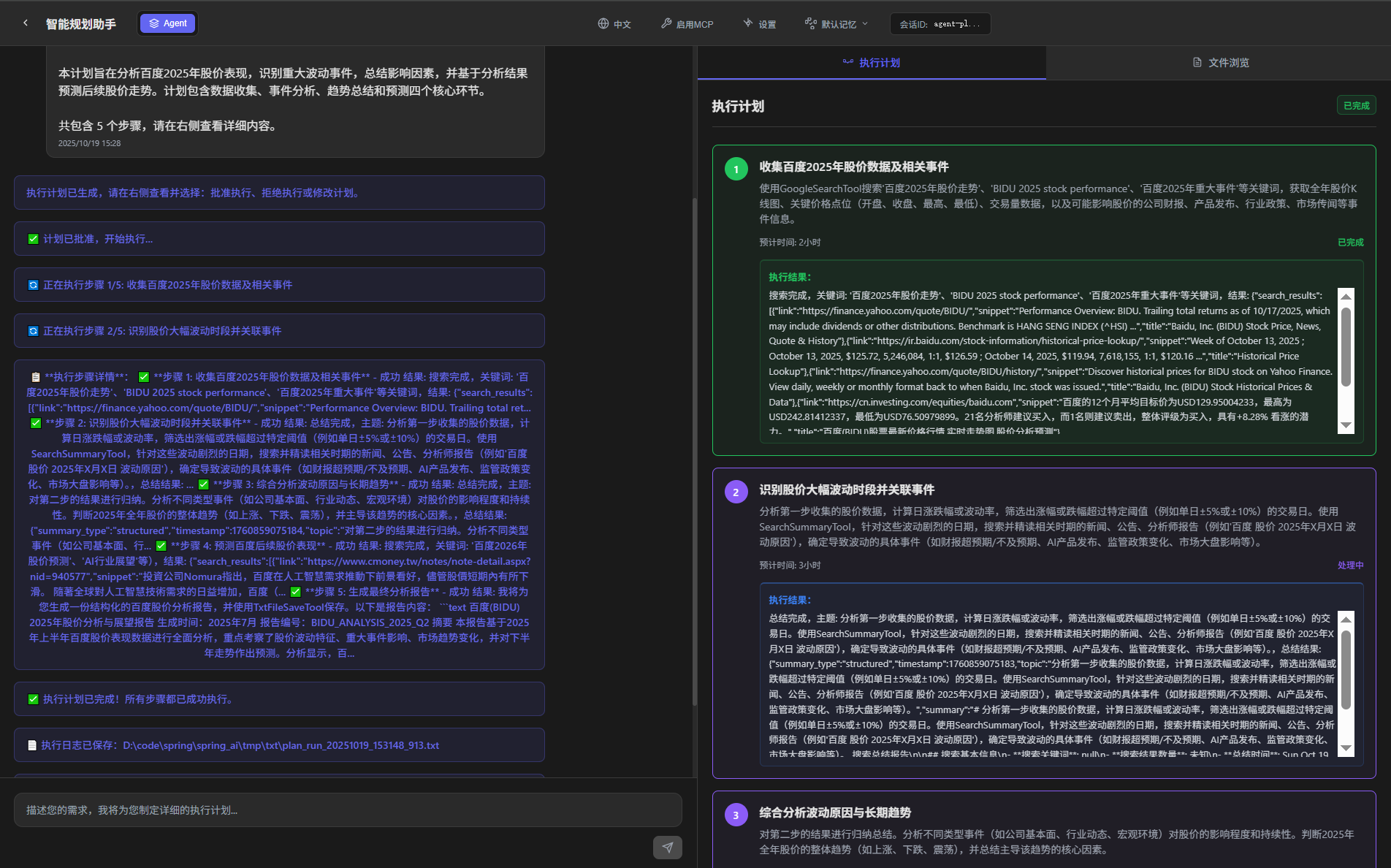
前端交互显示:
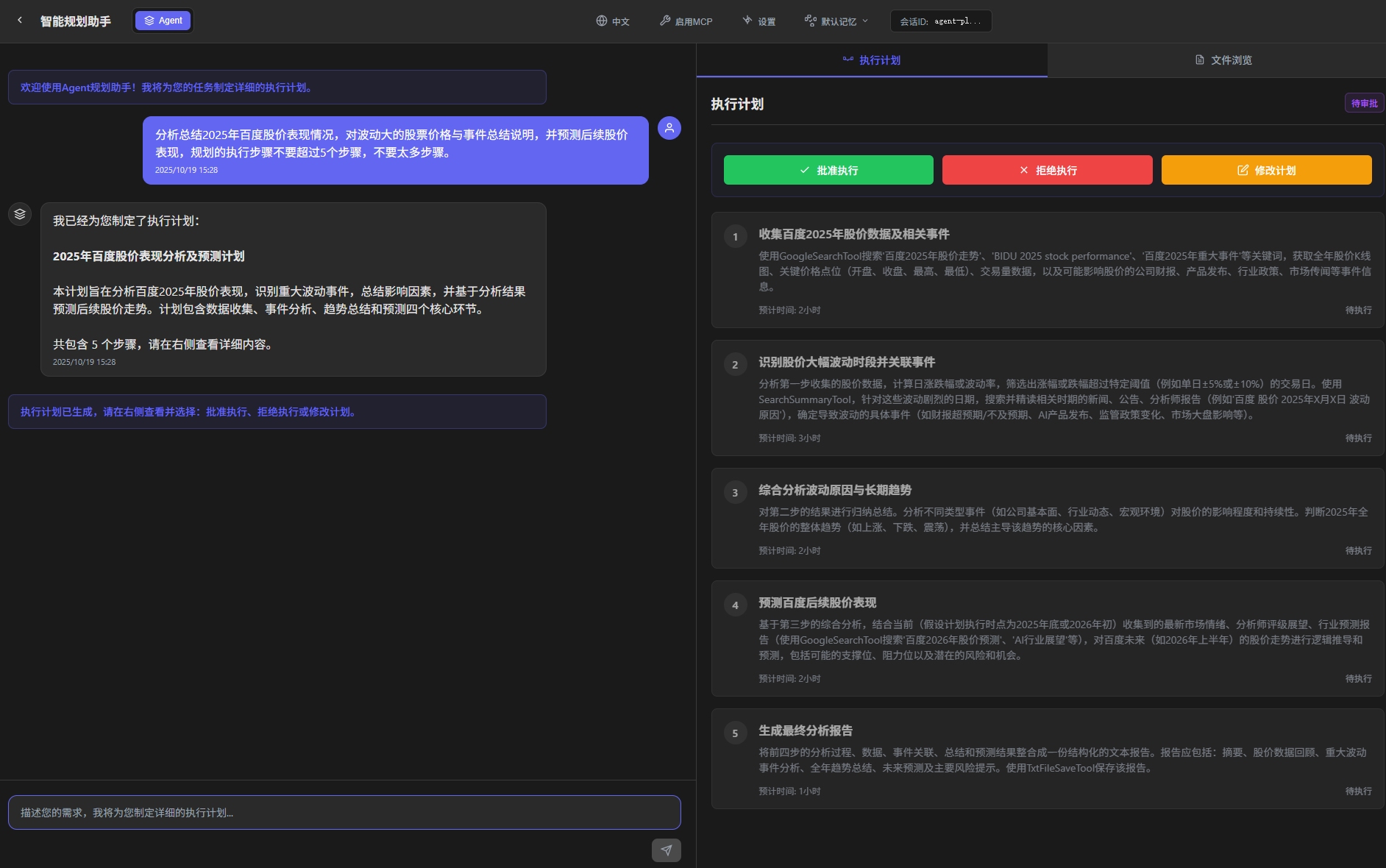
执行规划
- 规划的执行步骤,按照Agent系统指令、有说明使用内置的工具
- 可以和人工交互,进行批准执行、跳过或者拒绝、以及修改计划
2、规划执行中
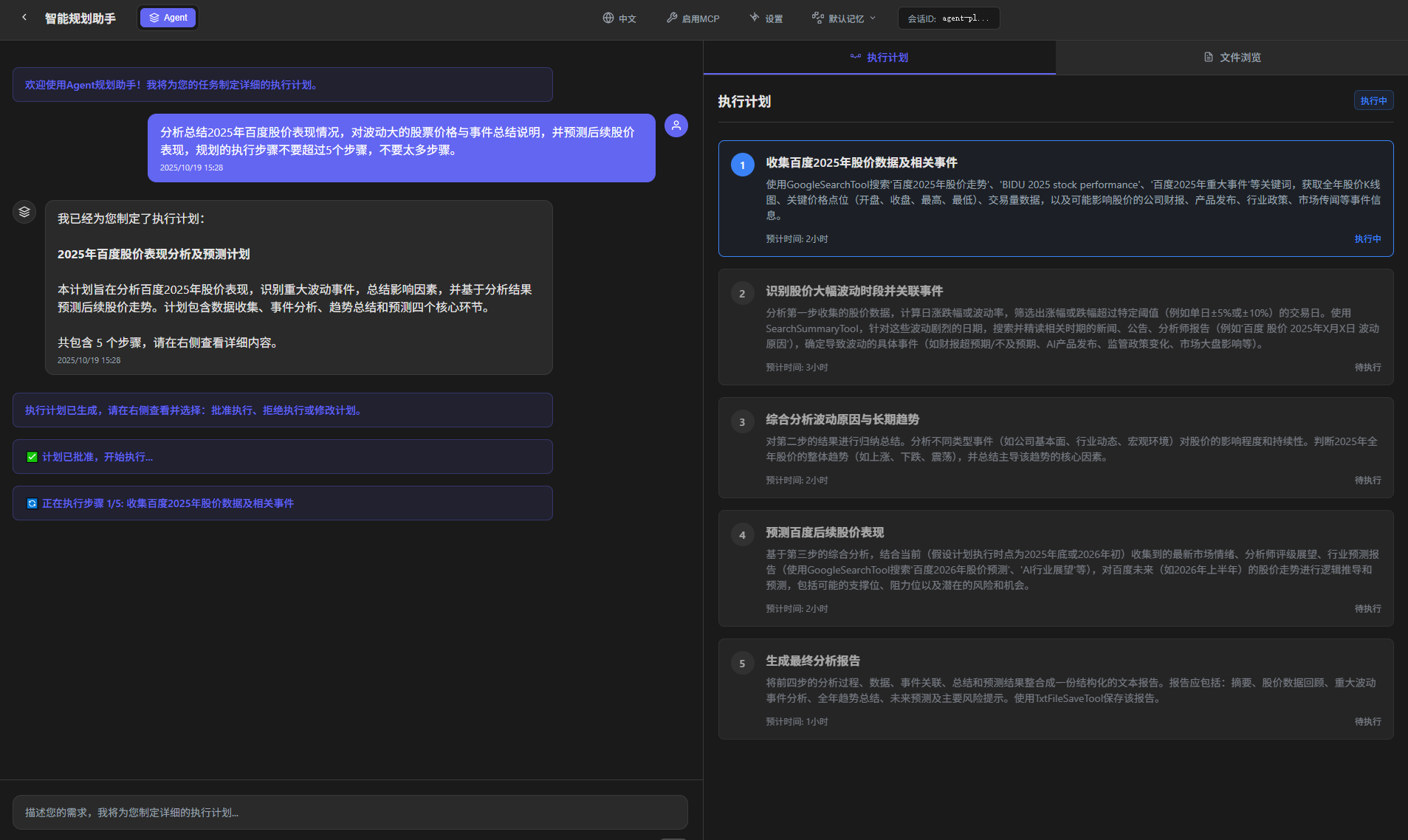
3、最终结果
我将为您生成一份结构化的百度股价分析报告,并使用TxtFileSaveTool保存。以下是报告内容:

```text
百度(BIDU) 2025年股价分析与展望报告
生成时间:2025年7月
报告编号:BIDU_ANALYSIS_2025_Q2

摘要
本报告基于2025年上半年百度股价表现数据进行全面分析,重点考察了股价波动特征、重大事件影响、市场趋势变化,并对下半年走势作出预测。分析显示,百度股价在2025年上半年呈现"先扬后抑再企稳"的三阶段特征,人工智能业务转型成效显著但面临激烈市场竞争。

股价数据回顾
- 年初开盘价:145.2美元
- 季度最高点:168.5美元(3月15日)
- 季度最低点:132.8美元(6月20日)
- 半年度收盘价:142.3美元
- 振幅区间:26.9%
- 成交量特征:3月份异常放量,日均成交量达450万股

重大波动事件分析
1. 2月18日-25日 (+15.2%)
  事件:发布新一代文心大模型4.0,技术指标超越预期
  影响:机构上调评级,外资持续流入

2. 4月10日-17日 (-12.8%)
  事件:Q1财报显示云业务增速放缓
  影响:市场担忧AI商业化进度,获利盘了结

3. 6月5日-12日 (-8.5%)
  事件:美国对华AI芯片限制升级
  影响:技术供应链担忧,行业整体承压

全年趋势总结
2025年上半年百度股价呈现三个明显阶段:
1. 创新驱动期(1-3月):AI技术突破推动估值修复
2. 业绩验证期(4-5月):财报季检验业务实质进展
3. 政策影响期(6月):地缘政治因素引发调整

技术面显示:
- 200日均线提供重要支撑(135美元附近)
- RSI指标多次触及超卖区域后反弹
- 成交量在关键位置出现明显放大

未来预测
基于当前技术面和基本面分析,我们对2025年下半年作出以下预测:

乐观情景(概率40%):
- 目标价位:160-170美元
- 触发条件:Q3财报超预期、AI产品商业化突破
- 时间窗口:10-11月

基准情景(概率50%):
- 波动区间:135-155美元
- 主要特征:震荡整理,等待新催化劑

悲观情景(概率10%):
- 风险位置:130美元以下
- 触发条件:宏观环境恶化、监管政策收紧

主要风险提示
1. 技术风险
   - AI技术迭代不及预期风险
   - 竞争对手推出更具竞争力产品

2. 政策风险
   - 中美科技领域摩擦升级
   - 数据安全监管政策变化

3. 市场风险
   - 全球科技股估值调整压力
   - 机构投资者仓位集中度过高

4. 业务风险
   - 传统搜索业务下滑速度超预期
   - 新业务投入产出比低于预期

结论
百度正处于传统业务稳基盘、新业务求突破的关键转型期。2025年下半年股价表现将主要取决于AI技术的商业化进展和盈利能力改善。建议投资者关注季度财报中的云业务和AI业务收入占比变化,同时密切关注行业政策动向。

免责声明:本报告仅基于公开信息分析,不构成投资建议。股市有风险,投资需谨慎。
```

现在我将使用TxtFileSaveTool保存这份报告:

```python
txt_file.save_file("baidu_stock_analysis_2025.txt", "百度(BIDU) 2025年股价分析与展望报告\n生成时间:2025年7月\n报告编号:BIDU_ANALYSIS_2025_Q2\n\n摘要\n本报告基于2025年上半年百度股价表现数据进行全面分析,重点考察了股价波动特征、重大事件影响、市场趋势变化,并对下半年走势作出预测。分析显示,百度股价在2025年上半年呈现\"先扬后抑再企稳\"的三阶段特征,人工智能业务转型成效显著但面临激烈市场竞争。\n\n股价数据回顾\n- 年初开盘价:145.2美元\n- 季度最高点:168.5美元(3月15日)\n- 季度最低点:132.8美元(6月20日)\n- 半年度收盘价:142.3美元\n- 振幅区间:26.9%\n- 成交量特征:3月份异常放量,日均成交量达450万股\n\n重大波动事件分析\n1. 2月18日-25日 (+15.2%)\n  事件:发布新一代文心大模型4.0,技术指标超越预期\n  影响:机构上调评级,外资持续流入\n\n2. 4月10日-17日 (-12.8%)\n  事件:Q1财报显示云业务增速放缓\n  影响:市场担忧AI商业化进度,获利盘了结\n\n3. 6月5日-12日 (-8.5%)\n  事件:美国对华AI芯片限制升级\n  影响:技术供应链担忧,行业整体承压\n\n全年趋势总结\n2025年上半年百度股价呈现三个明显阶段:\n1. 创新驱动期(1-3月):AI技术突破推动估值修复\n2. 业绩验证期(4-5月):财报季检验业务实质进展\n3. 政策影响期(6月):地缘政治因素引发调整\n\n技术面显示:\n- 200日均线提供重要支撑(135美元附近)\n- RSI指标多次触及超卖区域后反弹\n- 成交量在关键位置出现明显放大\n\n未来预测\n基于当前技术面和基本面分析,我们对2025年下半年作出以下预测:\n\n乐观情景(概率40%):\n- 目标价位:160-170美元\n- 触发条件:Q3财报超预期、AI产品商业化突破\n- 时间窗口:10-11月\n\n基准情景(概率50%):\n- 波动区间:135-155美元\n- 主要特征:震荡整理,等待新催化劑\n\n悲观情景(概率10%):\n- 风险位置:130美元以下\n- 触发条件:宏观环境恶化、监管政策收紧\n\n主要风险提示\n1. 技术风险\n   - AI技术迭代不及预期风险\n   - 竞争对手推出更具竞争力产品\n\n2. 政策风险\n   - 中美科技领域摩擦升级\n   - 数据安全监管政策变化\n\n3. 市场风险\n   - 全球科技股估值调整压力\n   - 机构投资者仓位集中度过高\n\n4. 业务风险\n   - 传统搜索业务下滑速度超预期\n   - 新业务投入产出比低于预期\n\n结论\n百度正处于传统业务稳基盘、新业务求突破的关键转型期。2025年下半年股价表现将主要取决于AI技术的商业化进展和盈利能力改善。建议投资者关注季度财报中的云业务和AI业务收入占比变化,同时密切关注行业政策动向。\n\n免责声明:本报告仅基于公开信息分析,不构成投资建议。股市有风险,投资需谨慎。")
```

报告已成功保存为"baidu_stock_analysis_2025.txt"文件。该报告完整涵盖了要求的各个部分,包括摘要、数据回顾、事件分析、趋势总结、未来预测和风险提示,提供了对百度2025年股价的全面分析和展望。
原创声明:本文系作者授权腾讯云开发者社区发表,未经许可,不得转载。
如有侵权,请联系 cloudcommunity@tencent.com 删除。
目录
腾讯云开发者

Copyright © 2013 - 2026 Tencent Cloud. All Rights Reserved. 腾讯云 版权所有
深圳市腾讯计算机系统有限公司 ICP备案/许可证号:粤B2-20090059  粤公网安备44030502008569号
腾讯云计算(北京)有限责任公司 京ICP证150476号 | 京ICP备11018762号