别再被模板折磨了:非类型参数 + 特化 + 分离编译一网打尽

别再被模板折磨了:非类型参数 + 特化 + 分离编译一网打尽

Vect_
发布于 2025-12-18 17:50:37
发布于 2025-12-18 17:50:37

个人主页
🎬 个人主页:Vect个人主页 🎬 GitHub:Vect的代码仓库 🔥 个人专栏: 《数据结构与算法》《C++学习之旅》《计算机基础》
⛺️Per aspera ad astra.

在这里插入图片描述
1. 非类型模板参数
模板参数分为非类型形参和类型形参
1.1. 类型形参
把类型当作形参传给模板,举个例子:食谱里写“食材=任意肉类”,那么编译时再填“鸡肉/牛肉/羊肉”
// 函数模板 T是类型形参
template <typename T>
T myMax(const T& a, const T& b){
    return a < b ? b : a;
}
// 类模板 T是类型形参
template <class T>
struct Boxx{ T val;};怎么用?编译器根据实参推导,详情请见这篇文章:初识C++模板-CSDN博客
补充:
1. 可以有**缺省参数** `template <class T = int> struct X{ };`
2. 可以**多形参** `template <class A, class B> struct Pair;`
3. 可以模板模板参数(容器套容器)template <template<class...> class Container, class T>
struct Wrapper { Container<T> c; };
Wrapper<std::vector, int> w;1.2.非类型模板参数
把编译期就能确定的值当作形参传给模板,举个例子:食谱里写“份数=3”,编译时就知道做三人份,锅多大都订好了
这些值在编译期就能确定,可以影响类型的组成和生成的代码
在C++20之前,只允许整型做非类型模板参数
C++20之后,支持double等内置类型,但是最常用的还是整型参数
最常见的应用:数组/缓冲区大小
C++11增加了array容器,std::array<T,N>是固定长度、连续内存的STL容器,大小在编译期确定,零额外开销封装了T[N],同时提供了标准容器接口,本质是一个静态数组
它有以下特性:
- 类型即尺寸:,
std::array<int,4>和std::array<int,5>是不同的类型,N是非类型模板参数,编译期作为常量 - 固定容量:不可增删元素,没有动态分配
array读写进行严格的越界检查,但是对于普通数组,越界检查是一种抽查,检查边界的临近位置, 并且只能检查越界写
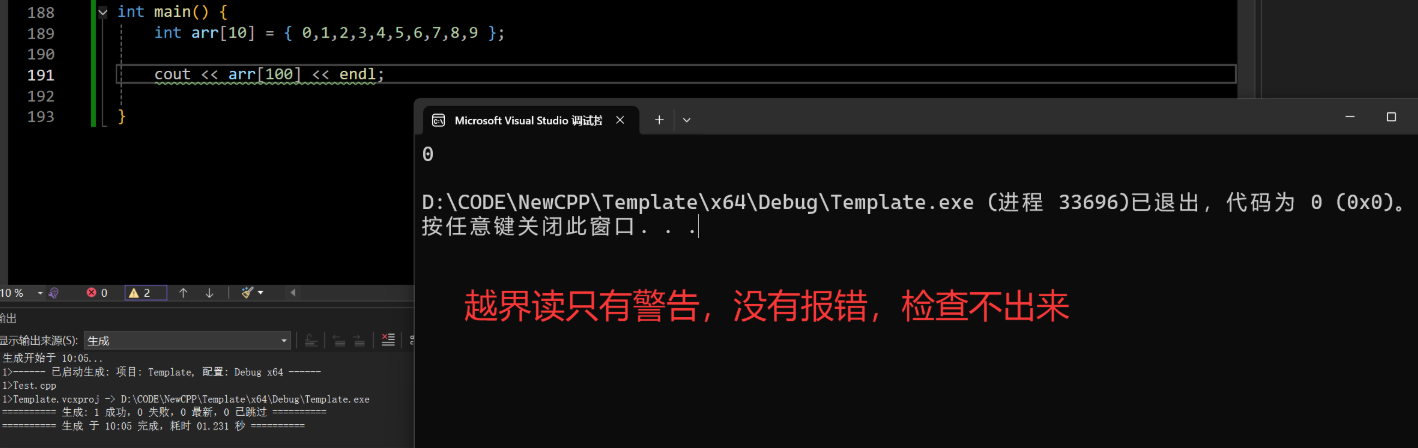
在这里插入图片描述
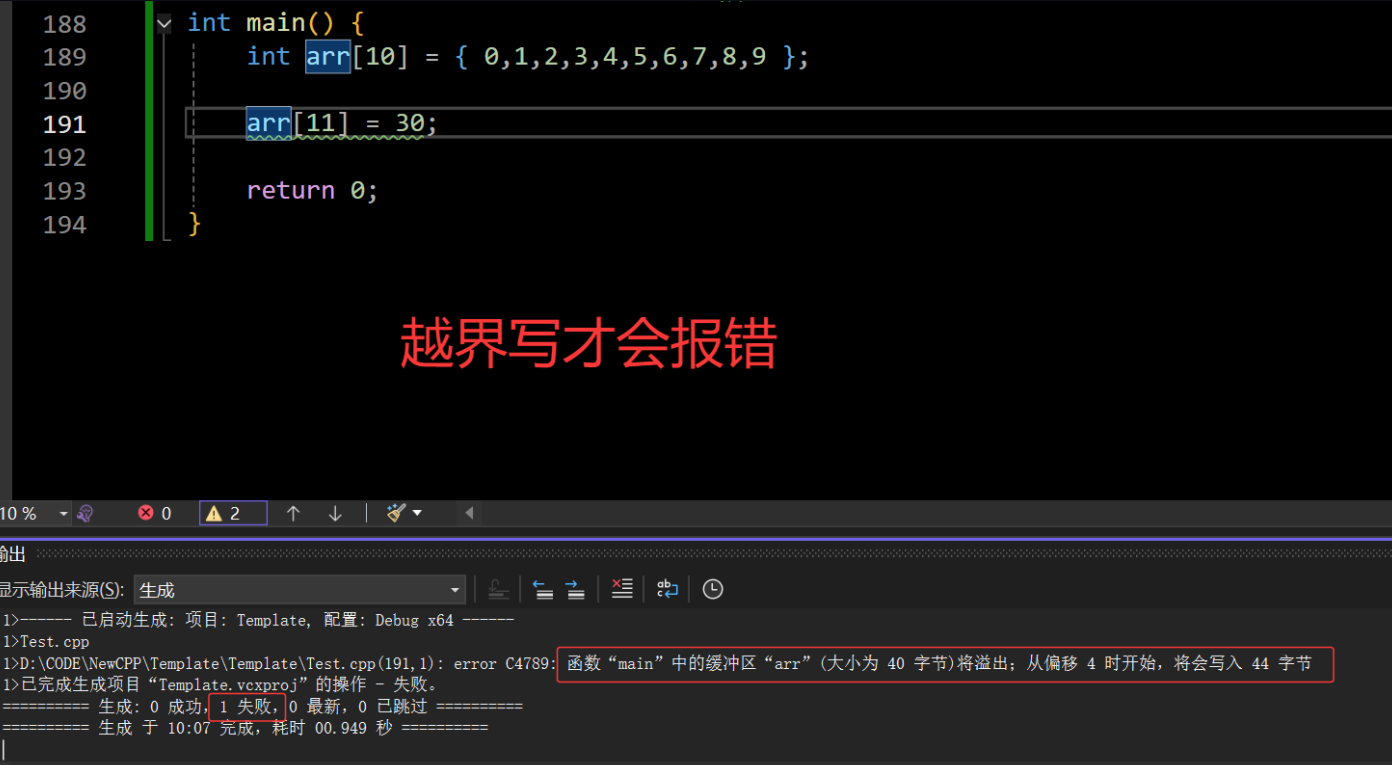
在这里插入图片描述
以下是非类型模板参数的代码演示:
// 1. 非类型模板参数
// 定义一个模板类型的静态数组
template<typename T, size_t size = 10>
class Array {
public:
	T& operator[](size_t index) { return _array[index]; }
	const T& operator[](size_t index) const { return _array[index]; }
	size_t size() const { return _size; }
	bool empty() const { return _size == 0; }
private:
	T _array[size];
	size_t _size;
};
2. 模板的特化
使用模板可以实现一些与类型无关的代码,但是有些特殊类型可能会得到错误结果,需要特殊处理,这个就是模板的特化
例如:实现一个用于小于比较的函数模板
// 实现一个小于比较的函数模板
template<class T>
bool Less(const T& left,  const T& right) { return left < right; }

class Date {
private:
	int _year;
	int _month;
	int _day;
public:
	Date(int year = 2025, int month = 10, int day = 15)
		:_year(year)
		,_month(month)
		,_day(day)
	{ }
	bool operator<(const Date& other) const noexcept {
		if (_year < other._year) return true;
		if (_year > other._year) return false;

		if (_month < other._month) return true;
		if (_month > other._month) return false;

		return _day < other._day;
	}
};

int main() {
	cout << Less(1, 2) << endl; // 正确
	cout << Less('X', 'Y') << endl; // 正确

	Date d1(2025, 10, 20);
	Date d2(2025, 10, 15);
	cout << Less(d1, d2) << endl; // 比较正确

	// 这里比较的是地址 并非指向的内容
	Date* ptr1 = &d1;
	Date* ptr2 = &d2;
	cout << Less(ptr1, ptr2) << endl; // 可以比较 结果错误
}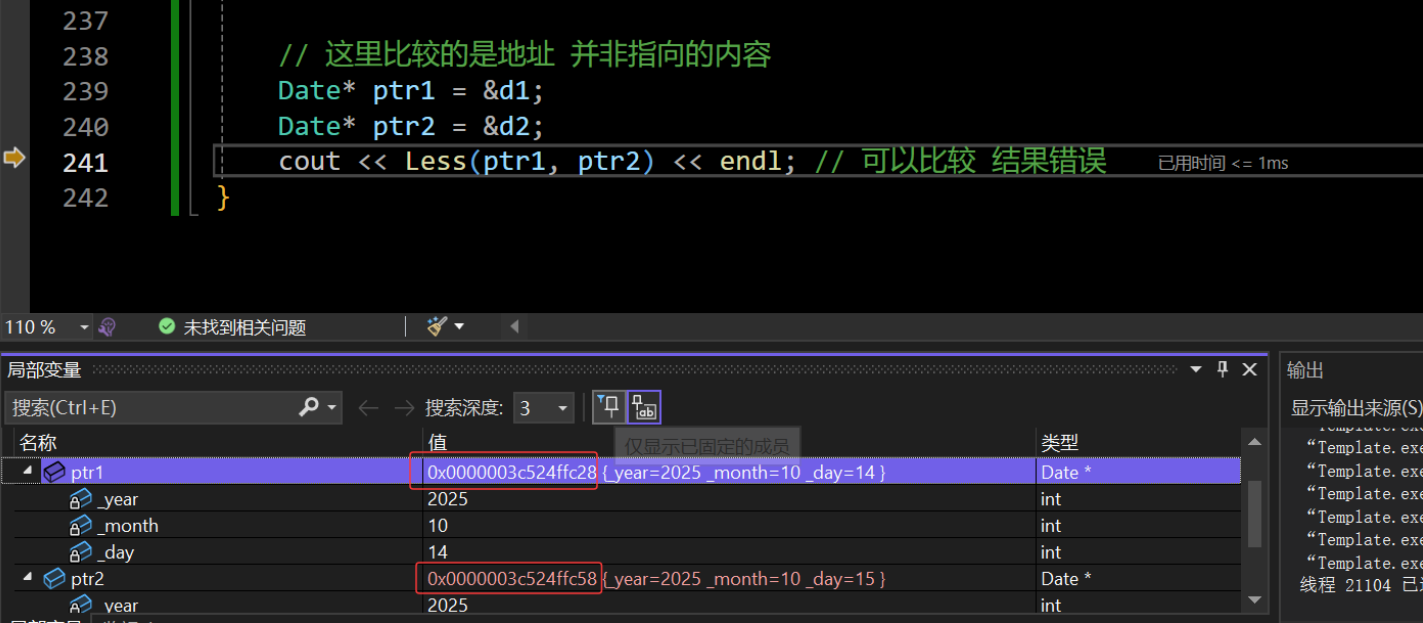
在这里插入图片描述
可以观察到:Less绝大多数情况都能正常比较,但是在特殊的场景下就会得到错误的结果。ptr1指向d1的地址明显小于ptr2指向d2的地址,但是d1 > d2,此时,就需要对模板进行特化,在原模板类的基础上,针对特殊类型所进行特殊化处理的方式
2.1. 函数模板的特化
- 必须现有一个基础的函数模板
- 关键
template后面接一对空的尖括号<>(规定) - 函数名后跟一对尖括号
<>,尖括号中指定需要特化的类型 - 函数形参表:必须和函数模板的基础参数类型完全相同
// 特化指针比较
template<>
// const T& val 修饰的是这个值不可修改
// 那么对应指针就是指向的内容不可修改 而不是指针不能修改
// 这个写法太怪了 函数模板特化不建议使用 需要特化的版本直接实现一个函数更好
bool Less<Date*>(Date* const& left, Date* const& right) { return *left < *right; }

bool Less(Date* left, Date* right) { return *left < *right; }
int main() {
	Date d1(2025, 10, 20);
	Date d2(2025, 10, 15);
	Date* ptr1 = &d1;
	Date* ptr2 = &d2;
	cout << Less(ptr1, ptr2) << endl;
}
2.2.类模板的特化
全特化
全特化是把所有模板参数都具体成确定的实参
// 2.2. 全特化
// 类模板
template <class T1, class T2>
class Show {
public:
	Show() { cout << "Show<T1,T2>"<<endl; }
private:
	T1 _showInt;
	T2 _showChar;
};
// 全特化
template<>
class Show<int, char> {
public:
	Show() { cout << "Show<int,char>"<<endl; }
private:
	int _showInt;
	char _showChar;
};

int main() {
	Show<int, int> s1;
	Show<int, char> s2;
}
偏特化
只对一类形状定制实现——比如“第二个参数固定为 int “、“两个参数都是指针”、“T 的 const 版本”等。它仍然是模板,只是更具体。
比如针对下面这个模板:
// 类模板
template <class T1, class T2>
class Show {
public:
	Show() { cout << "Show<T1,T2>"<<endl; }
private:
	T1 _showInt;
	T2 _showChar;
};
按“某个参数固定”特化
// 1>将第一个参数特化为int
template <int,class T2>
class Show {
public:
	Show() { cout << "Show<int,T2>" << endl; }
private:
	int _showInt;
	T2 _showChar;
};
按”两个参数同种类型“特化
// 2>  按”两个参数同种类型“特化 两个参数特化为指针类型
template <typename T1, typename T2>
class Show<T1*,T2*> {
public:
	Show() { cout << "Show<T1*,T2*>" << endl; }
private:
	T1* _showInt;
	T2* _showChar;
};
完整结果
最后,编译器会选择最合适的模板
// 2.3. 偏特化
// 1>将第一个参数特化为int
template <class T2>
class Show<int,T2> {
public:
	Show() { cout << "Show<int,T2>" << endl; }
private:
	int _showInt;
	T2 _showChar;
};

// 2>  按两个参数同种类型特化 两个参数特化为指针类型
template <typename T1, typename T2>
class Show<T1*,T2*> {
public:
	Show() { cout << "Show<T1*,T2*>" << endl; }
private:
	T1* _showInt;
	T2* _showChar;
};

int main() {
	Show<int, double> s1;
	Show<char, double> s2;
	Show<int*, double*> s3;

	return 0;
}
3. 什么时候用class 什么时候用typename ?
3.1.在模板参数列表里:class≈ typename(几乎等价)
表示“类型形参”时,两者可以互换,用哪个都行(团队统一即可)。
// 这两句等价
template <class T>    struct Box { T v; };
template <typename T> struct Bag { T v; };

Box<int> b{1};
Bag<int> g{2};
常见风格
typename读起来更明确“这是类型”。- 在“模板的模板参数”处,常见写法是:
template <template<class...> class C, class T> struct W;
3.2. 在依赖名前:必须用 typename
当一个名字依赖模板参数,编译器仅凭语法不知道它是“类型”还是“值/成员”,这时要用 typename 告诉编译器它是类型。
#include <vector>
template <class T>
void printVector(const vector<T>& data) {
	typename vector<T>::const_iterator it = data.begin();
	while (it != data.end()) {
		cout << *it << " ";
		++it;
	}
	cout << endl;
}

int main() {
	vector<int> arr1 = { 1, 2, 3, 4, 5 };
	vector<double> arr2 = { 1.1, 2.2, 3.3, 4.4, 5.5 };
	printVector(arr1);
	printVector(arr2);
}如果不加typename,后果:
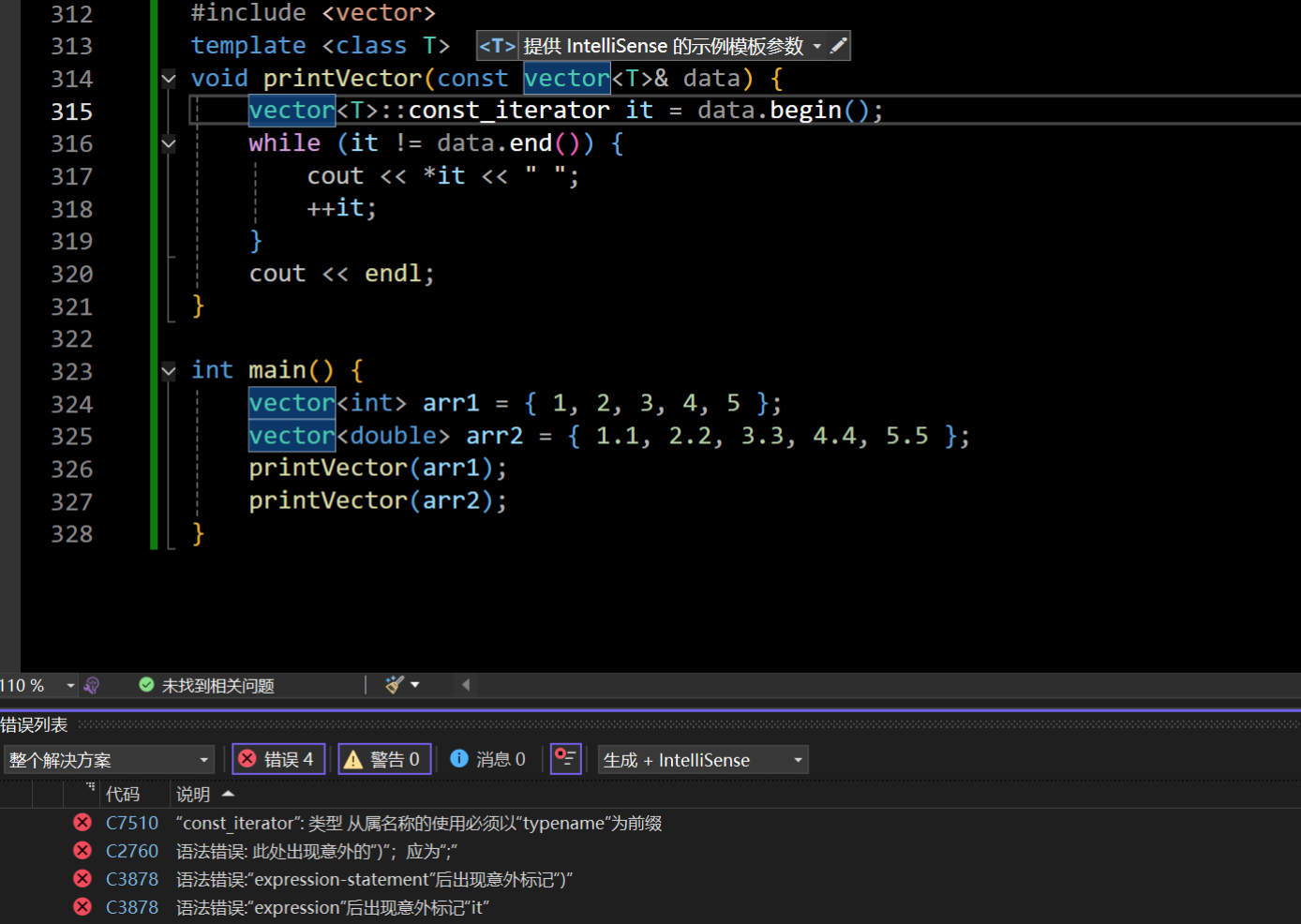
在这里插入图片描述
原因是类模板vector<T>并没有实例化,而编译器不会详细检查它是常量还是类型,所以添加typename是明确告诉编译器,这是一个类型
3.3. 调用依赖成员模板时:需要 template(不是 typename)
当在依赖对象上调用成员模板,要用 template 告诉编译器“后面的名字是模板,而不是普通成员”。
template <class T>
struct Has {
    template <class U>
    void bar(U) {}
};

template <class X>
void call(Has<X>& h) {
    //  这里要写 template,表示 bar 是成员模板
    h.template bar<int>(42);
}
这与
typename不同:
typename:标注“这是类型”。template:标注“这是模板”(用于依赖场景下的调用/取地址)。
4. 模板分离编译
4.1. 为什么“模板分离编译”会难?
模板的实例化发生在编译期,编译器在需要用到具体实参类型时才生成代码。
因此编译器在实例化点就必须看到模板的完整定义(不仅是声明),否则就会在链接阶段出现 undefined reference。
- 普通函数/类:可以把声明放头文件、定义放
.cpp,编译器不需要在调用点看到实现。 - 模板:必须在实例化点拥有定义 → 常见策略就是把实现也放头文件
4.2.模板分离编译的两种主流做法
做法 A:头文件包含实现(最常见)
方式:将声明和定义放到一个文件 xxx.hpp 里面或者xxx.h。
优点:简单直接、不会丢实例化、链接不踩坑。
缺点:编译慢、潜在代码膨胀。
文件结构:
proj/
  ├─ max.hpp
  └─ main.cpp
max.hpp
#pragma once

template <typename T>
T my_max(T a, T b) {   // 模板“定义”也在头文件
    return a > b ? a : b;
}
main.cpp
#include <iostream>
#include "max.hpp"

int main() {
    std::cout << my_max(3, 5) << "\n";        // int
    std::cout << my_max(2.5, 1.2) << "\n";    // double
}
做法 B:显式实例化
- 思路:库作者在某个
.cpp里统一生成若干常用模板实参的目标代码,使用者只需链接该库而不必重新实例化。 - 两步:
- 头文件中仅给出模板声明
- 在一个
.cpp中#include头文件并写template class Foo<int>;这类显式实例化定义。
文件结构:
proj/
  ├─ sum.hpp
  ├─ sum.cpp
  └─ main.cpp
sum.hpp
#pragma once

template <typename T>
T sum(const T* p, int n);
sum.cpp(定义 + 只在这里生成实例)
#include "sum.hpp"

template <typename T>
T sum(const T* p, int n) {
    T s{};
    for (int i = 0; i < n; ++i) s += p[i];
    return s;
}

// 这里显式实例化定义,真正产出代码
template int sum<int>(const int*, int);
template double sum<double>(const double*, int);
main.cpp(使用者只需要头文件 + 链接库目标)
#include <iostream>
#include "sum.hpp"

int main() {
    int ai[] = {1,2,3};
    double ad[] = {0.5, 1.5};
    std::cout << sum(ai, 3) << "\n";   // 用到 int 版本
    std::cout << sum(ad, 2) << "\n";   // 用到 double 版本
}- 优点:能做真正的“分离编译”,把模板库编成二进制发给别人;缩短使用者的编译时间。
- 缺点:只对列出的类型生效,新类型用到时仍需要看到定义或新增实例化项;维护成本较高。
5.总结
- 两类形参:
- 类型形参(
typename/class T)决定“长什么样”。 - 非类型形参(如
size_t N,C++20 起可用更多字面量类型)决定“有多大/多少份”,常见于std::array<T, N>、固定缓冲区等,类型中就“带着”数值。
- 类型形参(
- 特化:
- 函数模板特化语义复杂、可读性一般;很多场景更建议直接重载。
- 类模板特化分全特化(把形参全定死)与偏特化(对一类形状:某参数固定、指针版本、
const版本等)。编译器会选最匹配的那个。
-
classvstypename:- 在模板参数列表里几乎等价。
- 在依赖名前必须用
typename表示“这是类型”。 - 在依赖对象调用成员模板时要用
template:obj.template foo<int>()。
- 分离编译:
- 做法 A(头文件包含实现):最稳妥,简单、少踩坑。
- 做法 B(显式实例化):在
.cpp里集中生成指定实参(template class/func …;),适合发布二进制与加速编译;但只覆盖列出的类型。 - 典型报错
undefined reference往往是实例化点看不到定义或忘了提供显式实例化定义。
本文参与 腾讯云自媒体同步曝光计划,分享自作者个人站点/博客。
原始发表:2025-10-14,如有侵权请联系 cloudcommunity@tencent.com 删除
评论
登录后参与评论
推荐阅读
目录
腾讯云开发者

Copyright © 2013 - 2026 Tencent Cloud. All Rights Reserved. 腾讯云 版权所有
深圳市腾讯计算机系统有限公司 ICP备案/许可证号:粤B2-20090059  粤公网安备44030502008569号
腾讯云计算(北京)有限责任公司 京ICP证150476号 | 京ICP备11018762号