小V健身助手开发手记(一):启动即合规——实现隐私协议弹窗与用户授权状态管理

小V健身助手开发手记(一):启动即合规——实现隐私协议弹窗与用户授权状态管理

@VON
发布于 2025-12-21 13:31:53
发布于 2025-12-21 13:31:53

在这里插入图片描述
- 个人首页: VON
- 鸿蒙系列专栏: 鸿蒙开发小型案例总结
- 综合案例 :鸿蒙综合案例开发
- 鸿蒙6.0:从0开始的开源鸿蒙6.0.0
- 鸿蒙5.0:鸿蒙5.0零基础入门到项目实战
- Electron适配开源鸿蒙专栏:Electron for OpenHarmony
- Flutter 适配开源鸿蒙专栏:Flutter for OpenHarmony
- 本文所属专栏:鸿蒙综合案例开发
小V健身助手开发手记(一)
- 小V健身助手开发手记(一):启动即合规——实现隐私协议弹窗与用户授权状态管理
- 🧩 技术实现概览
- 🔒 隐私状态的持久化存储
- 🪟 自定义隐私协议弹窗
- 🚦 启动流程控制:`aboutToAppear`
- ✅ 用户点击“同意”:持久化授权状态
- ❌ 用户点击“不同意”:友好退出
- 🧭 页面跳转:从启动页到主界面
- 🛡️ 合规性与用户体验平衡
- 测试
- ✅ 总结
- 全套代码

在这里插入图片描述
小V健身助手开发手记(一):启动即合规——实现隐私协议弹窗与用户授权状态管理
在健康类应用中,用户数据的敏感性远高于普通工具类 App。作为一款专注于个人健康管理的「小V健身助手」,我们必须在产品设计之初就将用户隐私保护置于核心位置。根据《个人信息保护法》及主流应用市场的审核要求,任何涉及用户数据采集的应用都必须在首次启动时明确展示隐私政策,并获得用户的主动同意。
本文将基于 HarmonyOS 的 ArkTS 语言与 Stage 模型,通过实际代码详解如何在应用启动页实现一个合规、轻量且用户体验友好的隐私协议授权流程。整个方案包含三个关键环节:
- 首次启动时拦截未授权用户,弹出协议弹窗;
- 记录用户选择并持久化存储授权状态;
- 根据授权结果决定跳转主界面或退出应用。
🧩 技术实现概览
我们使用以下 HarmonyOS 能力完成该功能:
@ohos.data.preferences:轻量级键值对存储,用于保存用户授权状态;CustomDialogController+@CustomDialog:构建自定义弹窗;router.replaceUrl:页面路由控制;UIAbilityContext:获取 Ability 上下文,用于调用系统 API。
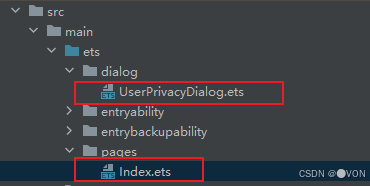
所有逻辑集中在两个文件中:
Index.ets:应用入口页面,负责判断授权状态并控制流程;UserPrivacyDialog.ets:自定义隐私协议弹窗组件。
🔒 隐私状态的持久化存储
首先,定义两个常量,用于标识首选项文件名和存储键:
const H_STORE: string = 'V_health'
const IS_PRIVACY: string = 'isPrivacy'
这里使用 V_health 作为首选项文件名,便于后续扩展其他健康相关配置;isPrivacy 则专门记录用户是否已同意隐私协议。
在 Index 页面中,通过 getContext(this) 获取当前 Ability 的上下文:
contest: common.UIAbilityContext = getContext(this) as common.UIAbilityContext;该上下文是调用 data_preferences.getPreferences() 所必需的。
🪟 自定义隐私协议弹窗
我们使用 @CustomDialog 装饰器创建 UserPrivacyDialog 组件:
@CustomDialog
export default struct UserPrivacyDialog {
  cancel: Function = () => {}
  confirm: Function = () => {}

  build() {
    Column({ space: 10 }) {
      Text('欢迎使用小V健身')
        .fontSize(18)
        .fontWeight(FontWeight.Bold)

      Button('同意')
        .fontColor(Color.White)
        .backgroundColor('#ff06ae27')
        .width(150)
        .onClick(() => {
          this.confirm()
          this.controller.close()
        })

      Button('不同意')
        .fontColor(Color.Gray)
        .backgroundColor('#c8fcd0')
        .width(150)
        .onClick(() => {
          this.cancel()
          this.controller.close()
        })
    }
    .width('80%')
    .height('75%')
    .justifyContent(FlexAlign.Center)
  }
}- 弹窗提供“同意”与“不同意”两个明确选项;
- 通过
confirm和cancel回调将用户操作传递回父组件; - 使用
controller.close()确保点击后关闭弹窗。
💡 注意:
controller实例由父组件传入,子组件无需重新创建。
🚦 启动流程控制:aboutToAppear
页面加载时,通过 aboutToAppear 生命周期钩子判断用户是否已授权:
aboutToAppear(): void {
  let preferences = data_preferences.getPreferences(this.contest, H_STORE)
  preferences.then((res) => {
    res.get(IS_PRIVACY, false).then((isPrivate) => {
      if (isPrivate === true) {
        this.jumpToMain()
      } else {
        this.dialogController.open()
      }
    })
  })
}- 默认值设为
false,确保首次安装时弹窗必现; - 若已授权(
isPrivate === true),则跳转主界面; - 否则,打开隐私协议弹窗。
✅ 用户点击“同意”:持久化授权状态
当用户点击“同意”按钮,触发 onConfirm 方法:
onConfirm() {
  let preferences = data_preferences.getPreferences(this.contest, H_STORE)
  preferences.then((res) => {
    res.put(IS_PRIVACY, true).then(() => {
      res.flush(); // 强制写入磁盘
      console.log('Index', 'isPrivacy记录成功');
    }).catch((err: Error) => {
      console.log('Index', 'isPrivacy记录失败,原因' + err);
    })
  })
}- 使用
put写入true值; - 调用
flush()确保数据立即落盘,避免因应用意外退出导致状态丢失; - 添加日志便于调试与监控。
❌ 用户点击“不同意”:友好退出
若用户拒绝授权,我们选择立即终止当前 Ability,符合隐私合规的最佳实践:
exitAPP() {
  this.contest.terminateSelf()
}terminateSelf()会关闭当前应用进程;- 不进行任何数据收集或后台操作;
- 体现对用户选择的充分尊重。
🧭 页面跳转:从启动页到主界面
授权成功后,通过 jumpToMain 跳转至首页:
jumpToMain() {
  setTimeout(() => {
    router.replaceUrl({ url: '' })
  }, 2000)
}- 使用
replaceUrl替换当前页面,防止用户通过返回键回到启动页; url: ''表示跳转到主页面(需在main_pages.json中配置为默认路由);- 2 秒延迟仅为演示效果,实际项目中可移除
setTimeout实现即时跳转。
⚠️ 提示:启动页背景图通过
.backgroundImage($r('app.media.backgroundBegin'))设置,提升首次启动的视觉体验。
🛡️ 合规性与用户体验平衡
本方案在满足法律合规的同时,兼顾了用户体验:
场景 | 行为 | 合规性 |
|---|---|---|
首次安装启动 | 弹出隐私协议弹窗 | ✅ 明示告知 + 主动同意 |
用户同意 | 记录状态,跳转主界面 | ✅ 授权后才启用功能 |
用户拒绝 | 立即退出,不收集任何数据 | ✅ 尊重用户选择 |
已授权用户再次启动 | 直接进入主界面 | ✅ 无重复打扰 |
测试
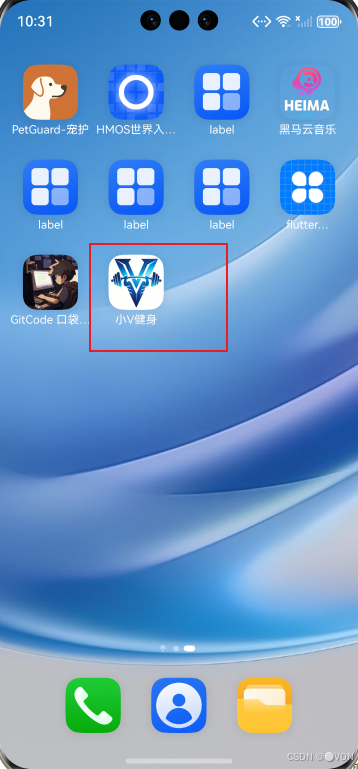
这里的应用logo和昵称可以自己改一下
在这里插入图片描述
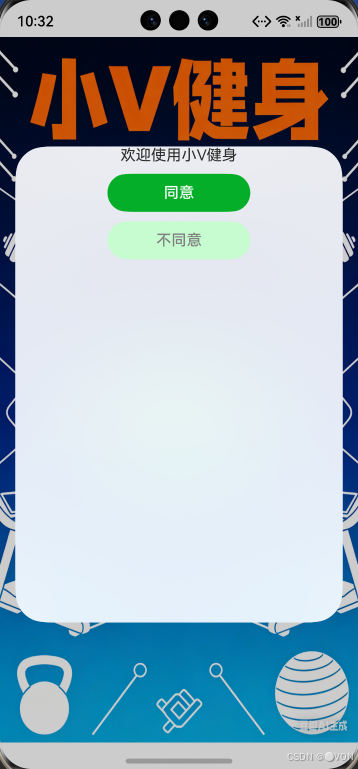
这里声明部分没有怎么做,就先占个位 首次进入应用才会提示
在这里插入图片描述
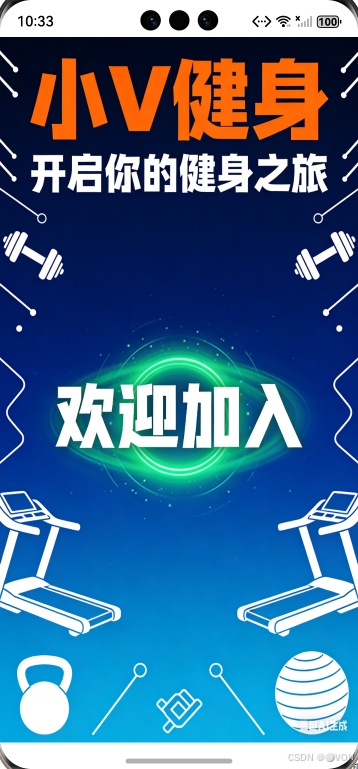
点击同意的时候就会消失,除非再次安装才显示
在这里插入图片描述
✅ 总结
通过不到 100 行核心代码,我们为「小V健身助手」构建了一个轻量、可靠、合规的隐私授权机制。这不仅是法律的要求,更是赢得用户长期信任的第一步。
全套代码
在这里插入图片描述
UserPrivacyDialog
@CustomDialog
export default struct UserPrivacyDialog{
  controller: CustomDialogController = new CustomDialogController({
    builder:''
  })
  cancel:Function = () =>{}  // 不同意
  confirm:Function = () =>{} // 同意
  build() {
    Column({space:10}){
      Text('欢迎使用小V健身')
      Button('同意')
        .fontColor(Color.White)
        .backgroundColor('#ff06ae27')
        .width(150)
        .onClick(()=>{
          this.confirm()
          this.controller.close()
        })
      Button('不同意')
        .fontColor(Color.Gray)
        .backgroundColor('#c8fcd0')
        .width(150)
        .onClick(()=>{
          this.cancel()
          this.controller.close()
        })
    }
    .width('80%')
    .height('75%')
  }
}
Index
import UserPrivacyDialog from '../dialog/UserPrivacyDialog'
import { common } from '@kit.AbilityKit'
import data_preferences from '@ohos.data.preferences'
import { router } from '@kit.ArkUI'

// 定义常量存储首选项中的键
const H_STORE:string = 'V_health'
const IS_PRIVACY:string = 'isPrivacy'

@Entry
@Component
struct Index {
  // 生命周期
  contest: common.UIAbilityContext = getContext(this) as common.UIAbilityContext;
  dialogController: CustomDialogController = new CustomDialogController({
    builder:UserPrivacyDialog({
      cancel:()=>{this.exitAPP()},
      confirm:()=>{this.onConfirm()}
    })
  })

  // 点击同意后的逻辑
  onConfirm(){
    // 定义首选项
    let preferences = data_preferences.getPreferences(this.contest,H_STORE)
    // 异步处理首选项中的数据
    preferences.then((res)=>{
      res.put(IS_PRIVACY,true).then(()=>{
        res.flush();
        // 记录日志
        console.log('Index','isPrivacy记录成功');
      }).catch((err:Error)=>{
        console.log('Index','isPrivacy记录失败,原因'+err);
      })
    })
  }
  // 点击不同意时的逻辑
  exitAPP(){
    this.contest.terminateSelf()
  }

  // 页面加载开始执行逻辑
  aboutToAppear(): void {
    let preferences = data_preferences.getPreferences(this.contest,H_STORE)
    preferences.then((res)=>{
      res.get(IS_PRIVACY,false).then((isPrivate)=>{
        // 判断传入的参数
        if(isPrivate==true){
          // 点击同意跳转到首页
          this.jumpToMain()
        }
        else{
          this.dialogController.open()
        }
      })
    })
  }

  // 页面结束时的执行逻辑
  aboutToDisappear(): void {
    clearTimeout()
  }

  // 跳转到首页
  jumpToMain(){
    setTimeout(()=>{
      router.replaceUrl({url:''})
    },2000)
  }

  build() {
    Column(){

    }
    .width('100%')
    .height('100%')
    .backgroundImage($r('app.media.backgroundBegin'))
    .backgroundImageSize({width:'100%',height:'100%'})
  }
}
本文参与 腾讯云自媒体同步曝光计划,分享自作者个人站点/博客。
原始发表:2025-12-11,如有侵权请联系 cloudcommunity@tencent.com 删除
目录
腾讯云开发者

Copyright © 2013 - 2026 Tencent Cloud. All Rights Reserved. 腾讯云 版权所有
深圳市腾讯计算机系统有限公司 ICP备案/许可证号:粤B2-20090059  粤公网安备44030502008569号
腾讯云计算(北京)有限责任公司 京ICP证150476号 | 京ICP备11018762号