
使AppBar透明并显示设置为全屏的背景图像
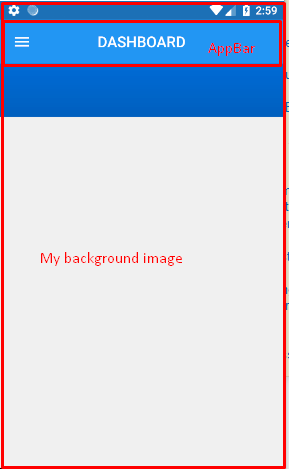
我在我的颤振应用程序中添加了AppBar。我的屏幕已经有了一个背景图像,我不想设置appBar颜色,也不希望将单独的背景图像设置为appBar。
我也想向appBar显示同样的屏幕背景图像。
我已经尝试过将appBar颜色设置为透明,但它显示的颜色像灰色。
示例代码:
appBar: new AppBar(
        centerTitle: true,
//        backgroundColor: Color(0xFF0077ED),
        elevation: 0.0,
        title: new Text(
            "DASHBOARD",
            style: const TextStyle(
                color:  const Color(0xffffffff),
                fontWeight: FontWeight.w500,
                fontFamily: "Roboto",
                fontStyle:  FontStyle.normal,
                fontSize: 19.0
            )),
      )
Stack Overflow用户
发布于 2022-01-04 20:56:15
可能有许多情况,例如,您是否希望保持AppBar,无论您是否希望使状态栏可见,为此,您可以将Scaffold.body包装在SafeArea中,如果您希望AppBar没有任何阴影(与我在示例2中提供的红色不同),您可以将其颜色设置为Colors.transparent。
- 完整图像(没有
AppBar)

支架( extendBodyBehindAppBar: true,body: SizedBox.expand(儿童: Image.network( 'https://wallpaperaccess.com/full/3770388.jpg',fit: BoxFit.cover,),)

- 完整图像(使用
AppBar)

支架( extendBodyBehindAppBar: true,appBar: AppBar( backgroundColor: Colors.transparent,shadowColor: Colors.red,标题: Text('MyApp'),),body: SizedBox.expand( child: Image.network( https://wallpaperaccess.com/full/3770388.jpg',fit: BoxFit.cover,),)
https://stackoverflow.com/questions/53080186
复制相似问题
腾讯云开发者

Copyright © 2013 - 2026 Tencent Cloud. All Rights Reserved. 腾讯云 版权所有
深圳市腾讯计算机系统有限公司 ICP备案/许可证号:粤B2-20090059  粤公网安备44030502008569号
腾讯云计算(北京)有限责任公司 京ICP证150476号 | 京ICP备11018762号