简介
本文档介绍如何不依赖 SDK,用简单的代码,在网页(Web 端)直传文件到对象存储(Cloud Object Storage,COS)的存储桶。
注意:
前提条件
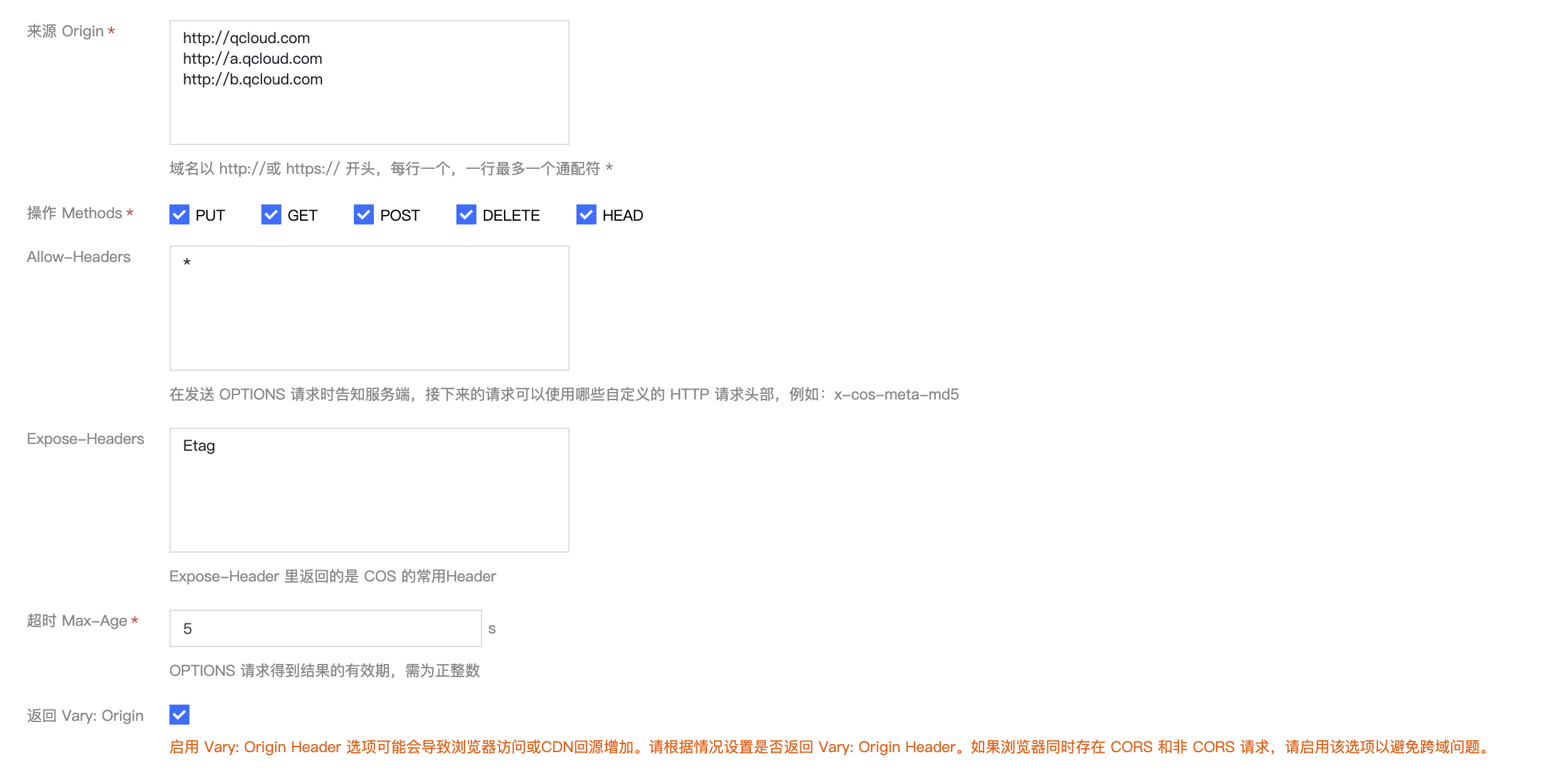
2. 进入存储桶详情页,单击安全管理页签。下拉页面找到跨域访问 CORS 设置配置项,单击添加规则,配置示例如下图,详情请参见 设置跨域访问 文档。
3. 登录 访问管理控制台, 获取您的项目 SecretId 和 SecretKey。
方案说明
执行过程
1. 在前端选择文件,前端将后缀发送给服务端。
2. 服务端根据后缀,生成带时间的随机 COS 文件路径,并计算对应的签名,返回 URL 和签名信息给前端。
3. 前端使用 PUT 或 POST 请求,直传文件到 COS。
方案优势
权限安全:使用服务端签名可以有效限定安全的权限范围,只能用于上传指定的一个文件路径。
路径安全:由服务端决定随机的 COS 文件路径,可以有效避免已有文件被覆盖的问题和安全风险。
实践步骤
配置服务端实现签名
注意:
正式部署时服务端请加一层您的网站本身的权限检验。
如何计算签名可参考文档 请求签名。
服务端使用 Nodejs 计算签名代码可参考 Nodejs 示例。
Web 端上传示例
使用 AJAX PUT 上传
1. 按照 前提条件 的步骤,准备存储桶的相关配置。
2. 创建
test.html文件,复制下方代码到test.html文件。3. 部署后端的签名服务,并修改
test.html里的签名服务地址。4. 将
test.html放在 Web 服务器下,并通过浏览器访问页面,测试文件上传功能。<!DOCTYPE html><html lang="en"><head><meta charset="UTF-8" /><title>Ajax Put 上传(服务端计算签名)</title><style>h1,h2 {font-weight: normal;}#msg {margin-top: 10px;}</style></head><body><h1>Ajax Put 上传(服务端计算签名)</h1><input id="fileSelector" type="file" /><input id="submitBtn" type="submit" /><div id="msg"></div><script>(function () {// 对更多字符编码的 url encode 格式const camSafeUrlEncode = function (str) {return encodeURIComponent(str).replace(/!/g, '%21').replace(/'/g, '%27').replace(/\\(/g, '%28').replace(/\\)/g, '%29').replace(/\\*/g, '%2A');};// 计算签名const getAuthorization = function (opt, callback) {// 替换为自己服务端地址 获取put上传签名,demo:https://github.com/tencentyun/cos-demo/blob/main/server/upload-sign/nodejs/app.jsconst url = `http://127.0.0.1:3000/put-sign?ext=${opt.ext}`;const xhr = new XMLHttpRequest();xhr.open('GET', url, true);xhr.onload = function (e) {let credentials;try {const result = JSON.parse(e.target.responseText);credentials = result;} catch (e) {callback('获取签名出错');}if (credentials) {// 打印确认credentials是否正确// console.log(credentials);callback(null, {securityToken: credentials.sessionToken,authorization: credentials.authorization,cosKey: credentials.cosKey,cosHost: credentials.cosHost,});} else {console.error(xhr.responseText);callback('获取签名出错');}};xhr.onerror = function (e) {callback('获取签名出错');};xhr.send();};// 上传文件const uploadFile = function (file, callback) {const fileName = file.name;// 获取文件后缀名let ext = '';const lastDotIndex = fileName.lastIndexOf('.');if (lastDotIndex > -1) {// 这里获取文件后缀 由服务端生成最终上传的路径ext = fileName.substring(lastDotIndex + 1);}getAuthorization({ ext }, function (err, info) {if (err) {alert(err);return;}const auth = info.authorization;const securityToken = info.securityToken;const Key = info.cosKey;const protocol =location.protocol === 'https:' ? 'https:' : 'http:';const prefix = protocol + '//' + info.cosHost;const url =prefix + '/' + camSafeUrlEncode(Key).replace(/%2F/g, '/');const xhr = new XMLHttpRequest();xhr.open('PUT', url, true);xhr.setRequestHeader('Authorization', auth);securityToken &&xhr.setRequestHeader('x-cos-security-token', securityToken);xhr.upload.onprogress = function (e) {console.log('上传进度 ' +Math.round((e.loaded / e.total) * 10000) / 100 +'%');};xhr.onload = function () {if (/^2\\d\\d$/.test('' + xhr.status)) {const ETag = xhr.getResponseHeader('etag');callback(null, { url: url, ETag: ETag });} else {callback('文件 ' + Key + ' 上传失败,状态码:' + xhr.status);}};xhr.onerror = function () {callback('文件 ' + Key + ' 上传失败,请检查是否没配置 CORS 跨域规则');};xhr.send(file);});};// 监听表单提交document.getElementById('submitBtn').onclick = function (e) {const file = document.getElementById('fileSelector').files[0];if (!file) {document.getElementById('msg').innerText = '未选择上传文件';return;}file &&uploadFile(file, function (err, data) {console.log(err || data);document.getElementById('msg').innerText = err? err: '上传成功,ETag=' + data.ETag;});};})();</script></body></html>
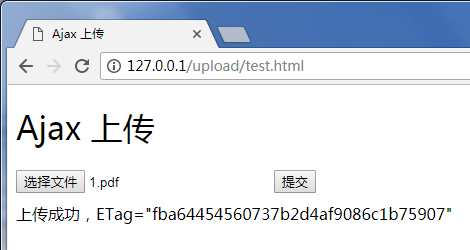
执行效果如下图:
使用 AJAX POST 上传
1. 按照 前提条件 的步骤,准备存储桶的相关配置。
2. 创建
test.html文件,复制下方代码到test.html文件。3. 部署后端的签名服务,并修改
test.html里的签名服务地址。4. 将
test.html放在 Web 服务器下,并通过浏览器访问页面,测试文件上传功能。<!DOCTYPE html><html lang="en"><head><meta charset="UTF-8" /><title>Ajax Post 上传(服务端计算签名)</title><style>h1,h2 {font-weight: normal;}#msg {margin-top: 10px;}</style></head><body><h1>PostObject 上传(服务端计算签名)</h1><input id="fileSelector" type="file" /><input id="submitBtn" type="submit" /><div id="msg"></div><script>(function () {let prefix = '';let Key = '';// 对更多字符编码的 url encode 格式const camSafeUrlEncode = function (str) {return encodeURIComponent(str).replace(/!/g, '%21').replace(/'/g, '%27').replace(/\\(/g, '%28').replace(/\\)/g, '%29').replace(/\\*/g, '%2A');};// 获取权限策略const getAuthorization = function (opt, callback) {// 替换为自己服务端地址 获取post上传签名,demo:https://github.com/tencentyun/cos-demo/blob/main/server/upload-sign/nodejs/app.jsconst url = `http://127.0.0.1:3000/post-policy?ext=${opt.ext}`;const xhr = new XMLHttpRequest();xhr.open('GET', url, true);xhr.onload = function (e) {let credentials;try {const result = JSON.parse(e.target.responseText);credentials = result;} catch (e) {callback('获取签名出错');}if (credentials) {// 打印确认credentials是否正确// console.log(credentials);callback(null, {securityToken: credentials.sessionToken,cosKey: credentials.cosKey,cosHost: credentials.cosHost,policy: credentials.policy,qAk: credentials.qAk,qKeyTime: credentials.qKeyTime,qSignAlgorithm: credentials.qSignAlgorithm,qSignature: credentials.qSignature,});} else {console.error(xhr.responseText);callback('获取签名出错');}};xhr.send();};// 上传文件const uploadFile = function (file, callback) {const fileName = file.name;// 获取文件后缀名let ext = '';const lastDotIndex = fileName.lastIndexOf('.');if (lastDotIndex > -1) {// 这里获取文件后缀 由服务端生成最终上传的路径ext = fileName.substring(lastDotIndex + 1);}getAuthorization({ ext }, function (err, credentials) {if (err) {alert(err);return;}const protocol =location.protocol === 'https:' ? 'https:' : 'http:';prefix = protocol + '//' + credentials.cosHost;Key = credentials.cosKey;const fd = new FormData();// 在当前目录下放一个空的 empty.html 以便让接口上传完成跳转回来fd.append('key', Key);// 使用 policy 签名保护格式credentials.securityToken &&fd.append('x-cos-security-token', credentials.securityToken);fd.append('q-sign-algorithm', credentials.qSignAlgorithm);fd.append('q-ak', credentials.qAk);fd.append('q-key-time', credentials.qKeyTime);fd.append('q-signature', credentials.qSignature);fd.append('policy', credentials.policy);// 文件内容,file 字段放在表单最后,避免文件内容过长影响签名判断和鉴权fd.append('file', file);// xhrconst url = prefix;const xhr = new XMLHttpRequest();xhr.open('POST', url, true);xhr.upload.onprogress = function (e) {console.log('上传进度 ' +Math.round((e.loaded / e.total) * 10000) / 100 +'%');};xhr.onload = function () {if (Math.floor(xhr.status / 100) === 2) {const ETag = xhr.getResponseHeader('etag');callback(null, {url:prefix + '/' + camSafeUrlEncode(Key).replace(/%2F/g, '/'),ETag: ETag,});} else {callback('文件 ' + Key + ' 上传失败,状态码:' + xhr.status);}};xhr.onerror = function () {callback('文件 ' + Key + ' 上传失败,请检查是否没配置 CORS 跨域规则');};xhr.send(fd);});};// 监听表单提交document.getElementById('submitBtn').onclick = function (e) {const file = document.getElementById('fileSelector').files[0];if (!file) {document.getElementById('msg').innerText = '未选择上传文件';return;}file &&uploadFile(file, function (err, data) {console.log(err || data);document.getElementById('msg').innerText = err? err: '上传成功,ETag=' + data.ETag + 'url=' + data.url;});};})();</script></body></html>
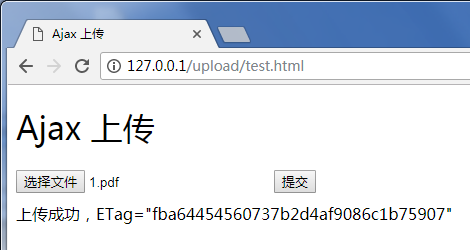
执行效果如下图:
使用 Form 表单上传
1. 按照 前提条件 的步骤,准备存储桶。
2. 创建
test.html文件,复制下方代码到test.html文件。3. 部署后端的签名服务,并修改
test.html里的签名服务地址。4. 在
test.html同一个目录下,创建一个空的empty.html,用于上传成功时跳转回来。5. 将
test.html和empty.html放在 Web 服务器下,并通过浏览器访问页面,测试文件上传功能。<!DOCTYPE html><html lang="en"><head><meta charset="UTF-8" /><title>Form 表单简单上传(兼容 IE8)(服务端计算签名)</title><style>h1,h2 {font-weight: normal;}#msg {margin-top: 10px;}</style></head><body><h1>Form 表单简单上传(兼容 IE8)(服务端计算签名)</h1><div>最低兼容到 IE6 上传,不支持 onprogress</div><formid="form"target="submitTarget"action=""method="post"enctype="multipart/form-data"accept="*/*"><input id="name" name="name" type="hidden" value="" /><input name="success_action_status" type="hidden" value="200" /><inputid="success_action_redirect"name="success_action_redirect"type="hidden"value=""/><input id="key" name="key" type="hidden" value="" /><input id="policy" name="policy" type="hidden" value="" /><inputid="q-sign-algorithm"name="q-sign-algorithm"type="hidden"value=""/><input id="q-ak" name="q-ak" type="hidden" value="" /><input id="q-key-time" name="q-key-time" type="hidden" value="" /><input id="q-signature" name="q-signature" type="hidden" value="" /><input name="Content-Type" type="hidden" value="" /><inputid="x-cos-security-token"name="x-cos-security-token"type="hidden"value=""/><!-- file 字段放在表单最后,避免文件内容过长影响签名判断和鉴权 --><input id="fileSelector" name="file" type="file" /><input id="submitBtn" type="button" value="提交" /></form><iframeid="submitTarget"name="submitTarget"style="display: none"frameborder="0"></iframe><div id="msg"></div><script>(function () {const form = document.getElementById('form');let prefix = '';// 对更多字符编码的 url encode 格式const camSafeUrlEncode = function (str) {return encodeURIComponent(str).replace(/!/g, '%21').replace(/'/g, '%27').replace(/\\(/g, '%28').replace(/\\)/g, '%29').replace(/\\*/g, '%2A');};// 计算签名const getAuthorization = function (opt, callback) {// 替换为自己服务端地址 获取post上传签名,demo:https://github.com/tencentyun/cos-demo/blob/main/server/upload-sign/nodejs/app.jsconst url = `http://127.0.0.1:3000/post-policy?ext=${opt.ext || ''}`;const xhr = new XMLHttpRequest();xhr.open('GET', url, true);xhr.onload = function (e) {let credentials;try {const result = JSON.parse(e.target.responseText);credentials = result;} catch (e) {callback('获取签名出错');}if (credentials) {// 打印确认credentials是否正确// console.log(credentials);callback(null, {securityToken: credentials.sessionToken,cosKey: credentials.cosKey,cosHost: credentials.cosHost,policy: credentials.policy,qAk: credentials.qAk,qKeyTime: credentials.qKeyTime,qSignAlgorithm: credentials.qSignAlgorithm,qSignature: credentials.qSignature,});} else {console.error(xhr.responseText);callback('获取签名出错');}};xhr.send();};// 监听上传完成let Key;const submitTarget = document.getElementById('submitTarget');const showMessage = function (err, data) {console.log(err || data);document.getElementById('msg').innerText = err? err: '上传成功,ETag=' + data.ETag;};submitTarget.onload = function () {let search;try {search = submitTarget.contentWindow.location.search.substr(1);} catch (e) {showMessage('文件 ' + Key + ' 上传失败');}if (search) {const items = search.split('&');let i = 0;let arr = [];const data = {};for (i = 0; i < items.length; i++) {arr = items[i].split('=');data[arr[0]] = decodeURIComponent(arr[1] || '');}showMessage(null, {url: prefix + camSafeUrlEncode(Key).replace(/%2F/g, '/'),ETag: data.etag,});} else {}};// 发起上传document.getElementById('submitBtn').onclick = function (e) {const filePath = document.getElementById('fileSelector').value;if (!filePath) {document.getElementById('msg').innerText = '未选择上传文件';return;}// 获取文件后缀名let ext = '';const lastDotIndex = filePath.lastIndexOf('.');if (lastDotIndex > -1) {// 这里获取文件后缀 由服务端生成最终上传的路径ext = filePath.substring(lastDotIndex + 1);}getAuthorization({ ext }, function (err, AuthData) {if (err) {alert(err);return;}const protocol =location.protocol === 'https:' ? 'https:' : 'http:';prefix = protocol + '//' + AuthData.cosHost;form.action = prefix;Key = AuthData.cosKey;// 在当前目录下放一个空的 empty.html 以便让接口上传完成跳转回来document.getElementById('success_action_redirect').value =location.href.substr(0, location.href.lastIndexOf('/') + 1) +'empty.html';document.getElementById('key').value = AuthData.cosKey;document.getElementById('policy').value = AuthData.policy;document.getElementById('q-sign-algorithm').value =AuthData.qSignAlgorithm;document.getElementById('q-ak').value = AuthData.qAk;document.getElementById('q-key-time').value = AuthData.qKeyTime;document.getElementById('q-signature').value = AuthData.qSignature;document.getElementById('x-cos-security-token').value =AuthData.securityToken || '';form.submit();});};})();</script></body></html>
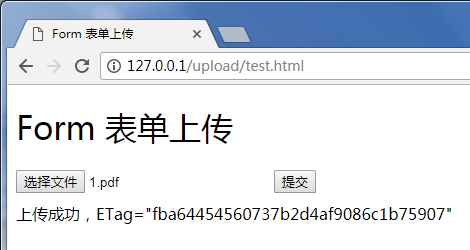
执行效果如下图:
上传时限制文件类型和文件大小
前端限制文件类型
参考上方 AJAX PUT 上传,只需要在选择文件时加一层判断即可。(只支持限制文件后缀)
// 省略其他代码document.getElementById('submitBtn').onclick = function (e) {const file = document.getElementById('fileSelector').files[0];if (!file) {document.getElementById('msg').innerText = '未选择上传文件';return;}// 获取文件后缀const fileName = file.name;const lastDotIndex = fileName.lastIndexOf('.');const ext = lastDotIndex > -1 ? fileName.substring(lastDotIndex + 1) : '';// 请替换为您想要限制的格式,假如只能上传jpg png类型文件const allowExt = ['jpg', 'png'];if (!allowExt.includes(ext)) {alert('只支持上传jpg、png文件');return;}file &&uploadFile(file, function (err, data) {console.log(err || data);document.getElementById('msg').innerText = err? err: '上传成功,ETag=' + data.ETag + 'url=' + data.url;});};
前端限制文件大小
参考上方 AJAX PUT 上传,只需要在选择文件时加一层判断即可。
// 省略其他代码document.getElementById('submitBtn').onclick = function (e) {const file = document.getElementById('fileSelector').files[0];if (!file) {document.getElementById('msg').innerText = '未选择上传文件';return;}const fileSize = file.size;// 请替换为您想要限制的对象大小,最高可限制单个对象为5GB。假如限制上传文件不能超过5MBif (fileSize > 5 * 1024 * 1024) {alert('所选文件超过5MB,请重新选择');return;}file &&uploadFile(file, function (err, data) {console.log(err || data);document.getElementById('msg').innerText = err? err: '上传成功,ETag=' + data.ETag + 'url=' + data.url;});};
服务端签名限制
相关文档
若您有更丰富的接口调用需求,请参考以下 JavaScript SDK 文档:
上传安全限制


