LLSync 蓝牙辅助配网功能是腾讯云 IoT 推出的针对
Wi-Fi + BLE 的官方 Combo 芯片方案,通过 BLE 创建指定的 GATT 服务,手机连接该 GATT SERVER,利用 BLE 的无线通信能力,将物联网设备连接所需的 SSID、PASSWORD 等信息传输给 Wi-Fi + BLE 的 Combo 芯片或模组,使设备顺利接入物联网平台,继而完成设备绑定等功能。蓝牙辅助配网移植的主要流程如下:
1. 硬件设备选择。
2. 控制台创建产品。
3. 获取 SDK。
4. 移植 SDK。
5. 验证蓝牙辅助配网功能。
一、 硬件设备选择
需要您根据产品特性选择合适的
Combo 芯片或模组。二、 控制台创建产品
1. 登录控制台创建设备。
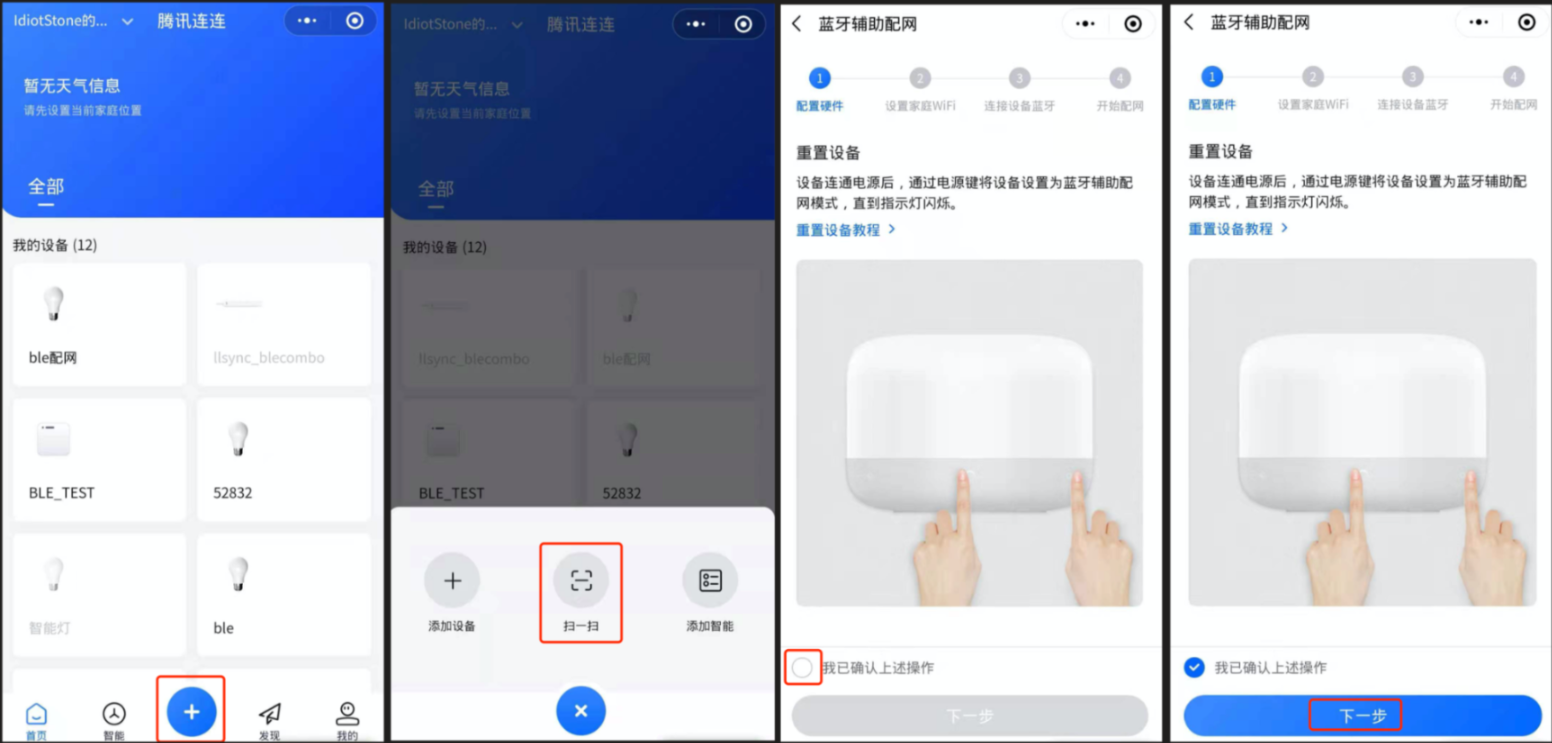
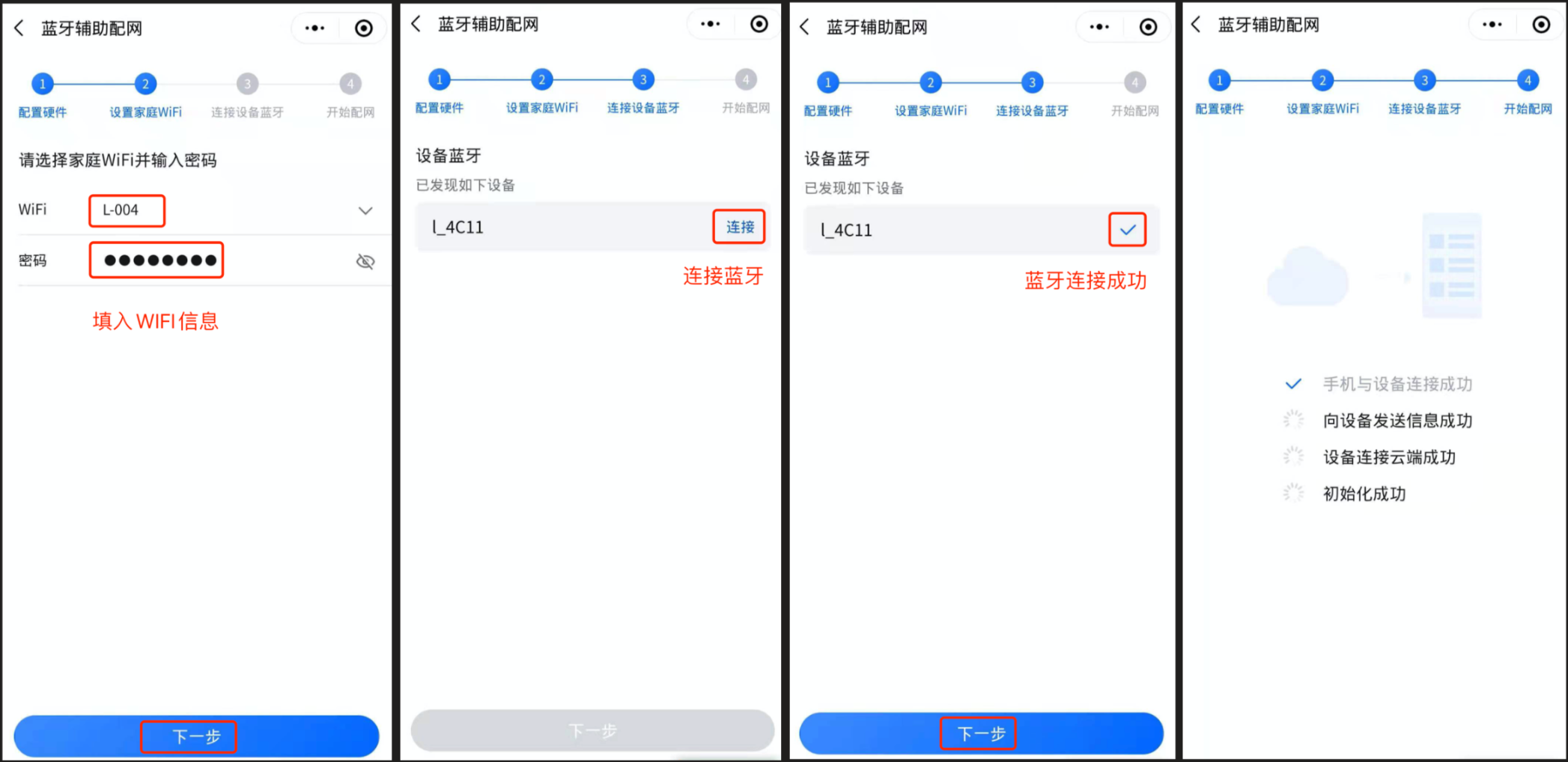
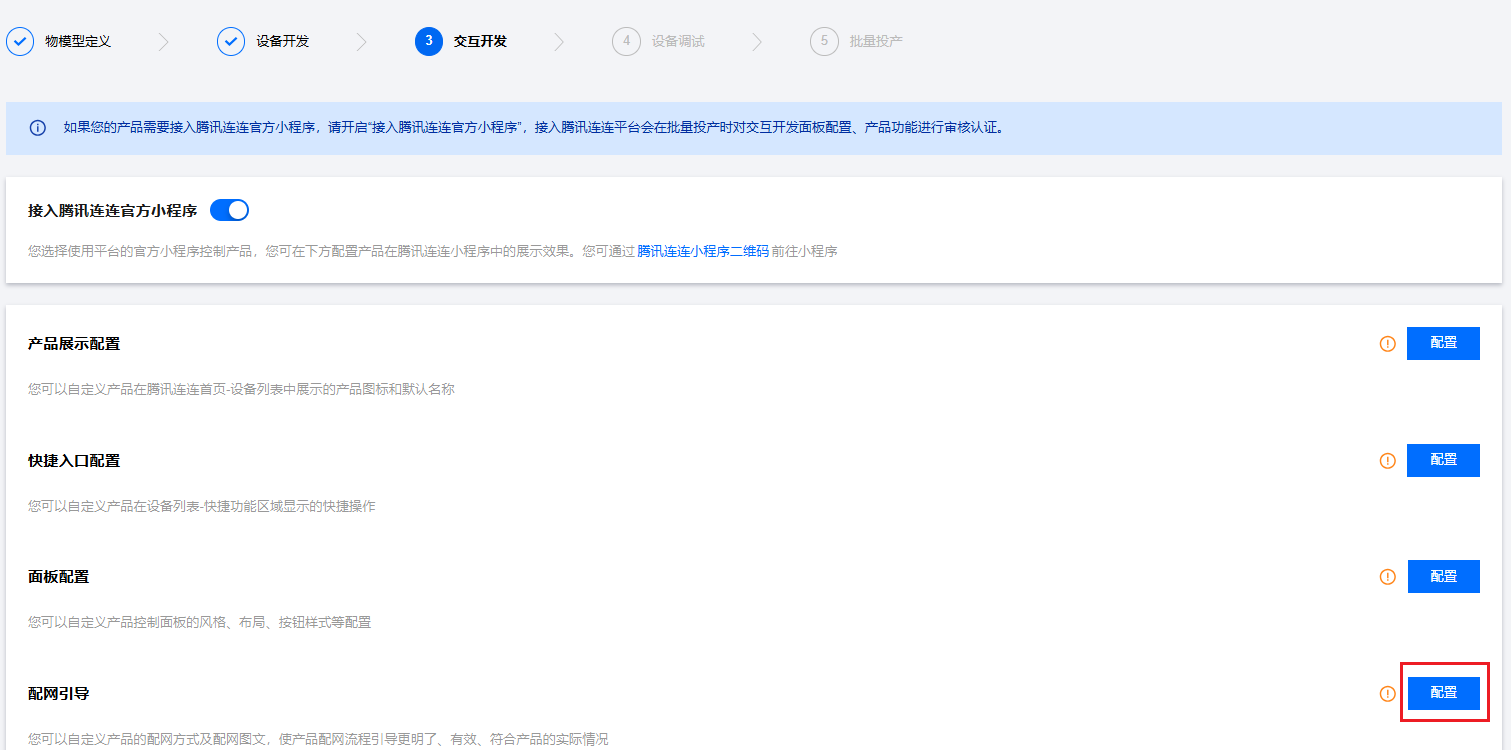
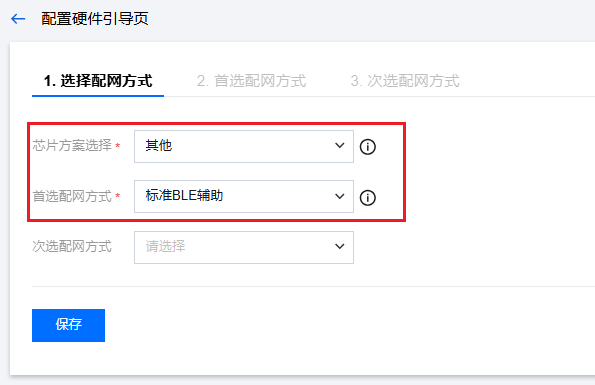
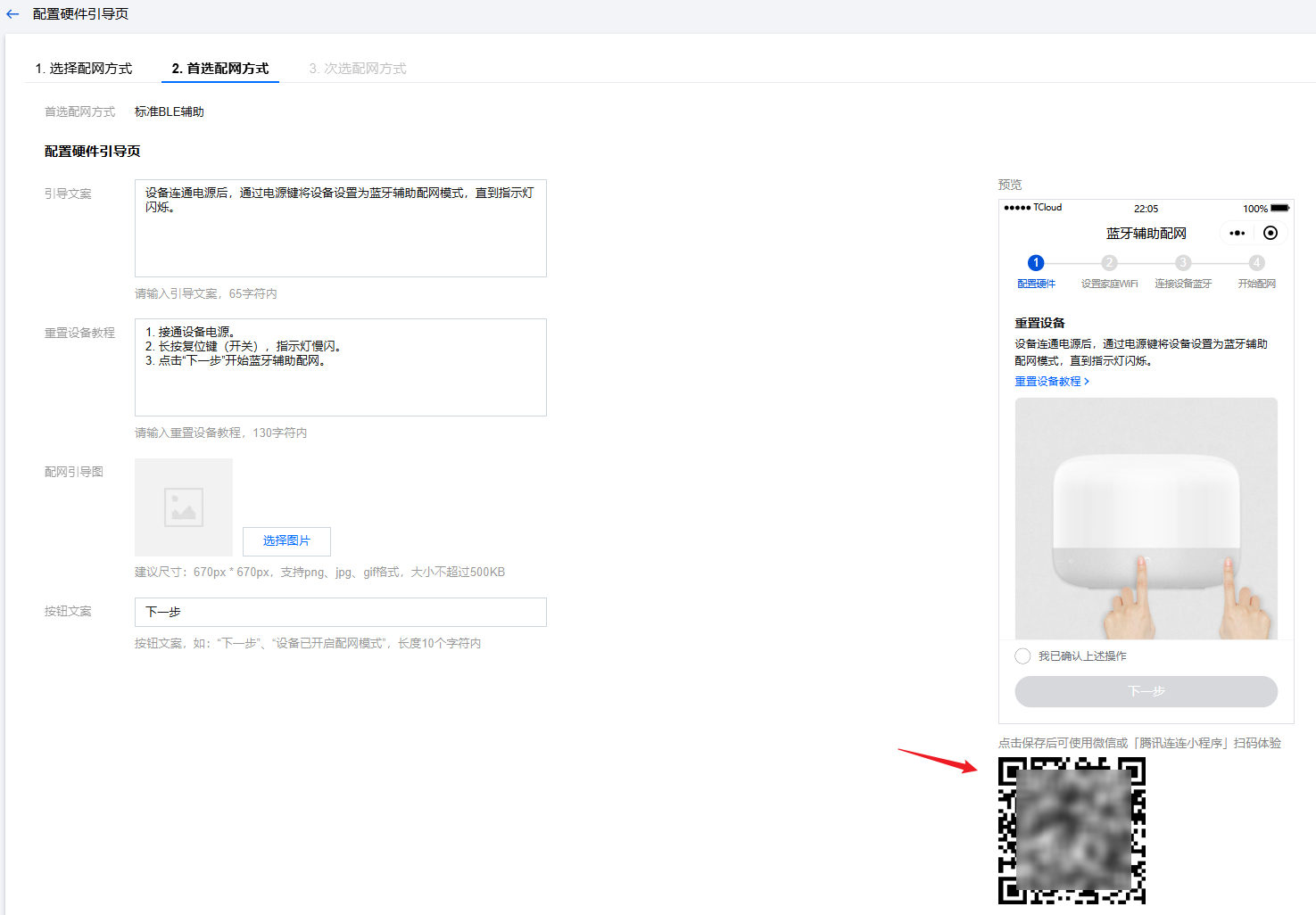
2. 在控制台选择设备配网方式,配网方式确定后可以通过扫描二维码的方式连接设备蓝牙进行配网。
三、 获取 SDK
四、 移植 SDK
蓝牙辅助配网功能使用了
Wi-Fi 和 BLE 的通信能力,因此包括 C SDK 和 LLSync SDK 的移植。1.
LLSync SDK 移植主要是做配置编译、HAL 实现、API 调用。1.1 配置编译
修改
config/ble_qiot_config.h 文件,对配网相关功能进行配置,不关心标准蓝牙功能。// 配置为0,SDK 初始化后默认广播。配置为1,SDK 初始化不广播,需要通过设备 UI 操作触发广播(例如按键)。#define BLE_QIOT_BUTTON_BROADCAST (0)#define __ORDER_LITTLE_ENDIAN__ (1234)#define __ORDER_BIG_ENDIAN__ (4321)// 设备大小端定义。#define __BYTE_ORDER__ (__ORDER_LITTLE_ENDIAN__)// 设备端串口输出函数。#define BLE_QIOT_LOG_PRINT(...) printf(__VA_ARGS__)#define BLE_QIOT_USER_DEFINE_HEXDUMP 0// 设备端和小程序通信过程中的单条数据最大长度,配网功能默认128即可。#define BLE_QIOT_EVENT_MAX_SIZE (128)// 取MTU和BLE_QIOT_EVENT_MAX_SIZE中的较小值,LLSync会对数据分片后再发送。#define BLE_QIOT_EVENT_BUF_SIZE (23)// 配置为1,建立蓝牙连接后小程序尝试设置MTU,通过ble_get_user_data_mtu_size接口获取;配置为0,默认MTU为23。#define BLE_QIOT_REMOTE_SET_MTU (1)// 配置为1,使能LLSync配网功能#define BLE_QIOT_LLSYNC_CONFIG_NET (1)
LLSync 使用配网功能不需要 OTA、数据模板等能力,
SDK 会通过功能宏控制编译。1.2 HAL 实现
inc/ble_qiot_import.h 中定义了 LLSync SDK 依赖的设备 HAL 实现,需要您在自己的硬件平台上进行实现。/* 获取设备MAC地址,示例:int ble_get_mac(char *mac){char *address = (char *)esp_bt_dev_get_address();memcpy(mac, address, 6);return 0;}*/int ble_get_mac(char *mac);/* 设置WIFI模式,当前支持wifi station,示例:ble_qiot_ret_status_t ble_combo_wifi_mode_set(BLE_WIFI_MODE mode){if (mode != BLE_WIFI_MODE_STA){return ble_event_report_wifi_mode(-1)}ESP_ERROR_CHECK(esp_wifi_set_mode(mode);return ble_event_report_wifi_mode(0);}*/ble_qiot_ret_status_t ble_combo_wifi_mode_set(BLE_WIFI_MODE mode);/* 设置WIFI SSID和PASSWORD,示例:ble_qiot_ret_status_t ble_combo_wifi_info_set(const char *ssid, uint8_t ssid_len, const char *passwd, uint8_t passwd_len){......memcpy(wifi_config.sta.ssid, ssid, ssid_len);memcpy(wifi_config.sta.password, passwd, passwd_len);ESP_ERROR_CHECK(esp_wifi_set_config(WIFI_IF_STA, &wifi_config) );return ble_event_report_wifi_info(0);}*/ble_qiot_ret_status_t ble_combo_wifi_info_set(const char *ssid, uint8_t ssid_len, const char *passwd, uint8_t passwd_len);/* 使用设置的WIFI信息请求连接WIFI,示例:ble_qiot_ret_status_t ble_combo_wifi_connect(){ESP_ERROR_CHECK(esp_wifi_connect());return 0;}*/ble_qiot_ret_status_t ble_combo_wifi_connect();
inc/ble_qiot_import.h 中定义了 LLSync SDK 依赖的蓝牙协议栈 HAL 实现,需要您在自己的硬件平台上进行实现。/* 通过ble_get_qiot_services获取蓝牙服务,将蓝牙服务添加到协议栈。配网功能使用的服务UUID是0xFFF0,特征值UUID是0xFFE1和0xFFE3。您也可以选择其他方式将服务添加到协议栈,示例为ESP32上添加蓝牙服务代码:static uint8_t llsync_service_uuid[16] = {0xe2, 0xa4, 0x1b, 0x54, 0x93, 0xe4, 0x6a, 0xb5, 0x20, 0x4e, 0xd0, 0x65, 0xf0, 0xff, 0x00, 0x00,};static uint8_t llsync_device_info_uuid[16] = {0xe2, 0xa4, 0x1b, 0x54, 0x93, 0xe4, 0x6a, 0xb5, 0x20, 0x4e, 0xd0, 0x65, 0xe1, 0xff, 0x00, 0x00,};static uint8_t llsync_event_uuid[16] = {0xe2, 0xa4, 0x1b, 0x54, 0x93, 0xe4, 0x6a, 0xb5, 0x20, 0x4e, 0xd0, 0x65, 0xe3, 0xff, 0x00, 0x00,};static const esp_gatts_attr_db_t gatt_db[HRS_IDX_NB] = {[IDX_SVC] = {{ESP_GATT_AUTO_RSP},{ESP_UUID_LEN_16, (uint8_t *)&primary_service_uuid, ESP_GATT_PERM_READ, sizeof(llsync_service_uuid), sizeof(llsync_service_uuid), (uint8_t *)llsync_service_uuid}},[IDX_CHAR_A] = {{ESP_GATT_AUTO_RSP},{ESP_UUID_LEN_16, (uint8_t *)&character_declaration_uuid, ESP_GATT_PERM_READ, CHAR_DECLARATION_SIZE, CHAR_DECLARATION_SIZE, (uint8_t *)&char_prop_write}},[IDX_CHAR_VAL_A] = {{ESP_GATT_AUTO_RSP},{ESP_UUID_LEN_128, (uint8_t *)llsync_device_info_uuid, ESP_GATT_PERM_WRITE,LLSYNC_CHAR_VAL_LEN_MAX, 0, NULL}},[IDX_CHAR_C] = {{ESP_GATT_AUTO_RSP},{ESP_UUID_LEN_16, (uint8_t *)&character_declaration_uuid, ESP_GATT_PERM_READ, CHAR_DECLARATION_SIZE, CHAR_DECLARATION_SIZE, (uint8_t *)&char_prop_notify}},[IDX_CHAR_VAL_C] = {{ESP_GATT_AUTO_RSP},{ESP_UUID_LEN_128, (uint8_t *)llsync_event_uuid, 0, LLSYNC_CHAR_VAL_LEN_MAX, 0, NULL}},[IDX_CHAR_CFG_C] = {{ESP_GATT_AUTO_RSP},{ESP_UUID_LEN_16, (uint8_t *)&character_client_config_uuid,ESP_GATT_PERM_READ | ESP_GATT_PERM_WRITE, sizeof(uint16_t), sizeof(heart_measurement_ccc), (uint8_t *)heart_measurement_ccc}},}……esp_err_t create_attr_ret = esp_ble_gatts_create_attr_tab(gatt_db, gatts_if, HRS_IDX_NB, SVC_INST_ID);};*/void ble_services_add(const qiot_service_init_s *p_service);/* 通过ble_get_my_broadcast_data获取广播数据,将其作为厂商数据开始广播,Compnay ID是0xFEE7。示例:……adv_info_s my_adv_info;adv_data_len = ble_get_my_broadcast_data((char *)adv_data, sizeof(adv_data));my_adv_info.manufacturer_info.company_identifier = TENCENT_COMPANY_IDENTIFIER;my_adv_info.manufacturer_info.adv_data = adv_data;my_adv_info.manufacturer_info.adv_data_len = adv_data_len;ble_advertising_start(&my_adv_info);……ble_qiot_ret_status_t ble_advertising_start(adv_info_s *adv){static uint8_t raw_adv_data[32] = {0x02, 0x01, 0x06, 0x03, 0x03, 0xF0, 0xFF};uint8_t usr_adv_data[31] = {0};uint8_t len = 0;uint8_t index = 0;memcpy(usr_adv_data, &adv->manufacturer_info.company_identifier, sizeof(uint16_t));len = sizeof(uint16_t);memcpy(usr_adv_data + len, adv->manufacturer_info.adv_data, adv->manufacturer_info.adv_data_len);len += adv->manufacturer_info.adv_data_len;index = 7;raw_adv_data[index++] = len + 1;raw_adv_data[index++] = 0xFF;// 添加厂商广播数据memcpy(raw_adv_data + index, usr_adv_data, len);index += len;……esp_log_buffer_hex("adv", raw_adv_data, index);esp_err_t ret = esp_ble_gap_config_adv_data_raw(raw_adv_data, index);if (ret) {ESP_LOGE(LLSYNC_LOG_TAG, "config adv data failed, error code = %x", ret);}adv_config_done |= ADV_CONFIG_FLAG;esp_ble_gap_start_advertising(&adv_params);return 0;}*/ble_qiot_ret_status_t ble_advertising_start(adv_info_s *adv);/* 停止广播接口,示例:ble_qiot_ret_status_t ble_advertising_stop(void){esp_ble_gap_stop_advertising();return 0;}*/ble_qiot_ret_status_t ble_advertising_stop(void);/* 特征值UUID FFE3向小程序写数据的接口,示例:ble_qiot_ret_status_t ble_send_notify(uint8_t *buf, uint8_t len){esp_ble_gatts_send_indicate(llsync_profile_tab[PROFILE_APP_IDX].gatts_if,llsync_profile_tab[PROFILE_APP_IDX].conn_id, llsync_handle_table[IDX_CHAR_VAL_C], len, buf, false);return BLE_QIOT_RS_OK;}*/ble_qiot_ret_status_t ble_send_notify(uint8_t *buf, uint8_t len);/* 用户指定MTU。当BLE_QIOT_REMOTE_SET_MTU设置为1时,小程序连接设备后会去修改MTU并通知设备。否则使用默认MTU(23)进行通信。uint16_t ble_get_user_data_mtu_size(void){return 128;}*/uint16_t ble_get_user_data_mtu_size(void);
1.3 API 调用
inc/ble_qiot_export.h 中定义了 LLSync SDK 对外提供的 API。/* 获取LLSync蓝牙服务,您可以在代码中获取蓝牙服务后将蓝牙服务添加到蓝牙协议栈*/const qiot_service_init_s *ble_get_qiot_services(void);/* LLSync SDK初始化接口,主要进行蓝牙服务添加。默认在start_device_btcomboconfig内已调用,您也可以选择在其他位置调用。*/ble_qiot_ret_status_t ble_qiot_explorer_init(void);/* LLSync广播启动接口,请您选择合适的位置调用。例如在蓝牙断开时重新开始广播。……ESP_LOGI(LLSYNC_LOG_TAG, "ESP_GATTS_DISCONNECT_EVT, reason = 0x%x", param->disconnect.reason);ble_qiot_advertising_start();……*/ble_qiot_ret_status_t ble_qiot_advertising_start(void);/* LLSync广播停止接口,请您选择合适的位置调用。例如在配网结束时停止广播。int stop_device_btcomboconfig(void){ble_qiot_advertising_stop();return QCLOUD_RET_SUCCESS;}*/ble_qiot_ret_status_t ble_qiot_advertising_stop(void);/* GAP连接时通知LLSync SDK。例如:case ESP_GATTS_CONNECT_EVT:……esp_ble_gap_update_conn_params(&conn_params);ble_gap_connect_cb();……*/void ble_gap_connect_cb(void);/* GAP断开时通知LLSync SDK。例如:……ESP_LOGI(LLSYNC_LOG_TAG, "ESP_GATTS_DISCONNECT_EVT, reason = 0x%x", param->disconnect.reason);ble_gap_disconnect_cb();……*/void ble_gap_disconnect_cb(void);/* 小程序无法获取蓝牙MTU接口,设备端收到MTU修改通知后调用此接口通知小程序。例如:case ESP_GATTS_MTU_EVT:ESP_LOGI(LLSYNC_LOG_TAG, "ESP_GATTS_MTU_EVT, MTU %d", param->mtu.mtu);ble_event_sync_mtu(param->mtu.mtu);break;*/ble_qiot_ret_status_t ble_event_sync_mtu(uint16_t llsync_mtu);/* 特征值UUID FFE1数据处理接口,收到数据后调用此接口。例如:case ESP_GATTS_WRITE_EVT:if (!param->write.is_prep) {// the data length of gattc write must be less than LLSYNC_CHAR_VAL_LEN_MAX.if (param->write.handle == llsync_handle_table[IDX_CHAR_VAL_A]) {ble_device_info_write_cb(param->write.value, param->write.len);}……}*/void ble_device_info_write_cb(const uint8_t *buf, uint16_t len);/* 设置WIFI Mode后,设备端给小程序回复设置结果。result 为0表示设置成功,其他表示错误。示例:ble_qiot_ret_status_t ble_combo_wifi_mode_set(BLE_WIFI_MODE mode){if (mode != BLE_WIFI_MODE_STA){return ble_event_report_wifi_mode(-1)}ESP_ERROR_CHECK(esp_wifi_set_mode(mode);return ble_event_report_wifi_mode(0);}*/ble_qiot_ret_status_t ble_event_report_wifi_mode(uint8_t result);/* 设置WIFI信息后,设备端给小程序回复设置结果。result 为0表示设置成功,其他表示错误。示例:ble_qiot_ret_status_t ble_combo_wifi_info_set(const char *ssid, uint8_t ssid_len, const char *passwd, uint8_t passwd_len){......memcpy(wifi_config.sta.ssid, ssid, ssid_len);memcpy(wifi_config.sta.password, passwd, passwd_len);ESP_ERROR_CHECK(esp_wifi_set_config(WIFI_IF_STA, &wifi_config) );return ble_event_report_wifi_info(0);}*/ble_qiot_ret_status_t ble_event_report_wifi_info(uint8_t result);/* WIFI连接结束后,将WIFI连接结果回复给小程序。WIFI连接成功后回复示例:static void bt_combo_report_wificonn_success(){wifi_config_t cfg;esp_wifi_get_config(WIFI_IF_STA, &cfg);ble_event_report_wifi_connect(BLE_WIFI_MODE_STA, BLE_WIFI_STATE_CONNECT, (uint8_t)strlen((const char *)cfg.sta.ssid), (const char *)cfg.sta.ssid);}注意:WIFI连接失败也要回复小程序。*/ble_qiot_ret_status_t ble_event_report_wifi_connect(BLE_WIFI_MODE mode, BLE_WIFI_STATE state, uint8_t ssid_len, const char *ssid);
2.
C SDK 移植请参考 C SDK 使用参考。C SDK 已经实现了配网代码框架,您只需要根据需要实现相关的 HAL 接口即可。为进一步简化适配步骤,在 qcloud-iot-explorer-BLE-sdk-embedded/lib/qcloud_iot_c_sdk 目录下已经实现了部分C SDK 的 HAL 接口,您需要拷贝文件覆盖 qcloud-iot-explorer-sdk-embedded-c/platform 和 qcloud-iot-explorer-sdk-embedded-c/sdk_src/wifi_config 目录下对应文件。cp qcloud-iot-explorer-BLE-sdk-embedded/lib/qcloud_iot_c_sdk/platform/* qcloud-iot-explorer-sdk-embedded-c/platform/cp qcloud-iot-explorer-BLE-sdk-embedded/lib/qcloud_iot_c_sdk/sdk_src/* qcloud-iot-explorer-sdk-embedded-c/sdk_src/wifi_config/
您还需要实现以下 HAL 接口以完成配网功能的适配工作。
/* COMBO设备配网功能启动接口,默认调用了LLSync SDK初始化接口,您可以按照需要修改。示例int start_device_btcomboconfig(void){// TODO other init(例如蓝牙协议栈初始化)ble_qiot_explorer_init(); // init llsync sdkreturn QCLOUD_RET_SUCCESS;}*/int start_device_btcomboconfig(void);/* COMBO设备配网功能关闭接口,默认调用了LLSync停止广播接口,您可以按照需要修改。示例int stop_device_btcomboconfig(void){ble_qiot_advertising_stop();// TODO other deinitreturn QCLOUD_RET_SUCCESS;}*/int stop_device_btcomboconfig(void)/* WIFI连接成功后上报给小程序,您需要获取当前连接的WIFI信息并调用ble_event_report_wifi_connect接口上报。示例static void bt_combo_report_wificonn_success(){wifi_config_t cfg;esp_wifi_get_config(WIFI_IF_STA, &cfg);ble_event_report_wifi_connect(BLE_WIFI_MODE_STA, BLE_WIFI_STATE_CONNECT, (uint8_t)strlen((const char *)cfg.sta.ssid), (const char *)cfg.sta.ssid);}*/void bt_combo_report_wificonn_success();/* 设置 WIFI 配置状态,当 WIFI 信息设置后根据结果修改状态。示例……ESP_LOGI(TAG, "wifi info %s, %s", wifi_config.sta.ssid,wifi_config.sta.password);ESP_ERROR_CHECK(esp_wifi_set_config(WIFI_IF_STA, &wifi_config) );// WIFI 信息设置成功set_bt_combo_config_state(WIFI_CONFIG_SUCCESS);……*/void set_bt_combo_config_state(eWiFiConfigState state);/* 获取 WIFI 连接状态,建议在获取到IP后才认为WIFI连接成功。示例bool HAL_Wifi_IsConnected(void){// TODO, retrun true when you got ipreturn false;}*/bool HAL_Wifi_IsConnected(void);/* 配网错误日志操作接口,需要固化存储日志时可以实现以下接口。当出现错误时设备存储日志,设备重启时读取日志,防止错误信息丢失。*/int HAL_Wifi_read_err_log(uint32_t offset, void *log, size_t log_size);int HAL_Wifi_write_err_log(uint32_t offset, void *log, size_t log_size);int HAL_Wifi_clear_err_log(void);
qcloud-iot-explorer-sdk-embedded-c/sdk_src/internal_inc/qcloud_wifi_config.h 中进行选择配网功能配置。#define WIFI_ERR_LOG_POST 1 // 配网出错时向小程序上报配网错误日志#define WIFI_LOG_UPLOAD 1 // 配网出错时向小程序上报配网过程日志#define WIFI_PROV_BT_COMBO_CONFIG_ENABLE 1 // 选择LLSync配网功能,soft ap,airkiss等配网选项需要关闭
五、验证蓝牙辅助配网功能
1. BLE 适配完成后,可以通过 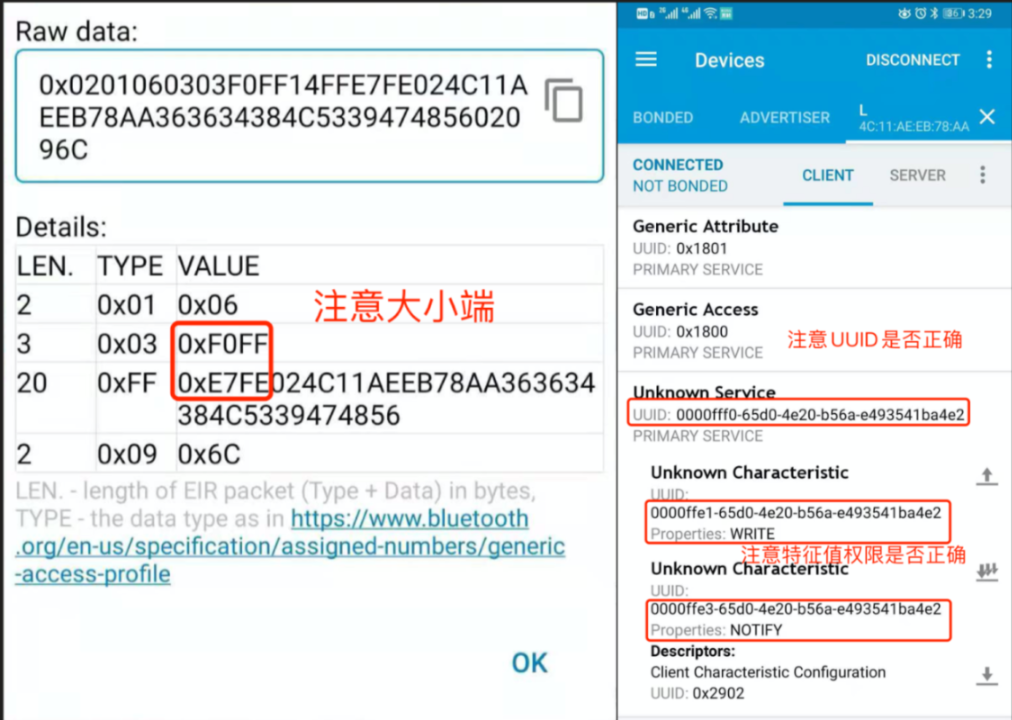
Nrf Connect 查看设备广播信息和蓝牙服务信息。
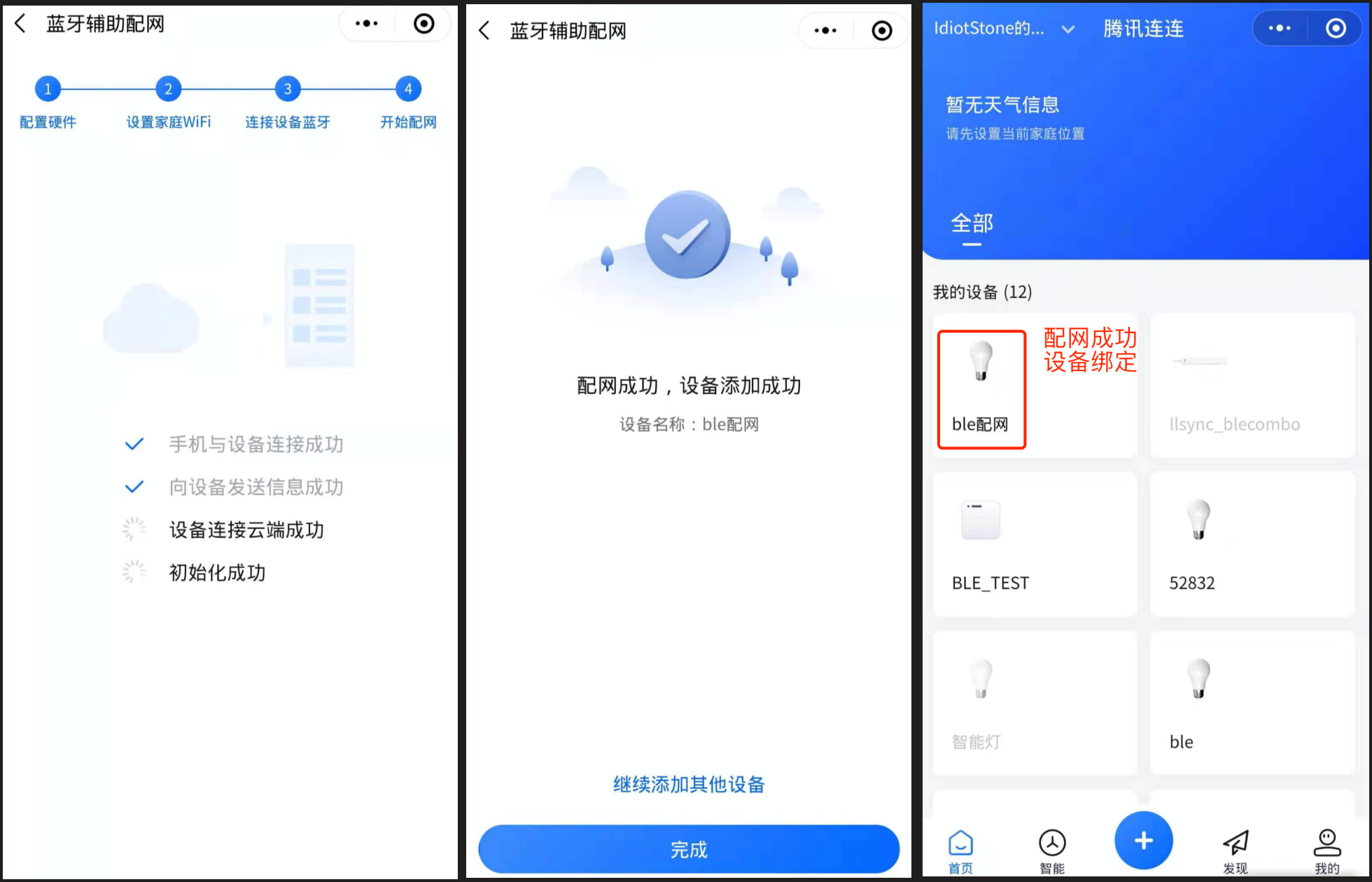
2. 小程序 LLSync 配网示例。