Blocking the Deployment of High-Risk Images

Last updated: 2024-03-25 10:37:00

Scenario

Tencent Container Registry (TCR) Enterprise Edition supports security scanning of hosted container images, generating scan reports, exposing potential security vulnerabilities within container images, and providing remediation suggestions. Container image security is a crucial aspect of cloud-native application delivery. Timely security scanning of uploaded container images and blocking application deployment based on scan results can effectively reduce vulnerability risks in production environments.
The image deployment blocking feature is built-in at the namespace level, allowing you to enable this feature and configure blocking rules and ignorable image vulnerabilities. Once enabled, if a container client attempts to pull a container image that meets the blocking policy, the action will be blocked and an error message will be returned.

Preparations

Before using the image deployment blocking feature, you need to perform the following operations:
If you are using a sub-account, you must have granted the sub-account operation permissions for the corresponding instance. For more information, see Example of Authorization Solution of TCR Enterprise.

Instructions

Configuring the blocking policy

1. Log in to the TCR console and click Namespace in the left sidebar.
2. On the "Namespace" page, click the name of the instance for which you want to configure the blocking policy to go to the namespace details page.
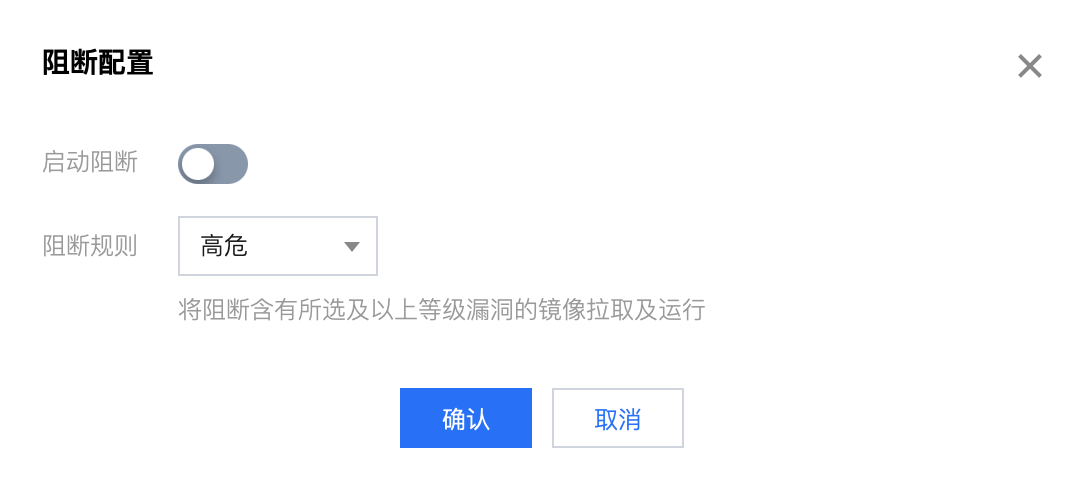
3. On the "Deployment security" page, enable the deployment blocking feature and configure the vulnerability levels to be blocked, as shown in the figure below:


Configure the allowlist of vulnerabilities

After enabling deployment blocking, you can configure a vulnerability allowlist by entering one or more CVE IDs separated by commas. If the image security scan results include the specified vulnerability ID, it will be ignored by the blocking policy. For example, if an image has a high-risk vulnerability, but the vulnerability is on the allowlist, the image can still be pulled normally even if the policy is set to block images with high-risk vulnerabilities.