The content of this page has been automatically translated by AI. If you encounter any problems while reading, you can view the corresponding content in Chinese.
What System Volume Modes Are Supported On the Mobile Terminal (Android/iOS)?
Support two system volume types, namely call volume type and media volume type.
Call Volume: A volume type specifically designed for call scenarios on mobile phones. It uses the built-in echo cancellation function of the mobile phone. The sound quality is relatively poor compared to the media volume type. The volume cannot be adjusted to zero using the volume keys, but it supports the microphone on Bluetooth headphones.
Media volume: A volume type specifically designed for music on mobile phones. Compared with the call volume type, the sound quality is better. The volume can be turned down to zero using the volume keys. When using the media volume type, if you want to enable the echo cancellation (AEC) feature, the SDK will activate the built-in acoustic processing algorithm to process the sound a second time. In media volume mode, Bluetooth headphones cannot use their built-in microphones to collect sound and can only use the microphone on the mobile phone for sound collection.
How to Set 1080p Resolution For Mobile Terminal SDK Streaming?
1080P is defined as 114 in TX_Enum_Type_VideoResolution. You can directly set the resolution by passing the enumeration value.
Create a Room On the Mini Program and Can the Mobile Terminal Enter It?
Yes, Tencent Real-Time Communication (TRTC) supports interconnectivity across the platform.
Audio and Video Call How to Achieve Screen Recording (Screen Sharing) On TRTC Mobile Terminal?
Android end: Screen recording on mobile phones is supported in Version 7.2 and later. For specific practices, see Real-time screen sharing (Android).
iOS platform: Screen recording within the App is supported in Version 7.2 and later; phone screen recording and screen recording within the App are supported in Version 7.6 and later. For specific practices, see Real-time screen sharing (iOS).
Audio and Video Call Can TRTC Android Support 64-Bit arm64-v8a Architecture?
Since version 6.3 of audio and video call TRTC, ABI support for the arm64-v8a architecture has been provided.
How to Achieve Dynamic Loading of so Libraries On Android?
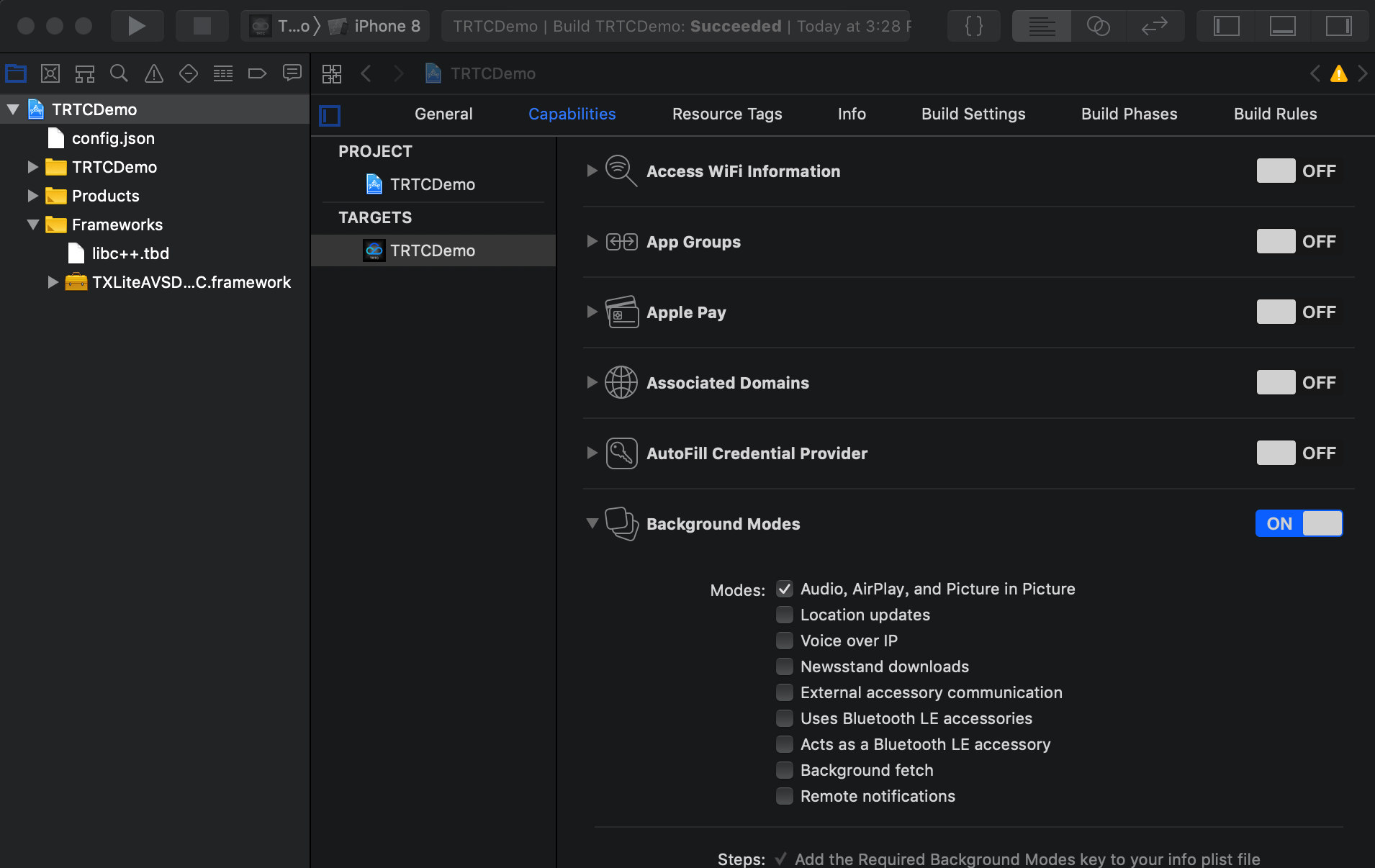
Can the TRTC SDK Support Backend Operation On iOS?
Yes, you can. To run the SDK in the background, select your current project, set Background Modes under Capabilities to ON, and check Audio, AirPlay, and Picture in Picture. For details, see the figure below:
Can I Listen For Room Exit By Remote Users On iOS?
You can use onRemoteUserLeaveRoom to listen for user leaving room events. This API will only trigger a callback when all users in VideoCall or the streamer in LIVE mode leave the room. There will be no callback when an audience member leaves the room.
How to Connect Audio and Video When the Mobile Phone Is in Screen Lock Status, the App Is in the Background or the App Is Closed?
Streamer and Fan Mic Connections During Live Streams, Can Both Parties Initiate Mic Connections Actively?
Both parties can initiate proactively. The logic for audiences and streamers to initiate is the same. For specific operations, see Run Live Mode (Android).
Multi-Person Audio-Video Room: Can Mobile Terminals and Web Access the Same Room?
Yes. Ensure that the SDKAppID and room number are consistent, and the user IDs are different.
Create N TRTC Objects On the Same Page, Log in to N Rooms Through N UserIDs Respectively?
Yes. Starting from Version 7.6, a user can enter multiple rooms.