功能简介
当您需要将同一路径的请求 URL 通过请求参数、cookie 或者 HTTP 请求头的区别指向不同文件时,或者将携带不同参数的请求 URL 均指向同一份文件时,自定义 Cache Key 支持自定义调整资源在节点内的缓存 Cache Key 标识,包括拼接查询字符串、拼接 HTTP 标头或 Cookie 信息等,以便请求 URL 能根据不同场景正确获取对应的缓存资源。您可以通过 缓存键(Cache Key)介绍 来了解什么是 Cache Key。
注意:
自定义 Cache Key 的查询字符串参数名称,以及 HTTP 请求头的头部名称,仅支持大小写英文字母、数字、下划线(_)和连字符(-)。
使用场景
场景一:用户访问的文件路径完全相同,但是根据携带的查询字符串、HTTP 请求头、Cookie 内容,将会有版本的区分,可通过自定义 Cache Key 来调整该类型文件的缓存键来区分文件缓存。
场景二:用户访问的 URL 中查询字符串的内容完全不影响文件内容,以上请求所对应的文件一致,不影响文件版本,可通过自定义 Cache Key 来调整该类型文件的缓存键来使请求命中同一份文件缓存。
操作步骤
场景一:针对站点所有域名配置自定义 Cache Key
若您需要对整个接入站点配置自定义 Cache Key,或作为站点级兜底配置,可参考以下步骤:
1. 登录 边缘安全加速平台 EO 控制台,在左侧菜单栏中,进入服务总览,单击网站安全加速内需配置的站点。
2. 在站点详情页面,单击站点加速 ,进入站点全局配置页面,在右侧导航栏中,单击缓存配置。
说明:
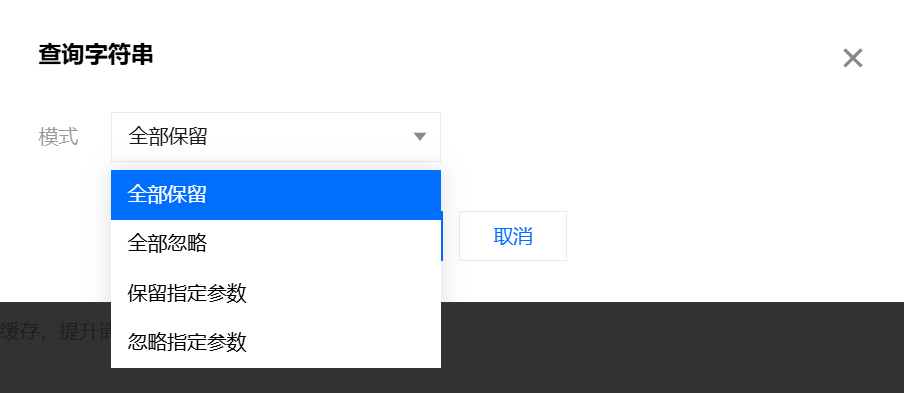
在缓存配置页面,找到查询字符串卡片,单击全局站点设置进行配置。

默认配置为全部保留,即保留原请求 URL 的全部查询参数作为 Cache Key。支持其他选项:a. 全部忽略:忽略整个查询字符串;b. 保留指定参数:仅保留查询字符串中指定的参数;c. 忽略指定参数:仅忽略查询字符串中指定的参数。
在缓存配置页面,找到忽略大小写卡片,默认配置为关闭忽略大小写,即使 URL 内容相同,但字母大小写不同,也被认为是不同的 Cache Key,单击全局开启开关开启忽略大小写后,则字母大小写不同将被认为是相同的 Cache Key。

场景二:针对指定域名,路径或文件后缀等请求粒度配置自定义 Cache Key
若您需要针对站点
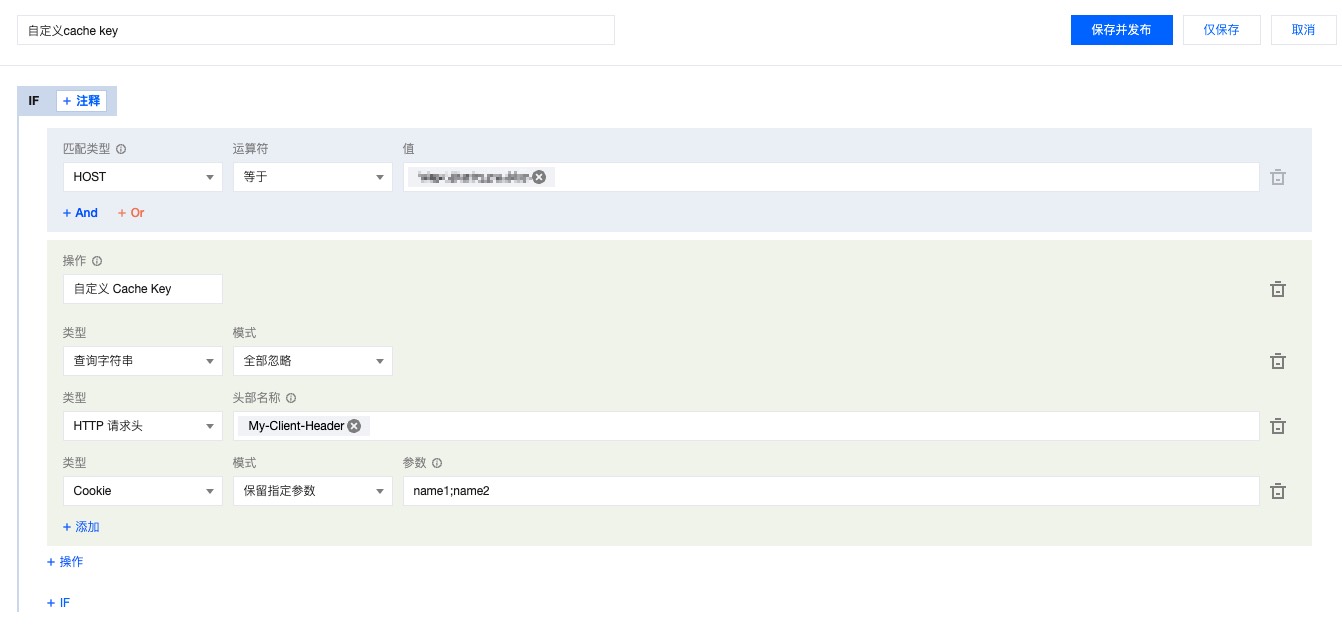
example.com 站点下的 www.example.com 域名配置自定义 Cache Key 规则为忽略所有查询字符串,将 HTTP 请求头 My-Client-Header 及 Cookie 内的参数 name1、name2 作为 Cache Key、可以参考以下步骤配置:操作步骤
1. 登录 边缘安全加速平台 EO 控制台,在左侧菜单栏中,进入服务总览,单击网站安全加速内需配置的站点。
2. 在站点详情页面,单击站点加速,进入站点全局配置页面,单击规则引擎 Tab 页。
3. 在规则引擎页面,单击创建规则,选择新增空白规则。
4. 在规则编辑页面,选择 Host 为匹配类型,配置为
www.example.com。5. 单击操作 > 选择框,在弹出的操作列表内,选择操作为自定义 Cache Key。
6. 单击类型下方的添加,可添加自定义 Cache Key 的类型,以本示例场景为例,添加查询字符串、HTTP 请求头、Cookie 进行配置并填写对应的内容,完整的规则配置如下所示:
7. 单击保存并发布,即可完成该规则配置。
生效示例
配置完成后,Cache Key 由 URL+My-Client-Header+Cookie 组成:忽略全部查询字符串,拼接
My-Client-Header 和保留指定参数后的 Cookie。则客户端请求 A:
URL:
https://www.example.com/path/demo.jpg?key1=value1&key2=value2。HTTP 请求头:含
My-Client-Header:fruit。Cookie:name1=yummy;name2=tasty;name3=strawberry。
与客户端请求 B:
URL:
http://www.example.com/path/demo.JPG?key1=value1&key2=value2&key3=value3。HTTP 请求头:含
My-Client-Header:fruit。Cookie:name1=yummy;name2=tasty;name3=blueberry。
与客户端请求 C:
URL:
http://www.example.com/path/demo.JPG?key1=value1&key2=value2&key3=value3&key4=value4。HTTP 请求头:含
My-Client-Header:sea。Cookie:name1=yummy;name2=tasty;name3=fish。
A 和 B 请求将会命中同一份缓存资源,C 命中另一份缓存资源。
相关参考
支持的头部名称说明:
头部类型 | 说明 |
自定义 | 自定义头部。 名称:1 - 100 个字符,由数字 0 - 9、字符 a - z、A - Z,及特殊符号 - 组成。 值:1 - 1000 个字符,不支持中文。 |
预设头部 | 根据客户端 User-Agent 信息聚合的头部: 客户端设备类型: EO-Client-Device取值: Mobile,Desktop,SmartTV,Tablet 或 Others客户端操作系统: EO-Client-OS取值: Android,iOS,Windows,MacOS,Linux 或 Others客户端浏览器类型: EO-Client-Browser取值: Chrome,Safari,Firefox,IE 或 Others |


