VPCs or Subnets Cannot Be Deleted

Last updated: 2026-03-17 14:20:50

Problem

VPCs or Subnets Cannot Be Deleted

Common Causes

The current deletion criteria for VPCs and subnets are as follows:
VPC: A VPC can only be deleted when there is no resource (Peering Connections, ClassicLink, NAT Gateway, VPN Gateway, Direct Connect Gateway, CCN, and Private Link) associated other than empty subnets (IPs in the subnet are not used), route tables, and network ACLs.
Subnet: A subnet can only be deleted when it’s not associated with any resource.
Note
Currently, Tencent Cloud resources that involve IP use in subnets include CVM, private network CLB, ENI, HAVIP, SCF, TKE, and TencentDB (for MySQL, Redis, TDSQL, etc.).
According to the rules above, VPCs and subnets cannot be deleted in the following cases:
There are cloud resources that have not been completely deleted. For example, after a database is terminated, it is in Isolated status, and the database resources in this status actually are not completely released and continue to use the IP resources of the VPC. Therefore, the VPC or subnet cannot be deleted immediately.
Some resources cannot be deleted in the VPC console.

Instructions

1. Log in to VPC console.
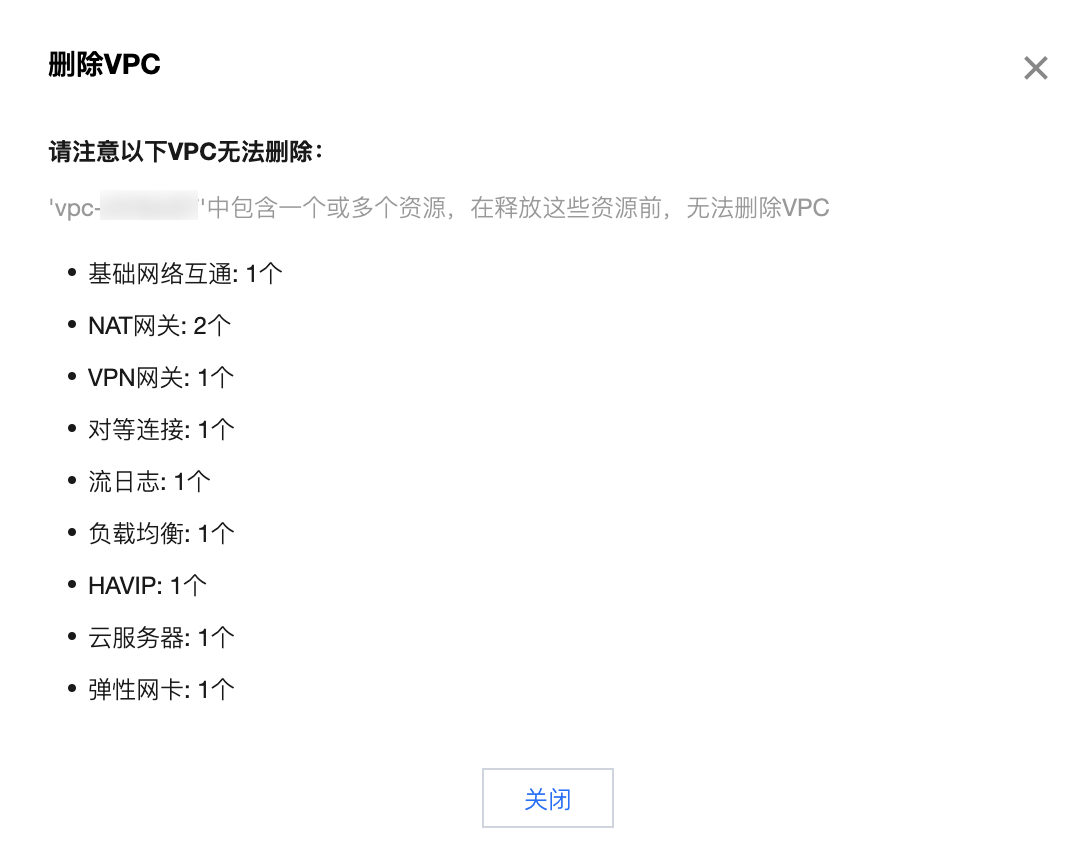
2. Click Delete on the right of the VPC to be deleted, and check the associated resources.
Note
Note that public network CLB instances don’t use VPC resources.
3. Click the VPC ID to enter the details page, click the corresponding cloud resource to enter its details page, and release it.
If the direction to a resource fails, search for the corresponding product in the Tencent Cloud console, go to the resource's console, search for the resource under the VPC ID, and release it.
A TencentDB instance is put into the Isolated status for a certain period after being terminated, during which the resources are not actually released. You need to click Eliminate Now or wait until the instance is automatically eliminated before you can delete the VPC or subnet.
Note
The Eliminate Now operation in TencentDB is async. There may be a delay in the repossession of some resources, so the VPC or subnet cannot be deleted immediately. In this case, wait a while.
4. After the resources are completely released, delete the VPC and subnet again.
Deletion succeeds and the process ends.
If the problem persists, please contact Online Support for assistance.