Creating MySQL Instance

Last updated: 2025-11-28 17:43:52

This document describes how to create a TencentDB for MySQL instance in the console.

Preparations

You have registered a Tencent Cloud account and completed identity verification.
To register a Tencent Cloud account: Click here.
To complete identity verification: Click here.
Note
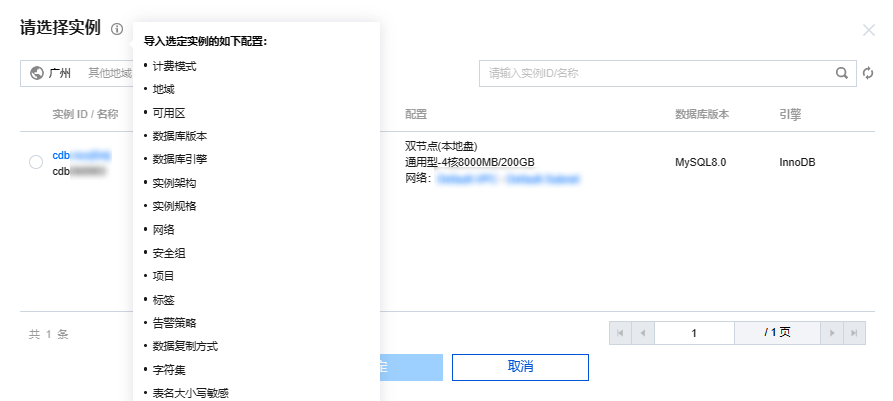
The new purchase page allows you to import existing configuration. If the logged-in account has an existing TencentDB for MySQL instance, this feature can automatically configure the new instance parameters on the purchase page, making it easier for you to adjust the existing configuration or directly purchase a new instance as follows:
1. On the purchase page, click Import Existing Configuration in the top-right corner.


2. In the pop-up window, select the existing target instance in the corresponding region and click OK.


Purchasing in the console

1. Log in to the TencentDB for MySQL purchase page, complete Basic Configuration and Instance Configuration as needed, and click Next: Set Network and Database. Basic Configuration
Billing Mode: Monthly subscription and pay-as-you-go billing are supported.
If your business has a stable long-term demand, we recommend you select monthly subscription.
If the request volume of your business fluctuates greatly and instantaneously, we recommend you choose pay-as-you-go billing.
Region: Select the region that you want your TencentDB for MySQL instance to be deployed in. We recommend that you select the same region as the CVM instance to be connected to. Tencent Cloud services in different regions cannot communicate with each other over the private network. The region cannot be modified after purchase.
Database Version: Currently, TencentDB for MySQL supports MySQL 5.5, 5.6, 5.7, and 8.0. For more information on the features of each version, see MySQL official documentation.
Note:
We recommend using newer database versions, such as MySQL 8.0 and 5.7. If you need to use MySQL 5.5, you can submit a ticket for application.
Engine: Select InnoDB or RocksDB.
InnoDB: The most commonly used OLTP storage engine, with complete transaction support and powerful capability of highly concurrent reads/writes.
RocksDB: A key-value storage engine, with efficient writing and high compression. If it is selected, the architecture will be two-node.
Architecture: Single-node, two-node, or three-node. For more information, see Database Architecture Overview.
Disk Type: The hard disk is used to store the files required by MySQL execution. TencentDB for MySQL supports local disk and cloud disk.
Two-node and three-node instances use local SSD disks.
Single-node instances use cloud disks.
AZ: Select different source and replica AZs for two-node and tree-node architecture (i.e., multi-AZ deployment) to protect your database from failures and AZ outages.
Note
If the source and replica nodes are in different AZs, there may be an additional network sync delay of 2–3 ms.
When you purchase Tencent Cloud services, we recommend that you select the region closest to your end users to minimize access latency and improve download speed.
Instance Configuration
Filter: You can quickly filter the needed CPU and memory specifications for the instance. By default, all CPU and memory specifications are selected.
Type: General or dedicated. For more information, see Resource Isolation Policy
Instance Specs: Select specifications as needed.
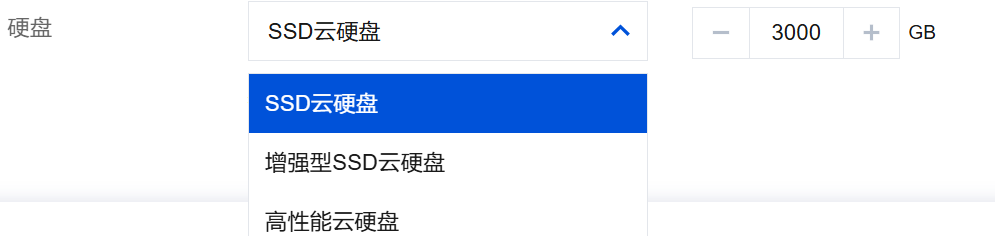
Hard Disk: The disk space is used to store the files required by MySQL execution. Select the size of the hard disk space.
The single-node architecture supports SSD cloud disks and enhanced SSD cloud disks. For more information about disk types, see Disk Types. Available disk capacity: 20 - 32,000 GB.


2. Configure Network and Others and Database Settings and click Next: Confirm the configuration info. Network and Others
Network: You can select the network and subnet for the instance. VPC is supported. If existing networks do not meet your requirements, you can create VPCs or subnets.
Note
A subnet is a logical network space in a VPC. You can create subnets in different AZs in the same VPC, which communicate with each other over the private network by default.
After you select a network, the subnet IPs in the AZ of the selected instance are displayed by default. You can also select subnet IPs in other AZs in the region of the instance. Business connections adopt nearby access, so the network latency will not be increased.
We recommend that you select the same VPC in the same region as the CVM instance to be connected to. Otherwise, the MySQL instance cannot connect to the CVM instance over the private network.
Custom Port: The database access port, which is 3306 by default.
Security Group: For more information on security group creation and management, see TencentDB Security Group Management.
Note
Port 3306 must be opened for the TencentDB for MySQL instance through the inbound rule of the security group. The instance uses private network port 3306 by default and supports custom port. If the default port is changed, the new port should be opened in the security group.
Project: Select a project to which the database instance belongs. The default project will be used if you don't specify one.
Tag: Categorize and manage resources with tags. For more information, see Tag Overview.
Alarm Policy: Create alarm policies to trigger alarms and send notifications when the status of Tencent Cloud services changes. For more information, see Alarm Policy.
Database Settings
Instance Name: Set a name for the instance now or later.
Data Replication Mode: Async, semi-sync, and strong sync replication modes are supported. For more information, see Database Instance Replication.
Parameter Template: Besides the system parameter template provided by TencentDB, you can create a custom parameter template. For more information, see Managing Parameter Template.
Character Set: LATIN1, GBK, UTF8, and UTF8MB4 character sets are supported. The default value is UTF8. After purchasing the instance, you can change the character set on the instance details page in the console. For more information, see Use Limits > Notes on character set.
Collation: The instance character set provides a case- and accent-sensitive collation for system data.
Table Name Case Sensitivity: Specify whether the table name is case-sensitive. Note that this configuration cannot be modified once set for MySQL 8.0.
Password Complexity: You can set the password complexity to improve the database security, which is disabled by default. For more information, see Setting Password Complexity.
Root Password: Set the password of the root account (the default user name for a new MySQL database is "root"). If you select Set After Creation, you can reset the password after creating the instance. For more information, see [Resetting Password](https://www.tencentcloud.com/document/product/236/31901)
3. Confirm the selected configuration items (if you need to modify them, click Edit to return to the corresponding step and make changes), read and indicate your consent to the Terms of Service, confirm the Validity Period and Quantity, and click Buy Now.
4. You will be returned to the instance list after you purchase the instance. The instance will be in the Delivering status. You can use the instance after around 3–5 minutes when its status changes to Running.


See Also

You can access the TencentDB for MySQL instance over both private and public networks from a Windows or Linux CVM instance. For more information, see Connecting to MySQL Instance.