Adjusting the instance specifications

Last updated: 2024-09-06 18:00:51

Instance specifications

For detailed instance specifications and pricing of TencentDB for SQL Server, please refer to Product Specification.

Prerequisites

You can adjust the configuration of a TencentDB for SQL Server instance and its associated instances only when they are in running status and are not executing any tasks.

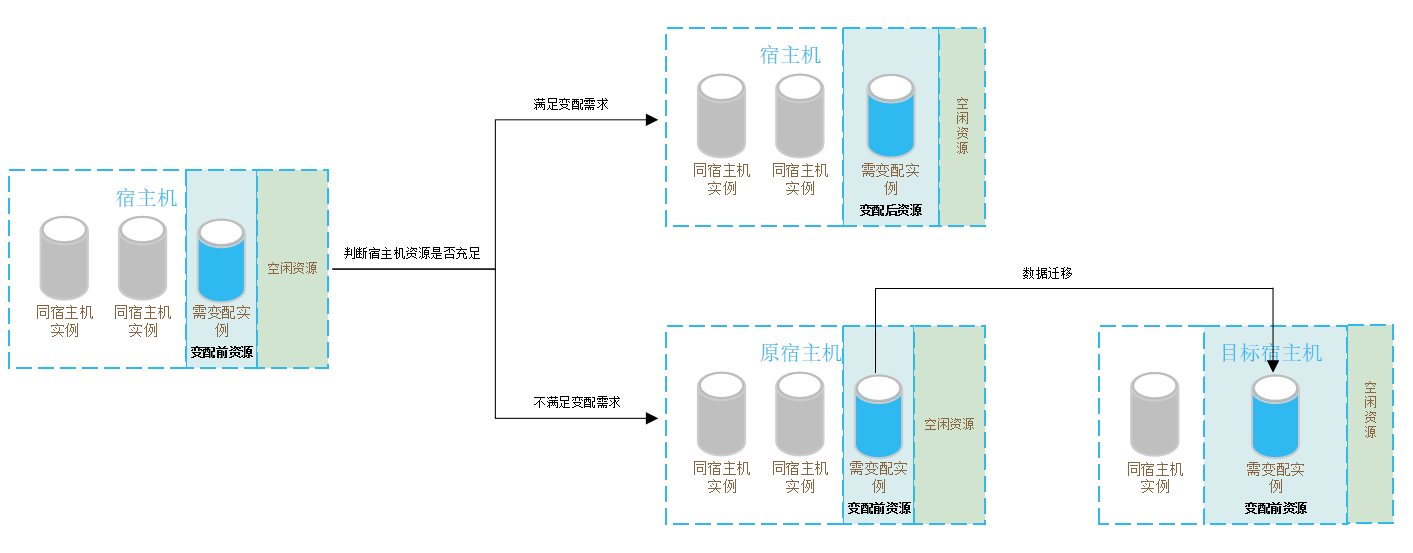
Specification Adjustment Process

Specification Expansion Scenarios After the user makes configuration adjustments in the console, the system will determine whether to complete the change through in-place scaling or data migration. The process is as follows:


Explanation of Configuration Adjustment Impact

Single Item Variable Configuration Explanation

Single item variable configuration refers to adjusting only one of the specifications or disk. The impact of this adjustment:
Instance Architecture
Disk type
Configuration Adjustment Item
Adjustment Judgment
Impact of configuration adjustment
Time
Single-node (formerly Basic Edition)
Cloud disk
Specification expansion or disk expansion or specification reduction
In-Place Upgrade
1. The instance will restart during configuration adjustment.
2. There will be about 3 minutes of service unavailability.
3. Please perform operations during the low peak period allowed by business.
You need to choose the time to take effect
Two-node (formerly High Availability/Cluster Edition)
Local disk
Disk reduction
In-Place Downgrade
1. During the instance configuration adjustment, in-place scaling down will be performed.
2. There will be no data migration or instance restart, and no momentary disconnection will occur.
3. You can choose the effective time, and it will not affect the business. This time is the actual configuration change time.
You can choose the effective time
Specification reduction
In-Place Downgrade
1. During the instance configuration adjustment, in-place scaling down will be performed.
2. There will be about 1 minute of service unavailability.
3. Please perform operations during the low peak period allowed by business.
You need to choose the time to take effect
Specification expansion or disk expansion
Migration upgrade
1. During the instance configuration adjustment, migration and expansion will be performed. The larger the data volume, the longer the data migration time. Instance access will not be affected during this period.
2. A switch will be performed after migration is completed, which causes a momentary disconnection from the database for few seconds. Make sure that your business has a reconnection mechanism.
3. Most database, account, and network operations are unavailable during the momentary disconnection. Therefore, we recommend that you perform the switch during off-peak hours.
You need to choose the time to take effect
Specification expansion or disk expansion
In-place upgrade
1. During the instance configuration adjustment, in-place expansion will be performed.
2. There will be no data migration or instance restart, and no momentary disconnection will occur.
3. You can choose the effective time, and it will not affect the business. This time is the actual configuration change time.
You can choose the effective time
Two-node (formerly High Availability/Cluster Edition)
Cloud disk
Specification expansion or disk expansion or specification reduction
In-Place Upgrade
1. The instance will restart during configuration adjustment.
2. There will be about 3 minutes of service unavailability.
3. Please perform operations during the low peak period allowed by business.
You need to choose the time to take effect

Combined Variable Configuration Explanation

Combined variable configuration refers to adjusting both specifications and disk simultaneously. The impact of this adjustment:
Instance Architecture
Disk type
Configuration Adjustment Item
Adjustment Judgment
Impact of configuration adjustment
Time
Single-node (formerly Basic Edition)
Cloud disk
Specification expansion, disk expansion, specification reduction
In-Place Upgrade
1. The instance will restart during configuration adjustment.
2. There will be about 3 minutes of service unavailability.
3. Please perform operations during the low peak period allowed by business.
You need to choose the time to take effect
Two-node (formerly High Availability/Cluster Edition)
Local disk
Specification expansion + disk expansion
In-place upgrade
1. During the instance configuration adjustment, in-place expansion will be performed.
2. There will be no data migration or instance restart, and no momentary disconnection will occur.
3. You can choose the effective time, and it will not affect the business. This time is the actual configuration change time.
You can choose the effective time
Specification expansion + disk expansion
Migration upgrade
1. During the instance configuration adjustment, migration and expansion will be performed. The larger the data volume, the longer the data migration time. Instance access will not be affected during this period.
2. A switch will be performed after migration is completed, which causes a momentary disconnection from the database for few seconds. Make sure that your business has a reconnection mechanism.
3. Most database, account, and network operations are unavailable during the momentary disconnection. Therefore, we recommend that you perform the switch during off-peak hours.
You need to choose the time to take effect
Specification expansion + disk reduction
In-Place Upgrade
1. During the instance configuration adjustment, in-place expansion will be performed.
2. There will be no data migration or instance restart, and no momentary disconnection will occur.
3. You can choose the effective time, and it will not affect the business. This time is the actual configuration change time.
You can choose the effective time
Specification expansion + disk reduction
Migration and Upgrading
1. During the instance configuration adjustment, migration and expansion will be performed. The larger the data volume, the longer the data migration time. Instance access will not be affected during this period.
2. A switch will be performed after migration is completed, which causes a momentary disconnection from the database for few seconds. Make sure that your business has a reconnection mechanism.
3. Most database, account, and network operations are unavailable during the momentary disconnection. Therefore, we recommend that you perform the switch during off-peak hours.
You need to choose the time to take effect
Specification reduction + disk expansion
Possible local upgrading, possible migration and upgrading
1. During the configuration adjustment process, the instance may experience around 1 minute of service unavailability. It may involve migration expansion, and the larger the data volume, the longer the data migration time. Access to the instance will not be affected during this period.
2. A switch will be performed after migration is completed, which causes a momentary disconnection from the database for few seconds. Make sure that your business has a reconnection mechanism.
3. Most database, account, and network operations are unavailable during the momentary disconnection. Therefore, we recommend that you perform the switch during off-peak hours.
You need to choose the time to take effect
Specification reduction + disk reduction
In-Place Downgrade
1. During the instance configuration adjustment, in-place scaling down will be performed.
2. There will be about 1 minute of service unavailability.
3. Please perform operations during the low peak period allowed by business.
You need to choose the time to take effect
Two-node (formerly High Availability/Cluster Edition)
Cloud disk
Specification expansion, disk expansion, specification reduction
In-Place Upgrade
1. The instance will restart during configuration adjustment.
2. There will be about 3 minutes of service unavailability.
3. Please perform operations during the low peak period allowed by business.
You need to choose the time to take effect

Operation step

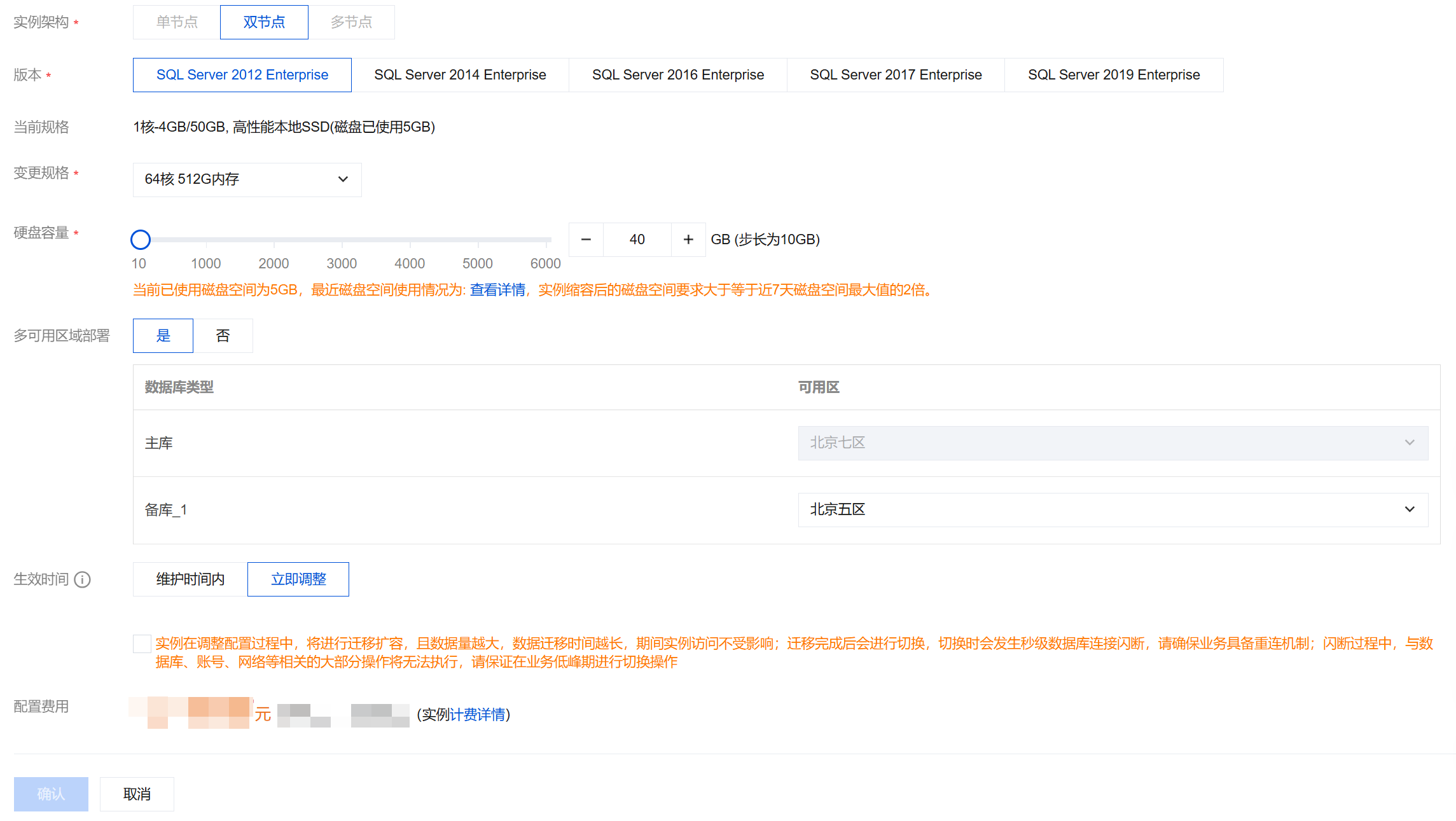
1. Log in to TencentDB for SQL Server console, select the region of the instance, find the corresponding instance in the instance list, and click Adjust Configuration in the Operation column.


2. In the pop-up configuration adjustment window, select the CPU/memory and disk capacity to be changed from the options for changing specifications and hard disk capacity. After checking that the settings are correct, click OK.
Note:
Select the Time to Take Effect for the configuration change and check the orange prompt.
During maintenance time: You can modify the maintenance time on the instance details page.
Adjust now: The configuration adjustment will be performed immediately.
If disk reduction is involved, to avoid failure in capacity reduction, the disk space after reduction should be at least twice the currently used disk space.
If the master instance to be adjusted (including dual-node local disk and cloud disk versions) is associated with an RO instance and involves data migration, please unlink the RO replica before reconfiguring or Submit a ticket to contact us.

3. For yearly/monthly billed instances, verify the configuration information and costs in the redirected payment window, and click Submit Order. For pay-as-you-go instances, verify the configuration information and costs in the redirected window, and click Adjust.
4. Return to the instance list. Wait for the instance status to change from Changing instance configurations to Running. Once the specification upgrade is completed, you can check and confirm the new instance specifications in the Instance List or instance details page.

Related APIs

API
Description
The API (DescribeUpgradeInstanceCheck) is used to pre-check the impact of instance configuration change before making the change.
The API (UpgradeDBInstance) is used to upgrade instances.
The API (CompleteExpansion) is used to immediately complete the instance upgrade switch after initiating the expansion, when the instance status is "Upgrade Pending Switch", without waiting for the maintenance window.