Monitoring at Five-Second Granularity

Last updated: 2025-06-10 19:07:31

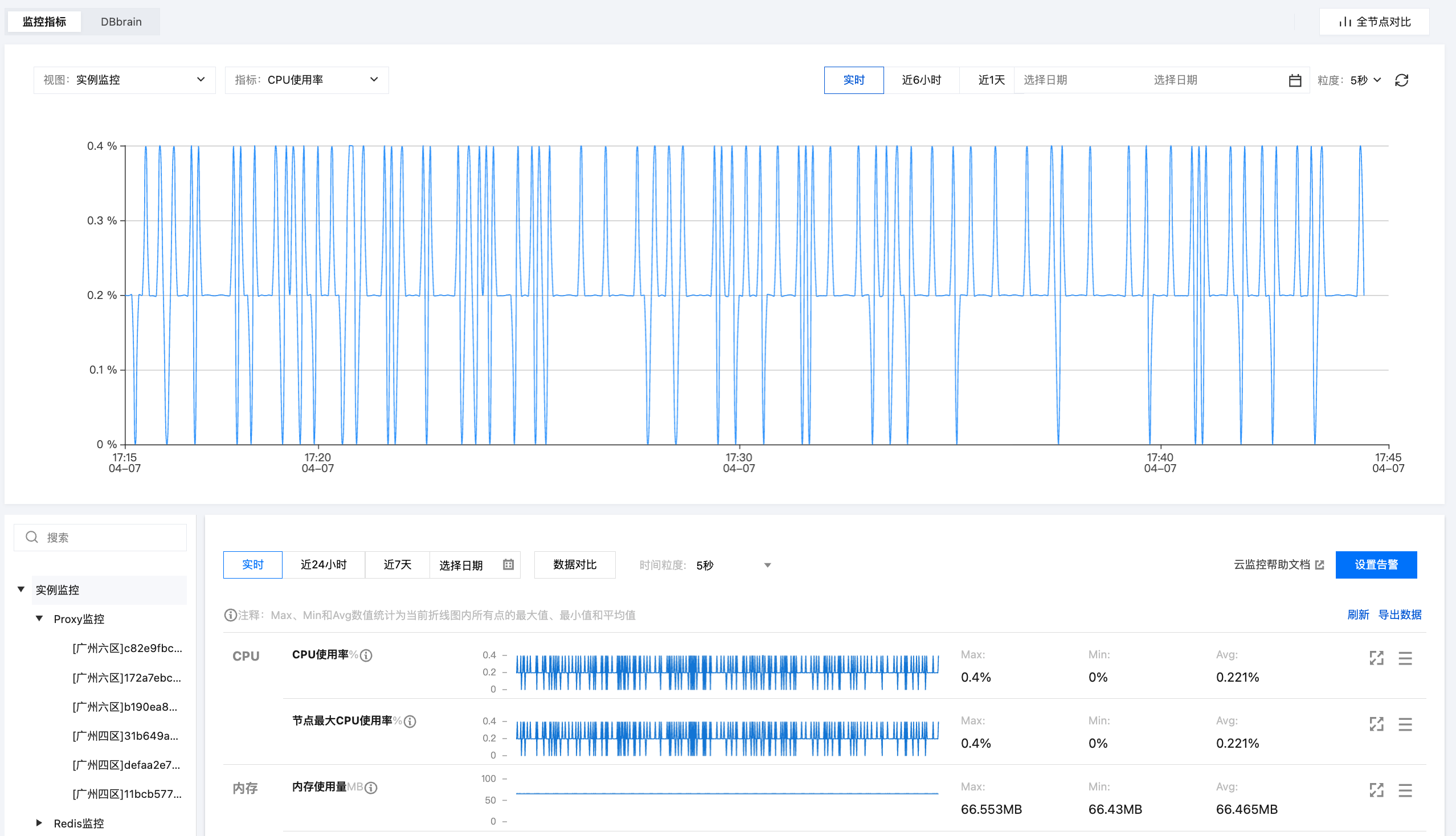
TencentDB for Redis® provides a complete and easy-to-use monitoring service at a 5-second granularity where you don't have to worry about, for example, collecting monitoring data or Ops of the monitoring system. The monitoring service includes Proxy monitoring, Redis monitoring, and instance monitoring which summarizes the monitoring data of an entire instance.
Proxy monitoring: provides monitoring information of all Proxy nodes in an instance. TencentDB for Redis® instances in standard or cluster architecture have Proxy nodes.
Redis monitoring: provides monitoring information of master and replica Redis nodes.
Instance monitoring: summarizes the monitoring data of an entire instance (including Proxy nodes and Proxy nodes) and aggregates data according to the SUM, AVG, MAX, and LAST aggregation algorithms.


Viewing Instance Monitoring Granularity

Log in to the TencentDB for Redis® console, click an instance ID to enter the instance management page, select System Monitoring > Monitoring Metrics. If the instance monitoring supports a 5-second granularity, it means the instance supports 5-second monitoring granularity. Redis currently supports monitoring metrics at granularities of 5 seconds, 1 minute, 5 minutes, 1 hour, and 1 day. For data retention periods of each granularity, please refer to Usage Constraints.

The granularity of instance monitoring can be determined by the InstanceSet.MonitorVersion field returned by the DescribeInstances API. If MonitorVersion = 5s, it indicates a granularity of 5 seconds; if MonitorVersion = 1m, it indicates a granularity of 1 minute.

Viewing monitoring data

You can view the monitoring information of TencentDB for Redis® instances through the Redis Instance List, Redis System Monitoring page, and Tencent Cloud Observability Platform (TCOP) Console.

Viewing the monitoring data in the instance list

2. Above the Instance List on the right, select the region.
3. In the instance list, find the target instance.
4. In the target instance row, click

in the Monitoring/Status/Task column to view the monitoring data on the right panel.

Viewing the monitoring data on the system monitoring page

2. Above the Instance List on the right, select the region.
3. In the instance list, find the target instance.
4. Click the instance ID in blue to enter the Instance Details page. Then, click the System Monitoring tab and select the Monitoring Metrics tab to view the monitoring data.

Access monitoring data via Tencent Cloud Observability Platform.

Log in to the Tencent Cloud Observability Platform console to view the summary of monitoring data.

Monitoring Metrics Description

Proxy node monitoring

Each TencentDB for Redis® instance contains at least three Proxy nodes. Generally, the number of Proxy nodes is 1.5 times that of Redis nodes. The Proxy node supports the following monitoring metrics:
Group
Metrics
Metric Name
Unit
Metric Description
CPU
CPU utilization
cpu_util
%
Proxy CPU utilization
Requests
Total requests
proxy_commands
Queries/second
The number of Proxy command executions per second
Key requests
cmd_key_count
keys/second
The number of keys accessed by a command per second
Mget requests
cmd_mget
Queries/second
The number of Mget command executions per second
Execution Errors
cmd_err
Queries/second
The number of Proxy command execution errors per second, for example, when a command does not exist, parameters are incorrect, etc.
Big value requests
cmd_big_value
Queries/second
The number of executions of commands larger than 32 KB per second
Network Monitoring
Connection Count
connections
Connections
Number of TCP connections to an instance
Connection utilization
connections_util
%
The ratio of the number of TCP connections to the maximum number of connections
Max Connections Utilization of Node
connections_max_util
%
The maximum connection utilization among all Proxy nodes is calculated by taking the highest ratio of the current number of connections to the maximum number of connections for each node. 
Inbound Traffic
in_flow
Mb/s
Private Inbound Traffic
Inbound traffic utilization
in_bandwidth_util
%
The ratio of the actually used private inbound traffic to the maximum traffic
Inbound traffic limit count
in_flow_limit
Threads
The number of times inbound traffic triggers a traffic limit
TrafficOut
out_flow
Mb/s
Private Outbound Traffic
Outbound traffic utilization
out_bandwidth_util
%
The ratio of the actually used private outbound traffic to the maximum traffic
Outbound traffic limit count
out_flow_limit
Threads
The number of times outbound traffic triggers a traffic limit
Latency monitoring
Average execution latency
latency_avg
ms
Average execution latency from Proxy to Redis server
Max execution latency
latency_max
ms
Maximum execution latency from Proxy to Redis server
Average read latency
latency_read
ms
The average execution latency of read commands between the proxy and the Redis server. For read command categories, please refer to Command Categories.
Average write latency
latency_write
ms
The average execution latency of writing commands between the proxy and the Redis server. For write command categories, see Command Categories.
Average latency of other commands
latency_other
ms
The average execution latency of commands other than read and write commands from Proxy to Redis server

Redis node monitoring

The Redis node monitoring includes monitoring information of all master nodes and replica nodes in an instance or a cluster. The following monitoring metrics are supported:
Group
Metrics
Description
<p>
MetricsDescription
CPU monitoring
CPU utilization
cpu_util
%
Avg CPU usage
Networking
Connection Count
connections
Connections
The number of connections from Proxy to a node
Connection utilization
connections_util
%
The connection usage of a node
Memory monitoring
MEM Usage
mem_used
MB
Memory capacity actually used, including data and cache
Memory utilization
mem_util
%
The ratio of the memory actually used to the total memory requested
Keys
keys
Connections
Total number of keys stored in an instance (first-level keys)
Expired keys
expired
Connections
The number of keys expired in a time window, which is equal to the value of expired_keys output by the info command
Evicted keys
evicted
Connections
The number of keys evicted in a time window, which is equal to the value of evicted_keys output by the info command
Replication Delay
repl_delay
Byte
The command delay between the secondary node and the primary node
Request Monitoring
Total requests
commands
Queries/second
QPS, that is, the number of command executions per second
Read Requests
cmd_read
Queries/second
Number of read command executions. For more information on read command types, see Command types.
Write Request
cmd_write
Queries/second
Number of write command executions. For more information on write command types, see Command types.
Other Requests
cmd_other
Queries/second
Executions of commands other than read and write commands
Response Monitoring
Slow query
cmd_slow
Threads
The number of command executions with a latency greater than the slowlog-log-slower-than configuration
Read request hits
cmd_hits
Threads
The number of keys successfully requested by read commands, which is equal to the value of the keyspace_hits metric output by the info command
Read request misses
cmd_miss
Threads
The number of keys unsuccessfully requested by read commands, which is equal to the value of the keyspace_misses metric output by the info command
Read request hit rate
cmd_hits_ratio
%
Key hits/(Key hits + Key misses). This metric reflects the cache miss situation.

Redis instance monitoring

The instance monitoring includes all monitoring data of an instance, including the monitoring data of Proxy nodes and Redis nodes, which is aggregated by the SUM, AVG, MAX, and LAST algorithms.
Group
Meaning
Associated View
Metric
<p>
MetricsDescription
CPU monitoring
CPU utilization
Redis node
cpu_util
%
Avg CPU usage
Max CPU utilization of a node
Redis node
cpu_max_util
%
The maximum CPU utilization of a node (shard or replica) in an instance
Memory monitoring
MEM Usage
Redis node
mem_used
MB
Memory capacity actually used, including data and cache
Memory utilization
Redis node
mem_util
%
The ratio of the memory actually used to the total memory requested
Max memory utilization of a node
Redis node
mem_max_util
%
The maximum memory utilization of a node (shard or replica) in an instance
Keys
Redis node
keys
Connections
Total number of keys stored in an instance (first-level keys)
Expired keys
Redis node
expired
Connections
The number of keys expired in a time window, which is equal to the value of expired_keys output by the info command
Evicted keys
Redis node
evicted
Connections
The number of keys evicted in a time window, which is equal to the value of evicted_keys output by the info command
Network Monitoring
Connection Count
Proxy node
connections
Connections
Number of TCP connections to an instance
Connection utilization
Proxy node
connections_util
%
The ratio of the number of TCP connections to the maximum number of connections
Inbound Traffic
Proxy node
in_flow
Mb/s
Private Inbound Traffic
Inbound traffic utilization
Proxy node
in_bandwidth_util
%
The ratio of the actually used private inbound traffic to the maximum traffic
Inbound traffic limit count
Proxy node
in_flow_limit
Threads
The number of times inbound traffic triggers a traffic limit
TrafficOut
Proxy node
out_flow
Mb/s
Private Outbound Traffic
Outbound traffic utilization
Proxy node
out_bandwidth_util
%
The ratio of the actually used private outbound traffic to the maximum traffic
Outbound traffic limit count
Proxy node
out_flow_limit
Threads
The number of times outbound traffic triggers a traffic limit
Latency
Average execution latency
Proxy node
latency_avg
ms
Average execution latency from Proxy to Redis server
Max execution latency
Proxy node
latency_max
ms
Maximum execution latency from Proxy to Redis server
Average read latency
Proxy node
latency_read
ms
The average execution latency of read commands between the proxy and the Redis server. For read command categories, please refer to Command Categories.
Average write latency
Proxy node
latency_write
ms
The average execution latency of writing commands between the proxy and the Redis server. For write command categories, see Command Categories.
Average latency of other commands
Proxy node
latency_other
ms
The average execution latency of commands other than read and write commands from Proxy to Redis server
P99 Latency
Proxy node
latency_p99
ms
The P99 latency between the proxy and the Redis server
Request Monitoring
Total requests
Redis node
commands
Queries/second
QPS, that is, the number of command executions per second
Read Requests
Redis node
cmd_read
Queries/second
Number of read command executions. For more information on read command types, see Command types.
Write Request
Redis node
cmd_write
Queries/second
Number of write command executions. For more information on write command types, see Command types.
Other Requests
Redis node
cmd_other
Queries/second
Executions of commands other than read and write commands
Big value requests
Proxy node
cmd_big_value
Queries/second
The number of executions of commands larger than 32 KB per second
Key requests
Proxy node
cmd_key_count
keys/second
The number of keys accessed by a command per second
Mget requests
Proxy node
cmd_mget
keys/second
The number of Mget command executions per second
Slow query
Redis node
cmd_slow
Threads
The number of command executions with a latency greater than the slowlog-log-slower-than configuration
Read request hits
Redis node
cmd_hits
Threads
The number of keys successfully requested by read commands, which is equal to the value of the keyspace_hits metric output by the info command
Read request misses
Redis node
cmd_miss
Threads
The number of keys unsuccessfully requested by read commands, which is equal to the value of the keyspace_misses metric output by the info command
Execution Errors
Proxy node
cmd_err
Threads
The number of command execution errors, for example, when a command does not exist, parameters are incorrect, etc.
Read request hit rate
Redis node
cmd_hits_ratio
%
Key hits/(Key hits + Key misses). This metric reflects the cache miss situation.

Command Classification

Command Classification
List
Read commands
get,strlen,exists,getbit,getrange,substr,mget,llen,lindex,lrange,sismember,scard,srandmember,
sinter,sunion,sdiff,smembers,sscan,zrange,zrangebyscore,zrevrangebyscore,zrangebylex,
zrevrangebylex,zcount,zlexcount,zrevrange,zcard,zscore,zrank,zrevrank,zscan,hget,hmget,
hlen,hstrlen,hkeys,hvals,hgetall,hexists,hscan,randomkey,keys,scan,dbsize,type,ttl,touch,pttl,
dump,object,memory,bitcount,bitpos,georadius_ro,georadiusbymember_ro,geohash,geopos,geodist,pfcount
Write commands
set,setnx,setex,psetex,append,del,unlink,setbit,bitfield,setrange,incr,decr,rpush,lpush,rpushx,
lpushx,linsert,rpop,lpop,brpop,brpoplpush,blpop,lset,ltrim,lrem,rpoplpush,sadd,srem,smove,spop,
sinterstore,sunionstore,sdiffstore,zadd,zincrby,zrem,zremrangebyscore,zremrangebyrank,
zremrangebylex,zunionstore,zinterstore,hset,hsetnx,hmset,hincrby,hincrbyfloat,hdel,incrby,decrby,
incrbyfloat,getset,mset,msetnx,swapdb,move,rename,renamenx,expire,expireat,pexpire,pexpireat,
flushdb,flushall,sort,persist,restore,restore-asking,migrate,bitop,geoadd,georadius,georadiusbymember,
pfadd,pfmerge,pfdebug

Querying Node Information

The Proxy node ID and Redis node ID can be obtained through the API DescribeInstanceNodeInfo.
Note:
The IDs of Proxy and Redis nodes will change when node failover, instance capacity expansion/reduction, data migration, etc., occur. Therefore, we recommend that you get the latest node information from the API in a timely manner.

Related APIs

Related APIs
API Meaning
Queries big keys of an instance
Queries the big key size distribution of an instance
Queries the big key type distribution of an instance
Queries hot keys of an instance
Queries the access source information of an instance
Queries the distribution of instance access time
Queries an instance access command
Queries the CPU time of an instance