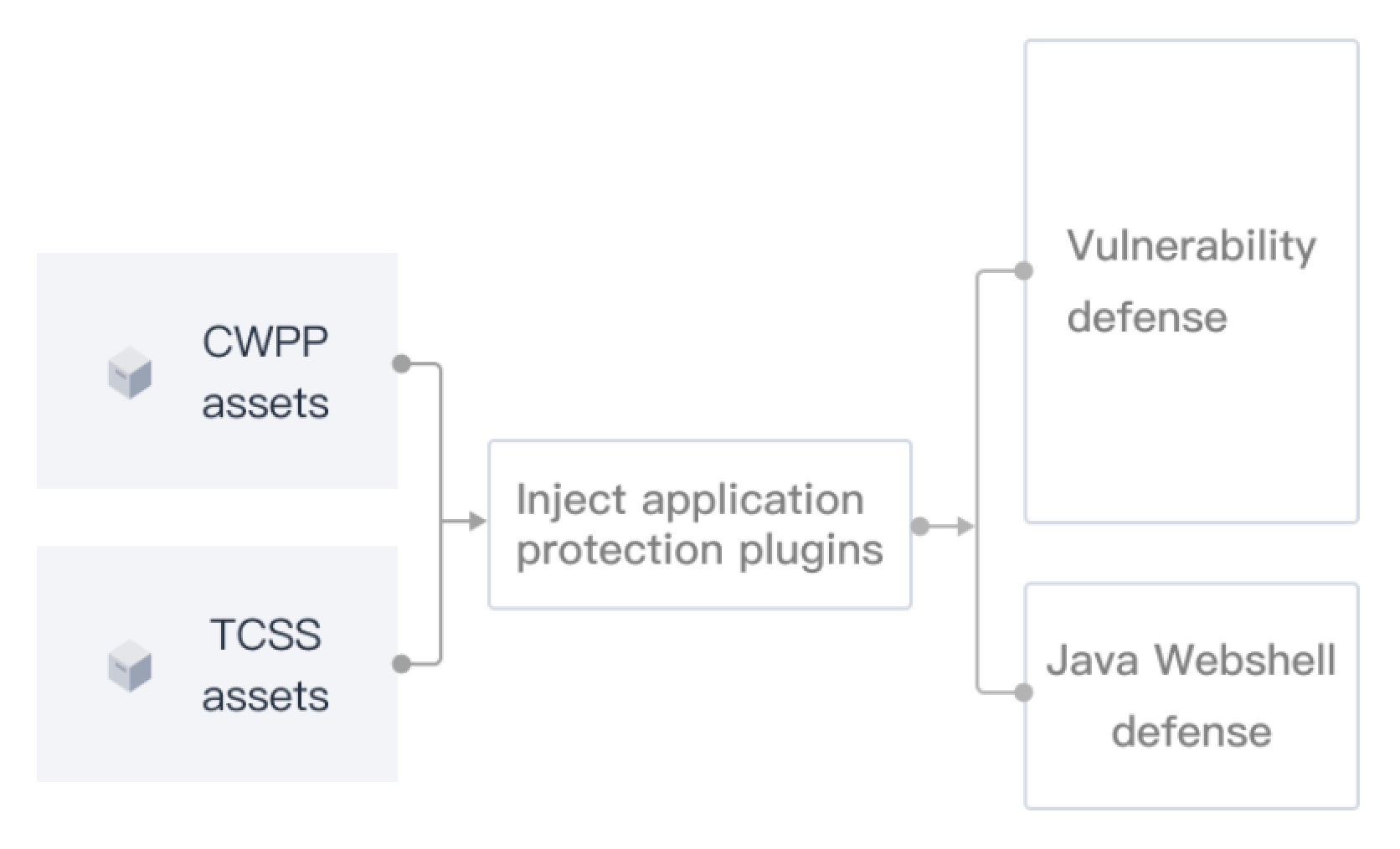
Application Protection is built on RASP (Runtime Application Self-Protection) technology. It identifies and handles attack behavior at application runtime, providing 0-day vulnerability defense, Java Webshell injection defense, and Java Webshell scanning. No application code changes or redeployment are required. Protection can be quickly enabled on both host and container workloads, helping businesses establish continuous protection during vulnerability remediation windows.
Note:
Application Protection is an upgraded capability built on the former Java Webshell and Vulnerability Defense features. It is currently being rolled out gradually. If your CWPP console does not show the Cyber Defense > Application Protection entry, contact us to request access.
Application Scenarios
Scenario | Pain Point | Application Protection Solution | Core Advantage |
Hot Spot Vulnerability Outbreak | No patch is available yet; Application Protection is needed as a mitigation measure to buy time for remediation. | Intelligence, engine, and product integration enables minute/hour-level identification of defensible vulnerabilities; one-click defense activation after detection. | Strong response timeliness |
Routine vulnerability governance | Many application vulnerabilities with long remediation cycles; risks persist because business constraints prevent rapid closure. | Multi-dimensional vulnerability protection and general attack protection; marks whether vulnerabilities are defensible to support closure. | Broad attack coverage |
High-protection 0-day attacks | High-risk assets during critical periods must defend against unknown 0-day attacks with rapid detection and defense. | Supports 0-day vulnerability defense and Java Webshell detection with rapid interception activation. | Strong 0-day fallback capability |
How It Works
Application Protection is deployed inside the application process. Its core goal is to defend against attacks that have already entered the application execution chain. The Application Protection plugin performs runtime detection at key function call points, combining request parameters, call stacks, triggered functions, and other context to identify risks. It then acts according to the protection configuration: only alert without interception, or alert and intercept. Compared with solutions that rely only on perimeter traffic characteristics, Application Protection focuses on real execution behavior, improving attack chain identification accuracy and response timeliness.
Operational Strategy
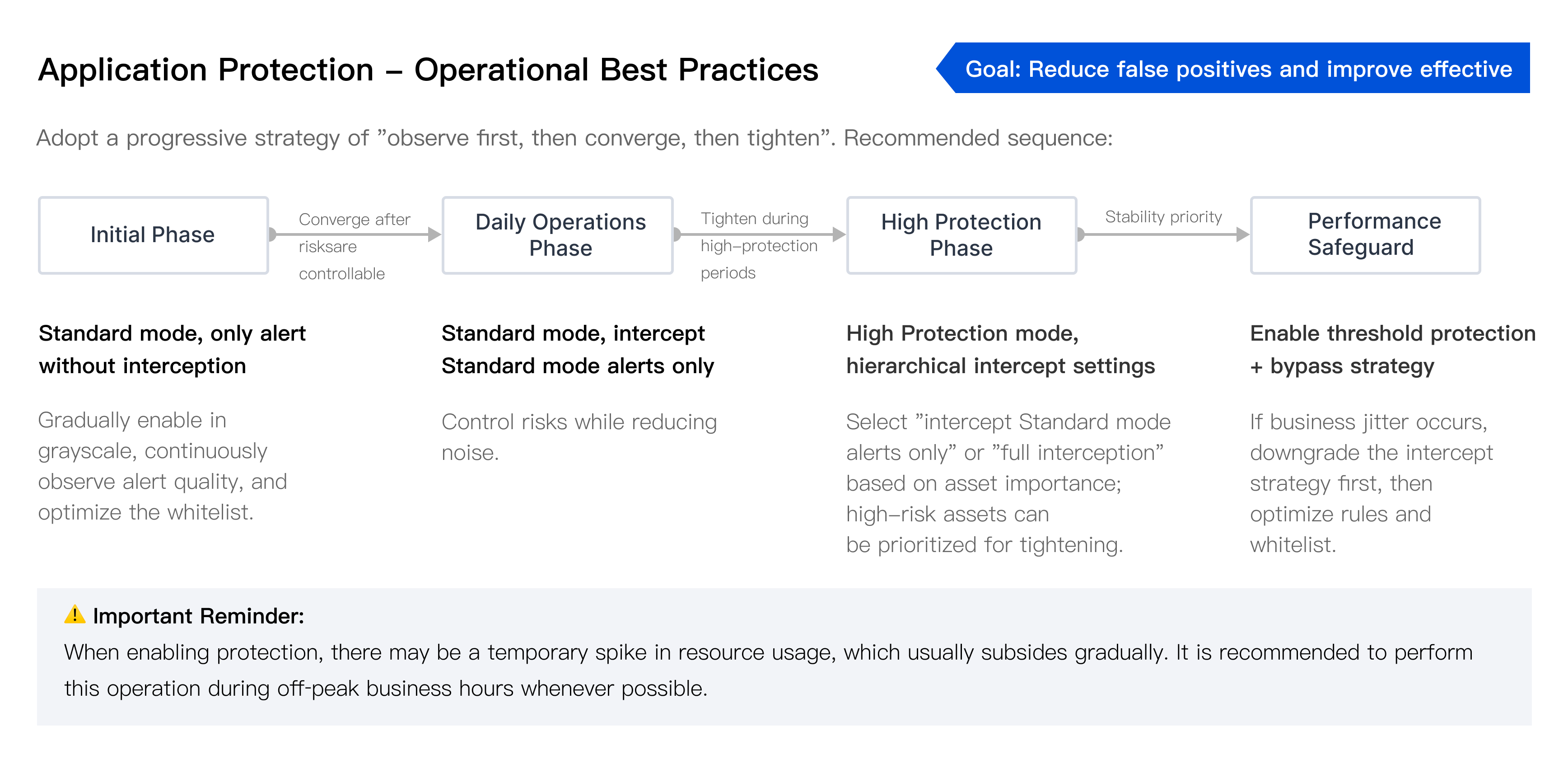
The following are key actions for day-to-day Application Protection operations. We recommend a progressive strategy of "observe first, then converge, then tighten" to gradually increase interception strength while maintaining business stability.
Limitations
Limitation Type | Description |
System requirements | Linux hosts (JDK version ≥ 1.6.0). The target host or container node must have the Agent installed and running normally. |
Activation requirements | All of the following conditions must be met: License requirements (meet any one): 1) Customer purchased Container Security Professional Edition before January 28, 2026 (Beijing time) and received the complimentary Application Protection benefit; 2) Customer purchased CWPP Ultimate and completed binding with the target node; 3) Customer purchased a High Protection Package and completed binding with the target node. Activation requirement: Enable the protection switch for target nodes in Application Protection > Protection switch configuration. |
Note:
To clarify billing rules and ensure long-term capability stability, the complimentary Application Protection policy for Container Security Professional Edition is adjusted as follows:
New purchases on or after January 28, 2026: Application Protection is no longer included. Purchase a High Protection Package separately if needed.
Purchases before January 28, 2026: Complimentary Application Protection continues (account-level), applicable to renewal, expansion, and repurchase after expiration. Keep the protection switch enabled in the console during use.
Protection Scope
Application Protection includes three capabilities: Vulnerability Defense, Java Webshell injection, and Java Webshell Scan.
Application Protection Attack: Includes Vulnerability Defense and Java Webshell injection attacks. Generates virtual patches to effectively intercept hacker attacks and defend against unknown vulnerabilities (see the table below).
Java Webshell Scan: Supports detection of static Java Webshell risks.
Capability Category | Representative Attack Types |
Injection and execution | Java Webshell injection, expression injection, deserialization, command execution, JNDI injection, JNI injection, XXE, XPath injection, SQL injection, thread injection |
File and path | Arbitrary file read, directory traversal, JSTL file inclusion, malicious file write, arbitrary file deletion, malicious file upload |
Protocol and outbound | AJP protocol, URL redirection, malicious DNS query, dangerous protocol, SSRF, IP blocking policy |
Component and framework | Engine injection, SpringBoot Actuator, malicious Beans, JDBC connection, high-risk method invocation, Unsafe |
Evasion and backdoor | Malicious Attach, malicious reflection invocation, malicious class loading, scanner detection, WebShell backdoor |
Note:
Application Protection does not fix vulnerabilities. Remediation must be completed through code/component fixes. It also does not provide perimeter protection. CC, Bot, and access control are still recommended to be handled by WAF/gateway.
Procedure
Step 1: Install the Agent
Application Protection relies on the CWPP Agent. No separate Application Protection component installation is required.
Assets with the CWPP Agent installed and running online can enable Application Protection directly;
Assets without the Agent must complete installation and ensure online status before enabling Application Protection.
Note:
For Host Assets installation, see Quick Start.
Container Assets require cluster onboarding first. Otherwise, basic information such as Pods may be missing later. See Cluster Access Guide.
Step 2: Purchase and Bind Licenses
On the Application Protection page, view the current number of CWPP Ultimate licenses and High Protection Package licenses. Both support Application Protection. Purchase and bind assets as needed.

Note:
Relationship Between Application Protection and High Protection Licenses:
Application Protection is the functional capability; a High Protection Package license is the billing vehicle to obtain that capability;
One High Protection Package order contains multiple licenses (for example, a Basic Protection Package includes 150 licenses). Licenses are issued automatically after purchase. Bind them to nodes on the Application Protection page to enable protection.
One license per node: One Critical Protection license can provide Application Protection capability for one node (host / container node / super node).
Shared license on the same node: When the same node hosts both host applications and container applications, one license covers protection for both. No duplicate purchase is required.
Independent host and container management: Host Assets and Container Assets are managed separately in the console, with protection switches enabled separately.
Step 3: Enable Protection
Note:
Enabling protection may cause a temporary resource increase, which usually subsides gradually. We recommend performing this during off-peak business hours.
Enable Protection Manually
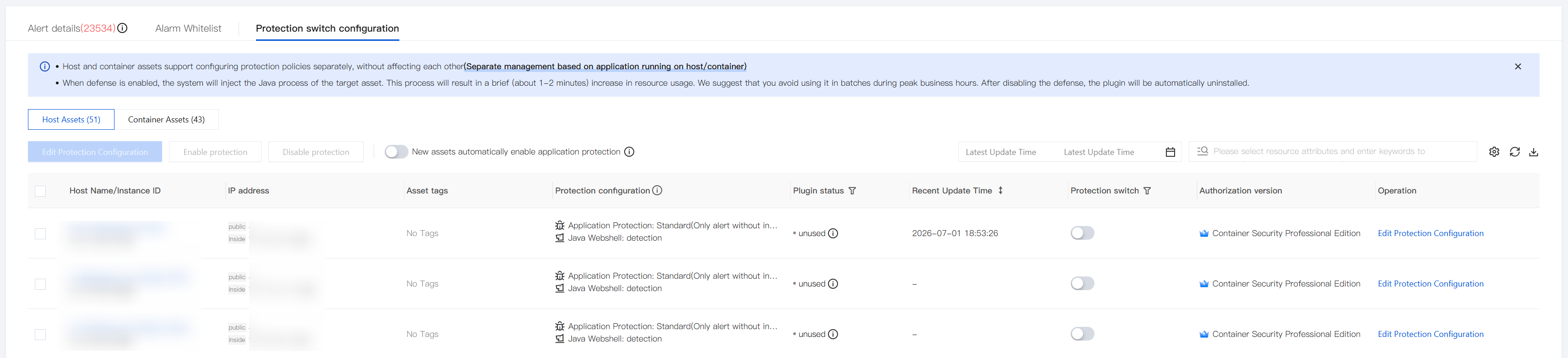
1. Go to Application Protection > Protection switch configuration, select the target assets, and click Edit Protection Configuration in the Operation column.
2. In the Edit Protection Configuration window, configure settings as needed and click Save.
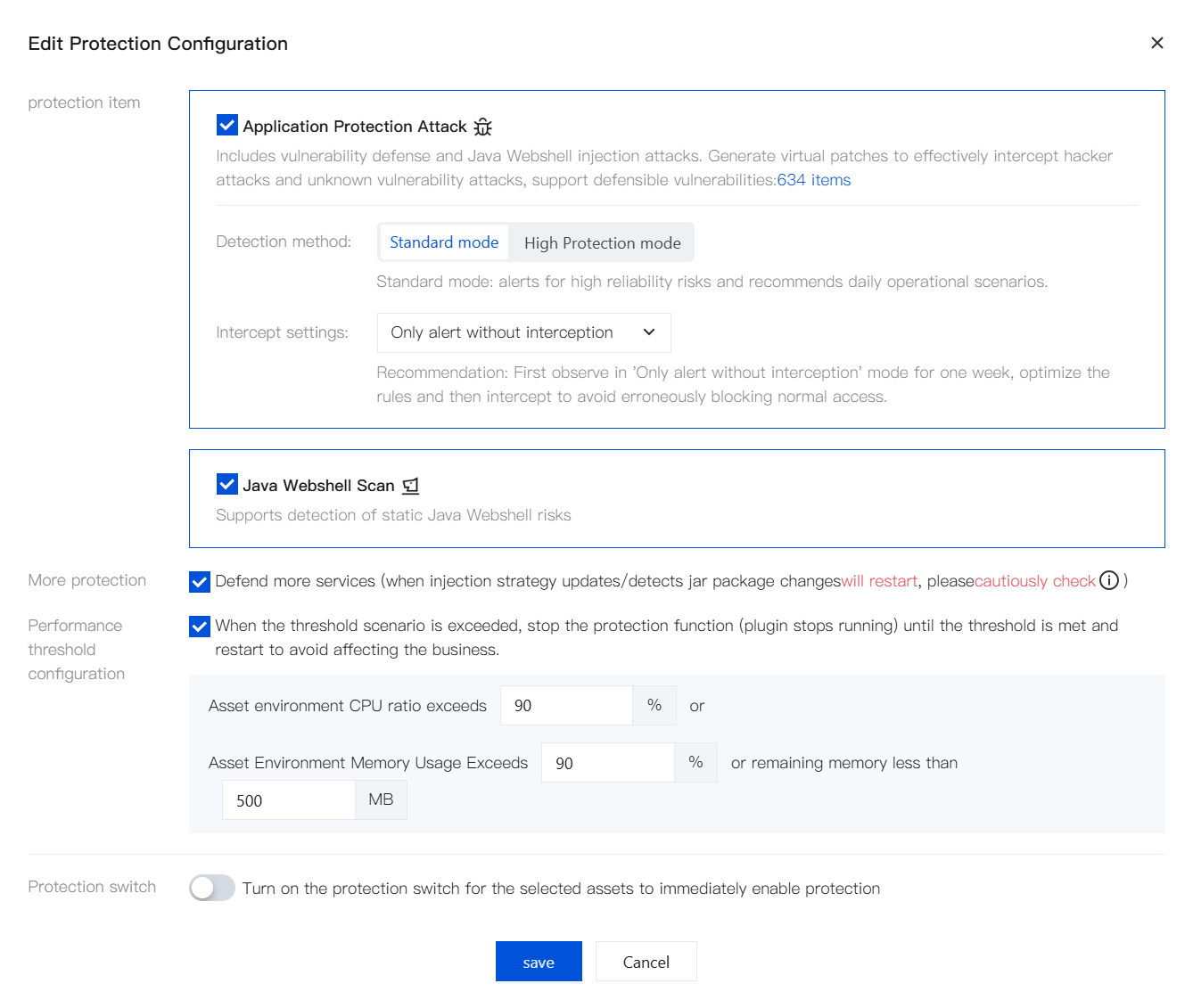
Protection item: Application Protection Attack (includes Vulnerability Defense and Java Webshell injection attacks), Java Webshell Scan.
Detection method:
Standard mode: Alerts for high reliability risks. Recommended for daily operational scenarios.
High Protection mode: Adds generalized rules on top of Standard mode. Has a certain false positive rate. Recommended for high-protection scenarios.
Intercept settings: Only alert without interception, Total interception, Only intercepts standard mode alarms
Optionally enable More protection and Performance threshold configuration, and turn on the protection switch for selected assets.
3. For more manual protection activation methods, see the following sections.
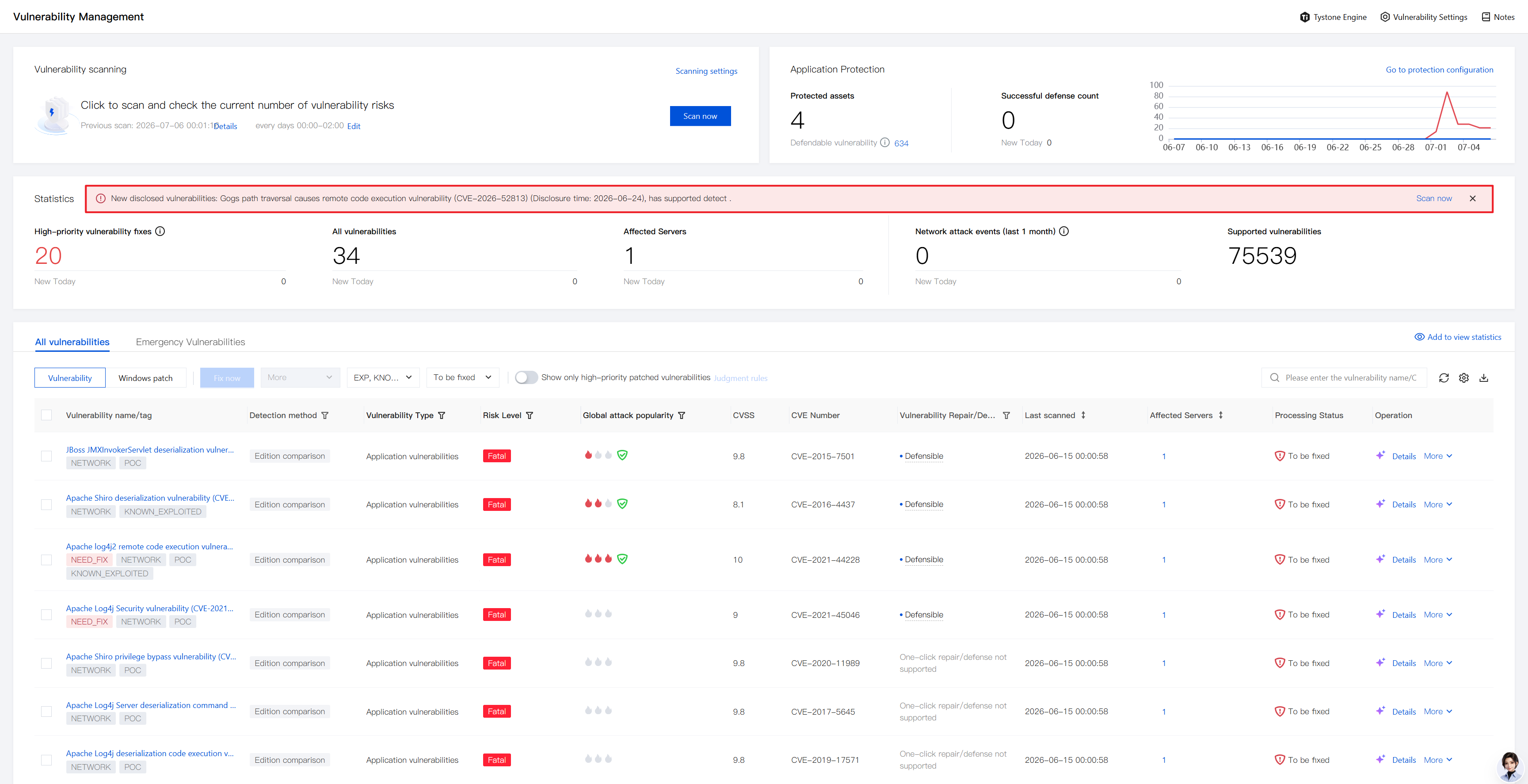
1. Obtain hot vulnerability information: On the Vulnerability Management page, view newly disclosed vulnerability information in the Vulnerability Overview module and check whether detection and defense are currently supported.
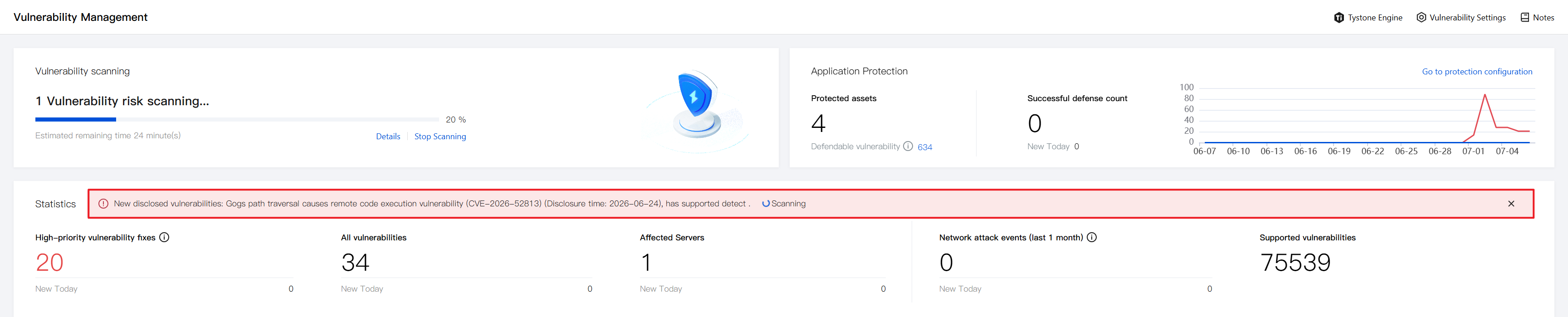
2. Hot vulnerability self-check: Click Scan Now and select the host scope to scan for the vulnerability.
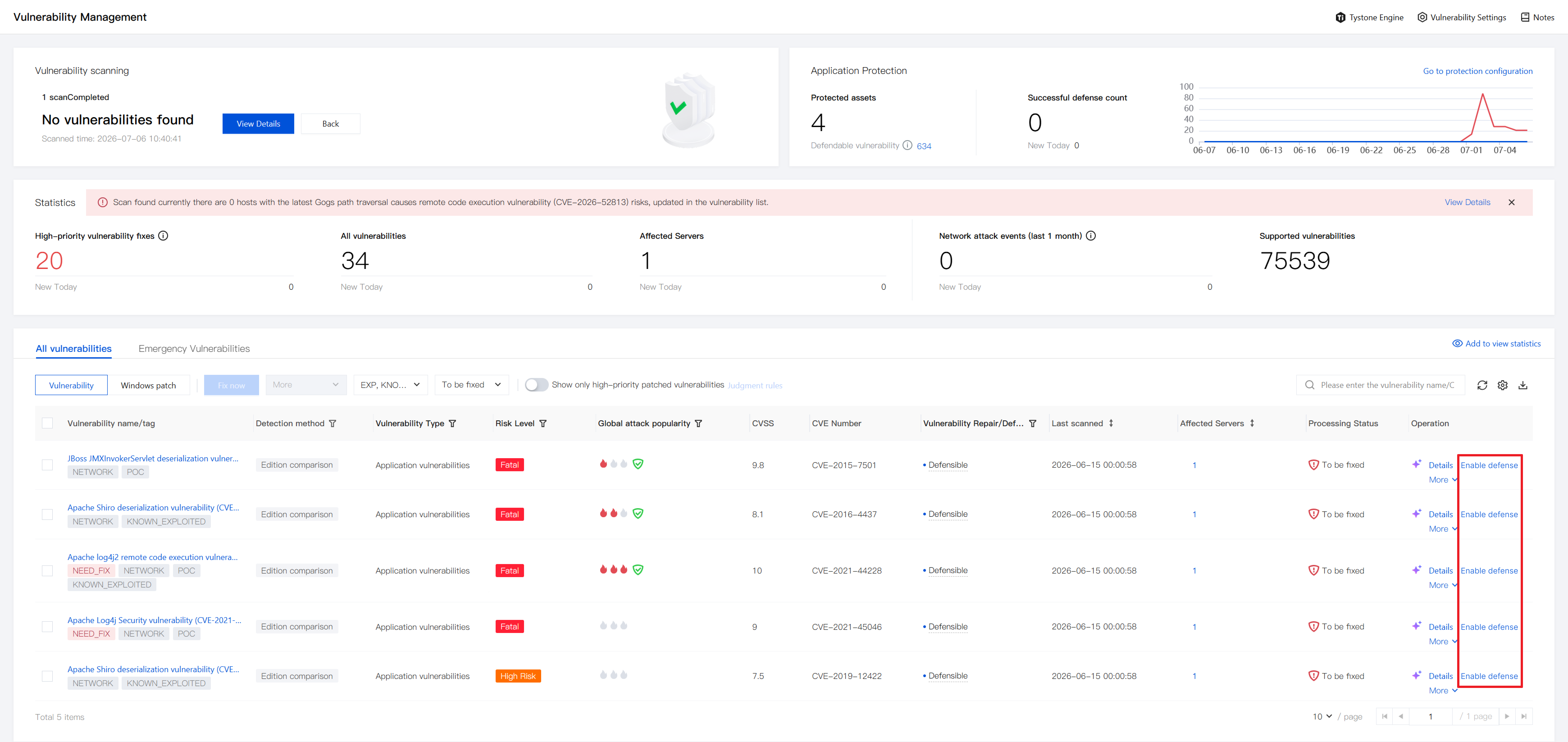
3. Hot vulnerability response: Remediate detected vulnerabilities on affected assets, or click Enable Defense to activate Application Protection - Vulnerability Defense.
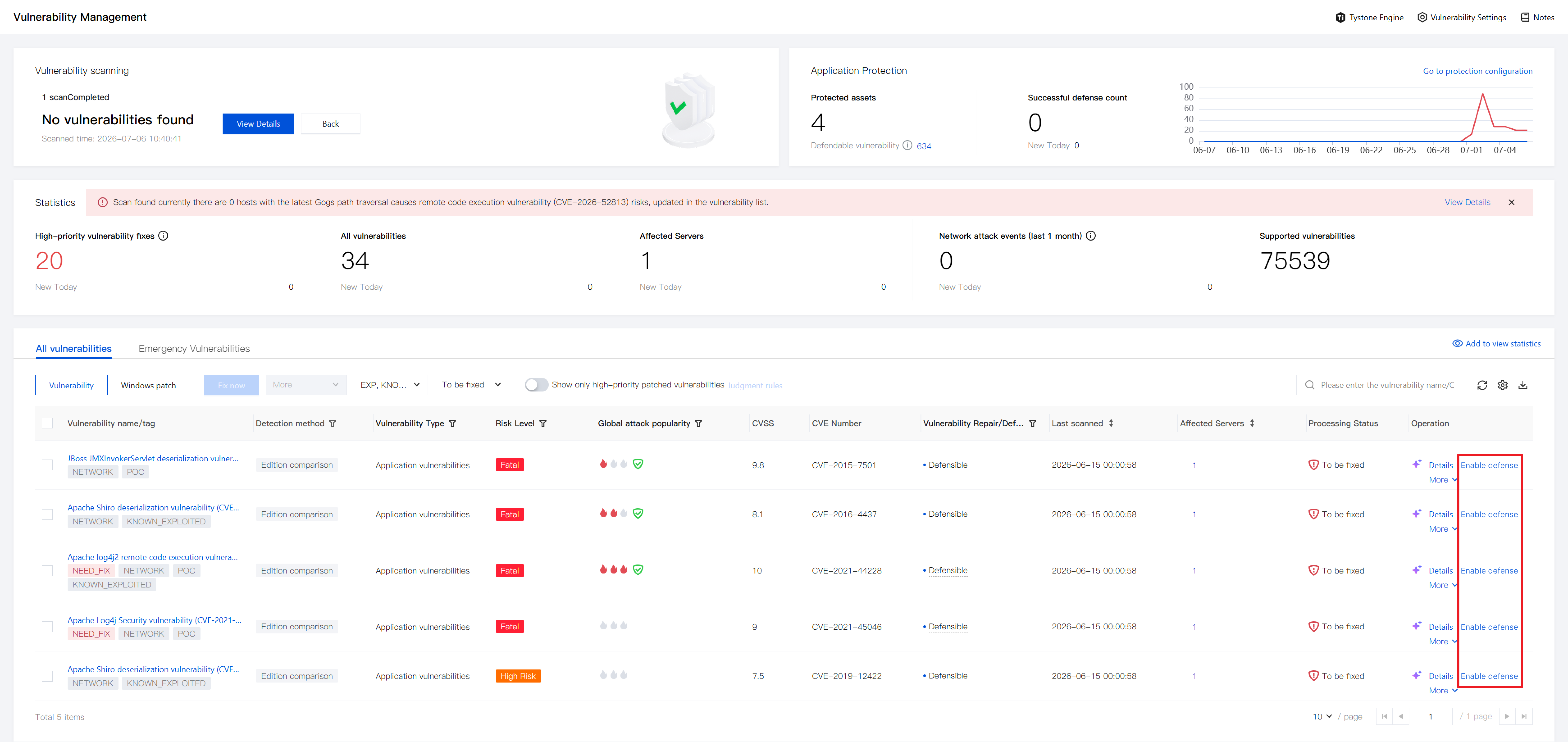
1. Check vulnerability defensibility: On the Vulnerability Management / Network Attack page, when handling alerts, check whether detected vulnerabilities or vulnerability exploitation attacks support defense.
2. Enable Application Protection: Click Enable defense.
Enable Protection Automatically
On the Application Protection page, enable Automatically bind High Protection Package authorization to automatically bind unauthorized nodes. Automatic protection is disabled by default and must be enabled manually.
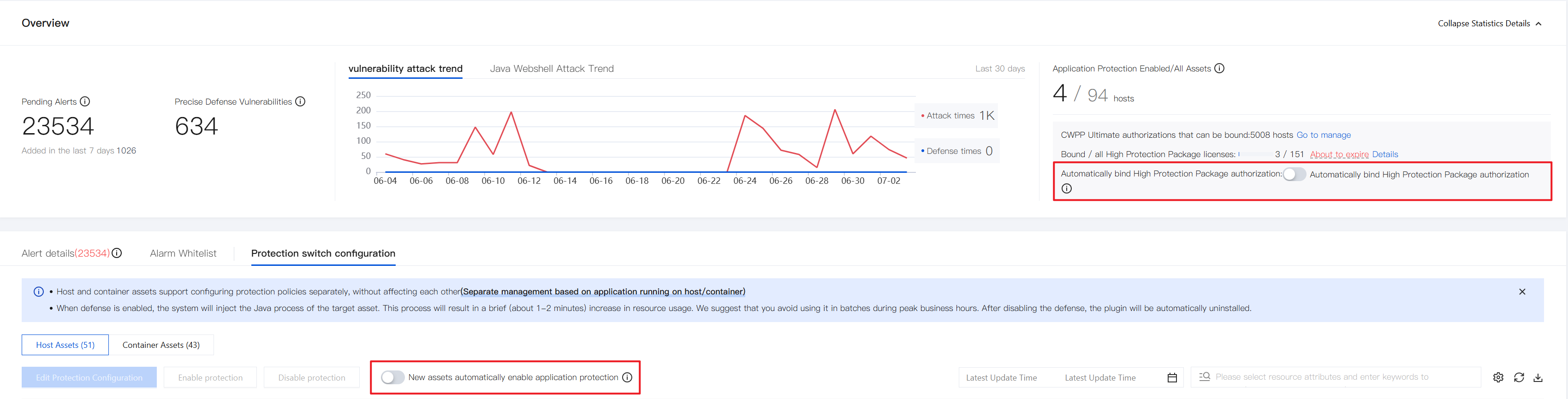
Note:
For existing customers using Vulnerability Defense, if the defense host scope was set to all Ultimate hosts in the legacy Vulnerability Defense feature, Application Protection automatically inherits that policy, enabling automatically enable protection for new assets by default.
Step 4: View Alerts
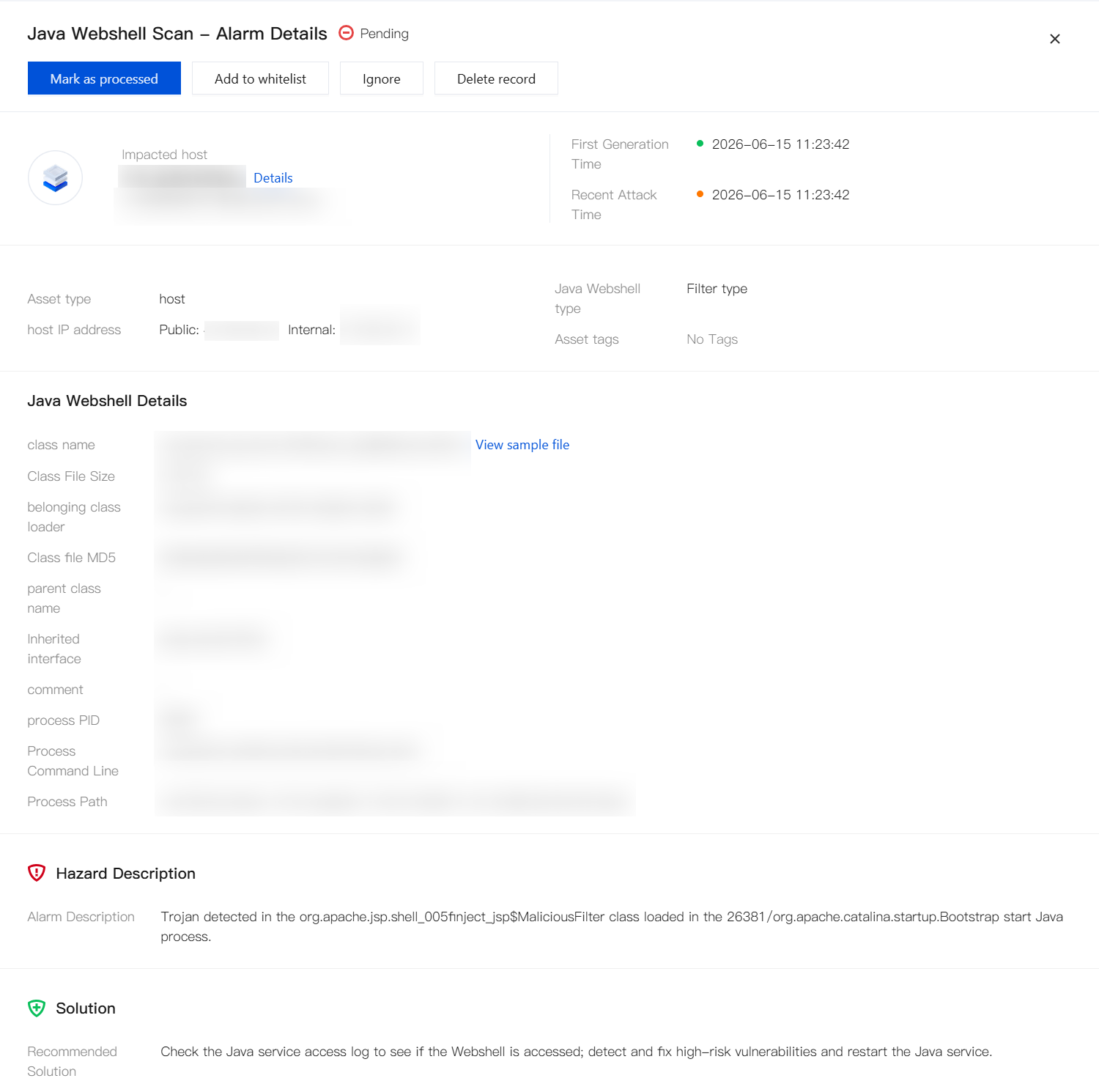
1. Go to Application Protection > Alarm Details, select an alert, and click Details.

2. On the Details page, review alert details to determine whether it is a false positive.
Step 5: Whitelist False Positives
1. Go to Application Protection > Alarm Allowlist, click Add Whitelist, or click Edit in the Operation column of the target rule.

2. On the add Whitelist Rule page, select the module based on the false positive type: Vulnerability Defense, Java Webshell Scan, or Java Webshell injection.
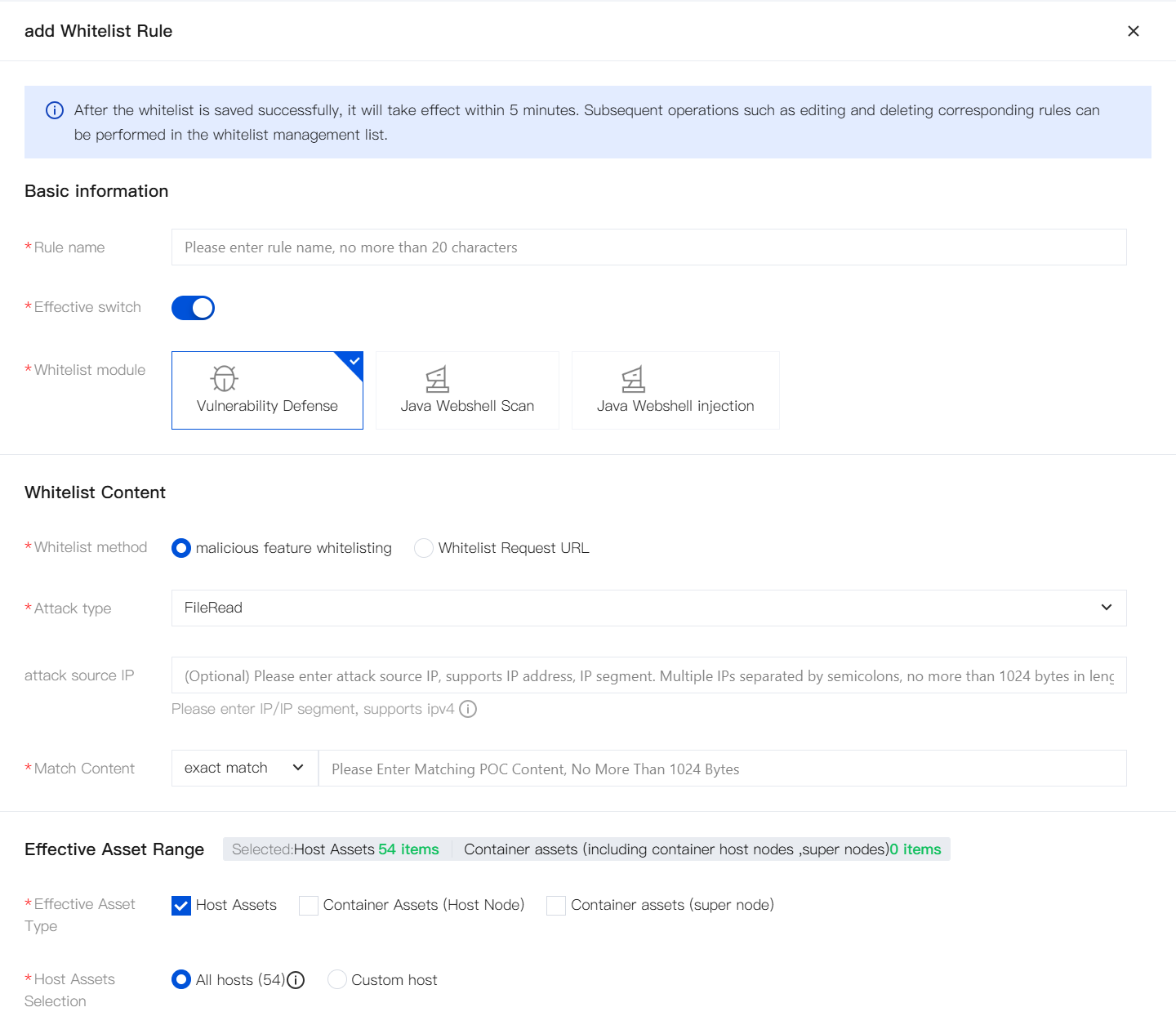
3. Configure whitelist content and effective asset range, then click save. Wait for the rule to take effect (usually about 5 minutes).
FAQs
What is the difference between Application Protection and WAF?
WAF focuses on perimeter traffic protection. Application Protection focuses on in-application runtime behavior protection. The two capabilities complement each other. We recommend using both.
Comparison Item | WAF | Application Protection |
Protection location | Network perimeter (Layer 7 traffic) | Inside the application process (runtime layer) |
Detection principle | Traffic signature matching and filtering | Function Hook + runtime call context to identify real execution behavior |
Strong scenarios | CC, Bot/crawler, scanner, access control, API security, and other traffic-based attacks | 0-day, Java Webshell, complex/encrypted traffic, non-HTTP protocols, lateral movement within the network |
0-day defense | Relies on rule updates with inherent lag | Supported by default without additional rules |
Encrypted traffic | Requires decryption before analysis | Naturally visible inside the process with no decryption overhead |
Virtual patches | Based on traffic characteristics; difficult to pinpoint vulnerable code | Can precisely locate exploit execution code |
Performance impact | Minimal direct impact on applications and business | Runs inside the application process with lightweight performance overhead |
What is the difference between Application Protection and legacy Vulnerability Defense?
Compared with legacy Vulnerability Defense, the new Application Protection is comprehensively upgraded across billing model, protection capabilities, emergency response, stability, and operational control. Existing customers can migrate smoothly to the new capability.
Improvement Area | Change |
Billing model | Application Protection supports standalone billing (no CWPP purchase required; purchase a High Protection Package only). Application Protection supports host and container views with node-level billing. One node is charged only once. |
Protection capabilities | Enhanced vulnerability protection and general attack protection, expanding coverage of common high-risk vulnerabilities and attack scenarios (such as Java Webshell and vulnerability exploitation), improving overall security protection and operational closure. |
Java Webshell detection | Upgraded from precise Java class scanning only to general Java Webshell detection, covering static detection + injection defense. |
Host/container consistency | Upgraded from misaligned capabilities (containers supported precise Vulnerability Defense only) to full alignment between host and container capabilities. |
Emergency response | Intelligence, engine, and product integration confirms defensibility within 24 hours after a hot vulnerability outbreak. |
Stability | Resolved short-term CPU resource spikes during injection. Established a dynamic monitoring system to further improve stability and compatibility. |
Operational control | Upgraded from basic switch configuration to fine-grained gradual rollout control, custom resource bypass, fine-grained whitelisting, and separation of daily/high-protection scenarios. |
What is the relationship between Application Protection and the High Protection Package?
Application Protection: A capability provided by CWPP that integrates the former Java Webshell detection and Vulnerability Defense features.
High Protection Package: The billing vehicle for Application Protection. Each package contains multiple licenses (for example, a Basic Protection Package includes 150 licenses). Extended Protection Packages can be added as needed.
High Protection Package license: One license equals Application Protection capability for one node.
Note:
Each license binds to one node (host node/container node/super node). Host and container applications on the same node share one license. No duplicate purchase is required.
CWPP Ultimate hosts have Application Protection capability by default and can enable protection directly. Non-Ultimate hosts that need Application Protection can purchase a High Protection Package as needed.
How do I confirm successful integration?
In Application Protection > Protection switch configuration, check the plug-in status of target assets and confirm the plug-in status is running normally.
Why is no alert data visible?
Plug-in injection exception or protection not enabled;
No valid attack behavior within the time window;
Query filter conditions (asset/time/type) do not match.