本文为您介绍通过控制台设置账号 CAM 验证相关说明和操作。
说明:
支持地域
此功能目前支持的地域为:上海、广州。
背景
在使用云数据库的场景中,通常需要为数据库创建独立的账号和密码,并授权给相应的用户进行访问和操作。这种方式的账户管理比较复杂,容易出现账号密码泄露等安全问题。基于以上背景,云数据库 PostgreSQL 支持为账号启用 CAM 验证功能,通过打通 CAM 凭证的身份验证,简化账号权限管理的复杂度,提升数据库的安全性和账号管理效率。
操作场景
如果用户对安全性有较高要求,可以通过本功能将 CAM 与数据库账号验证相绑定,用户在请求时可获取对应的密码来访问数据库,以提升数据库的安全性。我们建议如下两种场景,启用 CAM 验证。
使用 CAM 身份验证作为临时、个人访问数据库的机制时。
仅对可以轻松重试的工作负载使用 CAM 身份验证。
注意事项
请尽可能使用长连接访问数据库。
启用 CAM 验证前需要提前配置好相关 CAM 权限规则。
启用 CAM 验证后不支持修改密码。
关闭 CAM 验证后将无法通过 CAM 获取访问凭证,因此在关闭 CAM 验证时需要输入一个新密码。
功能限制
单个实例内建议不超过10个账号开启 CAM 验证。
启用 CAM 验证后不支持对该账号进行重置密码操作。
相同账号名不支持重复启用 CAM 验证功能。
步骤1:配置 CAM 权限规则
在使用账号 CAM 验证功能之前,用户需要先配置相关的 CAM 权限规则。
策略内容
{"statement": [{"action": ["cam:BuildDataFlowAuthToken"],"effect": "allow","resource": ["qcs::cam::uin/<用户 uin>:resourceUser/<实例 ID>/<账号名>",]}],"version": "2.0"}
<用户 uin>:替换为实际的账号 ID。
<实例 ID>:替换为实际需要授权的实例 ID。
<账号名>:替换为实际需要授权的账号名。
操作指引
1. 使用管理员账号登录访问管理控制台,在 策略 页面,按照策略生成器创建自定义策略(请参见 通过策略生成器创建自定义策略)。
效果:允许
服务:访问管理(cam)
操作:其他操作 - BuildDataFlowAuthToken
资源:特定资源 - 添加资源六段式
填写资源:<实例 ID>/<账号名>
2. 单击下一步,自定义策略的名称,并将策略授予目标子账号。
3. 单击完成,完成授权。
步骤2:启用 CAM 验证
1. 登录 PostgreSQL 控制台。
2. 在实例列表,单击实例 ID 或操作列的管理,进入实例管理页面。
3. 在实例管理页面,选择账号管理。
4. 在账号管理页面,单击创建账号,开启启用 CAM 验证的按钮。
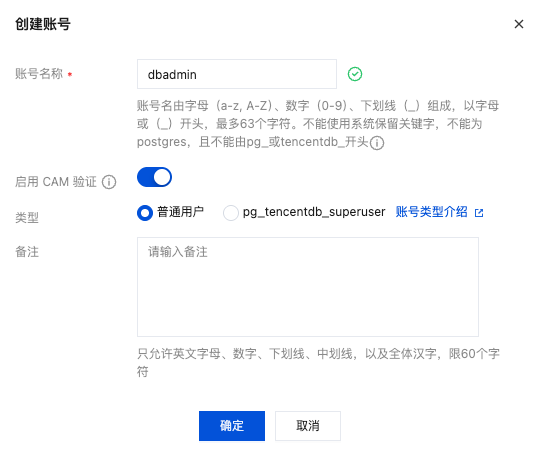
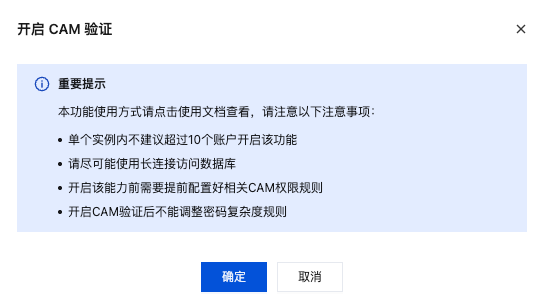
5. 在弹窗中单击确定。
1. 登录 PostgreSQL 控制台。
2. 在实例列表,单击实例 ID 或操作列的管理,进入实例管理页面。
3. 在实例管理页面,选择账号管理。
4. 在账号管理页面,找到目标账号,单击操作 > 更多 > 开启 CAM 验证。
5. 在弹窗下阅读风险提示并设置新密码后,单击确定。
步骤3:在应用程序通过代码调用获取密码
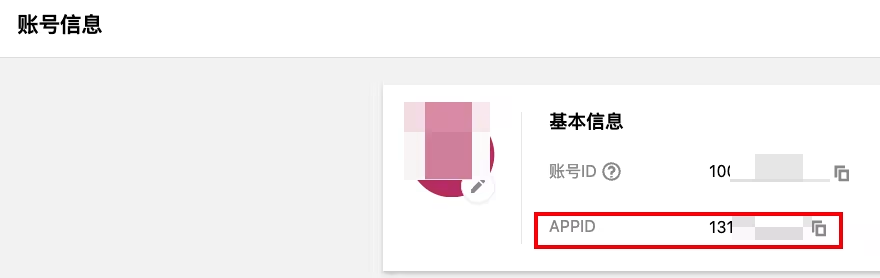
在腾讯云控制台,账号信息 页面,查询账号的 APPID。
在 访问管理控制台 > API 密钥管理 获取 SecretID 和 SecretKey。
通过 JAVA 连接数据库
说明:
如下只是项目最基本的依赖,如您的项目中还需要配置其他依赖请自行添加。
在项目依赖中添加如下直接依赖:
<dependency><groupId>com.tencentcloudapi</groupId><artifactId>tencentcloud-dbauth-sdk-java</artifactId><version>1.0.4</version></dependency>
间接依赖项:tencentcloud-sdk-java 3.1.1039版本及以上。
<dependency><groupId>com.tencentcloudapi</groupId><artifactId>tencentcloud-sdk-java</artifactId><version>3.1.1039</version></dependency>
通过代码调用获取密码并连接数据库
package com.example;import com.tencentcloud.dbauth.DBAuthentication;import com.tencentcloud.dbauth.model.GenerateAuthenticationTokenRequest;import com.tencentcloudapi.common.Credential;import com.tencentcloudapi.common.exception.TencentCloudSDKException;import com.tencentcloudapi.common.profile.ClientProfile;import com.tencentcloudapi.common.profile.HttpProfile;import java.sql.Connection;import java.sql.DriverManager;import java.sql.ResultSet;import java.sql.Statement;public class CAMDatabaseAuthenticationTester {public static void main(String[] args) throws Exception {// 定义连接所需的变量String region = "ap-guangzhou";String instanceId = "postgres-******";String userName = "dbadmin";String host = "10.0.0.*";int port = 5432;String dbName = "am";String secretId = "AKIDIa**********";String secretKey = "bEMGYZ**********";// 获取连接Connection connection = getDBConnectionUsingCAM(secretId, secretKey, region,instanceId, userName, host, port, dbName);// 验证连接是否成功Statement stmt = connection.createStatement();ResultSet rs = stmt.executeQuery("SELECT 'Success!';");while (rs.next()) {String id = rs.getString(1);System.out.println(id); // 应打印 "Success!"}// 关闭连接stmt.close();connection.close();}/*** 使用 CAM 数据库认证获取数据库连接** @param secretId 密钥 ID* @param secretKey 密钥* @param region 地区* @param instanceId 实例 ID* @param userName 用户名* @param host 主机* @param port 端口* @param dbName 数据库名称* @return Connection 对象* @throws Exception 异常*/private static Connection getDBConnectionUsingCAM(String secretId, String secretKey, String region, String instanceId, String userName,String host, int port, String dbName) throws Exception {// 从 secretId 和 secretKey 获取凭证Credential credential = new Credential(secretId, secretKey);// 定义最大尝试次数int maxAttempts = 3;Exception lastException = null;for (int attempt = 1; attempt <= maxAttempts; attempt++) {try {// 使用凭证获取认证令牌String authToken = getAuthToken(region, instanceId, userName, credential);String connectionUrl = String.format("jdbc:postgresql://%s:%d/%s", host, port, dbName);return DriverManager.getConnection(connectionUrl, userName, authToken);} catch (Exception e) {lastException = e;System.out.println("Attempt " + attempt + " failed.");Thread.sleep(5000);}}System.out.println("All attempts failed. error: " + lastException.getMessage());throw lastException;}/*** 获取认证令牌** @param region 区域* @param instanceId 实例 ID* @param userName 用户名* @param credential 凭证* @return 认证令牌*/private static String getAuthToken(String region, String instanceId, String userName, Credential credential) throws TencentCloudSDKException {// 实例化一个http选项,可选的,没有特殊需求可以跳过HttpProfile httpProfile = new HttpProfile();httpProfile.setEndpoint("cam.tencentcloudapi.com");// 实例化一个client选项,可选的,没有特殊需求可以跳过ClientProfile clientProfile = new ClientProfile();clientProfile.setHttpProfile(httpProfile);// 构建 GenerateAuthenticationTokenRequestGenerateAuthenticationTokenRequest tokenRequest = GenerateAuthenticationTokenRequest.builder().region(region).credential(credential).userName(userName).instanceId(instanceId).clientProfile(clientProfile) // clientProfile是可选的.build();return DBAuthentication.generateAuthenticationToken(tokenRequest);}}
通过 Python 连接数据库
通过 pip 安装方式将腾讯云数据库 CAM Python SDK 安装到您的项目中。请在命令行中执行以下命令:
pip install git+https://github.com/TencentCloud/dbauth-sdk-python.git
请注意,如果同时有 Python2 和 Python3 环境,Python3环境需要使用 pip3 命令安装。
间接依赖项:tencentcloud-sdk-python 3.0.1224版本及以上。
使用 Python 连接数据库示例如下:
import loggingimport osimport timeimport psycopg2from psycopg2 import extrasfrom dbauth.db_authentication import DBAuthenticationfrom dbauth.model.generate_authentication_token_request import GenerateAuthenticationTokenRequestfrom tencentcloud.common import credentialfrom tencentcloud.common.exception.tencent_cloud_sdk_exception import TencentCloudSDKExceptionfrom tencentcloud.common.profile.client_profile import ClientProfilefrom tencentcloud.common.profile.http_profile import HttpProfile# 配置 root loggerlogging.basicConfig(level=logging.INFO,format='[%(asctime)s] - [%(threadName)s] - {%(module)s:%(funcName)s:%(lineno)d} %(levelname)s - %(message)s',datefmt='%Y-%m-%d %H:%M:%S')log = logging.getLogger(__name__)def main():# 实例所在地域region = "ap-guangzhou"# 实例idinstance_id = "postgres-6yol****"# 用户名user_name = "dbadmin"# 实例viphost = "1*.*.*.*"# 实例端口port = 5432# database名db_name = "am"# secret_id和secret_keysecret_id = "AKIDI***************"secret_key = "bEMGY***************"connection = Nonetry:# 获取连接connection = get_db_connection_using_cam(secret_id, secret_key, region,instance_id, user_name, host, port, db_name)# 验证连接是否成功with connection.cursor() as cursor:cursor.execute("SELECT VERSION()")result = cursor.fetchone()log.info(result[0]) # 应该打印 "Success!"except Exception as e:log.error(f"An error occurred: {e}")connection.close()def get_db_connection_using_cam(secret_id, secret_key, region, instance_id, user_name, host, port, db_name):cred = credential.Credential(secret_id, secret_key)max_attempts = 3last_exception = Nonefor attempt in range(1, max_attempts + 1):try:auth_token = get_auth_token(region, instance_id, user_name, cred)log.info(auth_token)connection = psycopg2.connect(host=host,port=port,user=user_name,password=auth_token,dbname=db_name)return connectionexcept Exception as e:last_exception = elog.info(f"Attempt {attempt} failed.")time.sleep(5)log.error(f"All attempts failed. error: {last_exception}")raise last_exceptiondef get_auth_token(region, instance_id, user_name, cred):try:# 实例化一个 http 选项,可选的,没有特殊需求可以跳过http_profile = HttpProfile()http_profile.endpoint = "cam.tencentcloudapi.com"# 实例化一个 client 选项,可选的,没有特殊需求可以跳过client_profile = ClientProfile()client_profile.httpProfile = http_profilerequest = GenerateAuthenticationTokenRequest(region=region,instance_id=instance_id,user_name=user_name,credential=cred,client_profile=client_profile, # 可选)return DBAuthentication.generate_authentication_token(request)except TencentCloudSDKException as err:log.error(err)raiseif __name__ == "__main__":main()
刷新密码
当账号启用 CAM 验证功能后,可以通过刷新密码操作来更新密码。如果该账号设置的轮转周期为12小时更换一次密码,则在未到达轮转周期之前,可以通过刷新密码操作来立即更新密码。
注意:
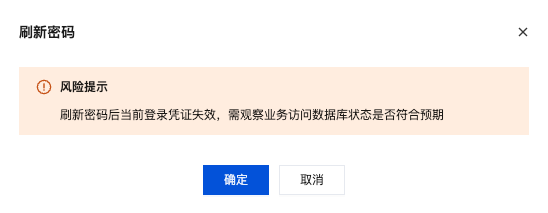
注意刷新密码后,当前登录凭证会失效,需要确认业务访问数据库状态是否符合预期。
1. 登录 PostgreSQL 控制台。
2. 在实例列表,单击实例 ID 或操作列的管理,进入实例管理页面。
3. 在实例管理页面,选择账号管理。
4. 在账号管理页面,找到目标账号,在其操作列单击刷新密码。
5. 在弹窗下阅读风险提示后,单击确定。
关闭 CAM 验证
注意:
关闭 CAM 验证后无法通过 CAM 获取访问凭证,请及时更新密码。
1. 登录 PostgreSQL 控制台。
2. 在实例列表,单击实例 ID 或操作列的管理,进入实例管理页面。
3. 在实例管理页面,选择账号管理。
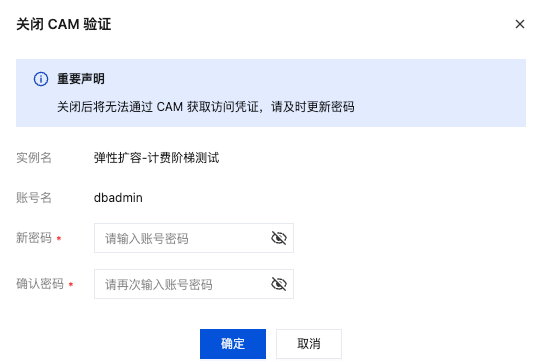
4. 在账号管理页面,找到目标账号,单击操作 > 更多 > 关闭 CAM 验证。
5. 在弹窗下阅读风险提示并设置新密码后,单击确定。
附录:错误码
云数据库 PostgreSQL 账号 CAM 验证功能相关的错误码如下:
公共错误码
错误码 | 说明 |
AuthFailure.InvalidAuthorization | 请求头部的 Authorization 不符合腾讯云标准。 |
AuthFailure.InvalidSecretId | 密钥非法(不是云 API 密钥类型)。 |
AuthFailure.MFAFailure | |
AuthFailure.SecretIdNotFound | |
AuthFailure.SignatureExpire | 签名过期。Timestamp 和服务器时间相差不得超过五分钟,请检查本地时间是否和标准时间同步。 |
AuthFailure.SignatureFailure | 签名错误。签名计算错误,请对照调用方式中的签名方法文档检查签名计算过程。 |
AuthFailure.TokenFailure | token 错误。 |
AuthFailure.UnauthorizedOperation |
业务错误码
错误码 | 说明 |
ResourceNotFound.DataFlowAuthClose | 未开启 CAM 数据流认证。 |


