Help & Documentation>TencentDB for PostgreSQL>Getting Started>Managing TencentDB for PostgreSQL Instance

Managing TencentDB for PostgreSQL Instance

Last updated: 2024-04-18 16:00:03

Instance list page

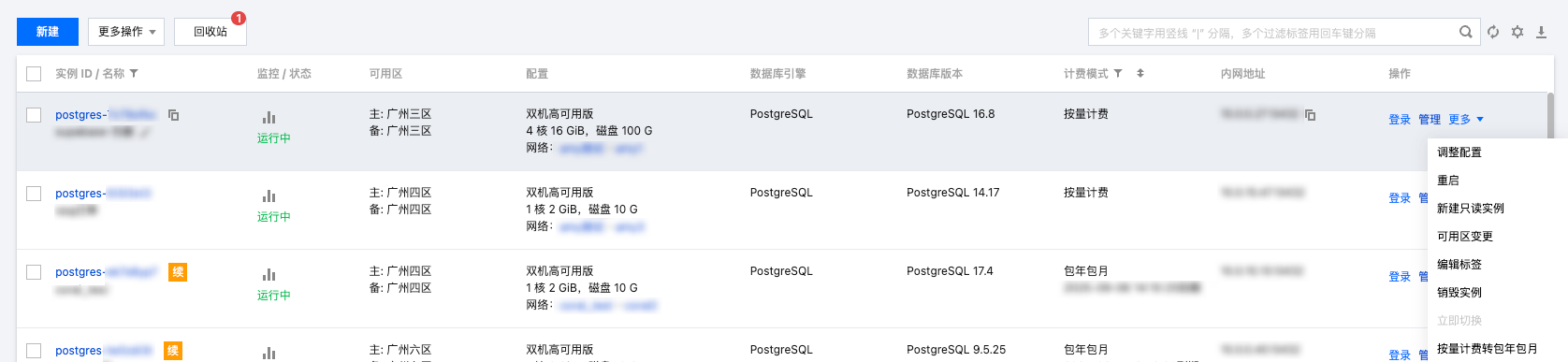
Log in to the TencentDB for PostgreSQL console. In the instance list, you can view instance-related information and manage instances.


Restarting an instance

Please exercise great caution when restarting a database, which plays a vital role in the business. Before the restart, it is recommended to disconnect the database from server and stop writing data.
Restarting an instance does not change its physical attributes, so the public IP, private IP, and any data stored on the instance will remain unchanged.
After the restart, reconnection to the database is needed. Make sure your business has a reconnection mechanism.
Restart the instance during off-peak hours to ensure success and minimize the impact on your business.
In the instance list, select the database instances you want to restart, and choose More > Restart to perform the restart operation. Batch restarts are supported by selecting multiple instances.
Note
Generally, it takes tens of seconds to a few minutes to restart an instance, during which the instance cannot be accessed and existing connections to it will be closed.
During the restart, if the volume of business writes is too large and there are too many dirty pages, the restart may fail. If the restart fails, the instance will return to its previous state and remain accessible.
Restarting the database may occasionally fail, which is normal. If the restart takes longer than 10 minutes, consider consulting online support.

Instance management page

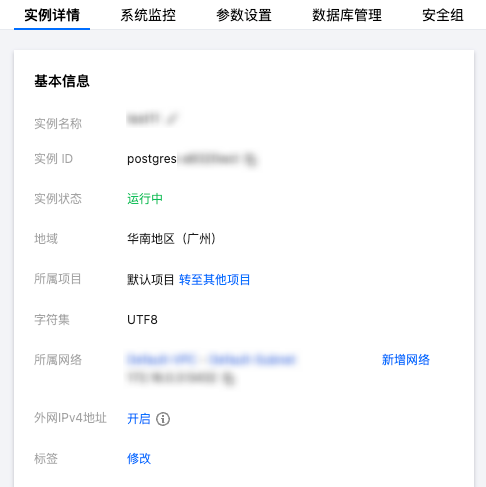
After creating a TencentDB for PostgreSQL instance, click the instance ID or Manage in the Operation column of the instance list to access the instance management page. You can view instance details, monitor the instance, and manage databases.


Instance details

On the Instance Details page, you can view and manage various basic information about the database. By default, the public network address is disabled. If needed, please enable it manually.

System Monitoring

On the System Monitoring page, you can view the monitoring of numerous core metrics related to the current database operation, including access, load, cache hit rate, SQL execution latency, and XLOG synchronization difference. For a detailed introduction to instance monitoring and alert features, please refer to Monitoring Features and Alert Features.

Setting parameters

On the Parameter Settings page, you can modify parameters in bulk or individually, as well as view recent modification logs. For more information, please refer to Setting Instance Parameters.

Account management

On the Account Management page, you can manage accounts, such as modifying remarks and resetting passwords.

Security Group

On the Security Group page, you can perform operations such as querying security group effect objects, configuring security groups, and previewing rules for instances. For more information, please refer to Managing Security Groups.
Note
Security group outbound rules won't take effect for TencentDB for PostgreSQL, and inbound rules only apply to the private IP and port of TencentDB for PostgreSQL.

Backup and restoration

On the Backup and Restoration page, you can view and download backups and xlog files. For more information, please refer to Data Backup.

Performance

On the Performance Optimization page, you can view and download slow query logs and error logs.

Read-only instance

On the Read-Only Instance page, you can query and create new read-only instances. When creating a new read-only instance, you can specify or create a new RO group. For more information, please refer to the Read-Only Instance Overview.