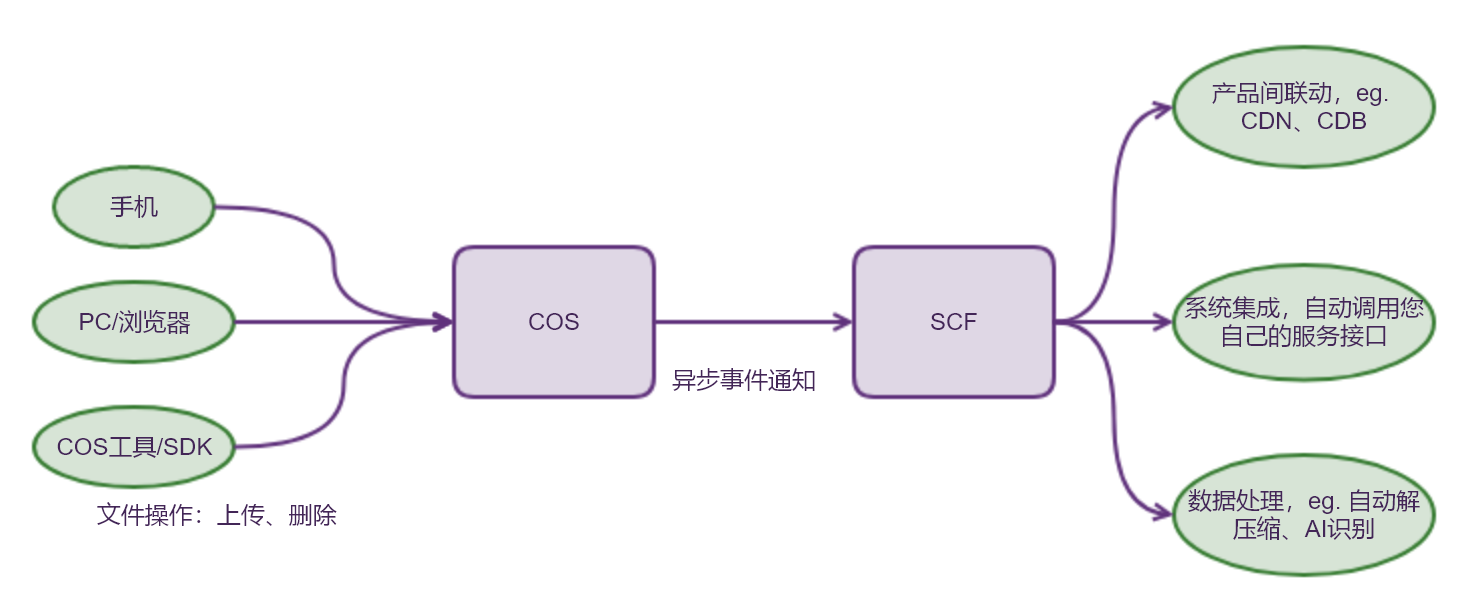
When changes occur in Cloud Object Storage (COS) resources (such as new file uploads or file deletions), you can receive timely notification messages. Event notifications can be combined with Serverless Cloud Function (SCF) to enable a wide range of application scenarios:
Interaction with other Tencent Cloud services: For example, purge CDN cache or update the database when a new file is uploaded to COS.
System integration: Your own service APIs can be called when files in COS are created, deleted, or overwritten. In user-generated content (UGC) scenarios, with the event notification feature, the client side will be able to interact with the server side.
Data processing: Automatically process files in COS, such as automatic decompression and AI recognition.
COS event notification has the following features:
Async processing: sending notifications does not affect normal COS operations.
Notification targets: notifications can only be sent to SCF functions in the same region.
Currently, an SCF function can be triggered by the following COS events:
Event type
Description
cos:ObjectCreated:*
All upload events mentioned below.
cos:ObjectCreated:Put
An object is created using the Put Object API.
cos:ObjectCreated:Post
An object is created using the Post Object API.
cos:ObjectCreated:Copy
An object is created using the Put Object - Copy API.
cos:ObjectCreated:CompleteMultipartUpload
Trigger a cloud function when using the Complete Multipart Upload API to create a file.
cos:ObjectCreated:Origin
Trigger a cloud function when an image is fetched from the origin.
cos:ObjectCreated:Replication
Trigger a cloud function when an object is created through cross-region replication.
cos:ObjectRemove:*
All deletion events mentioned below.
cos:ObjectRemove:Delete
In a bucket without versioning enabled, using the DELETE Object API to delete an object or using versionid to delete a specific version of an object will trigger the cloud function.
cos:ObjectRemove:DeleteMarkerCreated
When using the DELETE Object API to delete an object in a bucket with versioning enabled or suspended, a cloud function is triggered.
cos:ObjectRestore:Post
Trigger a Serverless Cloud Function when an archive restoration task is created.
cos:ObjectRestore:Completed
Trigger a Serverless Cloud Function upon completion of an archive restoration task.
How to Use COS Event Notification
Please follow the steps below:
1. Create SCF function
You can create a function in the SCF console or using the CLI. When creating the function, you need to select the runtime environment based on the language you will use to write the function and submit the function code either by editing online or uploading a local code package.
You can also use the pre-built SCF templates to simplify the creation process. For more information, see Create a Function. Different programming languages have different function syntax; for details, refer to the SCF documentation.
2. Testing Functions
After the function is created, you can use the test template feature for preliminary testing. Test templates can simulate COS events and trigger function execution. For more information, see Testing Functions.
3. Add Trigger
After preliminary testing, you can create a COS trigger to bind the SCF function and the storage bucket. You can add triggers through the console or command line. For more information, please refer to the Create Trigger documentation.
4. Validation
After completing the above steps, you can operate the COS bucket and verify if the overall process is working correctly. For example, you can upload or delete files using the console or COS Browser, then go to SCF Console > Function Service > Corresponding Function Name > Log Query to check if everything is functioning properly.
For more information about SCF and COS triggers, please refer to the COS Triggers documentation.