The testing feature of Serverless Cloud Function (SCF) allows you to initiate function calls directly through the console, simulating trigger events sent by triggers, and displaying the execution status, return content, and running logs of the SCF. In the function details page of the console, you can enter the function code subpage and click Test to test run the function. The following video will introduce you to the function testing:
1. Log in to the SCF console and select Function Service on the left sidebar.
2. On the Functions page, click the target function to enter its details page.
3. Select Function codes on the Function management page.
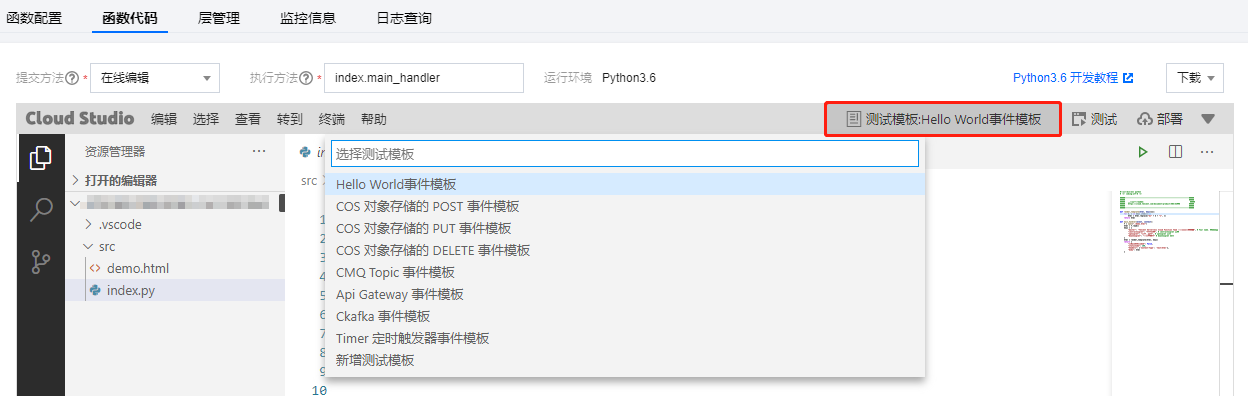
4. Select the desired test template in the editor, as shown below:
5. Click Test to test the function.
Preset Testing Event Templates
Throughout the product iteration process, default test event templates will be continuously added. These templates are used to simulate the events and content passed to the cloud function when the corresponding trigger initiates the function's execution, which is reflected in the function as an event parameter. The test event templates must be in JSON format. The currently included default test event templates and their descriptions are as follows:
Hello World Event Template: A simple, customizable event template. When triggering the function through the cloud API, you can input custom event content.
COS Upload/Delete File Event Template: This simulates the events generated and passed when a cloud function is triggered upon file upload or deletion in a Bucket, following the binding of a COS object storage trigger.
CMQ Topic Event Template: This simulates the events generated and passed when a cloud function is triggered upon receiving a message in the message queue, following the binding of a CMQ message queue topic subscription.
API Gateway Event Template: This simulates the events generated and passed when a cloud function is triggered upon the arrival of an API request at the API Gateway, following the binding of the API Gateway to the cloud function.
Note:
There is a call timeout limit in the function console testing scenario. Calls with a timeout of less than 60 seconds are synchronous, while those exceeding 60 seconds are asynchronous.
Custom Testing Event Template
You can modify the preset templates based on your own requirements, and save them as your custom templates.
Use limits
The following use restrictions apply to custom testing event templates:
Custom testing event templates are configured at the account level, which means the templates are shared by functions under the same account.
Up to 5 custom testing templates can be configured for a single account.
Each custom testing template can contain up to 64 KB of data.
Creating custom testing event templates
Select a preset template and click Create Template. Make changes as you want, specify a new template name and save it as a custom template. This template is used by default next time when you enter the test page.
Deleting custom testing event templates
To delete a custom template that is no longer used, select the template and click Delete.