The global acceleration feature provided by Tencent Cloud Object Storage (COS) utilizes a load balancing system based on Tencent's global traffic scheduling to intelligently route and parse user requests and select the optimal network linkage for nearby access. Backed by globally deployed Tencent Cloud data centers, it allows users across the world to quickly access buckets and improves application access success rate, allowing for greater business stability and a smoother user experience. In addition, COS's global acceleration also speeds up uploads and downloads.
Note
The global acceleration feature is now generally available and supported in all public cloud regions. However, it is not supported in finance cloud regions due to network isolation.
Using this feature incurs fees as request data transfers are accelerated via Direct Connect lines in the Tencent Cloud private network. For more pricing information, see Product Pricing.
How to Use
You can enable global acceleration on the COS Console or through APIs.
Using the COS console
1. Log in to the COS Console.
2. In the left sidebar, click Bucket List to go to the bucket list page.
3. Locate the bucket that requires global acceleration configuration, click its bucket name to enter the bucket details page.
4. In the left navigation bar, select Domains and Transfer > Global Acceleration, then click Edit in the Global Acceleration section to enable the current status.
5. After confirming that everything is correct, click Save to enable the bucket's global acceleration.
Global acceleration domain name: When uploading objects via this domain, public network global acceleration effect is achievable. The domain name format is
<BucketName-APPID>.cos.accelerate.myqcloud.com.6. After enabling global acceleration, you only need to access the bucket via the global acceleration domain name to achieve quick data access.
Note:
Enabling global acceleration will not affect the original default bucket domain name. You can still use it normally.
Using the REST API
You can directly use the following APIs to enable global acceleration:
Access Endpoint Domain Names
After enabling global acceleration, you can access your COS files through two types of domain names:
Default Bucket Domain: The format is
<BucketName-APPID>.cos.<Region>.myqcloud.com. For more information, see Regions and Access Domain Names.Global Acceleration Domain: The format is
<BucketName-APPID>.cos.accelerate.myqcloud.com.Taking a Guangzhou region bucket
examplebucket-1250000000 as an example, assuming you have enabled the global acceleration feature for this bucket, when your business needs to upload a file exampleObject.txt from Beijing to this bucket, you have two upload methods:Access via Global Acceleration Domain Name: When uploading, specify the domain name as
examplebucket-1250000000.cos.accelerate.myqcloud.com. When uploading objects through this domain name, the COS service will intelligently parse and provide nearby access based on network conditions, such as forwarding requests to the Beijing access layer and then transmitting data to the Guangzhou storage layer via Direct Connect lines, achieving accelerated performance.Use the default bucket domain name for access: When uploading the object, you need to set the domain name to
examplebucket-1250000000.cos.ap-guangzhou.myqcloud.com. When you upload the object through this domain name, your request will be directly forwarded to the Guangzhou access layer and then the Guangzhou storage layer. In this case, long public network linkage may lead to unstable transfer.Note
Using the global acceleration feature incurs additional costs, so we recommend that you carefully assess your actual business needs before proceeding:
If your business has more writes (e.g.,
PUT Object, POST Object, and Multipart Upload) than reads and uploads data to Tencent Cloud data centers from a remote region, we recommend using a global acceleration endpoint domain name.If your business has more reads (e.g., GET Object) than writes and mainly involves file download, you are recommended to perform a comprehensive evaluation on the CDN-based access acceleration solution and select the option with the best cost performance.
If your business mainly involves configuration operations or file extraction, we recommend using the default bucket endpoint domain name.
If your business needs to access buckets over a private network or through a Direct Connect line within the same region, we recommend using the default bucket endpoint domain name.
Configuring DNS Intelligent Resolution
If businesses need worldwide access, they can configure DNS intelligent resolution to determine whether users are domestic or outside Chinese mainland, so that they can respond to user access faster. Directions:
1. Log in to the DNS Console, click Add Domain, add a custom domain name that requires intelligent parsing, and enter its record management page.
2. Click Add Record to create 2 CNAME records (for example, set the host record to accelerate). The first resolution record's line type is set to domestic, and the record value is set to the bucket's default domain name
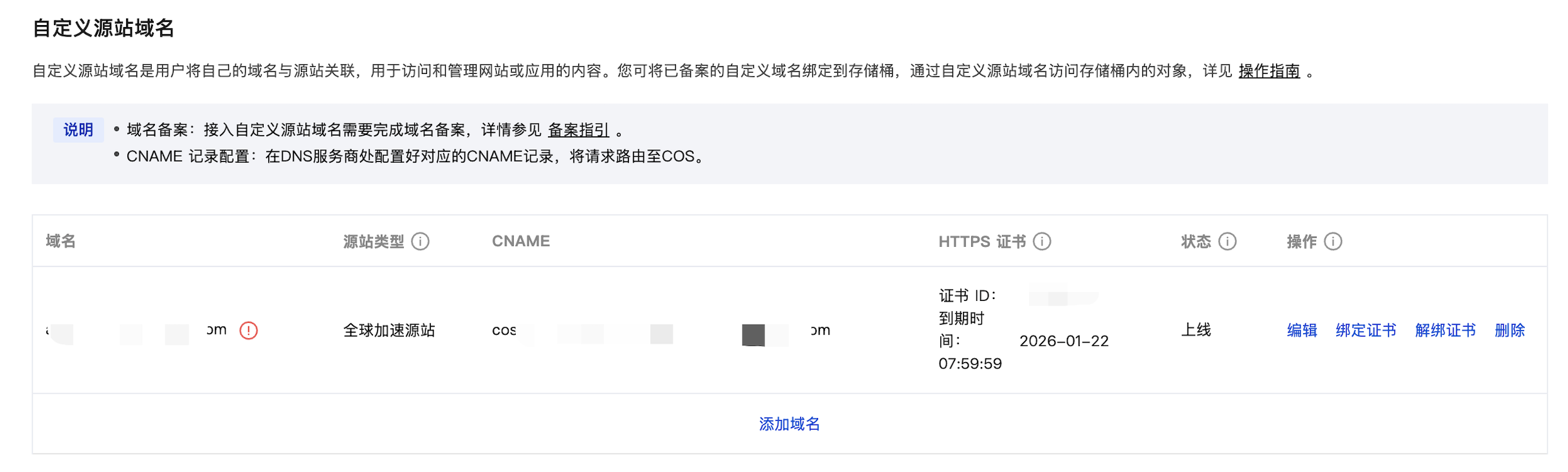
examplebucket-1250000000.cos.ap-guangzhou.myqcloud.com. The second resolution record's line type is set to default, and the record value is set to the global acceleration domain examplebucket-1250000000.cos.accelerate.myqcloud.com.3. Log in to the COS console, configure custom domain name for the bucket, and select the global acceleration origin site as the origin. A red exclamation mark may appear next to the custom domain name, indicating a domain name resolution issue. You may ignore this prompt.
4. After configuration as per the aforementioned method, access your custom domain name to achieve the effect:
If your local DNS egress IP comes from outside Chinese mainland, the address queried and retrieved by DNS is the global acceleration domain.
If your local DNS egress IP originates from domestic, the address queried and retrieved by DNS is the bucket default domain.
5. If you use COS SDK, you can initialize client with custom domain name to achieve the desired effect. Take JS SDK as an example:
import COS from 'cos-js-sdk-v5';const cos = new COS({SecretId: 'your_tmpSecretId', // temporary secretId issued by the sts serviceSecretKey: 'your_tmpSecretKey', // temporary secretKey issued by the sts serviceSecurityToken: 'your_sessionToken', // temporary SessionToken issued by the sts serviceDomain: 'your.custom.domain' //input custom domain name});
Supports and Limits
We have outlined below some important factors to note when using a global acceleration endpoint domain name:
The global acceleration domain name will take effect 15 minutes after being enabled.
After the global acceleration domain name is enabled, the maximum bandwidth for a bucket will be allocated based on the business volume of the entire network.
After the global acceleration endpoint domain name is enabled, only requests using that endpoint domain name will be accelerated. However, the default bucket endpoint domain name can still be used.
When using a global acceleration domain name, fees will be incurred only for requests for which linkage is accelerated. For example, if you use a global acceleration domain name to upload data from Beijing to a bucket in Beijing, the request will not incur acceleration fees as the linkage was not accelerated.
When using a global acceleration domain name, you can specify the HTTP or HTTPS transfer protocol. However, if the request is transmitted via a private network Direct Connect line, COS will choose to use HTTPS protocol to guarantee data transfer security.
Billing Example
Uploading data or accessing a bucket by using a global acceleration endpoint domain name will incur fees calculated by the day. For more information, please see Billing Overview and Product Pricing. The following example compares billing between a global acceleration endpoint domain name and a default endpoint domain name:
Business scenario 1
A user uses COS mainly to upload video files which require a high transmission success rate. If he/she uploads 1 GB of video data daily from his/her offices in Xinjiang and Singapore to his/her bucket in Guangzhou, then 30-day fees will be charged as follows:
Using acceleration domain for uploads incurs fees: 30 x 1GB x (0.5 CNY/GB + 1.25 CNY/GB) = 52.5 CNY.
Using the default bucket domain for uploads incurs upload fees: 30 x 1GB x (0 USD/GB) = 0 CNY.
Note
The domestic upload acceleration fee is CNY 0.5/GB, while the overseas upload acceleration fee is CNY 1.25/GB. No upload traffic fees are charged when using the default bucket domain to upload files.
Scenario 2
A user uses COS mainly to download video files which require a high transmission success rate. If he/she downloads 1 GB of video data daily from his/her office in Singapore to his/her bucket in Guangzhou, then 30-day fees will be charged as follows:
Using accelerated domain for downloads incurs download acceleration traffic fees: 30 x 1GB x 1.25 CNY/GB = 37.5 CNY.
Using an accelerated domain for downloads incurs public network downstream traffic fees: 30 x 1GB x 0.5 CNY/GB = 15 CNY.
In summary, the total download traffic cost is calculated as follows: 37.5 + 15 = 52.5 CNY.
Note
The cross-border download acceleration fee is CNY 1.25/GB. When using global acceleration domain names to download files, both public network outbound traffic fees and global acceleration outbound traffic fees will be charged.