Serverless Cloud Function (SCF) supports traffic routing settings. With this configuration, you can conveniently control the gray release or rollback process of function versions in actual use cases or environments, mitigating the potential risks of a one-time launch.
When creating an alias or adjusting traffic configurations, you can control the traffic direction to two function versions through the console, enabling traffic to route between versions according to certain rules. Currently, we support two routing schemes: Weighted Random Routing and Rule-based Routing.
When you wish to randomly route between any two versions based on a set percentage weight, you can perform the Weighted Random Routing operation.
When you wish to route requests containing specific content to a particular version, you can perform the Rule-based Routing operation.
Procedure
Weighted Random Routing
This article takes the configuration during alias creation as an example. Once creation is complete, traffic will randomly route between the two versions according to the set percentage. The steps are as follows:
1. Refer to the Create Alias steps to access the "Create alias" window.
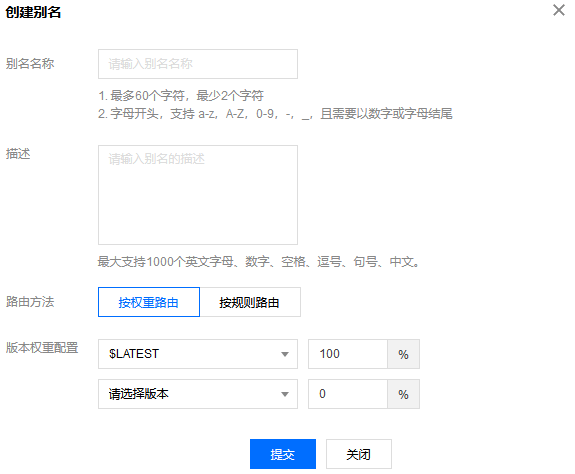
2. In the "Create alias" window, refer to the following information for traffic routing configuration, as illustrated in the figure below:
The main parameter information is as follows:
Routing method: Select Weighted Routing.
Version weight configurations: You can select two versions from the drop-down list and configure the percentage weight.
3. Click Submit to complete the setup.
By rules
When configuring routing by rules, the current rule syntax includes the following three parts:
Matching Key
The position of the value during matching, that is, determining whether it is a hit by locating and obtaining the value. The currently supported notation for Key is invoke.headers.[userKey], where the [userKey] part represents modifiable content. This notation means that the userKey part in the HTTP request headers is matched when the invoke interface is called.
Matching Method
During matching, the method and expression are compared. The currently supported matching methods are exact and range.
exact: Precise match. When using the exact method, the matching expression must be a string. The rule is hit when the value read by the matching key is exactly equal to the expression.
range: Range match. When using the range method, the matching expression must be in the form of (a,b) or [a,b], where a and b must be integers. The rule is hit when the value read by the matching key is an integer and falls within the interval defined by the expression.
Matching Expression
A hit occurs when the set value is matched. For the expression syntax, refer to the Matching Method description.
Please follow the steps below to configure routing based on rules:
1. Refer to the Create Alias steps to access the "Create alias" window.
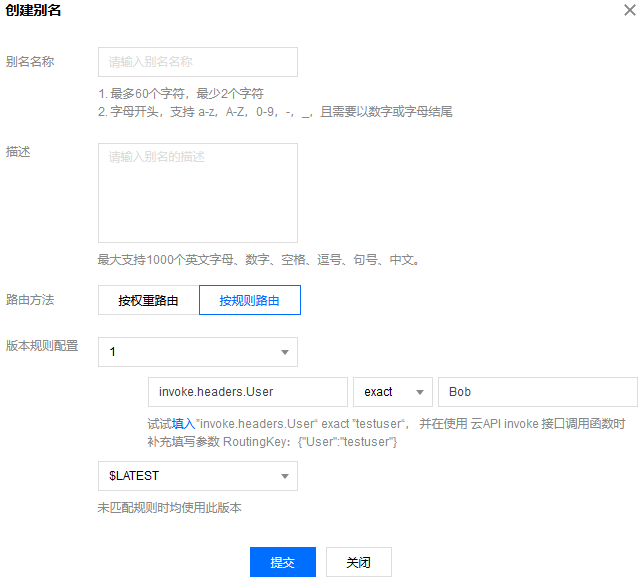
2. In the "Create alias" window, refer to the following information to configure traffic routing, and click Submit to complete the configuration. See the figure below:
The main parameter information is as follows:
Routing method: Select Rule-based Routing.
Version rule configurations: Please configure as needed, using the following examples as a guide:
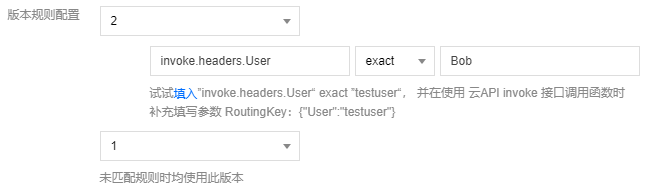
For instance, if you have two versions (Version 2 and Version 1), and you want Version 2's matching rule to be set as invoke.headers.User exact Bob, and Version 1 to be set for no hits. Refer to the figure below for settings:
Based on this configuration, when the cloud function platform calls the function alias through the invoke interface, if the routingKey parameter is set to {"User":"Bob"}, the execution will use the code and configuration of Version 2. If the routingKey parameter is not set or if the routingKey is set to other values, the execution will use the code and configuration of Version 1.
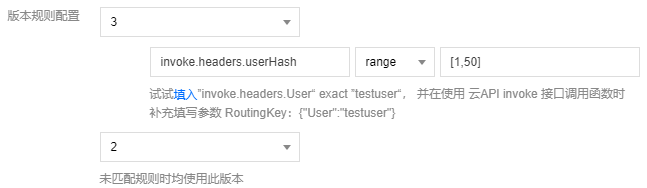
For instance, if you have two versions (Version 3 and Version 2), and you want Version 3's matching rule to be set as invoke.headers.userHash range [1,50], and Version 2 to be set for no hits. Refer to the figure below for settings:
Based on this configuration, when the cloud function platform calls the function alias through the invoke interface, if the routingKey parameter is set to {"userHash":30}, the execution will use the code and configuration of Version 3. If the routingKey parameter is not set or if the routingKey is set to values other than [1,50], for example, {"userHash":80}, the execution will use the code and configuration of Version 2.