事件回调服务支持将实时音视频业务下的事件,以 HTTP/HTTPS 请求的形式通知到您的服务器。事件回调服务已集成房间事件组(Room Event)和媒体事件组(Media Event),您可以向腾讯云提供相关的配置信息来开通该服务。
配置信息
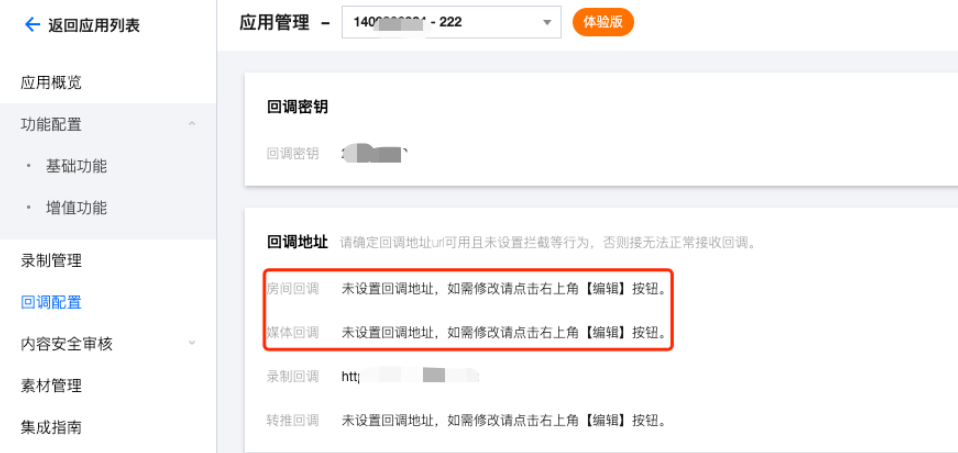
超时重试
事件回调服务器在发送消息通知后,5秒内没有收到您的服务器的响应,即认为通知失败。首次通知失败后会立即重试,后续失败会以10秒的间隔继续重试,直到消息存续时间超过1分钟,不再重试。
事件回调消息格式
事件回调消息以 HTTP/HTTPS POST 请求发送给您的服务器,其中:
字符编码格式:UTF-8。
请求:body 格式为 JSON。
应答:HTTP STATUS CODE = 200,服务端忽略应答包具体内容,为了协议友好,建议客户应答内容携带 JSON: {"code":0}。
注意:
您的 HTTP 应答包长(header+body)需要控制在2000个字节以内。
POST 请求的 JSON 包体不会删减已有字段,但会根据业务需求添加新字段。在集成回调时,您需要适应这些新增字段的情况。
参数说明
回调消息参数
事件回调消息的 header 中包含以下字段:
字段名 | 值 |
Content-Type | application/json |
Sign | 签名值 |
SdkAppId | sdk application id |
事件回调消息的 body 中包含以下字段:
事件组 ID
字段名 | 值 | 含义 |
EVENT_GROUP_ROOM | 1 | 房间事件组 |
EVENT_GROUP_MEDIA | 2 | 媒体事件组 |
说明:
事件类型
字段名 | 值 | 含义 |
EVENT_TYPE_CREATE_ROOM | 101 | 创建房间 |
EVENT_TYPE_DISMISS_ROOM | 102 | 解散房间 |
EVENT_TYPE_ENTER_ROOM | 103 | 进入房间 |
EVENT_TYPE_EXIT_ROOM | 104 | 退出房间 |
EVENT_TYPE_CHANGE_ROLE | 105 | 切换角色 |
EVENT_TYPE_START_VIDEO | 201 | 开始推送视频数据 |
EVENT_TYPE_STOP_VIDEO | 202 | 停止推送视频数据 |
EVENT_TYPE_START_AUDIO | 203 | 开始推送音频数据 |
EVENT_TYPE_STOP_AUDIO | 204 | 停止推送音频数据 |
EVENT_TYPE_START_ASSIT | 205 | 开始推送辅路数据 |
EVENT_TYPE_STOP_ASSIT | 206 | 停止推送辅路数据 |
注意:
退出房间只会回调104事件,不会回调202跟204事件。104事件相当于包含了202和204事件。手动关闭视频/音频,才会回调202/204事件。
事件回调示例
{ "EventGroupId": 1,"EventType": 101,"CallbackTs": 1687770730166,"EventInfo": {"RoomId": 12345,"EventTs": 1687770730,"EventMsTs": 1687770730160,"UserId": "test"}}
{"EventGroupId": 1,"EventType": 102,"CallbackTs": 1687771618531,"EventInfo": {"RoomId": "12345","EventTs": 1687771618,"EventMsTs": 1687771618457}}
{"EventGroupId": 1,"EventType": 103,"CallbackTs": 1687770731932,"EventInfo": {"RoomId": 12345,"EventTs": 1687770731,"EventMsTs": 1687770731831,"UserId": "test","Role": 21,"TerminalType": 2,"UserType": 3,"Reason": 1}}
{"EventGroupId": 1,"EventType": 104,"CallbackTs": 1687770731922,"EventInfo": {"RoomId": 12345,"EventTs": 1687770731,"EventMsTs": 1687770731898,"UserId": "test","Role": 20,"Reason": 1}}
{"EventGroupId": 1,"EventType": 105,"CallbackTs": 1687772245596,"EventInfo": {"RoomId": 12345,"EventTs": 1687772245,"EventMsTs": 1687772245537,"UserId": "test","Role": 21}}
{"EventGroupId": 2,"EventType": 201,"CallbackTs": 1687771803198,"EventInfo": {"RoomId": 12345,"EventTs": 1687771803,"EventMsTs": 1687771803192,"UserId": "test"}}
{"EventGroupId": 2,"EventType": 202,"CallbackTs": 1687771919458,"EventInfo": {"RoomId": 12345,"EventTs": 1687771919,"EventMsTs": 1687771919447,"UserId": "test","Reason": 0}}
{"EventGroupId": 2,"EventType": 203,"CallbackTs": 1687771869377,"EventInfo": {"RoomId": 12345,"EventTs": 1687771869,"EventMsTs": 1687771869365,"UserId": "test"}}
{"EventGroupId": 2,"EventType": 204,"CallbackTs": 1687770732498,"EventInfo": {"RoomId": 12345,"EventTs": 1687770732,"EventMsTs": 1687770732383,"UserId": "test","Reason": 0}}
{"EventGroupId": 2,"EventType": 205,"CallbackTs": 1687772013823,"EventInfo": {"RoomId": 12345,"EventTs": 1687772013,"EventMsTs": 1687772013753,"UserId": "test"}}
{"EventGroupId": 2,"EventType": 206,"CallbackTs": 1687772015054,"EventInfo": {"RoomId": 12345,"EventTs": 1687772015,"EventMsTs": 1687772015032,"UserId": "test","Reason": 0}}
事件信息
字段名 | 类型 | 含义 |
RoomId | String/Number | 房间名(类型与客户端房间号类型一致) |
EventTs | Number | 事件发生的 Unix 时间戳,单位为秒(兼容保留) |
EventMsTs | Number | 事件发生的 Unix 时间戳,单位为毫秒 |
UserId | String | 用户 ID |
UniqueId | Number | 唯一标识符(option:房间事件组携带) 当客户端发生了一些特殊行为,例如切换网络、进程异常退出及重进等,此时您的回调服务器可能会收到同一个用户多次进房和退房回调,UniqueId 可用于标识用户的同一次进退房 |
Role | Number | |
TerminalType | Number | 终端类型(option:进房时携带) |
UserType | Number | 用户类型(option:进房时携带) |
Reason | Number | |
ClientIpv4 | String | 客户端 Ipv4 地址(option:使用Ipv4进房时,103事件携带) |
ClientIpv6 | String | 客户端 Ipv6 地址(option:使用Ipv6进房时,103事件携带) |
注意:
我们已发布“过滤客户端特殊行为导致的重复回调”策略。如果您是2021年07月30日之后接入回调服务,默认走新策略,房间事件组不再携带 UniqueId(唯一标识符)。
角色类型
字段名 | 值 | 含义 |
MEMBER_TRTC_ANCHOR | 20 | 主播 |
MEMBER_TRTC_VIEWER | 21 | 观众 |
终端类型
字段名 | 值 | 含义 |
TERMINAL_TYPE_WINDOWS | 1 | Windows 端 |
TERMINAL_TYPE_ANDROID | 2 | Android 端 |
TERMINAL_TYPE_IOS | 3 | iOS 端 |
TERMINAL_TYPE_LINUX | 4 | Linux 端 |
TERMINAL_TYPE_OTHER | 100 | 其他 |
用户类型
字段名 | 值 | 含义 |
USER_TYPE_WEBRTC | 1 | webrtc |
USER_TYPE_APPLET | 2 | 小程序 |
USER_TYPE_NATIVE_SDK | 3 | Native SDK |
具体原因
字段名 | 含义 |
进房 | 1:正常进房 2:切换网络 3:超时重试 4:跨房连麦进房 |
退房 | 1:正常退房 2:超时离开 3:房间用户被移出 4:取消连麦退房 5:强杀 注意:Android 系统无法捕捉进程被强制终止,只能等待后台超时离开,此时回调 reason 为2 |
停止媒体流 | 0:正常停止 1:超时停止 注意:后台连续30秒(默认)没有收到媒体流,将回调停止媒体流事件,并携带 Reason 为1,表示超时停止。 |
计算签名
签名由 HMAC SHA256 加密算法计算得出,您的事件回调接收服务器收到回调消息后,通过同样的方式计算出签名,相同则说明是腾讯云的实时音视频的事件回调,没有被伪造。签名的计算如下所示:
//签名 Sign 计算公式中 key 为计算签名 Sign 用的加密密钥。Sign = base64(hmacsha256(key, body))
注意:
body 为您收到回调请求的原始包体,不要做任何转化,示例如下:
body="{\\n\\t\\"EventGroupId\\":\\t1,\\n\\t\\"EventType\\":\\t103,\\n\\t\\"CallbackTs\\":\\t1615554923704,\\n\\t\\"EventInfo\\":\\t{\\n\\t\\t\\"RoomId\\":\\t12345,\\n\\t\\t\\"EventTs\\":\\t1608441737,\\n\\t\\t\\"UserId\\":\\t\\"test\\",\\n\\t\\t\\"UniqueId\\":\\t1615554922656,\\n\\t\\t\\"Role\\":\\t20,\\n\\t\\t\\"Reason\\":\\t1\\n\\t}\\n}"
签名校验示例
import javax.crypto.Mac;import javax.crypto.spec.SecretKeySpec;import java.util.Base64;//# 功能:第三方回调sign校验//# 参数://# key:控制台配置的密钥key//# body:腾讯云回调返回的body体//# sign:腾讯云回调返回的签名值sign//# 返回值://# Status:OK 表示校验通过,FAIL 表示校验失败,具体原因参考Info//# Info:成功/失败信息public class checkSign {public static String getResultSign(String key, String body) throws Exception {Mac hmacSha256 = Mac.getInstance("HmacSHA256");SecretKeySpec secret_key = new SecretKeySpec(key.getBytes(), "HmacSHA256");hmacSha256.init(secret_key);return Base64.getEncoder().encodeToString(hmacSha256.doFinal(body.getBytes()));}public static void main(String[] args) throws Exception {String key = "123654";String body = "{\\n" + "\\t\\"EventGroupId\\":\\t2,\\n" + "\\t\\"EventType\\":\\t204,\\n" + "\\t\\"CallbackTs\\":\\t1664209748188,\\n" + "\\t\\"EventInfo\\":\\t{\\n" + "\\t\\t\\"RoomId\\":\\t8489,\\n" + "\\t\\t\\"EventTs\\":\\t1664209748,\\n" + "\\t\\t\\"EventMsTs\\":\\t1664209748180,\\n" + "\\t\\t\\"UserId\\":\\t\\"user_85034614\\",\\n" + "\\t\\t\\"Reason\\":\\t0\\n" + "\\t}\\n" + "}";String Sign = "kkoFeO3Oh2ZHnjtg8tEAQhtXK16/KI05W3BQff8IvGA=";String resultSign = getResultSign(key, body);if (resultSign.equals(Sign)) {System.out.println("{'Status': 'OK', 'Info': '校验通过'}");} else {System.out.println("{'Status': 'FAIL', 'Info': '校验失败'}");}}}
# -*- coding: utf8 -*-import hmacimport base64from hashlib import sha256# 功能:第三方回调sign校验# 参数:# key:控制台配置的密钥key# body:腾讯云回调返回的body体# sign:腾讯云回调返回的签名值sign# 返回值:# Status:OK 表示校验通过,FAIL 表示校验失败,具体原因参考Info# Info:成功/失败信息def checkSign(key, body, sign):temp_dict = {}computSign = base64.b64encode(hmac.new(key.encode('utf-8'), body.encode('utf-8'), digestmod=sha256).digest()).decode('utf-8')print(computSign)if computSign == sign:temp_dict['Status'] = 'OK'temp_dict['Info'] = '校验通过'return temp_dictelse:temp_dict['Status'] = 'FAIL'temp_dict['Info'] = '校验失败'return temp_dictif __name__ == '__main__':key = '123654'body = "{\\n" + "\\t\\"EventGroupId\\":\\t2,\\n" + "\\t\\"EventType\\":\\t204,\\n" + "\\t\\"CallbackTs\\":\\t1664209748188,\\n" + "\\t\\"EventInfo\\":\\t{\\n" + "\\t\\t\\"RoomId\\":\\t8489,\\n" + "\\t\\t\\"EventTs\\":\\t1664209748,\\n" + "\\t\\t\\"EventMsTs\\":\\t1664209748180,\\n" + "\\t\\t\\"UserId\\":\\t\\"user_85034614\\",\\n" + "\\t\\t\\"Reason\\":\\t0\\n" + "\\t}\\n" + "}"sign = 'kkoFeO3Oh2ZHnjtg8tEAQhtXK16/KI05W3BQff8IvGA='result = checkSign(key, body, sign)print(result)
<?phpclass TlsEventSig {private $key = false;private $body = false;public function __construct( $key, $body ) {$this->key = $key;$this->body = $body;}private function __hmacsha256() {$hash = hash_hmac( 'sha256', $this->body, $this->key, true );return base64_encode( $hash);}public function genEventSig() {return $this->__hmacsha256();}}$key="789";$data="{\\n\\t\\"EventGroupId\\":\\t1,\\n\\t\\"EventType\\":\\t101,\\n\\t\\"CallbackTs\\":\\t1608086882372,\\n\\t\\"EventInfo\\":\\t{\\n\\t\\t\\"RoomId\\":\\t20222,\\n\\t\\t\\"EventTs\\":\\t1608086882,\\n\\t\\t\\"UserId\\":\\t\\"222222_phone\\"\\n\\t}\\n}";$api = new TlsEventSig($key, $data);echo $api->genEventSig();
package mainimport "fmt"import ("crypto/hmac""crypto/sha256""encoding/base64")func main () {var data = "{\\n\\t\\"EventGroupId\\":\\t1,\\n\\t\\"EventType\\":\\t101,\\n\\t\\"CallbackTs\\":\\t1608086882372,\\n\\t\\"EventInfo\\":\\t{\\n\\t\\t\\"RoomId\\":\\t20222,\\n\\t\\t\\"EventTs\\":\\t1608086882,\\n\\t\\t\\"UserId\\":\\t\\"222222_phone\\"\\n\\t}\\n}"var key = "789"fmt.Println(hmacsha256(data,key))}func hmacsha256(data string, key string) string {h := hmac.New(sha256.New, []byte(key))h.Write([]byte(data))return base64.StdEncoding.EncodeToString(h.Sum(nil))}


