IM聊天不掉线?生产级WebSocket断线重连、心跳保活实战
原创
IM聊天不掉线?生产级WebSocket断线重连、心跳保活实战
原创
JackJiang
发布于 2026-10-14 18:38:22
发布于 2026-10-14 18:38:22
本文作者老前端的功夫,有修订和改动。
1、引言
聊天聊的正嗨,突然IM消息发不出去,一看控制台——WebSocket disconnected。网络抖动、切换WiFi、电脑休眠都可能触发断线。如果不做掉线重连和心跳保活,用户只能手动刷新页面,体验极差。
本文将给出一套生产级Web端即时通信方案,包括心跳检测保活 + 指数退避重连,代码直接能跑。
2、技术思路
主要思路如下:
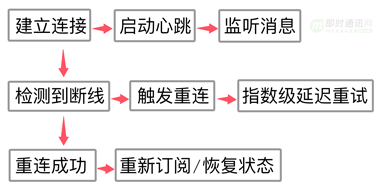
核心要解决三个问题:
- 1)怎么知道连接断了?(心跳超时 + 浏览器onclose事件)
- 2)断了怎么重连?(指数退避,避免疯狂重试压垮服务器)
- 3)重连后状态怎么恢复?(重新鉴权、重新加入房间)
3、实现代码
class ReconnectingWebSocket {
  constructor(url, options = {}) {
    this.url = url
    this.options = {
      heartbeatInterval: 30000,        // 心跳间隔 30秒
      heartbeatTimeout: 10000,         // 心跳超时 10秒
      reconnectDelay: 1000,            // 初始重连延迟 1秒
      maxReconnectDelay: 30000,        // 最大重连延迟 30秒
      reconnectDecay: 1.5,             // 退避指数
      maxReconnectAttempts: Infinity,  // 最大重试次数
      ...options
    }

    this.ws = null
    this.reconnectAttempts = 0
    this.heartbeatTimer = null
    this.heartbeatTimeoutTimer = null
    this.manualClose = false// 是否手动关闭(手动关不重连)
    this.messageQueue = []            // 重连期间的离线消息队列

    this.listeners = newMap()        // 事件监听器
    this.connect()
  }

  // 建立连接
  connect() {
    this.ws = newWebSocket(this.url)

    this.ws.onopen = (event) => {
      console.log('WebSocket 连接成功')
      this.reconnectAttempts = 0
      this.startHeartbeat()
      this.flushMessageQueue()        // 重连成功后发送队列中的消息
      this.emit('open', event)
    }

    this.ws.onmessage = (event) => {
      // 收到任何消息都重置心跳超时计时器
      this.resetHeartbeatTimeout()
      this.emit('message', event.data)
    }

    this.ws.onclose = (event) => {
      console.warn('WebSocket 连接关闭', event.code, event.reason)
      this.stopHeartbeat()

      if(!this.manualClose) {
        this.scheduleReconnect()
      }
      this.emit('close', event)
    }

    this.ws.onerror = (error) => {
      console.error('WebSocket 错误', error)
      this.emit('error', error)
      // onerror之后通常会触发onclose,所以这里不额外处理重连
    }
  }

  // 启动心跳
  startHeartbeat() {
    this.stopHeartbeat() // 清理旧定时器

    this.heartbeatTimer = setInterval(() => {
      if(this.ws.readyState === WebSocket.OPEN) {
        // 发送心跳包,格式和后端约定好
        this.ws.send(JSON.stringify({ type: 'PING'}))

        // 设置心跳超时定时器
        this.heartbeatTimeoutTimer = setTimeout(() => {
          console.warn('心跳超时,主动断开连接')
          this.ws.close() // 触发onclose,进而触发重连
        }, this.options.heartbeatTimeout)
      }
    }, this.options.heartbeatInterval)
  }

  // 重置心跳超时(收到消息时调用)
  resetHeartbeatTimeout() {
    if(this.heartbeatTimeoutTimer) {
      clearTimeout(this.heartbeatTimeoutTimer)
      this.heartbeatTimeoutTimer = null
    }
  }

  // 停止心跳
  stopHeartbeat() {
    if(this.heartbeatTimer) {
      clearInterval(this.heartbeatTimer)
      this.heartbeatTimer = null
    }
    this.resetHeartbeatTimeout()
  }

  // 指数退避重连调度
  scheduleReconnect() {
    if(this.reconnectAttempts >= this.options.maxReconnectAttempts) {
      console.error('已达最大重连次数,停止重连')
      this.emit('reconnectFailed')
      return
    }

    const delay = Math.min(
      this.options.reconnectDelay * Math.pow(this.options.reconnectDecay, this.reconnectAttempts),
      this.options.maxReconnectDelay
    )

    console.log(`${delay}ms 后尝试第 ${this.reconnectAttempts + 1} 次重连`)

    setTimeout(() => {
      if(!this.manualClose) {
        this.reconnectAttempts++
        this.emit('reconnecting', this.reconnectAttempts)
        this.connect()
      }
    }, delay)
  }

  // 发送消息(支持离线队列)
  send(data) {
    const message = typeofdata === 'string'? data : JSON.stringify(data)

    if(this.ws.readyState === WebSocket.OPEN) {
      this.ws.send(message)
    } else{
      console.warn('连接未就绪,消息进入队列')
      this.messageQueue.push(message)
    }
  }

  // 连接恢复后发送队列中的消息
  flushMessageQueue() {
    while(this.messageQueue.length > 0) {
      const msg = this.messageQueue.shift()
      if(this.ws.readyState === WebSocket.OPEN) {
        this.ws.send(msg)
      }
    }
  }

  // 手动关闭(不再重连)
  close() {
    this.manualClose = true
    this.stopHeartbeat()
    this.ws.close()
  }

  // 事件监听系统
  on(event, callback) {
    if(!this.listeners.has(event)) {
      this.listeners.set(event, newSet())
    }
    this.listeners.get(event).add(callback)
  }

  off(event, callback) {
    this.listeners.get(event)?.delete(callback)
  }

  emit(event, ...args) {
    this.listeners.get(event)?.forEach(cb => cb(...args))
  }
}

// 使用示例
const ws = newReconnectingWebSocket('wss://chat.example.com/ws', {
  heartbeatInterval: 20000,
  maxReconnectAttempts: 10
})

ws.on('open', () => {
  console.log('连接建立,发送鉴权信息')
  ws.send({ type: 'AUTH', token: localStorage.getItem('token') })
})

ws.on('message', (data) => {
  const msg = JSON.parse(data)
  if(msg.type === 'PONG') {
    console.log('收到心跳响应')
  } else{
    // 处理业务消息
    handleChatMessage(msg)
  }
})

ws.on('reconnecting', (attempt) => {
  showToast(`网络不稳定,正在重连... (${attempt}/10)`)
})

ws.on('reconnectFailed', () => {
  showToast('连接失败,请检查网络后刷新页面')
})
4、为什么要双向心跳?
很多文章只讲前端定时发PING,忽略了后端也要发PONG。
如果后端不响应心跳,前端无法区分“连接正常”和“连接已断但TCP还未感知”。
代码中设置了heartbeatTimeout,超时未收到任何消息(包括PONG)就主动断开触发重连。
关于TCP长连接有效性的文章:
- 《为何基于TCP协议的移动端IM仍然需要心跳保活机制?》
- 《彻底搞懂TCP协议层的KeepAlive保活机制》
关于移动网络复杂性问题的资料:
- 《为什么WiFi信号差?一文即懂!》
- 《上网卡顿?网络掉线?一文即懂!》
- 《为什么手机信号差?一文即懂!》
- 《高铁上无线上网有多难?一文即懂!》
关于移动弱网问题、优化方案等:
- 《现代移动端网络短连接的优化手段总结:请求速度、弱网适应、安全保障》
- 《移动端IM开发者必读(一):通俗易懂,理解移动网络的“弱”和“慢”》
- 《移动端IM开发者必读(二):史上最全移动弱网络优化方法总结》
- 《百度APP移动端网络深度优化实践分享(三):移动端弱网优化篇》
5、为什么要指数退避
网络抖动时,如果立即重连很可能再次失败。
指数退避(1s → 1.5s → 2.25s...)既能快速恢复,又能避免重连风暴打挂服务器。
公式:delay * decay^attempts,上限 maxReconnectDelay。
6、离线消息队列的作用
重连期间用户可能还在发消息,放入队列,等onopen触发后批量发送。
注意:要做去重或幂等处理,避免消息重复。
7、手动关闭与自动重连的区分
用户主动退出聊天室时,不应该再重连。
用manualClose标志区分,调用close()方法关闭连接且不再重连。
8、与后端配合的约定
前后端需要约定好心跳消息格式,例如:
//前端发 { "type": "PING"} //后端回 { "type": "PONG"}
后端也应有超时踢人机制,例如60秒未收到PING则主动断开该连接。
9、生产环境补充优化
主要有以下几点:
- 1)页面可见性API:页面切后台时降低心跳频率或暂停心跳,切回来立即检查连接状态;
- 2)网络状态监听:结合navigator.onLine,断网时暂停重连,网络恢复时立即重连;
- 3)token过期处理:重连后鉴权可能失败,需在onmessage中处理401并引导重新登录。
// 页面可见性优化示例
document.addEventListener('visibilitychange', () => {
  if(document.hidden) {
    ws.options.heartbeatInterval = 60000 // 后台降频
  } else{
    ws.options.heartbeatInterval = 20000
    if(ws.ws.readyState !== WebSocket.OPEN) {
      ws.connect() // 立即重连
    }
  }
})
这套方案已在多个IM项目中稳定运行,断线重连成功率99%以上。复制代码到项目里,根据业务微调参数即可。
10、参考资料
- [1] 零基础IM开发入门(二):什么是IM聊天系统的实时性?
- [2] 冰山之下,一次网络请求背后的技术秘密
- [3] 为何基于TCP协议的移动端IM仍然需要心跳保活机制?
- [4] 跟着源码学IM(五):正确理解IM长连接、心跳及重连机制,并动手实现
- [5] 彻底搞懂TCP协议层的KeepAlive保活机制
- [6] 能Ping通,TCP就一定能连接和通信吗?
- [7] 网络ping不通到底有多少原因?一文搞明白!
- [8] 关闭TCP连接时为什么会TIME_WAIT、CLOSE_WAIT
- [9] 深入研究分析TCP的异常关闭
- [10] 通俗易懂,理解移动网络的“弱”和“慢”
- [11] 为什么WiFi信号差?一文即懂!
- [12] 上网卡顿?网络掉线?一文即懂!
- [13] 为什么手机信号差?一文即懂!
- [14] 高铁上无线上网有多难?一文即懂!
- [15] Web端即时通讯实践干货:如何让你的WebSocket断网重连更快速?
- [16] WebSocket从入门到精通,半小时就够!
- [17] 都HTML5了,Web端即时通讯技术到底该用什么?一文即懂!
(本文同步发布于:http://www.52im.net/thread-4924-1-1.html )
原创声明:本文系作者授权腾讯云开发者社区发表,未经许可,不得转载。
如有侵权,请联系 cloudcommunity@tencent.com 删除。
目录
腾讯云开发者

Copyright © 2013 - 2026 Tencent Cloud. All Rights Reserved. 腾讯云 版权所有
深圳市腾讯计算机系统有限公司 ICP备案/许可证号:粤B2-20090059  粤公网安备44030502008569号
腾讯云计算(北京)有限责任公司 京ICP证150476号 | 京ICP备11018762号