Only the Chinese version of this page is provided currently. The English version will be provided soon.

Employee Resignation Guide

Last updated: 2024-11-28 11:13:31

This document provides guidance on Tencent Cloud account handover, account recovery, account login issues, etc., during employee resignation.

Pre-resignation Operations

Root Account Handover

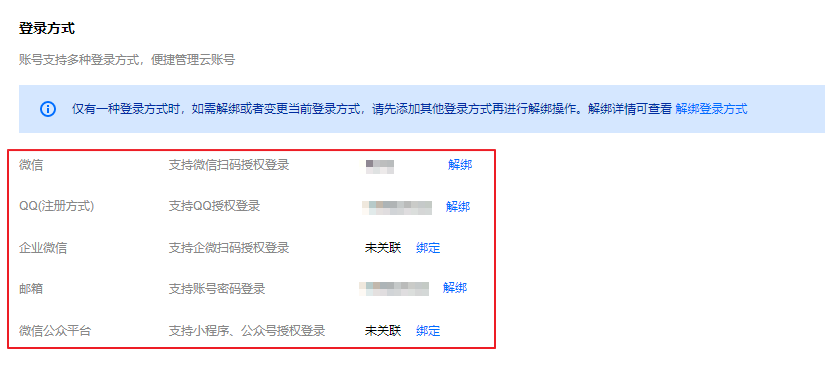
Before resignation, employees need to disconnect their personal contact information from their Tencent Cloud account, including:
Unbind personal phone number
Unbind personal email
Unbind enterprise WeChat ID
Unbind personal WeChat ID
Unbind personal QQ ID
Unbind WeChat public platform
The above operations can all be completed at the Account Information > log in to method. For detailed instructions, please refer to the Unbinding log in to Method document.


Sub-account Handover

Before an employee resigns, if they are linked to a sub-account, the root account must delete the sub-account.
1. If a sub-account has active keys, please disable or delete the keys in the API Key Management section (refer to Sub-Account Access Key Management).
2. In the User List , find the sub-account you wish to delete, click the More Actions > Delete, and follow the prompts to confirm and delete.


Post-resignation Operations

Employee Resignation Account Recovery

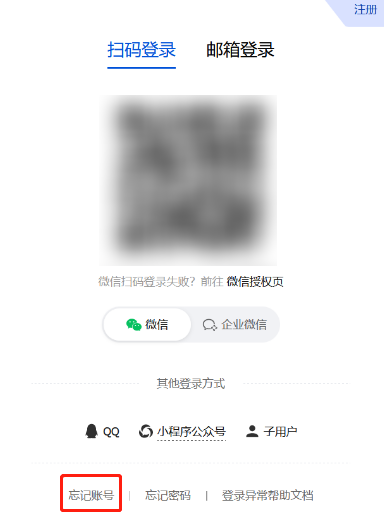
In cases where an employee leaves and there is no knowledge of the account ID, associated phone number, domain, registration information, etc., the following method can be used to recover the account.
Recover using enterprise information
Recover using personal information
Recover using secure mobile
Recover using domain name
Recover using record information
Recover using server IP
Recover using account ID


Employee resignation unable to log in to

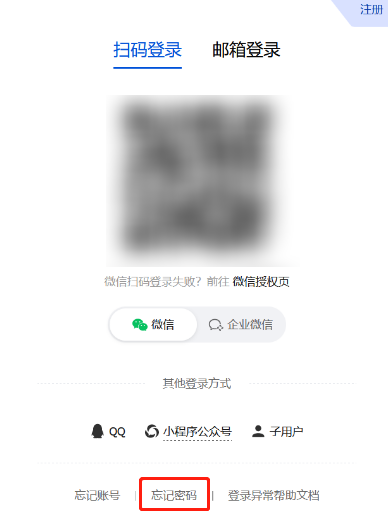
If your Tencent Cloud account becomes inaccessible due to staff departure and you need to rebind or change the account, you can through forget password fill in basic account information to apply for binding a new email as the log in method. Once approved, you can log in to your account through this email, or you can click forget password to reset your log in password.


Log in to security verification issue

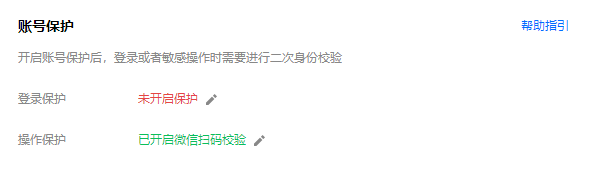
If you encounter security verification issues with your Tencent Cloud account due to employee resignation, please refer to Security Settings > Account Protection for specific verification methods, and then modify as follows:
If verifying via phone number, then modify the phone number
If verifying via WeChat ID, then unbind WeChat ID
If verifying via email, then unbind email
If verifying via QQ Number, then unbind QQ Number