手把手教你用Python+迅投miniqmt构建实时大盘涨跌幅图形变化监控

手把手教你用Python+迅投miniqmt构建实时大盘涨跌幅图形变化监控

子晓AI量化
发布于 2026-05-07 18:25:51
发布于 2026-05-07 18:25:51
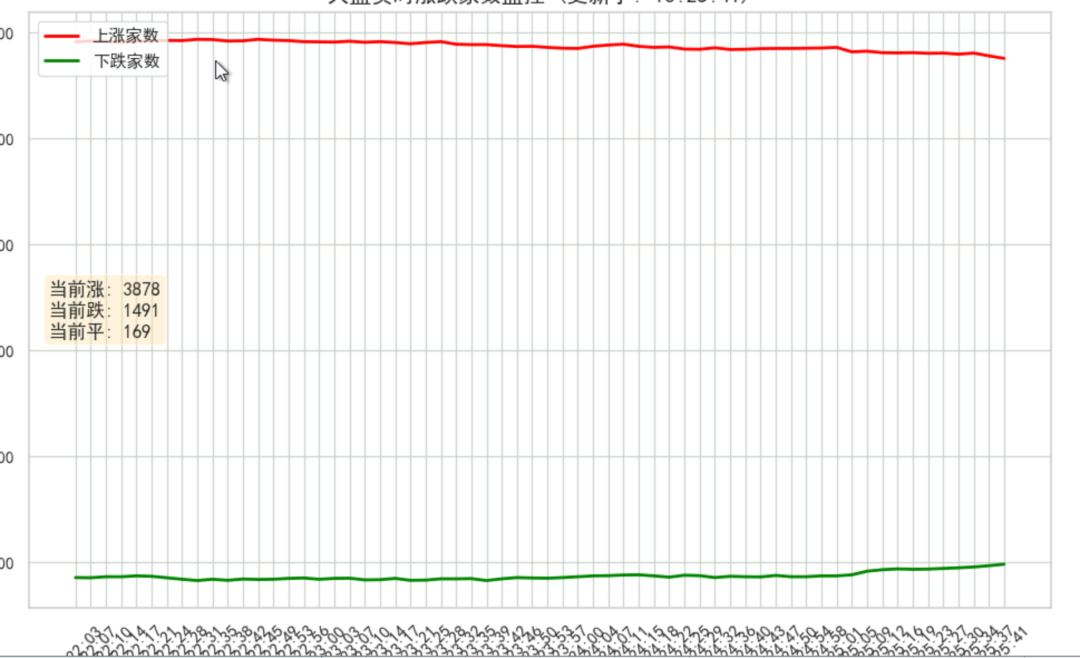
在量化交易的道路上,很多初学者往往只盯着上证指数或者深证成指的跳动。然而,经验丰富的老手都知道,指数往往是失真的。
有时候指数翻红,但你手里的个股却绿油油一片;有时候指数微跌,但市场情绪却已经崩溃。这是因为大盘股的权重扭曲了整体市场的真实表现。要想看透市场的真实水温,我们需要一个更微观、更直接的指标——全市场涨跌家数统计。
今天,我们就利用 Python 和 QMT 的 xtdata 接口,手写一个实时大盘情绪监控工具。这不仅能帮你告别“只赚指数不赚钱”的困惑,更是你学习 Python 数据可视化和量化实盘对接的绝佳案例。
一、 为什么我们需要监控“涨跌家数”?
在正式写代码之前,我们先聊聊这个工具的实战意义。
在量化技术分析中,有一个非常重要的概念叫 “市场广度” 。涨跌家数就是市场广度的核心指标之一。
- 验证指数的真实性:当指数创新高,但上涨家数却逐渐减少(顶背离),说明上涨仅仅是由少数权重股拉动的,市场其实是虚弱的,此时往往是风险预警信号。
- 捕捉情绪冰点与沸点:当全市场上涨家数超过 4000 家,说明市场情绪达到沸点,可能需要警惕回调;当上涨家数不足 500 家,说明市场进入情绪冰点,往往孕育着反弹的机会。
通过实时绘制涨跌家数的曲线,我们能直观地看到资金在全市场的攻击方向,而不仅仅是盯着那几只大象在跳舞。
二、 核心代码实现
基于 QMT 的 xtdata 库和强大的 matplotlib 绘图库,我们可以在几十行代码内实现一个动态刷新的监控面板。
这里提供一个AI写的例子, 动态监控股票涨跌家数。
from xtquant import xtdata
import matplotlib.animation as animation
import matplotlib.pyplot as plt
import seaborn as sns
from datetime import datetime, timedelta
import warnings
# 忽略警告信息
warnings.filterwarnings('ignore')
# 设置绘图风格
sns.set(style="whitegrid")
# 设置字体 (兼容 Windows 和 Mac)
plt.rcParams['font.sans-serif'] = ['Arial Unicode MS', 'PingFang SC', 'SimHei']
plt.rcParams['axes.unicode_minus'] = False
def get_all_a_stock_codes():
    # 获取沪深A股板块
    stocks = xtdata.get_stock_list_in_sector('沪深京A股')
    return stocks
fig, ax = plt.subplots(figsize=(10, 6))
# 用于存储历史数据
time_history = []
up_history = []
down_history = []
flat_history = []
def update_market_charts(frame):
    """
    动态更新函数,会被matplotlib周期性调用
    """
    try:
        # 1. 获取全市场代码 (只在第一次运行时获取,避免重复请求)
        if not hasattr(update_market_charts, "stock_codes"):
            update_market_charts.stock_codes = get_all_a_stock_codes()
        stock_list = update_market_charts.stock_codes
        # 2. 获取实时行情快照
        # 返回结构: { stock_code: { 'lastPrice': ..., 'lastClose': ... }, ... }
        tick_data = xtdata.get_full_tick(stock_list)
        up_count = 0
        down_count = 0
        flat_count = 0
        # 3. 统计涨跌数
        for code, data in tick_data.items():
            last_price = data.get('lastPrice')  # 最新价
            last_close = data.get('lastClose')  # 昨收价
            # 过滤停牌或无数据的情况 (最新价为0通常表示无数据/停牌)
            if last_price is None or last_price == 0:
                continue
            if last_price > last_close:
                up_count += 1
            elif last_price < last_close:
                down_count += 1
            else:
                flat_count += 1
        current_time = datetime.now().strftime("%H:%M:%S")
        # 4. 更新历史数据
        time_history.append(current_time)
        up_history.append(up_count)
        down_history.append(down_count)
        flat_history.append(flat_count)
        # 保持数据列表长度,比如只显示最近 100 个时间点
        max_len = 100
        if len(time_history) > max_len:
            time_history.pop(0)
            up_history.pop(0)
            down_history.pop(0)
            flat_history.pop(0)
        # 5. 绘图
        ax.clear()  # 清空上一帧
        # 绘制三条线
        ax.plot(time_history, up_history, label='上涨家数', color='red', linewidth=2)
        ax.plot(time_history, down_history, label='下跌家数', color='green', linewidth=2)
        # ax.plot(time_history, flat_history, label='平盘家数', color='gray', linestyle='--') # 平盘通常波动小,可选
        # 设置图表格式
        ax.set_title(f"大盘实时涨跌家数监控 (更新于: {current_time})", fontsize=14)
        ax.set_xlabel("时间")
        ax.set_ylabel("家数")
        ax.legend(loc='upper left')
        # 优化X轴显示,避免时间标签重叠
        plt.xticks(rotation=45)
        # 在图表上显示当前数值
        info_text = f"当前涨: {up_count}\n当前跌: {down_count}\n当前平: {flat_count}"
        ax.text(0.02, 0.5, info_text, transform=ax.transAxes, fontsize=12,
                verticalalignment='center', bbox=dict(boxstyle='round', facecolor='wheat', alpha=0.5))
    except Exception as e:
        print(f"Error: {e}")
# --- 启动实时监控 ---
print("开始启动实时行情监控...")
print("如果是在QMT脚本里运行,请确保已连接行情接口。")
# 使用FuncAnimation进行动画循环,interval单位是毫秒 (例如3000ms = 3秒刷新一次)

ani = animation.FuncAnimation(fig, update_market_charts, interval=3000)
plt.tight_layout()
plt.show()
如何利用这个工具?
写好代码只是第一步,更重要的是如何解读图表。
当运行这个程序后,你会看到红绿两条线在实时搏杀。你可以尝试观察以下几种形态:
- 剪刀差开口:如果红线(上涨家数)快速向上,绿线向下,且两者开口迅速扩大,说明市场正在形成合力攻击,是跟随买入的信号。
- 顶背离预警:此时上证指数可能还在缓慢爬升,但你发现监控图中的红线开始掉头向下,甚至绿线反超红线。这就是典型的“二八分化”,此时应警惕权重股掩护出货的风险。
- 极度缩量横盘:如果红绿两条线都紧贴着底部(数值都很低),且变动很小,说明市场进入“垃圾时间”,资金观望情绪浓厚,此时操作容易挨打,不妨休息。
本文参与 腾讯云自媒体同步曝光计划,分享自微信公众号。
原始发表:2026-05-06,如有侵权请联系 cloudcommunity@tencent.com 删除
目录
腾讯云开发者

Copyright © 2013 - 2026 Tencent Cloud. All Rights Reserved. 腾讯云 版权所有
深圳市腾讯计算机系统有限公司 ICP备案/许可证号:粤B2-20090059  粤公网安备44030502008569号
腾讯云计算(北京)有限责任公司 京ICP证150476号 | 京ICP备11018762号