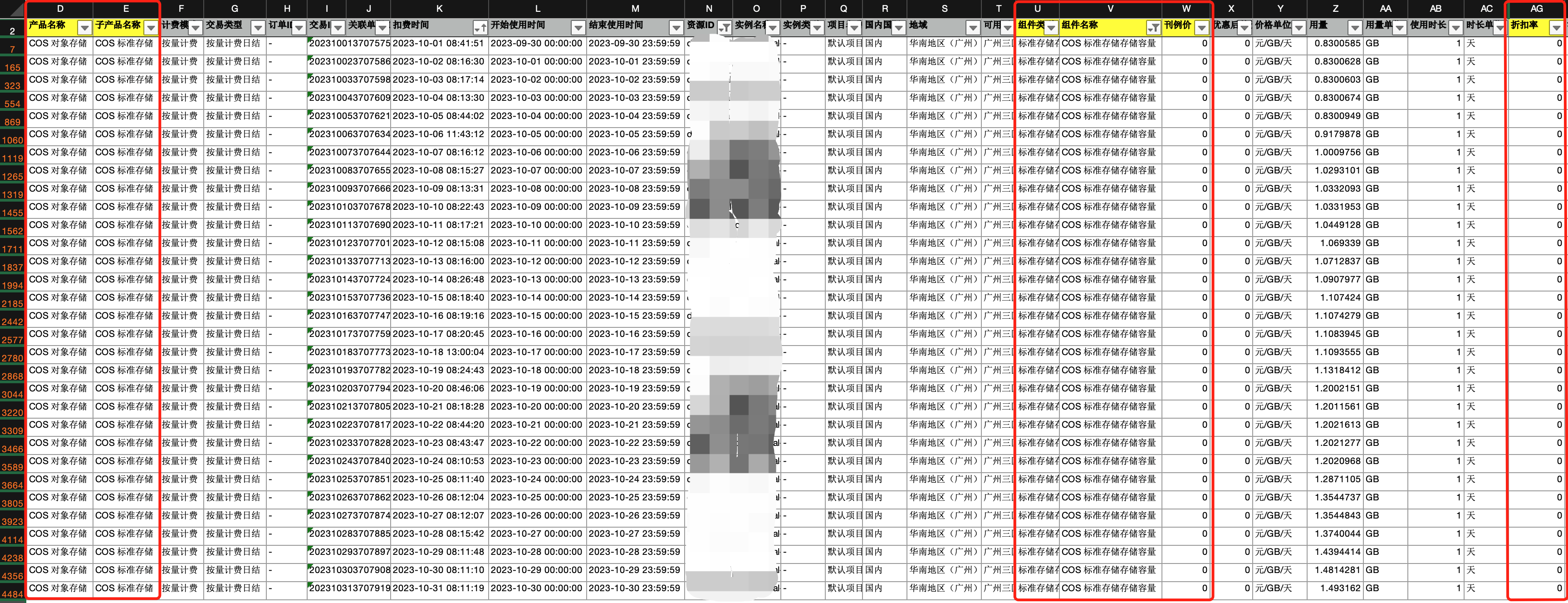
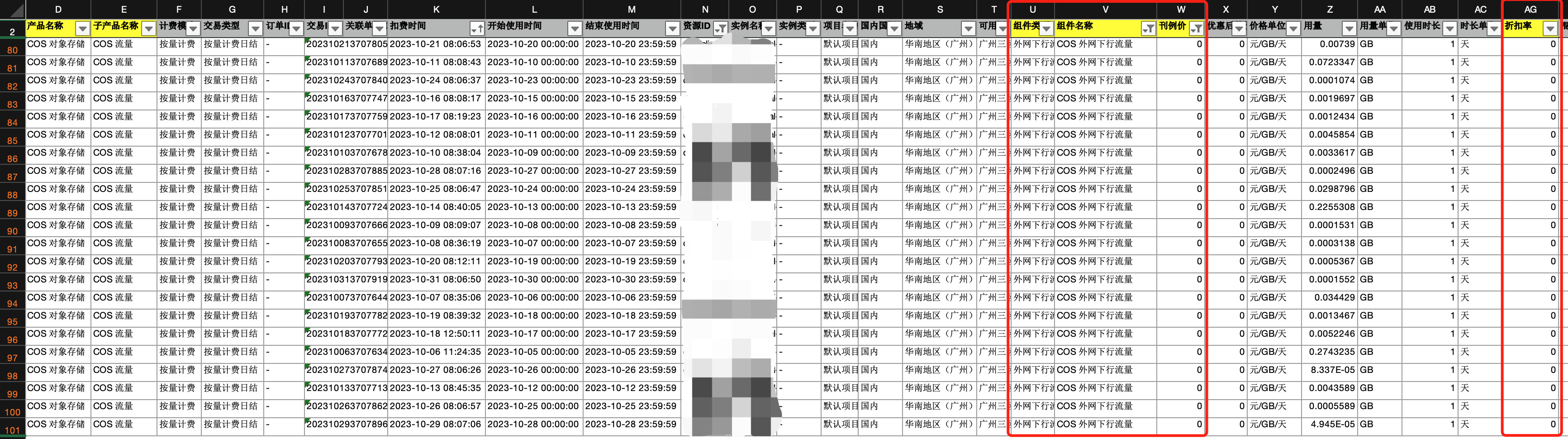
Can I change the billing mode of COS? How do I switch from pay-as-you-go billing to resource pack deduction mode?
You don't need to manually modify the billing mode of COS. If there are resource packs under your account, they will be used for deduction first; otherwise, pay-as-you-go billing will be adopted. For more information, see Billing Overview.
If there are valid COS resource packs under your account, they will be used for deduction first, that is, resource pack (prepaid) billing is used.
If there are no available COS resource packs under your account, your account balance will be used for deduction by default, that is, pay-as-you-go (postpaid) billing is used.
Can COS be billed by bandwidth?
No. COS supports only two billing modes: resource pack (prepaid) and pay-as-you-go (postpaid).
How are COS request fees calculated?
Request fees are calculated based on the number of requests sent to COS, including user requests and backend requests generated after you configure a feature. For more information, see Request Fees.
What changes have been made to COS pricing?
On September 30, 2021, the published prices of COS were reduced as follows:
1. Unit price of object tagging
Product Pricing: Public cloud regions in the Chinese mainland are reduced to 0.00166667 CNY/10,000 tags/day, while Hong Kong and overseas regions are reduced to 0.002 CNY/10,000 tags/day.
Billing cycle: Fees incurred between 00:00 and 23:59:59 on a day are settled the next day.
Bill description: These prices have taken effect for bills generated starting from October 1, 2021 (i.e., fees incurred in September until September 30, 2021).
2. Unit price of DEEP ARCHIVE read/write requests
Product Pricing: Public cloud regions in Chinese mainland, Hong Kong, and overseas are reduced to 0.5 CNY/10,000 times.
Billing cycle: Fees incurred in a month are billed on the first day of the next month.
Bill description: These prices have taken effect for bills generated starting from October 1, 2021 (i.e., fees incurred in September).
Free Tier
Does COS offer a free tier?
COS offers a limited free tier to all new users (both individual and enterprise users) to deduct the fees incurred by data stored in the STANDARD storage class. For more information, see Free Tier.
How do I check the free tier of COS?
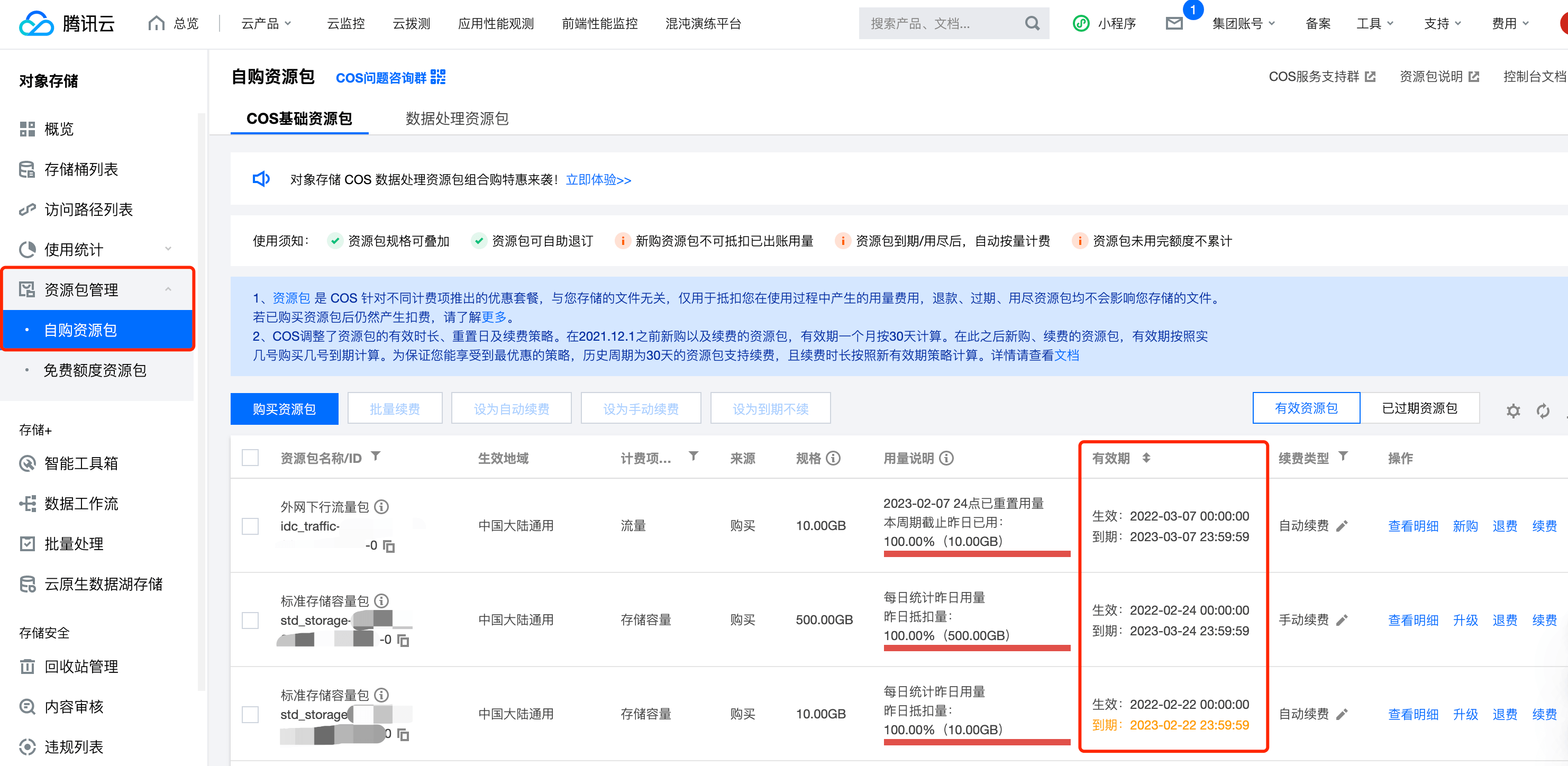
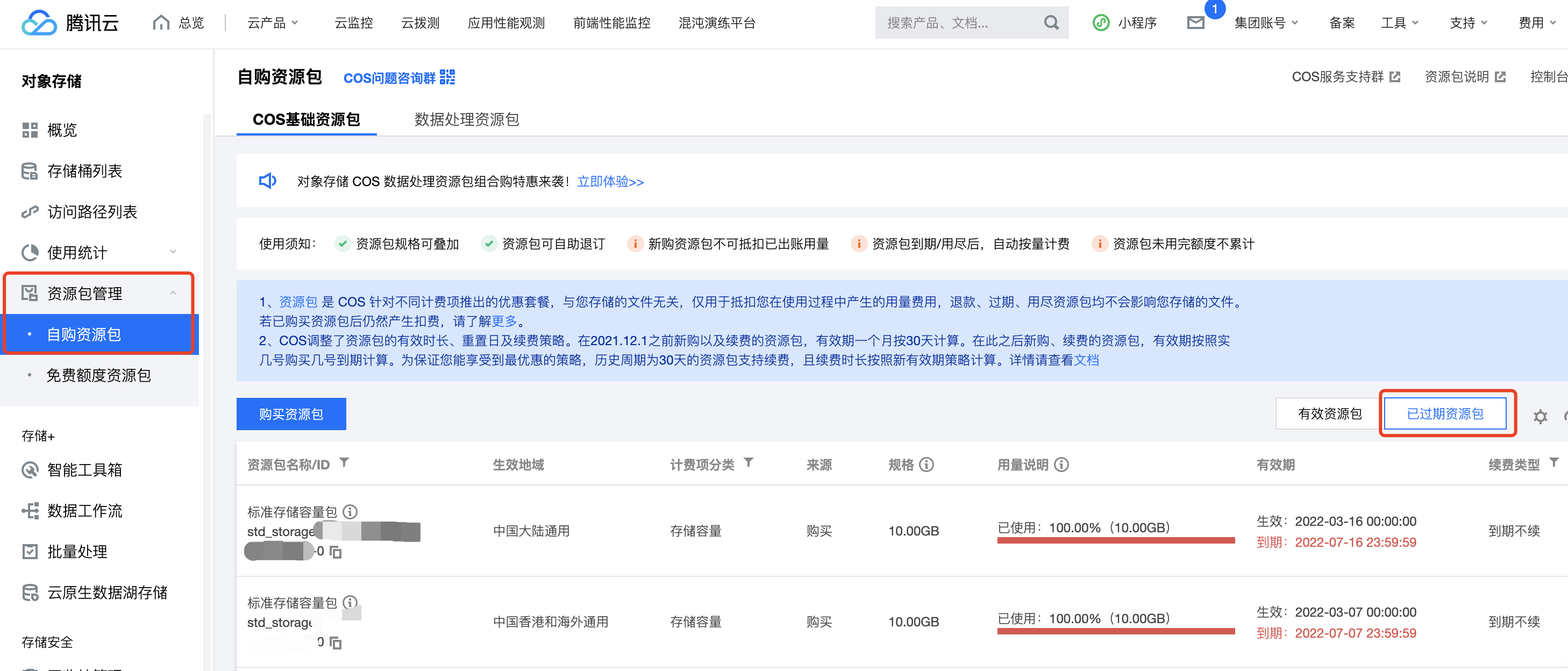
You can view the current status of your free quota resource packs in the COS console by navigating to Resource Pack Management > Free Quota Resource Packs. If the page is empty, it means there are no available free quota resource packs. You can check if the free quota has expired by visiting the Expired Resource Packs page.
Does COS offer a free tier outside the Chinese mainland?
Yes. The free tier is applicable to public cloud regions (including regions outside the Chinese mainland), not to finance cloud regions. For more information on regions, see Regions and Access Endpoints.
Based on the deductible billing items, the free tier resource pack provided by COS can only be applied to STANDARD storage and cannot be applied to non-STANDARD storage billing items, such as Infrequent Access storage, Archive storage, request count, and traffic. For more information about billing items, please refer to the Billing Items documentation.
Why is my account overdue or charged even if I am on the free tier?
The following are some of the possible reasons why your account has overdue payments if your free tier hasn't expired:
1. Multiple billable items are used, but the free tier is insufficient to deduct the fees of all the billable items:
When you upload data to the STANDARD storage class, storage usage fees will be incurred, which can be deducted from the free tier offered by COS. COS provides multiple separately billed storage classes. The free tier of STANDARD cannot be applied to deduction of fees of other storage classes (such as STANDARD_IA).
In COS, if your data needs to be accessed or downloaded, it will incur data traffic fees and data request fees. The free quota resource pack provided by COS does not cover these fees. You need to purchase outbound traffic packs and data request packs for deductions.
If you upload and download data between the COS bucket and CVM instance in the same region, the access is over the private network in the same region and doesn't incur traffic fees (cross-region private network access will incur cross-region traffic fees). If your data is downloaded to the local file system through the console, API, or COS tools, public network downstream traffic fees will be incurred.
COS offers multiple storage classes that generate different types of requests. For example, if STANDARD_IA data is downloaded, STANDARD_IA requests will be generated. Different types of requests cannot share the same request pack. Currently, only STANDARD and STANDARD_IA request packs are available, and requests for other storage classes are pay-as-you-go only.
If you use COS in conjunction with CDN/EdgeOne, you may incur CDN origin-pull traffic fees. You can purchase a CDN Origin-Pull Traffic Package for deductions. For information on the fees generated when using COS with CDN/EdgeOne, see Traffic Generated When COS Serves as a CDN Origin Server.
If you enable global acceleration, global acceleration fees will also be incurred, so you need to purchase a global acceleration traffic pack for deduction.
2. Excess resource usage fees:
For example, if COS grants you 50 GB of free STANDARD storage, but your actual data storage usage exceeds this limit and reaches 60 GB, the excess 10 GB will be billed on a pay-as-you-go basis, resulting in charges. You can resolve this situation by purchasing a storage capacity resource pack.
3. Free Quota Expiration:
COS offers a 6-month validity period of standard storage capacity free quota for first-time users. After the free quota expires, storage fees will be charged on a pay-as-you-go basis. You can log in to the COS console and go to Resource Pack Management > Free Quota Resource Pack to check the validity period of the free quota.
Does the free tier apply to the INTELLIGENT TIERING storage class?
No. The free tier is applicable only to STANDARD storage usage but not other billable items such as STANDARD_IA/ARCHIVE storage usage, requests, and traffic.
INTELLIGENT TIERING is an independent storage class and incurs INTELLIGENT TIERING storage usage fees, which cannot be deducted from the free tier for the STANDARD storage class. You can purchase an INTELLIGENT TIERING storage pack for deduction. For more information, see Free Tier.
Does COS offer a free tier for CDN usage?
No, COS and CDN/EdgeOne are two separate cloud products. COS does not offer free allowances for CDN/EdgeOne. The back-to-origin traffic generated when using CDN/EdgeOne is charged by COS, and you can purchase a CDN Back-to-Origin Traffic Package to offset usage or opt for pay-as-you-go billing. The CDN traffic fees are charged by the CDN cloud product. For an explanation of the differences between CDN/EdgeOne back-to-origin traffic and CDN traffic, see Traffic Generated When COS Serves as a CDN Origin.
Resource Pack
What is a resource pack (prepaid)?
COS supports two billing modes: pay-as-you-go (postpaid) and resource pack (prepaid). A resource pack (prepaid) is more cost-saving than pay-as-you-go billing. For more information on the supported resource pack types, see Resource Pack (Prepaid).
How do I purchase a resource pack?
You can purchase a resource pack as instructed in Purchase Guide.
Does the specification of a COS traffic pack refer to the monthly available amount or the total available amount for the validity period?
The specification of a traffic pack refers to the monthly amount of traffic that can be deducted. Fees for excess usage will be deducted from your account balance, and any amount of traffic not used in a month will not roll over to the next month. If you purchase two traffic packs with the same validity period, their specifications will be applied together every month, and fees for excess usage will be deducted from your account balance.
Why does my account still have overdue payment or incur charges even if I purchased a storage pack?
Possible causes are as follows:
1. Multiple billable items are used, but the purchased types of resource packs are insufficient to deduct the usage of all the billable items:
After uploading your data to COS, data storage fees will be incurred, and you need to purchase storage capacity packs for deductions. COS offers various storage types, each with its corresponding storage capacity pack, which cannot be mixed between different storage types. For example, STANDARD storage capacity packs cannot be used to deduct storage fees generated by STANDARD_IA storage.
In COS, if your data needs to be accessed or downloaded, data traffic fees and data request fees will be incurred. You need to purchase public outbound traffic packs and data request packs for deductions:
If you upload and download data between the COS bucket and CVM instance in the same region, the access is over the private network in the same region and doesn't incur traffic fees (cross-region private network access will incur cross-region traffic fees). If your data is downloaded to the local file system through the console, API, or COS tools, public network downstream traffic fees will be incurred.
COS offers multiple storage classes that generate different types of requests. For example, if STANDARD_IA data is downloaded, STANDARD_IA requests will be generated. Different types of requests cannot share the same request pack. Currently, only STANDARD and STANDARD_IA request packs are available, and requests for other storage classes are pay-as-you-go only.
If you use COS in conjunction with CDN/EdgeOne, you may incur CDN origin-pull traffic fees. You can purchase a CDN Origin-Pull Traffic Package for deductions. For information on the fees generated when using COS with CDN/EdgeOne, see Traffic Generated When COS Serves as a CDN Origin Server.
If you enable global acceleration, global acceleration fees will also be incurred, so you need to purchase a global acceleration traffic pack for deduction.
2. The region of the purchased resource pack is not the same as the region of your bucket, so the resource pack cannot be applied to deduction of fees:
You need to select a region for a resource pack when purchasing it, and a resource pack purchased for one region cannot be used for another region. For example, if you purchased a STANDARD storage pack for regions in the Chinese mainland (excluding finance cloud regions), but your data is stored in a bucket in Singapore, the bucket in Singapore will incur fees separately, which cannot be deducted from the resource pack for regions in the Chinese mainland.
Currently, COS only provides resource packs for regions in the Chinese mainland and regions outside the Chinese mainland, and fees incurred by buckets in other regions (such as buckets in finance cloud regions) are still pay-as-you-go. For more information on regions, see Regions and Access Endpoints.
3. Your data usage has exceeded the specifications of the purchased resource pack. For example, if you purchased a 100GB standard storage capacity pack but used 105GB, the additional 5GB will be billed on a pay-as-you-go basis, resulting in a charge. You can upgrade your resource pack to resolve this situation.
Will my usage be automatically deducted from the purchased COS resource pack? Is any additional configuration required?
Starting from the selected effective date, your usage will be automatically deducted from the purchased COS resource pack, and no additional configuration is required.
Will other resource packs under my account be automatically used after one expires?
Yes. After a resource pack expires or is used up, other available resource packs will be automatically used for deduction first with no configuration or data migration operation required. If there are no available resource packs, fees will be deducted from your account balance by default. If your account balance becomes negative, and you fail to top up your account promptly, the services will be suspended due to overdue payment.
Can I use multiple COS storage packs together?
Yes. Multiple COS resource packs can be used together, but only their specifications can be combined, not their validity periods. For more information on how to purchase a resource pack as well as its validity period and effective scope, see Resource Pack (Prepaid).
Do I need to purchase a CDN origin-pull traffic package if I have already purchased an outbound traffic package?
CDN/EdgeOne back-to-origin traffic is generated only when CDN is enabled and the CDN accelerated domain is used to access COS. Public outbound traffic does not include CDN/EdgeOne back-to-origin traffic. If you have enabled CDN acceleration, it is recommended to purchase a CDN back-to-origin traffic package.
What is the difference between renewing an existing COS resource pack and purchasing a new one?
Renewing an existing COS resource pack means extending the validity period of a resource pack. For example, if you purchased a public network downstream traffic pack of 50 GB with a validity period of three months and manually renewed it for three months, then its validity period would be extended by three months, during which you would get monthly traffic of 50 GB.
Purchasing a new COS resource pack means purchasing a new and appropriate resource pack at Pricing | Cloud Object Storage.
Note
A previously purchased resource pack whose price has changed (for example, price reduction) can no longer be renewed, so you need to purchase a new one.
The free resource pack displayed on the resource pack management page cannot be renewed, so you need to purchase a new one.
Why certain COS resource packs cannot be renewed or upgraded?
In the following circumstances, resource packs cannot be renewed or upgraded, and you can purchase new resource packs at Pricing | Cloud Object Storage.
1. The free STANDARD storage pack offered to new users cannot be renewed or upgraded (the STANDARD storage pack of 50 GB or 1 TB for all regions displayed on the resource pack management page is a free STANDARD storage pack).
2. A previously purchased resource pack whose price has changed (for example, price reduction) can no longer be renewed or upgraded, so you need to purchase a new one.
3. Storage packs can be upgraded, while traffic packs and request packs cannot. To upgrade a traffic pack or request pack, you need to purchase a new one at Pricing | Cloud Object Storage. Multiple traffic packs or request packs can be used together.
What is the difference between renewing and upgrading a COS resource pack?
Renewing a resource pack means extending the validity period of a resource pack.
You can renew a resource pack if it will expire soon and you need to extend its availability.
For example, if you purchased a public network downstream traffic pack of 50 GB with a validity period of three months and manually renewed it for three months, then its validity period would be extended by three months, during which you would get monthly traffic of 50 GB.
Upgrading a resource pack means increasing the specification of a resource pack.
You can upgrade a resource pack if it no longer meets your actual business needs and you need a resource pack of a higher specification.
For example, if you purchased a public network downstream traffic pack of 50 GB with a validity period of three months and upgraded it to 100 GB on the upgrade page, then it can be applied to deduction of 100 GB public network downstream traffic every month, with its validity period being unchanged.
Can I return a COS resource pack?
Yes. A self-service refund is available for resource packs that are eligible for a refund. For more information, see Self-Service Refund.
Will my data be lost after the COS resource pack expires? Do I need to migrate the data?
No. A resource pack is only used for deduction of your usage and not for storage of data. A resource pack will be automatically switched to the pay-as-you-go billing mode after it is used up or expires, that is, fees will be deducted from your account balance. Therefore, your data won't be lost, and you don't need to migrate your data. Your data will be destroyed only if your payment is overdue for 120 days. For more information, see Payment Overdue.
What is the relationship between a COS resource pack and a bucket?
A COS bucket is the space used to store data, while a resource pack is a prepaid mode used for deduction based on billable items and the region. There is no mapping between a resource pack and a bucket. For more information, see Resource Pack (Prepaid).
For example, if there is a STANDARD storage pack of 50 GB for regions in the Chinese mainland with a validity period of three months under your account, it can be applied to deduction of the STANDARD storage usage generated by all buckets in regions in the Chinese mainland under your account.
What resource pack should I purchase for deduction of fees incurred by enabling global acceleration for COS?
Traffic fees incurred by using the global acceleration feature can be deducted from a global acceleration traffic pack. For more information on global acceleration and its billing details, see Overview.
Will COS services be suspended after the purchased resource pack expires?
Upon expiration of the resource pack, you will be billed using the pay-as-you-go method. If your account has overdue payments, COS will suspend the service after 24 hours. Your data can be retained for 120 days. If you do not top up your account to a positive balance during this period, your data will be destroyed. For more information, see the Overdue Payment documentation.
Can I migrate a COS resource pack to another Tencent Cloud account?
No. A COS resource pack cannot be migrated to another account and can only be used under the account under which it was purchased.
Does a COS resource pack cover request fees?
Different resource pack types are available for different billable items of COS. You need to purchase a separate request pack for deduction of requests. Currently, STANDARD request packs and STANDARD_IA request packs are available and can be purchased at Pricing | Cloud Object Storage.
Do I need to purchase a COS traffic pack?
You can purchase a traffic pack suitable for your actual use case. COS offers multiple billable items, and the free tier can only be applied to deduction of STANDARD storage usage. As traffic fees and request fees may also be incurred, we recommend that you purchase a public network downstream traffic pack and a request pack in advance at Pricing | Cloud Object Storage.
Can a COS resource pack be applied to overdue payment?
If you configure a resource pack to take effect immediately when purchasing it, your usage on the day of purchase can be deducted from the resource pack, and your earlier usage will not be deducted. Therefore, a resource pack cannot be applied to overdue payment.
How are COS resource packs applied to deduction?
When bills are settled within the validity period of the COS resource package, the following rules apply:
Resource package type: Free tier resource packages are used for deduction before the purchased resource packages.If the total usage exceeds the specifications of both free tier and purchased resource packages, the excess part is billed in pay-as-you-go mode.
Expiration time of resource package: Resource packages that expire first will be used first.Note: The expiration time here refers to the time specified in the validity period of the resource package instead of that of the current cycle.
Resource package usage: Resource packages with more remaining quotas will be used first.
Purchase time of resource package: Resource packages that are purchased first will be used first.
For further description of the rules, see the Types and Rules section in Resource Package Overview.
What are the unit conversion rules of COS resource packages?
COS provides storage capacity packages, traffic packages, and request packages.
1. The billing unit of the storage capacity billing item and storage capacity packages is GB, and the capacity unit conversion ratio is 1:1,024.For example, 1 TB of standard storage capacity equals 1,024 GB. A standard storage capacity package of 1 TB can deduct fees of 1,024 GB of standard storage capacity.
2. The billing unit of the traffic billing item and traffic packages is GB, and the traffic unit conversion ratio is 1:1,024.For example, 1 TB of public network downstream traffic equals 1,024 GB. A public network downstream traffic package of 1 TB can deduct fees of 1,024 GB of public network downstream traffic.This conversion rule will take effect from April 1, 2025.
3. The billing unit of the request billing item and request packages is 10,000 requests.For example,A standard storage request package with a quota of 100,000 requests can deduct fees of 100,000 standard storage requests.
What is the expiration, isolation, and termination of a COS resource pack?
1. Scope
The expiration, isolation, and deletion policies for COS resource packs apply only to purchased resource packs (i.e., self-purchased resource packs) and not to gifted resource packs (i.e., free quota resource packs). You can view and confirm the classification of your current resource packs in the COS Console under Resource Pack Management.
2. Definitions
Expiration: Your resource pack has expired.
In the COS Console, go to Resource Pack Management to view the validity period of resource packs. The effective date refers to the start time of the resource pack, and the expiration date refers to the end time of the resource pack.
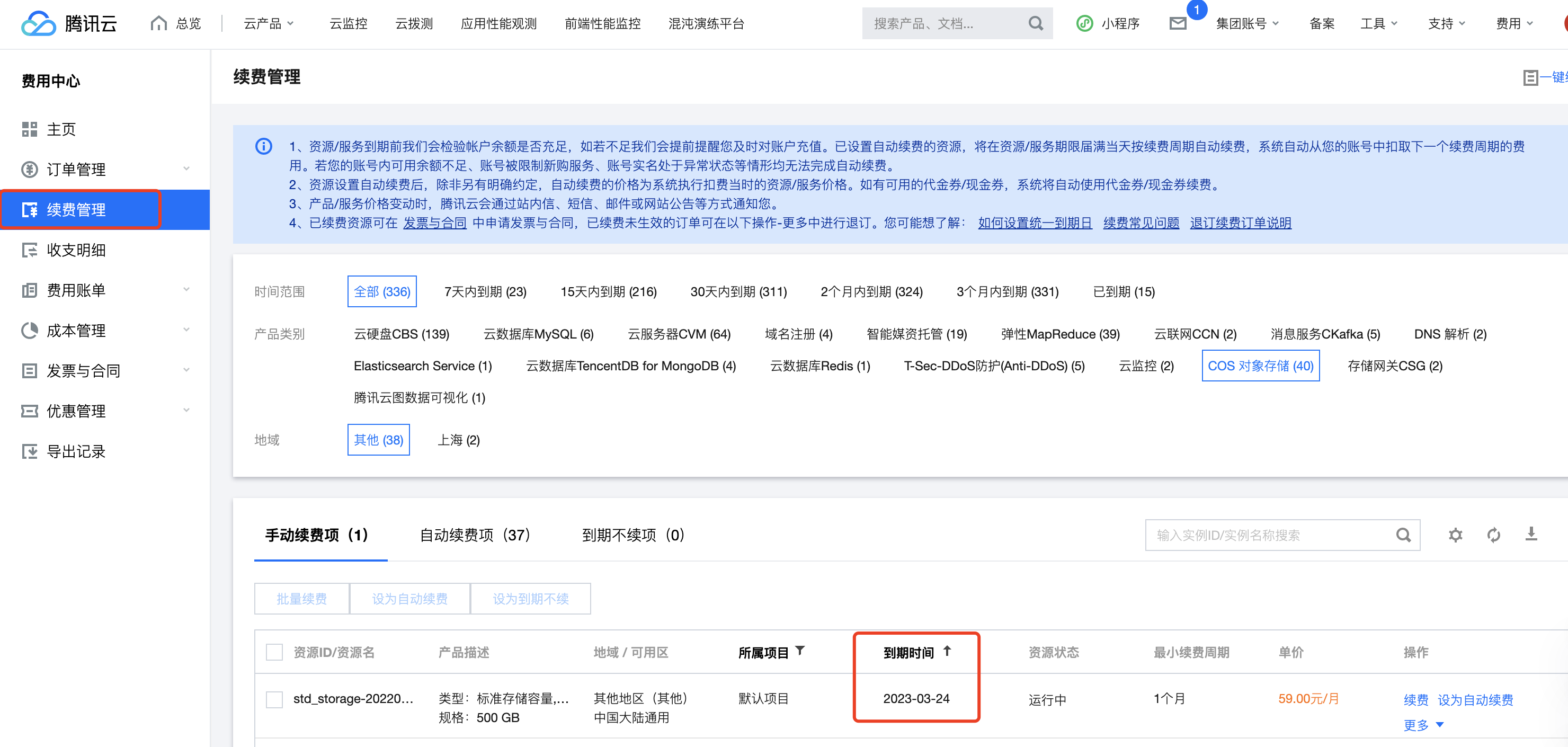
In the Billing Center - Renewal Management page: You can view the expiration time of resource packs.
Isolation: Your resource pack will be isolated one day after expiration.
In the COS Console - Resource Pack Management page: Isolated resource packs can be viewed in the expired resource pack list.
On the Renewal Management page in the Billing Center, isolated resource packs are not displayed and cannot be renewed. To use a resource pack of the same configuration, purchase a new one at Pricing | Cloud Object Storage.
Termination: Your resource pack will be isolated one day after expiration and will be terminated after 365 days of isolation.
On the Resource Packs page in the COS console, terminated resource packs are not displayed.
On the Renewal Management page in the Billing Center, terminated resource packs are not displayed.
Notification of change of a COS resource pack expiration/isolation/termination policy
Details are as follows:
1. Scope
This isolation and deletion policy change applies only to purchased resource packs (i.e., self-purchased resource packs in the list) and does not affect gifted resource packs (i.e., free quota resource packs in the list). You can view and confirm the classification of your current resource packs in the COS Console under Resource Pack Management.
2. Policy description
Rule
Before Change
After Change
Expiration of a COS resource pack
An expiration reminder is sent before the expiration of the resource pack, and an expiration notification is sent after the expiration of the resource pack.
Both the policies for sending the expiration reminder and the expiration notification remain unchanged, and the notification text is updated.
Isolation of a COS resource pack
No isolation policy
A resource pack will be isolated one day after expiration. Isolated resource packs are displayed on the Resource Packs page in the COS console and not displayed on the Renewal Management page in the Billing Center.
Termination of a COS resource pack
No termination policy
A resource pack will be isolated one day after expiration and will be terminated after 365 days of isolation. Terminated resource packs are not displayed on both the Resource Packs page in the COS console and the Renewal Management page in the Billing Center.
3. Use cases
If you purchased a STANDARD storage pack of 10 GB with a validity period of one month on January 1, 2023, the resource pack would expire on January 31, 2023. You would receive an expiration reminder before the expiration of the resource pack and receive an expiration notification after the expiration of the resource pack.
Before change: The resource pack will be displayed on the Resource Packs page in the COS console and on the Renewal Management page in the Billing Center after expiration, and will exist permanently.
After change: One day after expiration, the resource pack will be isolated and will be displayed on the Resource Packs page in the COS console and not be displayed on the Renewal Management page in the Billing Center. After 365 days of isolation, the resource pack will be terminated and will not be displayed on both the Resource Packs page in the COS console and the Renewal Management page in the Billing Center.
Notification
What types of notifications does COS send?
COS sends notifications for new feature launch, product change, expiration, repossession, and alarms.
What are subscribed and non-subscribed messages?
Subscribed messages: You can customize their recipients and notification methods in Message Center. They are used in default scenarios.
Non-subscribed messages: You cannot modify their recipients and notification methods but can only receive them passively. They are used in special scenarios.
How do I configure the root account and sub-accounts to receive COS notifications?
COS notifications support custom recipients. You can set message recipients in the Subscription Management section of the Message Center.
Details are as follows:
1. Log in to the Tencent Cloud console and go to the Subscription Management page in the Message Center.
2. In the product and service list filter, select Cloud Object Storage.
3. In the row of the object storage, click Edit to set the recipient.
4. In the basic subscription editing mode, you can configure whether to receive messages for the Cloud Object Storage product, the receiving channel, and recipients. If you need to set more granular message notifications, click on the bottom right corner to enter Advanced Editing Mode.
5. In Advanced Editing mode, you can configure whether to receive more specific message types. For example, if you want a specific sub-account to receive Product Expiration and Recycling Notifications, simply modify the recipients.
What are the resource packs and billing notifications for COS?
Notification sources can be categorized as follows:
COS notifications include resource pack purchase success, resource pack overage reminders, and free quota expiration reminders.
Billing Center: Notifications include resource expiration alerts, resource expiration reminders, resource release warnings, and resource release notifications.
Therefore, if you need to set up sub-accounts to receive notifications, you must select the corresponding product to which the notification belongs.
Example:
To set up a sub-account to receive resource pack overage alerts, go to the subscription management in the Message Center and select the product Cloud Object Storage for configuration.
To set up a sub-account to receive resource expiration alerts, go to the Subscription Management in the Message Center and select the product Billing Center for configuration.
What is the policy for sending reminders of exceeding COS resource packs?
Reminders are sent of exceeding all COS resource packs of the same type. Up to four reminders are triggered every month for all resource packs of the same type, regardless of their number.
Note: For example, if there are two STANDARD storage packs, one STANDARD request pack, and three public network downstream traffic packs under your account, then you have three types of resource packs; therefore, you will receive up to four reminders for each type of resource pack in a month.
For example, the system will send reminders when the usage of the three public network downstream traffic packs reaches 90% and 100%.
Traffic
What are the differences among COS public network downstream traffic, CDN origin-pull traffic, and global acceleration traffic?
Public network downstream traffic: The traffic generated by data transfer from COS to the client over the internet, such as the traffic generated when you directly access a resource at a COS domain name in a browser, which can be deducted from a public network downstream traffic pack.
CDN origin-pull traffic: When CDN acceleration is enabled and accessed using a CDN domain, the traffic generated from transferring data from COS to Tencent Cloud CDN/EdgeOne edge nodes. This can be offset using CDN origin-pull traffic packs.
Global Acceleration Traffic: Traffic generated by data transfer using global acceleration domain names after enabling the global acceleration feature can be deducted through Global Acceleration Traffic Packages.
How is the public network downstream traffic in COS generated and billed?
Public network downstream traffic refers to the data transmitted from COS to the client through the internet. Traffic generated by users directly downloading objects via object links or browsing objects through static website origin is considered public network downstream traffic, with corresponding fees as public network downstream traffic charges. For detailed information on public network downstream traffic billing, please refer to Billing Items and Product Pricing.
Will I be charged for public network downstream traffic generated by downloading files through the COS console, tools, API, or SDK?
The traffic (private or public network traffic) generated by accessing COS is subject to the use case, and only access to COS from a Tencent Cloud product in the same region will be over the private network by default, with no public network downstream traffic fees incurred. For more information on how to identify private network access, see Overview > Private Network Access.
What is public network traffic in COS?
Public network downstream traffic is the traffic generated by data transfer from COS to the client over the internet. Downloading a file stored in COS in the COS console, accessing or downloading an object through a tool, object address, or custom domain name, and previewing an object in a browser will generate public network downstream traffic. For more information, see Overview.
Will accessing COS over the private network incur fees?
When accessing Object Storage via the private network, traffic fees are waived, but storage capacity and request count will still incur related costs. For more information, see Billing Items.
Does COS offer traffic packs?
COS offers three types of traffic packs: public network downstream traffic pack, CDN origin-pull traffic pack, and global acceleration traffic pack. Public network downstream traffic packs are most used, and traffic fees will be incurred only after the corresponding feature is enabled for the latter two. You can purchase traffic packs at Pricing | Cloud Object Storage. For more information on traffic fees, see Traffic Fees.
How will COS be billed after it is connected to CDN?
After COS is connected to CDN, the fees incurred by COS and CDN will be billed separately.
COS fees include storage usage fees, request fees, and CDN origin-pull traffic fees. You can purchase COS resource packs at Pricing | Cloud Object Storage.
CDN fees include CDN traffic fees. You can purchase CDN resource packs on the purchase page.
Do I only need to purchase a CDN traffic package when using COS with CDN?
When CDN acceleration is enabled and accessed via the CDN acceleration domain, CDN traffic fees and CDN origin-pull traffic fees will be incurred, while public network outbound traffic fees will not be charged. In this case, you only need to purchase CDN origin-pull traffic packages and CDN traffic packages.
Why is there public network downstream traffic after I enabled CDN acceleration?
After enabling CDN acceleration, if you still access files on COS using the source domain name (in the format <BucketName-APPID>.cos.<region>.myqcloud.com), public network downstream traffic fees will still be incurred. COS recommends using the CDN acceleration domain name to access files, which will only generate back-to-origin traffic for CDN/EdgeOne.
What is COS's CDN/EdgeOne origin-pull traffic, and how is it generated?
When accessing a file through a CDN/EdgeOne domain name, if the file is not cached on the CDN/EdgeOne edge node, CDN/EdgeOne will fetch the data from COS to the cache node. This action is referred to as CDN/EdgeOne origin-pull.
Note
CDN/EdgeOne origin-pull traffic incurs fees. For specific rates, please refer to the Traffic Fees documentation.
How is the CDN/EdgeOne origin-pull traffic billed for COS?
CDN/EdgeOne origin-pull traffic is the data transferred from COS to Tencent Cloud CDN/EdgeOne edge nodes. When users enable CDN acceleration, the traffic generated by browsing or downloading COS data through the Tencent Cloud CDN accelerated domain is considered CDN/EdgeOne origin-pull traffic, and the corresponding fee is the CDN origin-pull traffic fee. For detailed information on COS CDN origin-pull traffic billing, please refer to Billing Overview and Pricing | Cloud Object Storage.
What are the differences between CDN/EdgeOne origin-pull traffic and CDN traffic?
CDN/EdgeOne origin-pull traffic is a billable item for COS. When users use COS as the origin for CDN/EdgeOne, the traffic generated from transferring data from COS to Tencent Cloud CDN/EdgeOne edge nodes is considered origin-pull traffic.
CDN traffic is a billing item for Tencent Cloud Content Delivery Network (CDN). It refers to the data transferred from Tencent Cloud CDN/EdgeOne edge nodes to the user end.
Will fees be charged for traffic and requests generated by data transfer between COS and CVM?
When data transfer happens between COS and CVM from different regions, there are charges for both traffic and requests. When data is transferred in the same region, there are charges for requests, but not for traffic (free for data transfer over private network). For more information, see How to determine access over private network.
Will there be traffic fees when I upload a file to a COS bucket?
No. The upstream traffic generated by file uploads is free of charge.
Will there be traffic fees when I access Tencent Cloud products in the same region?
Tencent Cloud products within the same region access each other over the private network by default, with no traffic fees incurred. For more information, see How to determine an access over private network.
Bill
How do I view my bill?
You can view the cost information generated by using the COS service in the Billing Center of the console. For detailed query methods, please refer to View and Download Bills. Bucket-level billing details can be viewed by downloading the usage details in the Billing Center of the console.
How do I download a bill?
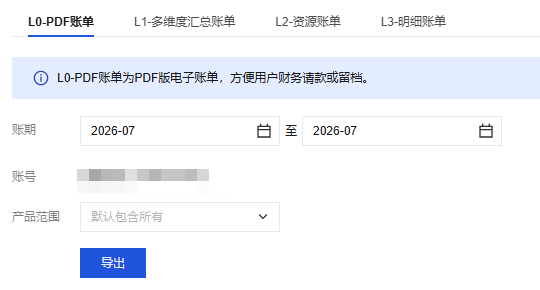
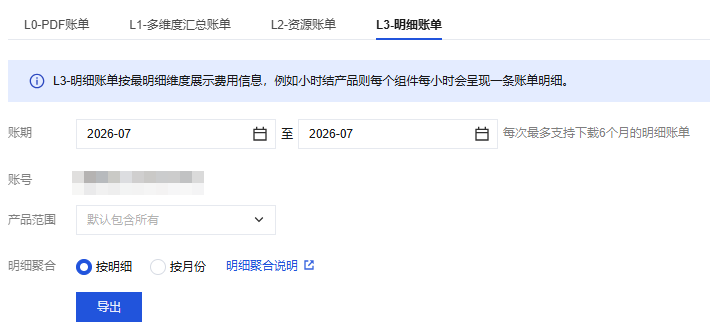
You can log in to the Tencent Cloud console and download the required bill packages, L0-PDF bills, L1-multidimensional summary bills, L2-resource bills, and L3-detailed bills through the Bill Download Center in the Billing Center. For more information, see Bill Download Center.
What are billing by bucket and cost allocation by tag?
Billing by bucket: It refers to using the bucket name and APPID together as the resource ID and using the bucket name as the instance name, i.e., generating bills by bucket. You can view the fees and usage of billable items by bucket.
Cost allocation by tag: Refers to differentiating resource ownership using cost allocation tags. For more information on setting up cost allocation tags, see Cost Allocation Tags.
How do I set billing by bucket and cost allocation by tag?
Bucket-based billing: COS has fully implemented bucket-based billing, and subsequent bills will be generated per bucket. You no longer need to apply for a whitelist. For more information on bucket-based billing, see What is the release plan for COS bucket-based billing. Historical bills before the full implementation remain unchanged, meaning bills generated before the bucket-based billing feature was introduced are still Resource ID bills.
To allocate costs by tag, you need to add tags to the bucket and then set cost allocation tags. For more information, see Setting Bucket Tags and Cost Allocation Tags.
How do I determine whether bills are generated by bucket?
You can determine this in two ways:
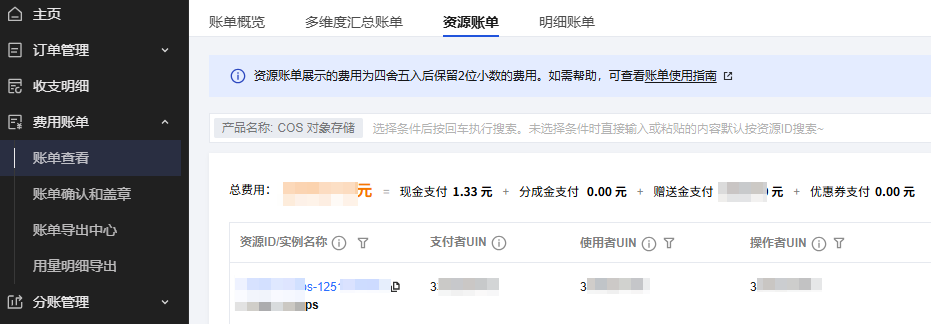
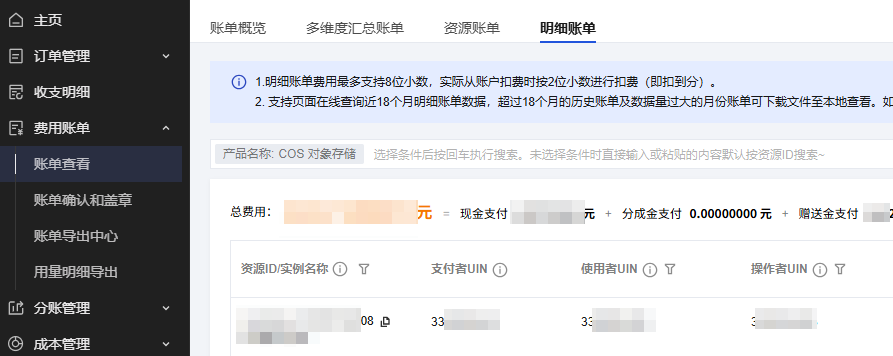
Method 1: You can view the billing details in the Bill Details section of the Expense Center, under Resource ID Bills and Detailed Bills. If the Resource Alias/ID column shows the bucket name + APPID, the billing is done by the bucket.
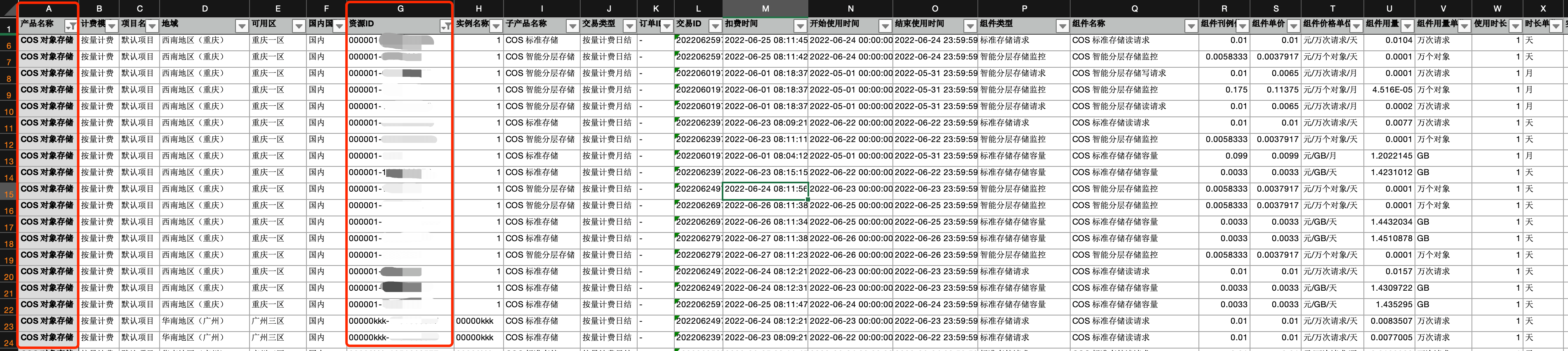
Method 2: You can download the L3: Bill Details in the Billing Download Center. If the Resource ID column is the bucket name + APPID, and the Instance Name is the bucket name, then the bill is generated by the bucket.
Below are the effects after billing by bucket is enabled:
(1) Bill by Instance
(2) Detailed Bills
(3) L3: Bill Details
Note
After the full release of COS bucket-based billing, the Cost Allocation - Monthly sheet in the usage detail bill will no longer display the cost allocation for storage buckets, while other information remains unchanged. For specific costs related to storage buckets, please download the L2 or L3 bills for review.
How is the billing by bucket feature of COS launched?
COS bucket-based billing rollout plan consists of two phases:
Phase 1:
Before February 6, 2023, users can apply for bucket-based billing whitelist on-demand. By joining the whitelist, billing will be based on storage buckets. This is manifested as:
If you have applied for the bucket-based billing whitelist: The Resource ID and Instance Name columns in the bill will change. The Resource ID column will display the bucket name + APPID, and the Instance Name column will display the bucket name.
If you have not applied for the allowlist for billing by bucket: the bill remains unchanged.
Phase 2:
Starting from February 6, 2023, COS will gradually roll out billing by bucket for users not added to the Bucket Billing Whitelist. By April 25, 2023, COS bucket billing will be available to all users with any UIN suffix. The feature has been fully released, and subsequent bills will be directly billed by the bucket.
The canary release strategy is based on the last digit of the UIN, as detailed below:
Note
Users who have not previously applied for the bucket-based billing allowlist will be able to use the bucket-based billing feature through this phased rollout plan.
Release Date
Release Note
Bill Description
February 1, 2023
Before full launch - allowed account verification.
(1) For users who have not applied for the allowlist, the billing remains unchanged.
(2) For users who have applied for the whitelist, the bill will change and be charged per bucket.
February 6, 2023
Batch 1 launch - for UINs ending in 9
(1) For users who have applied for the whitelist and users with a UIN ending in 9, the bill will change and be charged per bucket.
(2) For other users, the bill remains unchanged.
February 20, 2023
Batch 2 launch - for UINs ending in 2
(1) For users who have applied for the whitelist and users with UIN ending in 9 or 2, the bill will be updated and charged per bucket.
(2) For other users, the bill remains unchanged.
March 7, 2023
Batch 3 launch - for UINs ending in 3
(1) For users who have applied for the whitelist and those with UIN ending in 9, 2, or 3, the billing will be adjusted and charged per bucket.
(2) For other users, the bill remains unchanged.
March 14, 2023
Batch 4 launch - for UINs ending in 4
(1) For users who have applied for the whitelist and users with UIN ending in 9, 2, 3, or 4, the bill will be generated based on the bucket usage.
(2) For other users, the bill remains unchanged.
March 21, 2023
Batch 5 launch - for UINs ending in 5
(1) For users who have applied for the whitelist and those with UIN ending in 9, 2, 3, 4, or 5, the billing will be adjusted and charged per bucket.
(2) For other users, the bill remains unchanged.
March 27, 2023
Batch 6 launch - for UINs ending in 6
(1) For users who have applied for the whitelist and those with UIN ending in 9, 2, 3, 4, 5, or 6, the bill will be generated based on the bucket usage.
(2) For other users, the bill remains unchanged.
April 3, 2023
Batch 7 launch - for UINs ending in 7
(1) Billing by bucket will be enabled for users in the allowlist and with UINs ending in 9, 2, 3, 4, 5, 6, or 7. (2) Billing will stay unchanged for other users.
April 25, 2023
Batch 8 Release - UINs ending in 8, 1, 0
Billing for all users (including those on the whitelist and users with UIN ending in 9, 2, 3, 4, 5, 6, 7, 8, 1, 0) is based on the bucket.
How do I view the billing statistical period?
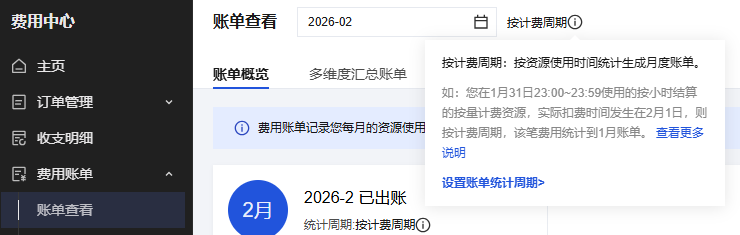
You can log in to the Tencent Cloud console and view your account's billing cycle through the Bill Overview in the Billing Center. The billing cycle, whether it's a charging cycle or a deduction cycle, is displayed in the red box as shown in the image below.
What are billing by deduction cycle and billing by billing cycle?
Billing by deduction cycle: The system generates a bill per calendar month based on the resource fees deduction time.
Billing by billing cycle: The system generates a bill per calendar month based on the actual resource usage time.
What is the relationship between the billing mode and billing statistical period?
COS supports two billing modes: pay-as-you-go (postpaid) and resource pack (prepaid).
Pay-as-you-go (postpaid) resources
Daily settled resources: Fees incurred from 00:00 to 23:59 on January 31 will be deducted on February 1. The record will be posted to the bill for February by deduction cycle and to the bill for January by billing cycle.
Monthly settled resources: Fees incurred from 00:00 on January 1 to 23:59 on January 31 will be deducted on February 1. The record will be posted to the bill for February by deduction cycle and to the bill for January by billing cycle.
Prepaid Resource Packs
Resource packs (new purchase, renewal, upgrade/downgrade, and refund upon termination) are billed or refunded based on the time of the transaction. Regardless of the billing cycle, the records are included in the invoice for the natural month in which the fees occurred.
For more information on billing cycles, see Bill Management.
Why did the amount of the bill (by deduction cycle) of the first month “increase” after the upgrade from monthly to daily settlement?
Starting from July 1, 2022, the settlement cycle of COS storage usage, request, and data retrieval fees was upgraded from monthly to daily to help you manage fees in a more refined manner. The upgrade was implemented on user accounts in batches and went through a two-month beta test. The release dates of different bill statistical periods are as listed below. For more information, see Daily Billing for COS Storage Usage, Request, and Data Retrieval and Bill Management.
Release Date
Release Note
Bill Description
July 1, 2022
The first release for the first batch of accounts in beta test
(1) Before July 1, 2022, billing is done monthly. Consumption from June 1, 00:00 to June 30, 23:59 will be charged on July 1. If categorized by deduction period, this record belongs to July's bill; if categorized by billing period, this record belongs to June's bill.
(2) After July 1, 2022, billing will be settled daily. For usage incurred between 00:00 and 23:59 on July 1, the actual deduction time will be on July 2. If categorized by deduction period, this record belongs to the July 2 invoice; if categorized by billing period, this record belongs to the July 1 invoice.
August 1, 2022
The second release for the second batch of accounts in beta test
(1) Before August 1, 2022, billing is done monthly. The consumption generated between July 1, 00:00 and July 31, 23:59 will be deducted on August 1. If categorized by deduction period, this record belongs to the August bill; if categorized by billing period, this record belongs to the July bill.
(2) Starting from August 1, 2022, billing will be done daily. For usage incurred between 00:00 and 23:59 on August 1, the actual deduction time will be on August 2. If categorized by deduction period, this record belongs to the August 2 bill; if categorized by billing period, this record belongs to the August 1 bill.
September 1, 2022
The third release for all accounts
(1) Before September 1, 2022, billing is done on a monthly basis. Consumption generated between August 1, 00:00 and August 31, 23:59 will be charged on September 1. If categorized by deduction period, this record belongs to September's bill; if categorized by billing period, this record belongs to August's bill.
(2) Starting from September 1, 2022, billing will be done daily. The consumption generated between 00:00 and 23:59 on September 1 will be deducted on September 2. If sorted by deduction period, this record belongs to the bill of September 2; if sorted by billing period, this record belongs to the bill of September 1.
Therefore, if the monthly usage remained the same, after monthly settlement was upgraded to daily settlement, the bill amount varied by billing statistical period and billable items as follows:
Billing by billing cycle: The monthly fees of storage usage, requests, and data retrievals remain basically unchanged after the upgrade.
Billing by deduction cycle: The monthly fees of storage usage increase after the upgrade, while the monthly fees of requests and data retrievals remain basically unchanged after the upgrade.
In the first month after the upgrade from monthly settlement to daily settlement, the storage fees increased. This was because two bills were generated for billing by deduction cycle. The first bill was the monthly bill for the last month, while the second bill was the daily bill for the current month. Therefore, the bill amount seemed to have increased, but no additional fees were deducted in fact, which was normal under the settlement and billing logic.
In the second month after the upgrade from monthly settlement to daily settlement, your bills were settled daily, and the bill amount "decreased" compared with that in the first month, which was also normal under the settlement and billing logic.
For example, if your account is billed according to the billing cycle and was upgraded from monthly to daily billing on September 1, 2022, you can download the COS L3-Detailed Bill on September 30 from the Cost Center in the console.
Taking the COS STANDARD storage usage billable item as an example, the bills consisted of the monthly bill for August and daily bill for September as detailed below:
Pay-as-you-go monthly settlement: The monthly bill was generated on September 1 for resource usage fees incurred in the entire August (from 00:00 on August 1 to 23:59 on August 31).
For pay-as-you-go daily billing: After the "monthly to daily" billing change takes effect on September 1, daily bills will be issued starting from September 2. These bills cover the daily resource usage fees for the entire month of September. For example, the resource usage fees for September 1 are calculated on September 2, and those for September 2 are calculated on September 3, and so on, until the fees for September 29 are calculated on September 30. (This includes resource usage fees incurred from 00:00 to 23:59 on September 1, September 2, ..., and September 29.)
Due to the large amount of billing data, the following figure only displays the daily bills from September 2 to September 3 as a reference.
Therefore, if your monthly fees increased in the first month after the upgrade from monthly settlement to daily settlement and your bill was generated by deduction cycle, the increase was normal under the settlement and billing logic, and no additional fees were deducted in fact. If you have any questions, contact us for assistance.
Why was the storage usage in the bill details (L3) (by deduction cycle) different from that in the usage details after the upgrade from monthly to daily settlement?
If your bill was generated by deduction cycle, in the first month after the upgrade from monthly settlement to daily settlement, you might find that the storage usage fees amount in the bill details (L3) was different from that in the usage details. This was because the bill details (L3) and usage details had different statistics collection logic for the storage usage fees.
The reason is as detailed below:
If your account is billed according to the billing cycle and was upgraded from monthly to daily billing on September 1, 2022, you can download the COS L3-Detailed Bill and Usage Detail Bill on September 30 from the Cost Center in the console.
Taking COS Standard Storage usage as an example, the bill will reflect the storage usage consumed in August and the storage usage consumed in September.
1. In the L3-Detailed Bill:
(1) Pay-as-you-go monthly billing: The "Monthly Bill" issued on September 1st covers the storage usage for the entire month of August (i.e., consumption generated from August 1st 00:00 to August 31st 23:59).
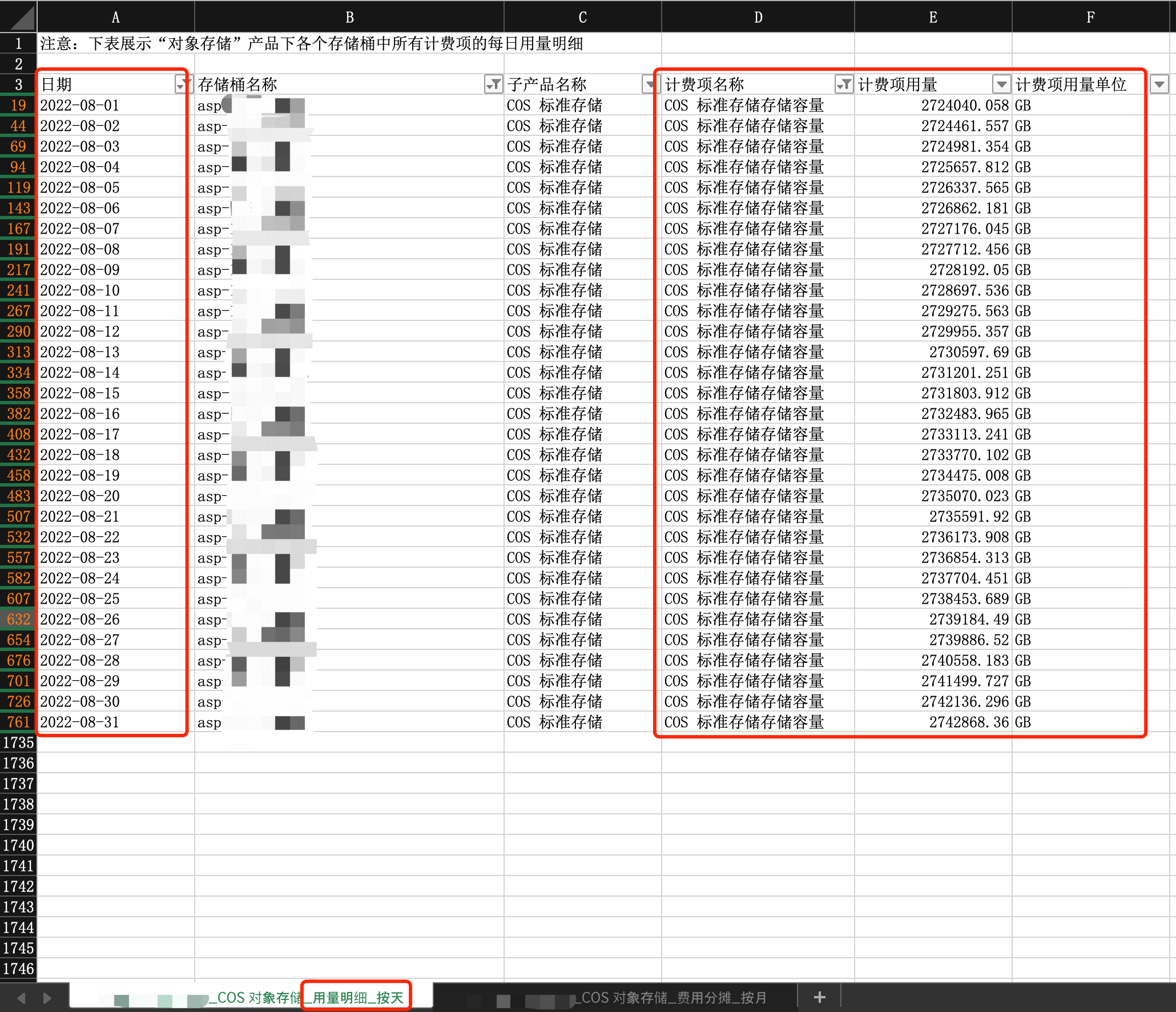
Hence, as shown below, the average monthly storage of COS STANDARD storage for the bucket 'asp' from August 1, 2022, to August 31, 2022, is 2,732,799.233 GB (sum of the two monthly settlement records), as detailed in column Y of the following chart.
(2) Pay-as-you-go daily settlement: After the upgrade from monthly settlement to daily settlement on September 1, a daily bill was generated on each day starting from September 2 for daily storage usage fees incurred in the entire September. The bill generated on September 2 was for fees incurred from 00:00 to 23:59 on September 1, that on September 3 was for fees incurred from 00:00 to 23:59 on September 2, and so on.
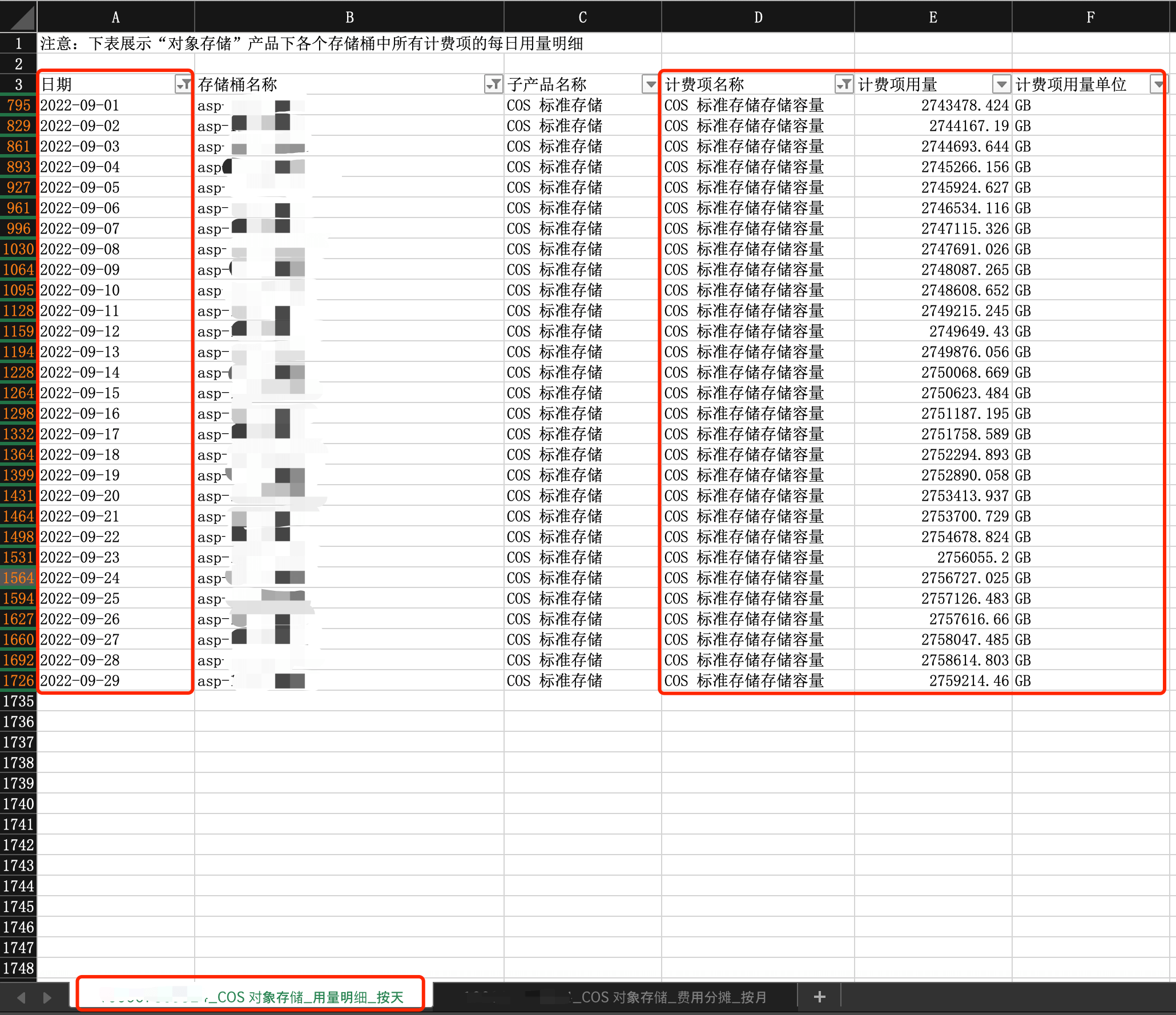
As shown in the figure below, the COS STANDARD storage usage of bucket 'asp' has a varying daily average storage from September 1 to September 29, 2022. The total daily average storage as of September 29 is 79,784,325.88 GB (due to the large number of daily bills, the screenshot only shows a portion of the dates). See column Y in the figure below for details.
2. In the Usage Detail Bill:
(1) Daily Usage: Includes daily usage from the entire month of August to September 20th. That is, the usage generated daily from August 1st 00:00 to September 19th 23:59.
Hence, from the daily usage details, you can see the average daily storage of COS STANDARD storage for the bucket 'asp' from August 1, 2022, to September 19, 2022. Refer to column E in the image below.
Where:
From August 1 to August 31, the fees were settled monthly. As the statistics collection logics were different, the total of daily storage usage in the usage details was different from the monthly storage usage in the bill details (L3).
From September 1st to September 29th: daily settlement is applied. Due to the same data statistics logic, the daily average storage usage data can correspond to the average daily storage usage data in the L3-Detailed Bill. The total average storage usage for the month is 79,784,325.65 GB, which is consistent with the L3-Detailed Bill.
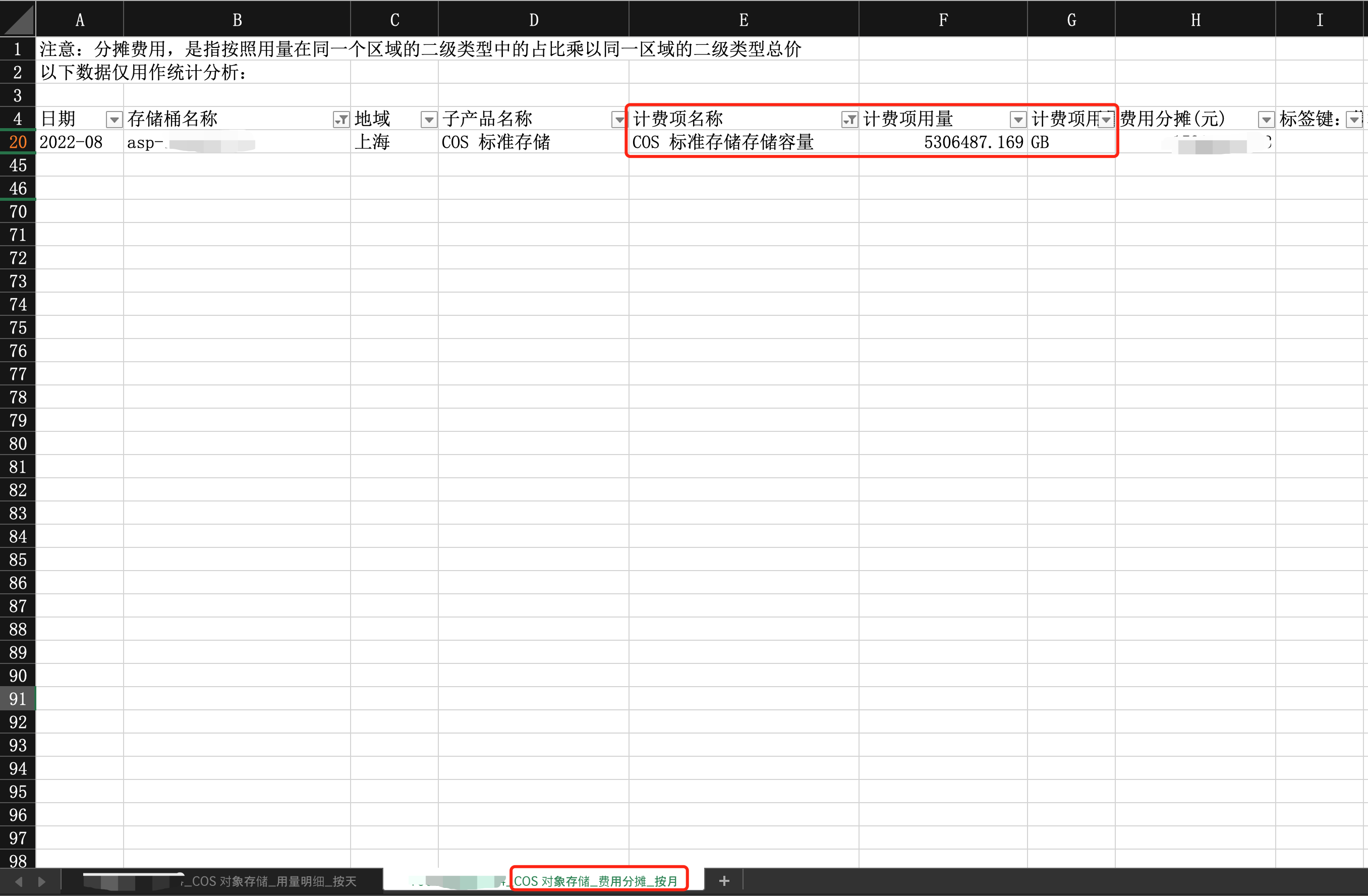
(2) Monthly cost allocation: The sum of the average storage usage in August and the daily storage usage in September. That is, the sum of the average storage usage generated from August 1, 00:00 to August 31, 23:59, and the daily storage usage generated from September 1, 00:00 to September 29, 23:59.
Hence, from the usage details in the monthly bill, it can be seen that for the storage bucket 'asp' from August 1, 2022, to September 29, 2022, the total sum of COS STANDARD storage usage for average monthly storage and average daily storage is 5,306,487.1688193 GB. See column F in the image below for details.
Due to differences in data statistics logic, the usage details cost allocation by month cannot correspond to the storage usage data in the L3-detailed bill.
In summary, due to differences in data statistics logic, the L3-Bill Details and the monthly usage in the Usage Details Fee Allocation_By Month may differ. This situation only occurs in the first month when transitioning from monthly to daily billing and charging by billing cycle, and it will be normal afterward. If you encounter this situation, there is no need to worry, as it is a normal logic.
The actually deducted fees are as displayed in the bill details (L3), and the usage details are for reference only. If you have enabled billing by bucket, you only need to view the bill details (L3); otherwise, you can view the usage and fees of each bucket in the usage details.
Why are there daily and monthly settlement modes in the transaction details?
Before the upgrade, COS' storage, requests, STANDARD_IA data retrievals, and ARCHIVE data retrievals are settled monthly, and their monthly settlement details are displayed in the transaction details, while DEEP ARCHIVE data retrievals, traffic, and management features are still settled daily, and their daily settlement details are still displayed in the transaction details. After the upgrade, all COS billable items are settled daily. For more information, see Billing Overview.
In addition, you can view the L3 bill to check whether the billable items are settled daily or monthly as instructed in Billing.
Fee Deduction
Will I be charged immediately after activating COS?
Activating COS is free of charge, and fees will be incurred only after you use it. For billing details, see Billing Overview.
If you upload multiple files in a total size of 1 GB to the STANDARD storage class after activating COS and then view and download them, STANDARD storage, write requests, public/private network upstream traffic, and public network downstream traffic (of about 1 GB) will be generated, and the bill generated on the next day will include the STANDARD storage, STANDARD write request, and public network downstream traffic fees. As the public/private network upstream traffic is free of charge, it will not be included in the bill.
Will file uploads to COS incur fees?
When you upload a file to COS, the generated traffic is free of charge, but the generated write request will incur fees, and the storage usage fees will be calculated based on the file size. If you access or download the object over the public network, public network downstream traffic fees will be incurred. For billing details, see Billing Overview and Pricing | Cloud Object Storage.
Why is my account charged even if I am on the free tier?
If your account is charged even if you have a free tier (STANDARD storage pack), possible causes are as follows:
Scenario 1: In addition to STANDARD storage usage, other billable items such as read/write requests and public network downstream traffic are also generated. As such billable items cannot be deducted from the STANDARD storage pack, they are billed in a pay-as-you-go manner.
Scenario 2: The specification of your free tier (STANDARD storage pack) is smaller than your actual storage usage. For example, if the specification of your free tier is 50 GB and your actual STANDARD storage usage is 100 GB, the excess of 50 GB will be pay-as-you-go.
Scenario 3: Your free tier (STANDARD storage pack) has expired, and your STANDARD storage usage will be pay-as-you-go.
Why are fees still deducted after my data in COS is deleted?
If you no longer use the COS service, you need to delete all the buckets in your account. Please confirm that all buckets have been deleted. If you still incur charges after deleting all buckets, it may be due to daily charges generated from yesterday's usage. COS storage and request fees are billed daily, meaning today's bill reflects yesterday's usage. You can log in to the Transaction Details page, click Details on the right side of the deduction item, and view the deduction details.
The details about the change from monthly settlement to daily settlement are as follows: Starting from July 1, 2022, the settlement cycle of COS storage usage, request, and data retrieval fees was upgraded from monthly to daily to help you manage fees in a more refined manner. The upgrade was implemented on user accounts in batches and went through a two-month beta test. The release dates of different bill statistical periods are as listed below. For more information, see Daily Billing for COS Storage Usage, Request, and Data Retrieval and Bills.
How do I deactivate the COS service and stop being charged?
You can deactivate COS or stop its billing as follows:
1. If you decide to stop using COS, you can avoid any further billing by permanently deleting all of your COS data (including incomplete multipart uploads and object versions) as instructed in Payment Overdue. There is no need to remove your account, and if you use other Tencent Cloud products, avoid doing so as it will affect your other services.
2. If you don't use COS for more than one month, you can set lifecycle rules to transition data in STANDARD storage class in the bucket to a colder class such as STANDARD_IA, ARCHIVE, or DEEP ARCHIVE to reduce storage fees. For more information, see Setting Lifecycle. The transition will generate read requests in the original storage class and write requests in the target storage class, so transition by lifecycle will incur read/write request fees.
Considerations
Data, once deleted from the bucket, cannot be recovered, so make backups accordingly.
If versioning is enabled for the bucket, disable it before deleting data.
Please pay attention to the billing cycle to avoid overdue payments. If your billing items are settled daily, the bill for the current day will be generated on the day after the cleanup. Once the data is completely cleared, the system will not generate new charges. For more information, see Billing Cycle.
If your account has overdue payment (i.e., your account balance is below 0), COS services will be suspended after 24 hours, regardless of whether your resource pack is within the validity period.
If your account has overdue payment and COS services are suspended, the free tier for which your account is eligible won't be available.
If data in your bucket is blocked for the second time due to non-compliance, it cannot be deleted. Contact us if you have any questions.
How will I be charged when storing data in STANDARD_IA for less than 30 days?
The minimum data storage duration in STANDARD_IA storage class is 30 days.
Below are the specific rules:
An object stored less than 30 days is billed by 30 days as described in Storage Usage Fees.
An object stored more than 30 days is billed by the actual storage duration.
Data retrieval fees are fees incurred by reading or downloading MAZ_STANDARD_IA/STANDARD_IA data or restoring ARCHIVE or DEEP ARCHIVE data to STANDARD. They are calculated based on the amount of retrieved data. The higher the amount, the higher the fees. If you don't have special storage needs, you can directly use STANDARD, which doesn't involve data retrieval fees.
What fees will be incurred by copying MAZ_STANDARD_IA/STANDARD_IA data?
Copying STANDARD_IA data will incur request fees and data retrieval fees and may also incur cross-region replication traffic fees if the destination and source files are in different regions.
Will I be charged for a copy generated by restoring ARCHIVE or DEEP ARCHIVE data in COS?
A copy generated by restoring ARCHIVE or DEEP ARCHIVE data is in the STANDARD storage class and will incur STANDARD storage usage fees.
How will I be charged for less than 10,000 read/write requests?
The read/write requests are priced by storage class and billed based on the actual quantity, with a minimum billable quantity of 10,000. For more information, see Pricing | Cloud Object Storage and Read/Write Requests.
Why are the COS read/write request fees zero?
If the number of requests does not reach the minimum value for fee deduction, the request fees will be zero.
Case Study: Xiao Yun has a storage bucket in the Beijing region with data stored in the STANDARD storage class. In December 2021, the data generated 0.0023 ten-thousand STANDARD read requests. The unit price for STANDARD read/write requests is 0.01 CNY/ten-thousand times. The account has no discount, so Xiao Yun's payable STANDARD read request fee for December is 0.0023 * 0.01 = 0.000023 CNY. Since the billing supports up to 2 decimal places, the billable amount for this item is 0 CNY.
Cause: As bills support eight decimal places at most, while fee deduction is accurate down to two decimal places, the system will automatically adjust the accuracy difference. For more information, see Bills.
Overdue Payment and Service Suspension
Can I still access and download files in the COS console if my COS service is suspended due to overdue payment?
After the COS service is suspended due to overdue payment, you cannot read or write data from or to COS, but you can top up your account. For more information, see Payment Overdue.
Why can't I use the COS service after topping up my account to a positive balance?
After topping up your overdue account, the restriction will be lifted automatically within 10 minutes. If the page still shows a restricted status after you've topped up, it may be due to your browser caching the previous page. We recommend you refresh your browser or **