Only the Chinese version of this page is provided currently. The English version will be provided soon.

Log in to anomalies

Last updated: 2026-04-16 15:29:07

To ensure your Tencent Cloud account is not affected by security policies of QQ, WeChat, etc., and to enhance Tencent Cloud account security, it is recommended that you bind your email as the log in method for your Tencent Cloud account. For specific operation instructions, please refer to Related account email, Bind log in method.
Note:
If your issue remains unresolved, you can contact us through the following channels:
Submit a ticket (You need to log in to Tencent Cloud to submit a ticket. It is recommended that you use another real-name verified account to submit. If there is no other account, please call the hotline to contact us.).
Call the hotline
4009100100
95716
Table of Contents:

Account Login Issues

Don't remember the account, how to retrieve?

You can use the Find Account tool to retrieve your account by security phone number, account ID, domain name, and real-name information, and so on.
If you are unable to log in to your account due to forgotten/unavailable login methods or forgotten password after retrieving your account, you can access it through self-service application.

After retrieving the account, still can't log in?

You can, based on the retrieved account information, see request to log in to a Tencent Cloud account.

What to do if your account cannot verify domain name, CVM information?

1. Verify whether the login account is correct.
2. Go to Find Account and use the Self-service View by domain name to retrieve your Tencent Cloud account.

QQ account login prompts an exception and cannot log in?

If your QQ account shows that it has entered protection mode or is temporarily unable to log in to when attempting to log in, your QQ account may have been frozen. For more details, please see Freezing and Unfreezing Documentation. If you have any questions about your QQ account being frozen, you can consult QQ Security Center or Tencent Customer Service.

Password login problem

Forgot your password and cannot reset it successfully?

1. To reset your account password , please refer to Resetting log in to password .
2. Use other login methods for this account to log in to the account.
3. Submit a request to log in to a Tencent Cloud account, add/modify an email login method to log in to the account. Once the request is approved, you can log in with the newly added email .

Forgot your sub-account password, how to log in to the sub-account?

You can refer to the documentation to reset the log in to password for Sub-user. After resetting the password , log in to the sub-account again.

How long does it take for a Tencent Cloud account log in to password change to take effect?

The log in to password change for a Tencent Cloud account takes effect immediately.

Mobile login problem

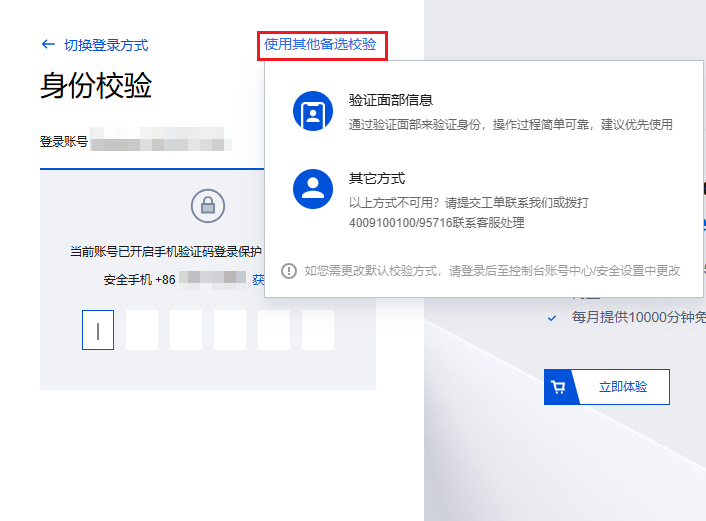
When logging in to the account, it requires phone verification, but the phone is unavailable. What should I do?

You can click Use Alternative Verification Methods in the upper-right corner of the log-in page instead of mobile verification.
Note:
If you have not bound any alternative verification methods, please call 4009100100 / 95716 to contact customer service.


The secure mobile is unavailable. How to log in?

Tencent Cloud accounts do not support direct login using the security phone. If you need to verify your phone during login but the phone is unavailable, you can click Use Alternative Verification Methods in the upper-right corner of the Log in page instead of phone verification.
Note:
If you have not bound any alternative verification methods, please call 4009100100 / 95716 to contact customer service.

What should I do if I can't receive the CAPTCHA?

How to log in to Tencent Cloud on mobile phones?

You can use WeChat to search for the "Tencent Cloud Assistant" mini program and log in to Tencent Cloud using Tencent Cloud Assistant on your mobile phone to manage your Tencent Cloud products.

Scan code/face login issues

Why do I need WeChat QR code scanning when logging in?

Tencent Cloud accounts support WeChat QR code scanning for login. If your account is already bound to WeChat, you can log in by scanning the QR code. If not, scan the code, then select to bind an existing account with WeChat. After binding successfully, you can use WeChat to log in to your Tencent Cloud account.

What to do if I can't log in to Tencent Cloud by scanning the WeChat QR code?

You can switch hotspots or devices and try scanning the QR code again.

Why do I need face recognition when logging in to the account?

Your account or related environment is at risk, and further identity verification is needed to ensure the security of your resources.

What to do if the account is bound to WeChat, but the scan redirects to the WeChat Open Platform?

To ensure account security, please do not provide the log in to QR code to others or scan QR codes provided by others. If you need someone else to help manage your account, you can create sub-accounts with different permissions through User Management to assist you.

Why doesn't scanning the QR code with Mobile QQ respond?

To log in using mobile QQ QR code scanning, if there's no response after scanning, we recommend clicking Account Password Login below the QR code. Enter your QQ account credentials and select Authorize and Log In to access Tencent Cloud.

QQ account login requires QR code verification?

If you are prompted to log in via QQ mobile app QR code scanning when you attempt to log in to QQ, this occurs because QQ Security Center has detected malicious attempts to access your QQ account through credential stuffing. To protect your QQ account security, you must scan the QR code using the QQ mobile app or log in to the QQ PC version and authorize access before proceeding to Tencent Cloud. Currently, requesting to disable QR code login is not supported.
If you have any questions regarding QQ's security policy, you can consult QQ Security Center.

Can the Tencent Cloud account registered with QQ be logged in with WeChat scan?

If you wish to use WeChat to log in to a Tencent Cloud account registered via QQ, you can refer to the 'Binding Login Method' operation guidance for association.

Employee Resignation Login Issues

Employee resigned and the account administrator is unreachable?

You can refer to the 'Recover Account Through Company Information' document to recover all accounts under your company by providing relevant company information.

How should the account be handled when an employee resigns?

You can refer to the 'Employee Resignation Guide' document, which provides guidance on handling Tencent Cloud account transfers, account recovery, account login, etc., when an employee leaves.

Other Login Issues

What should I do if I forget the login method? How to recover the login method?

If you have forgotten your account, you can submit a self-service application to add/modify an email login method to access your account.
If you know the account ID but have forgotten the login method, you can also use Find Account to retrieve the login method via the account ID.

What to do if you cannot log in due to QQ/WeChat/Public account freezing or deactivation?

If your account is frozen due to personnel changes, log in to methods (such as WeChat, QQ), preventing you from log in to Tencent Cloud resources, you can click apply to log in to Tencent Cloud, fill in basic account information, apply online to bind a new email as the log in to method. Once approved, you will be able to log in to your account through this email.

What if my personal or corporate information is stolen and used for Tencent Cloud account authentication?

To protect your personal/company information, please do not purchase or register accounts from any platforms or channels other than Tencent Cloud's official platform and Tencent Cloud-certified authorized agents. Otherwise, information leakage may occur. Tencent Cloud accounts and their associated resources belong to the account authentication entity. You can refer to the following methods to recover your account:
Individual users
1.1 Go to find your account, fill in your identity information, Face Recognition once approved, you can retrieve your verified.account information on Tencent Cloud. For operation guidance, please refer to recover through personal information.
1.2 Based on the retrieved account information, submit a log in to Tencent Cloud account application. Once approved, you will be able to log in to the Tencent Cloud account.
Corporate users Go to find your account, fill in your company's information, upload company documents. Once the appeal is approved, you can retrieve your company's verified account information on Tencent Cloud. For operation guidance, please refer to recover through company information.

Can QQ and WeChat-registered Tencent Cloud accounts be merged?

If you have registered Tencent Cloud with both QQ and WeChat, then these two accounts are independent and cannot be merged. Similarly, Tencent Cloud accounts registered with a WeChat public account cannot be merged with other accounts registered with QQ, email, or WeChat. However, you can link all accounts to WeChat. After successful linking, you can manage multiple accounts with a single WeChat. For specific operations, please refer to binding log in to method.

What should I do if the login session keeps expiring?

For accessing the Tencent Cloud console, it is recommended to use https://cloud.tencent.com. Due to browser security policies, login status is not shared between Tencent Cloud's primary and backup domains.
Go to Account Center to adjust the inactive session duration and maximum session duration. For details, see Setting Session Duration.

Can a registered Tencent Cloud account email be linked to another account?

If the email has already registered a Tencent Cloud account, it cannot be linked to another account.

How do I view the historical login information of a Tencent Cloud account?

1. log in to the Tencent Cloud console, enter CloudAudit in the search box, click CloudAudit to enter the CloudAudit console.
2. On the Operation Record page, view the log in to records of the Tencent Cloud account.

How do I log in to an account on the WeChat Official Account Platform?

Mini Program Official Account login includes logging in via WeChat Official Platform's Service Accounts, Subscription Accounts, and Mini Programs. If you want to log in to your account using WeChat Official Platform, see Logging in with Mini Program Official Accounts (WeChat Official Platform Service Accounts, Subscription Accounts, Mini Programs).