A Tencent Cloud image provides all the information needed to launch a CVM instance. With an image, you can launch instances with similar configurations easily. Generally speaking, an image is the "installation disk" of a CVM instance.
Image Type
Tencent Cloud provides the following types of images:
Public Images: Available to all users, covering most mainstream operating systems.
Service Marketplace Images: Available to all users, integrating specific applications in addition to the operating system.
Custom Images: Accessible only to the creator and shared users, created from existing running instances or imported from external sources.
Shared Images: Images shared by other users, can only be used for creating instances.
Quickly create a suitable CVM based on mature marketplace solutions or the already used solutions.
Select the appropriate operating system, database, application software and plugins to create a CVM, and installation and debugging is required.
Security
Apart from shared images, which users need to evaluate themselves, public images, custom images, and marketplace images have all undergone testing and review by Tencent Cloud.
It depends on the development and deployment personnel.
Applicable scenarios
Public images: Genuine operating systems, which contain the initialized add-ons provided by Tencent Cloud. Marketplace images: Quickly build personalized application environments based on mature solutions. Custom images: Quickly create the same software environment as an existing CVM, or perform environment backup. Shared images: Quickly create the same software environment as other users' CVMs.
Configure a CVM completely by yourself, without basic settings provided.
Use Cases
Deploying Specific Software Environments
Using shared images, custom images, and marketplace images can help quickly set up specific software environments, eliminating the need for time-consuming tasks such as configuring environments and installing software. This meets various personalized needs, such as website building, application development, and visual management, making CVMs ready-to-use and time-saving.
Batch Deployment of Software Environment: Create an image from a CVM instance with a pre-configured environment, and use this image as the operating system when creating multiple CVM instances. This ensures that the new instances have the same software environment as the original instance, achieving the purpose of batch deployment.
Server Runtime Environment Backup
Create an image backup of a CVM instance's runtime environment. If the instance becomes inoperable due to software environment damage, the image can be used for recovery.
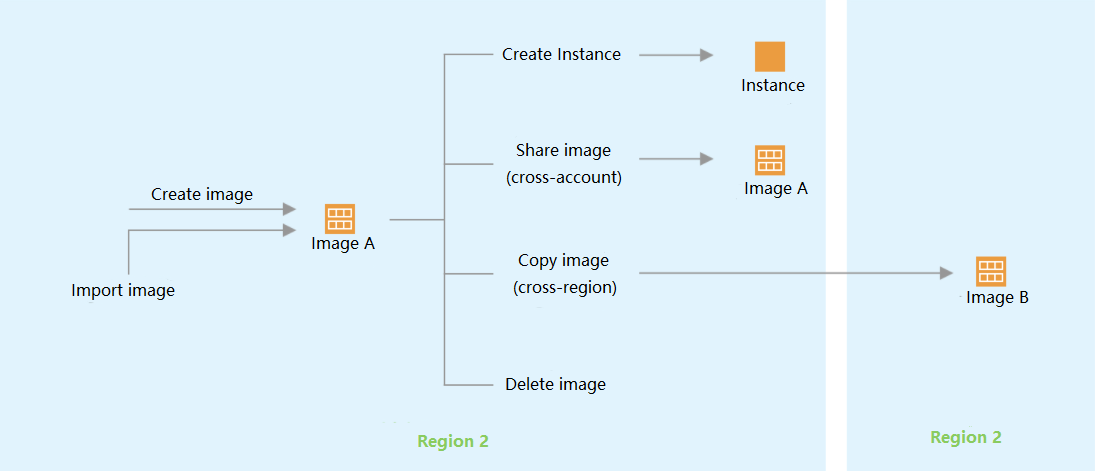
Custom Image Lifecycle
The diagram below summarizes the lifecycle of a custom image. After creating or importing a new custom image, users can use it to launch new instances (users can also launch instances from existing public images or marketplace images). Custom images can be replicated to other regions under the same account, becoming independent images in those regions. Users can also share custom images with other users.